Prompt-Based Translation: How to Improve Machine Translation Accuracy on a Subtitle File
How do you improve machine translation accuracy on a subtitle file?
Send the engine context alongside the text. In Closed Caption Creator that means attaching a KNP terminology guide so approved names are enforced, and writing translation instructions describing tone, audience and style. With Anthropic, OpenAi or Gemini Pro the system also reads the whole transcript first and writes a context brief.
Machine translation is reliable on literal content and unreliable on everything else. That is not a quality problem with any particular engine. It is a consequence of how a subtitle file is submitted: a sequence of short, disconnected strings, each translated without knowing what the programme is, who is speaking, or whether the line is meant literally.
A human translator is never asked to work that way. They are given the title, the audience, a style sheet and a list of how the names are spelled. Prompt-based translation is the feature that lets you hand a machine the same package.
This guide covers what can actually be sent with a job, which providers accept it, the order in which the pieces are applied, and the one asymmetry that causes more confusion than everything else combined — the fact that the same terminology guide does two entirely different jobs depending on whether you attach it to a transcription or a translation.
Why Literal Translation Fails on Dialogue
Take a line of dialogue where a character says someone has thrown in the towel. A dedicated engine sees fourteen characters of English with no surrounding scene and renders a towel being thrown, because that is what the words say. The translator who receives the file now has to recognise the failure, work out what was meant, and rewrite the line inside a reading-speed budget.
Multiply that by the figurative density of real dialogue and post-editing stops being a polish pass. The cost is not in the lines the engine got wrong in an obvious way; it is in the lines that are grammatical, fluent and quietly incorrect, which have to be read against the source to be caught at all.
Three categories account for most of it:
- Figurative language. Idiom, metaphor, sarcasm and understatement all mean something other than their words, and a sentence-scoped engine has no way to detect that.
- Recurring terminology. A character name, an invented term or a product name rendered three different ways across an episode is the error a client notices first, and it is produced by translating each occurrence independently.
- Register. Whether two characters address each other formally is a decision, not a translation, and languages that mark it grammatically force the engine to guess on every line.
All three are information problems rather than language problems. The engine is not failing to translate; it is translating without being told anything.
The Three Things You Can Send With a Job
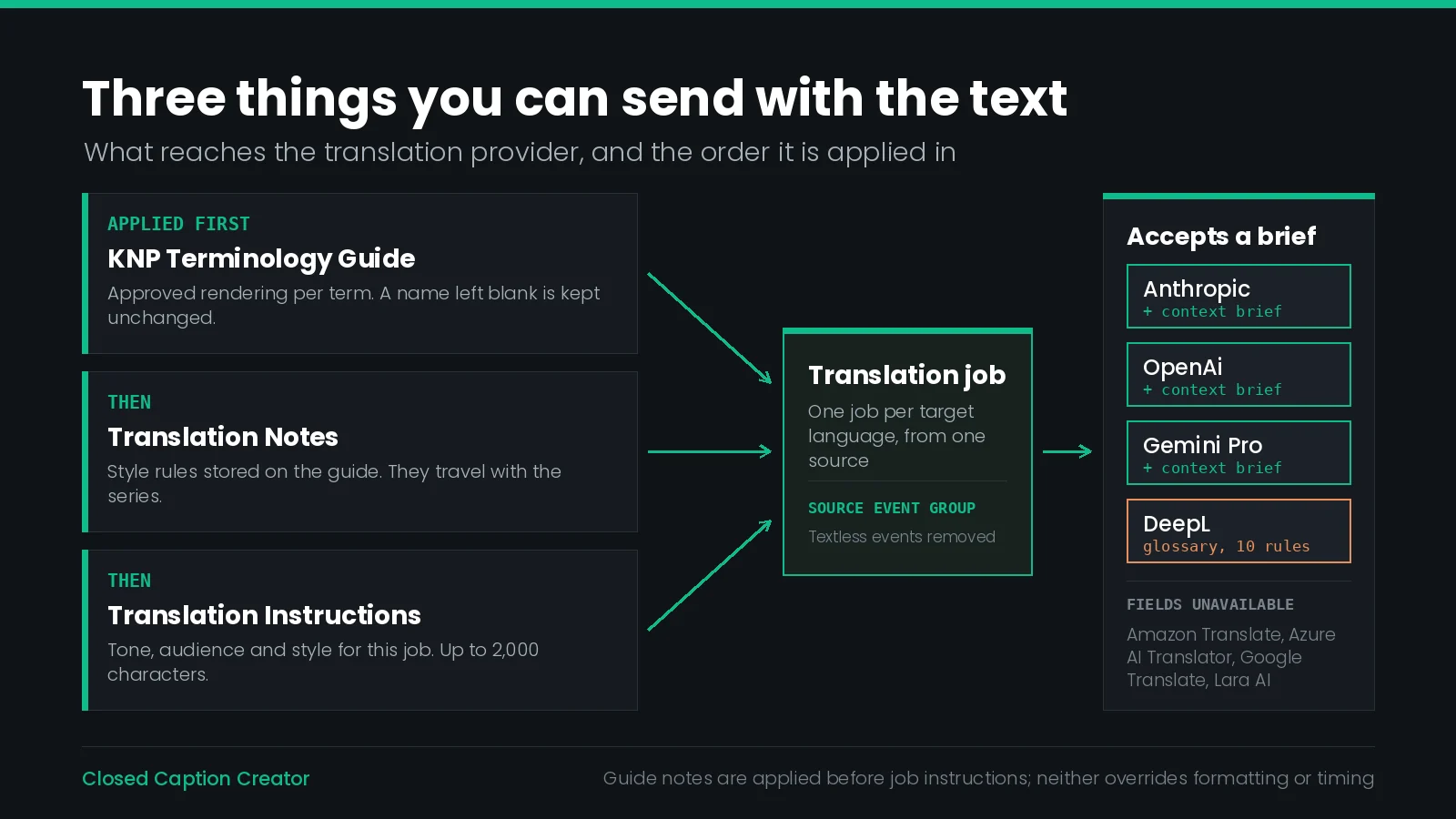
Open AI Tools > Automatic Translation, choose a provider, the source Event Group and its languages, then expand Advanced Options. Three separate inputs live there, and they do different jobs.
| Input | What it controls | Where it lives |
|---|---|---|
| KNP Terminology Guide | Exact renderings for named entities and fixed phrases | Your team account, reusable across projects |
| Translation Notes | Style rules that should apply every time this guide is used | A field on the guide itself, in the KNP Manager |
| Translation Instructions | Tone, audience and style for this job, up to 2,000 characters | The job form, remembered for the next job |
The split matters because the two text fields look interchangeable and are not. Translation Notes belong to the guide, so they travel with the series: “keep all brand names in English” is a rule that should apply to every episode anyone ever submits. Translation Instructions belong to the job, so they describe this delivery: “this is the broadcast version, use formal address between the detectives.”
Both are remembered. Your instructions and your guide selection are carried to the next job, and Advanced Options opens automatically when it holds saved settings — which is convenient on episode four of a series and a trap on the first job of a different one. Check the panel before you submit rather than after you import.
The third control in Advanced Options, Include Formatting, is not a context input. It decides whether bold, italic and underline survive the round trip, and it is a delivery-style decision rather than a translation-quality one.
Which Providers Accept a Brief
Eight providers are available for Automatic Translation: Amazon Translate, Anthropic, Azure AI Translator, DeepL, Gemini Pro, Google Translate, Lara AI and OpenAi. Azure AI Translator is the default. Only four of the eight accept a brief, and only three of those four do the full two-pass job.
| Provider | KNP guide | Instructions | Context brief |
|---|---|---|---|
| Anthropic | Yes | Yes | Yes |
| OpenAi | Yes | Yes | Yes |
| Gemini Pro | Yes | Yes | Yes |
| DeepL | Yes, as a per-job glossary | Up to ten short instructions | No |
| Amazon Translate | No | No | No |
| Azure AI Translator | No | No | No |
| Google Translate | No | No | No |
| Lara AI | No | No | No |
With a provider in the lower half of that table, Advanced Options shows a note that the fields are unavailable. There is no partial mode: the guide and the instructions are either sent or they are not.
If you watched the video first. Our tutorial on this feature says prompt-based translation is available for Gemini, Anthropic and OpenAI. DeepL was added afterwards and now accepts a guide and instructions too, with the differences described below. The table above is the current behaviour.
Note that this table answers a narrower question than our engine-by-engine comparison, which covers what each provider's own API exposes. Several engines support glossaries at the API level without those glossaries being reachable from this workflow. What matters when you are submitting a job is which inputs this form will actually send.
The Context Brief: A Two-Pass Translation
This is the part of the feature that does the most work and gets described the least, because it happens without a control in the interface.
With Anthropic, OpenAi and Gemini Pro, the system reads the entire transcript before translating any of it, and writes a short context brief: what the content is, the tone to use, who the main speakers are, and how recurring names and phrases should be translated. Each section of the transcript is then translated with that brief attached, plus a few neighbouring lines for local context.
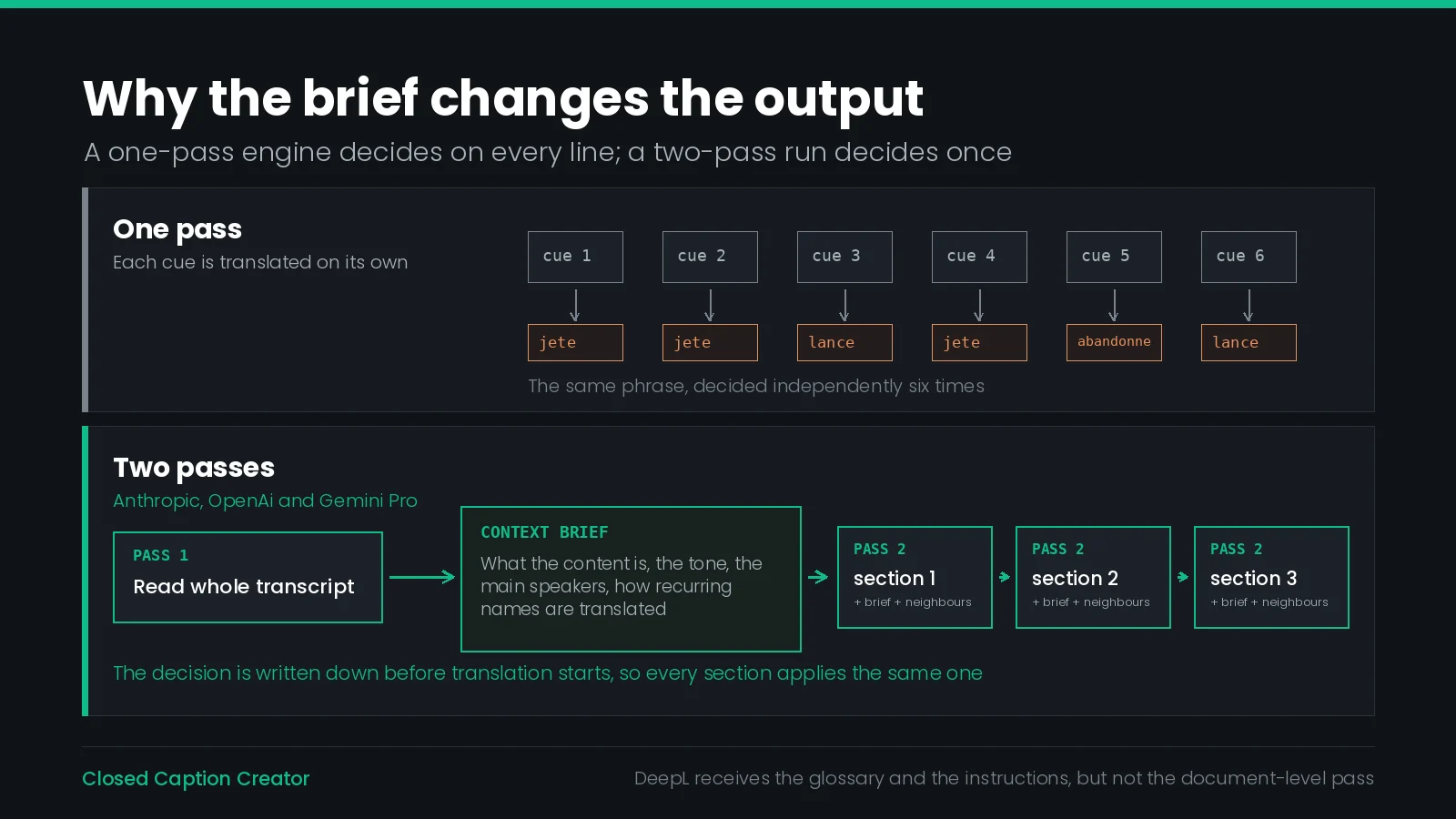
The consequence is worth stating plainly, because it is the mechanism behind the quality difference rather than a claim about it. A one-pass engine decides how to render a recurring phrase separately on every occurrence, and has no basis for consistency beyond the phrase itself. A two-pass run decides once, in the brief, and then applies that decision to every section. Consistency stops being a lucky property of the output and becomes a thing that was written down before translation started.
It also means the brief is derived from your file, not from you. If the transcript is wrong, the brief is wrong, and the error is then applied consistently across the whole deliverable rather than appearing in one line. That is an argument for correcting the source group before submitting, not after — which is the opposite of the habit most teams have with machine translation, where the source is treated as disposable.
DeepL does not do this pass. With DeepL you get the glossary and the instructions, applied per request, with no document-level reading step.
What a KNP Guide Does to a Translation
KNP stands for Key Names and Phrases. A guide is a list of terms with a type and, optionally, an approved rendering in each language attached to the guide. Guides are a team feature and are managed centrally, in Edit > KNP Manager, so a series has one list rather than one per translator.
Attached to a translation job, a guide does three specific things.
- A term with an approved translation is rendered exactly that way. Not preferred, not biased toward — that string is what comes back.
- A Character, Organization or Location with no translation is kept unchanged. This is the do-not-translate behaviour, and it is implicit: leaving a cell empty on a name is the instruction to leave the name alone.
- Only the terms that appear in a section are sent with it. A guide covering an entire series does not flood a single episode's request, so there is no reason to maintain a trimmed copy per episode.
That last point removes the usual argument against large guides. Build one guide per programme or subject area and let the selection happen at submission time.
A correction to an earlier article. Our engine comparison, published in October, stated that the Automatic Translation dialog had no glossary picker and that KNP was a reference for human reviewers rather than a submission setting. That was accurate when it was written and is no longer accurate: Advanced Options now carries the guide and the instructions into the job. We have corrected that section rather than leaving it to age.
The Same Guide Does a Different Job in Transcription
A KNP guide can also be attached to an Automatic Transcription job, and this is where expectations break. The dropdown looks the same and the guide is the same object, but what happens to it is not remotely the same.
| Behaviour | Automatic Transcription | Automatic Translation |
|---|---|---|
| What the guide becomes | Custom vocabulary sent to the speech engine | A glossary applied to the text |
| Strength | A bias. The engine is more likely to choose your spelling | Enforcement. The approved rendering is used |
| Which column is used | The Term column only | The language columns |
| Term cap | 100 to 1,000, set by the provider | Only the terms present in each section are sent |
| Length limit | Five or six words with three of the five | No documented word limit |
| Confirmation | A book badge on the jobs dashboard with the term count | Visible in the output |
The row that causes real damage is the third one. A translation filled into a language column has no effect on a transcript, and a correct spelling in the Term column does not by itself produce a translation. A guide built for transcription and reused for translation will have an empty language column for every term, which means every name falls through to the do-not-translate path. Sometimes that is what you wanted. Often it is not, and nothing warns you.
The transcription side also has hard provider caps, which the translation side does not:
| Transcription provider | Terms sent | Longest term accepted |
|---|---|---|
| Gladia | Up to 1,000 | No limit |
| Speechmatics | Up to 1,000 | 6 words |
| Assembly AI | Up to 200 | 6 words |
| Deepgram | Up to 100 | No limit |
| ElevenLabs Scribe | Up to 100 | 5 words, under 50 characters |
| Gemini 3.5 Transcribe, GPT Transcribe | Not supported | — |
| Rev AI, Voicegain, Google Speech-to-Text | Not supported | — |
When a guide holds more terms than the provider accepts, terms are sent in order of type: Character first, then Organization, Title, Location and Phrase. Terms over the length limit are left out, and duplicates and single-character terms are never sent. If you are over a 100-term cap, the way to control what survives is to type the entries that matter as Character or Organization rather than leaving them as Phrase.
Filling In the Language Columns
A guide only steers a translation to the extent that its language columns are filled in, and this is the step teams skip.
In the KNP Terminology Manager, add the target languages to the guide in Guide Details, which creates an editable column per language in the Terms tab. Then fill in the approved rendering for each term that needs one, and deliberately leave empty the names you want preserved. Removing a language from a guide later hides its column but does not delete the stored translations, so a language can be re-added without losing work.
Two mechanical details are worth knowing before you plan the work.
- Matching is by language family. A guide with an
fr-FRcolumn is used when translating tofr. You do not need a column per locale variant to get coverage, which keeps the grid manageable on a long language list. - Terms are managed as a batch. Edits in the datagrid are not saved automatically; the Save button commits every pending change in one operation and only the differences are written. There is undo and redo while you work, but a confirmed delete of selected terms cannot be undone.
For a long list, the Terms tab imports and exports CSV with a column for the term ID, the term text, the type, the two pronunciation fields and one column per attached language. That is the practical route when a client sends a glossary as a spreadsheet, which is how most of them arrive.
One warning that applies to the whole approach: a guide is only as good as its agreement. Locking in a rendering that the broadcaster's reviewer later rejects means re-running every episode that used it. Get the list signed off before the first job, not after the first delivery.
Translation Notes Against Job Instructions
When a guide carries Translation Notes and the job carries Translation Instructions, both are used, and the order is defined: the guide's notes are applied first, then the instructions entered for the job.
That ordering is the reason to keep them separate rather than pasting everything into whichever field is in front of you.
| Rule | Where it belongs | Why |
|---|---|---|
| Keep brand names in English | Guide notes | True for every episode of the series |
| This is a children's programme | Guide notes | A property of the title, not the delivery |
| Use formal address between the leads | Guide notes | A continuity decision that must not drift between episodes |
| This episode contains a courtroom scene; keep legal terms precise | Job instructions | Specific to this file |
| This cut is for the airline version; soften profanity | Job instructions | Specific to this deliverable |
Put another way: if the rule would still be true on episode twelve, it belongs on the guide. If it describes this particular file or this particular delivery, it belongs in the job form. Rules that live on the guide cannot be forgotten by whoever submits the next job, which is the whole point of putting them there.
Writing Instructions That Change the Output
Translation Instructions are plain language, up to 2,000 characters. The useful ones name a decision the engine would otherwise have to guess at. The useless ones ask for quality in the abstract.
| Instead of | Write |
|---|---|
| Translate accurately | This is a technical training video for engineers. Keep equipment names in English and translate the surrounding instructions. |
| Make it sound natural | Use an informal, conversational register. The speakers are teenagers talking to each other. |
| Be consistent | The narrator is never named. Translate narration in the third person, and dialogue in the first. |
| Handle idioms properly | This is a comedy. Replace idioms with an equivalent expression in the target language rather than translating them literally. |
| Keep it short | Prefer the shorter of two acceptable phrasings; this is a subtitle track, not a dub. |
Three habits make the difference.
- Describe the content before the rules. One sentence on what the programme is does more than five sentences of style rules, because it is the thing the engine most obviously does not know.
- Name the audience. Register follows from audience in most languages, and stating it once resolves a decision that otherwise recurs on every line.
- State the handling, not the wish. “Replace idioms with an equivalent expression” is an instruction; “handle idioms well” is not.
Write instructions in English even when translating into several languages at once. A single submission creates one job per target language, all drawing on the same instruction text, so instructions written in one target language will be the odd ones out on every other job.
Where DeepL Behaves Differently
DeepL accepts the same two inputs and handles both differently enough to plan around.
- The guide becomes a real DeepL glossary. It is created for the job and deleted when the job finishes, so nothing accumulates in your DeepL account and nothing has to be maintained there.
- Instructions are capped at ten. DeepL accepts up to ten short instructions. Long instructions are split, and anything past the tenth is dropped silently.
- There is no context brief. The document-level reading pass is specific to Anthropic, OpenAi and Gemini Pro.
The ten-instruction cap has a practical consequence: with DeepL, a 2,000-character instruction block is not a better brief, it is a worse one, because splitting a long paragraph can consume the budget before the rules that matter are reached. Write five or six short, declarative sentences and put the most important first.
Choose DeepL when terminology enforcement is the priority and the dialogue is relatively literal. Choose one of the three language-model providers when the file is dialogue-heavy, figurative, or has a tone that has to be sustained across an episode.
What a Brief Cannot Do
Being precise about the ceiling is more useful than selling the feature, because every one of these gets discovered during review otherwise.
- Instructions cannot override the technical rules. The rules that keep formatting and timing intact are not negotiable from the instruction field. Asking for shorter lines in the brief is not how you get shorter lines.
- A brief is not a reading-speed control. Target-language expansion is a layout problem, handled on import and in review. See our guide to subtitle reading speed for the limits that actually bind.
- A guide does not catch what it does not list. Terminology enforcement is exactly as complete as the list, and a name that was never added is translated like any other word.
- Output is not deterministic. With language-model providers, re-running a job can produce different phrasing. Lock a version by keeping the imported Event Group, not by expecting the job to reproduce.
- None of it removes the review step. It reduces the volume of post-editing and changes its character — fewer mechanical fixes, more judgement calls — but a deliverable still gets read by someone who knows the language.
The Provider That Went Away
Modern MT has been removed from the provider list, and the detail is worth getting right because the vendor's own pages and the practical effect do not quite line up.
Translated, the developer, describes Lara Translate as the official successor and states that new registrations on ModernMT.com are closed and that existing ModernMT API endpoints remain active until December 31, 2026. Its migration page simultaneously says that ModernMT is “not shutting down” and frames the change as an upgrade, while the ModernMT site says the service will sunset by the end of 2026. The dates are consistent; the vocabulary is not.
What that means here is narrow and practical. Modern MT is no longer selectable as a service provider in Automatic Translation. If it was your saved default, the modal opens on Lara AI instead, with English (US) to French (France) preselected.
Check your language codes once. Lara AI uses locale-specific codes such as en-US and fr-FR rather than two-letter codes such as en and fr. If you had a habit of selecting a bare language, confirm the source and target the first time you submit a job on Lara AI. Lara's published migration pages do not document the code format, so treat the behaviour in the application as the reference.
Note also that Lara AI does not accept a terminology guide or instructions through this workflow, so a move from Modern MT to Lara AI is not a route into prompt-based translation. If terminology enforcement is why you are changing providers, the destination is DeepL or one of the three language-model providers.
Running the Job and Importing the Result
The submission path itself is short, and what happens either side of it is where the quality comes from.
- Correct the source Event Group first. The context brief is written from this text, so an error here propagates to every section.
- Open AI Tools > Automatic Translation and choose a provider that accepts a brief.
- Select the source group, the source language and one or more target languages. Hold Ctrl on Windows or Command on Mac to select several.
- Expand Advanced Options and check what is already in it from the last job.
- Attach the guide, write the instructions, and set Include Formatting to match the delivery style.
- Submit. One job is created per target language, each referencing the same uploaded source, so they process in parallel.
- Watch the Translation Import dashboard. It refreshes every ten seconds and shows progress, status, provider, language pair and character count.
- When a job shows Passed, select it and click Import Translation.
Three things happen during submission that are worth knowing. The source group is copied rather than modified, and events with no text are stripped from the copy before upload, so empty gaps and timing-only events are not sent or charged for. All timing, formatting, speaker tags and positioning are preserved and carried onto the translated group. And on import, auto-format runs twice to settle line breaks and distribution, with overlap detection and correction applied after it.
That last step is why an imported translation usually looks tidier than the raw output of any engine, and also why you should not judge the engine by the shape of the imported group. The formatting you are looking at is ours.
Once the group is in the project, assign the same KNP guide to it in Event Group Settings. Guide terms are then highlighted in the original text shown beside each translation, and clicking a highlighted term opens the Terminology Lookup panel on that term without selecting the event — so a reviewer can check an approved rendering without losing their place in the file.
Proving the Brief Did Something
If you are introducing this into a team workflow, somebody will reasonably ask whether it is doing anything. The test is cheap and the invalid versions of it are common.
A valid test: run the same source Event Group twice, with the same provider and the same target language, once with the guide and instructions attached and once with the guide set to None and the instruction field cleared. Import both. Compare the two Event Groups in the same project.
Invalid tests that will tell you nothing useful:
- Comparing jobs submitted to two different providers. You are measuring the provider.
- Comparing against a translation imported before the guide existed. The source may have changed too.
- Comparing a single line. The whole mechanism is about consistency across a file; one line is the case where it matters least.
What to count, rather than eyeball: the number of distinct renderings of each guide term across the file, the number of lines a reviewer changed, and the time the review took. The first of those is the one the feature is designed to move, and it is the one a client will notice. Our guide to measuring caption accuracy covers why a reviewer's edits are not the same thing as errors, which matters if you intend to report a number.
What Goes Wrong
| Symptom | Cause | Fix |
|---|---|---|
| Names came back untranslated | The language column was empty, which is the do-not-translate instruction | Fill in the approved rendering in the target language column |
| The guide had no effect at all | The provider does not accept guides, or the dropdown was left on None | Check the provider, then re-open Advanced Options and confirm the selection |
| Advanced Options was empty on a new series | It is also possible it was full — settings carry over from the previous job | Read the panel before every submission on a new title |
| Later instructions were ignored on DeepL | Past the ten-instruction cap, the rest are dropped | Rewrite as five or six short sentences, most important first |
| Terminology drifted mid-episode | The provider has no context brief, so each section decided independently | Move the title to Anthropic, OpenAi or Gemini Pro |
| A transcription guide produced no translations | Transcription uses the Term column; translation uses the language columns | Add the target languages to the guide and populate them |
| The guide dropdown is missing entirely | KNP guides are a team feature and require an online project | Join or create a team, and confirm the project is online |
| The brief described the wrong programme | The brief is written from the source transcript, errors included | Correct and approve the source group before submitting |
| Re-running the job gave different wording | Language-model output is not deterministic | Keep the imported Event Group as the version of record |
Prompt-Based Translation Checklist
- Correct and approve the source Event Group before submitting anything.
- Confirm the project is online and the account is a team account.
- Build one KNP guide per programme, client or subject area.
- Type each entry as Character, Organization, Title, Location or Phrase.
- Add every target language to the guide in Guide Details.
- Fill in the approved rendering for each term that should be translated.
- Leave the cell empty for every name that must be preserved as written.
- Get the list signed off by the reviewer before the first episode, not after.
- Put series-wide style rules in the guide's Translation Notes field.
- Choose Anthropic, OpenAi, Gemini Pro or DeepL as the provider.
- Expand Advanced Options and read what carried over from the last job.
- Write instructions that name the content, the audience and the handling.
- On DeepL, keep to five or six short sentences in priority order.
- Set Include Formatting to match the delivery style.
- Submit, then import only jobs showing Passed.
- Assign the same guide to the imported group so terms are highlighted in review.
- Count distinct renderings per guide term as the measure that the brief worked.
Frequently Asked Questions
How do you improve machine translation accuracy on a subtitle file?
Send the engine context alongside the text. In Closed Caption Creator that means attaching a KNP terminology guide so approved names are enforced, and writing translation instructions describing tone, audience and style. With Anthropic, OpenAi or Gemini Pro the system also reads the whole transcript first and writes a context brief.
What is prompt-based translation?
Prompt-based translation gives a machine translation engine the same briefing a human translator would get: an approved terminology list and a short description of the content, the audience and the style. It is available in Automatic Translation when the service provider is Anthropic, OpenAi, Gemini Pro or DeepL. With other providers, Advanced Options shows a note that the fields are unavailable.
Why does machine translation get idioms wrong?
A standard engine translates a subtitle cue as an isolated string, with no knowledge of what the programme is, who is speaking or whether a phrase is literal. Figurative language has no meaning at that scale, so the engine renders it word for word. Supplying a context brief and a terminology list restores the information the engine was missing.
Does a KNP guide work the same way for transcription and translation?
No, and this catches teams out. In Automatic Transcription a guide is custom vocabulary: a soft bias toward your spellings, capped by the provider at between 100 and 1,000 terms. In Automatic Translation it is a glossary: a term with an approved translation is rendered exactly that way. The language columns that drive translation are not used by transcription at all.
What is a translation context brief?
With Anthropic, OpenAi and Gemini Pro, the system reads the entire transcript before translating anything and writes a short brief covering what the content is, the tone to use, the main speakers and how recurring names and phrases should be translated. Each section is then translated with that brief and a few neighbouring lines for context.
How long can translation instructions be?
Up to 2,000 characters in the Translation Instructions field. DeepL is the exception: it accepts up to ten short instructions, so long instructions are split and anything past the tenth is dropped. Write the rules that matter most first if DeepL is the provider.
Do translation instructions override line length and timing rules?
No. Instructions cannot override the technical rules that keep formatting and timing intact. They steer wording, register and terminology. Reading speed and line length are handled on import, where auto-format runs twice and overlap correction is applied, and then in review.
Does a large terminology guide dilute the translation?
No. Only the terms that actually appear in each section of the transcript are sent with that section, so a guide covering a whole series does not flood a single episode's request with irrelevant entries. Guide languages are matched by language family, so a guide with an fr-FR column is used when translating to fr.
What happened to ModernMT in Closed Caption Creator?
Modern MT has been removed as a translation service provider. Its developer, Translated, has closed new registrations and states that existing ModernMT API endpoints remain active until December 31, 2026, with Lara Translate as the successor. If Modern MT was your saved default, Automatic Translation now opens on Lara AI, which uses locale codes such as en-US and fr-FR rather than two-letter codes.
How do you prove a terminology guide changed the output?
Run the same source group twice with the same provider and the same target language, once with the guide attached and once with None, then compare the two imported Event Groups. Comparing jobs from two different providers, or comparing against a job submitted before the guide existed, tells you nothing about the guide.
A translator you brief is a translator who needs less correcting. Want to see prompt-based translation on your own content? Talk to our team or start a free trial.