Subtitle Reading Speed: CPS, WPM, and the Limits That Actually Matter
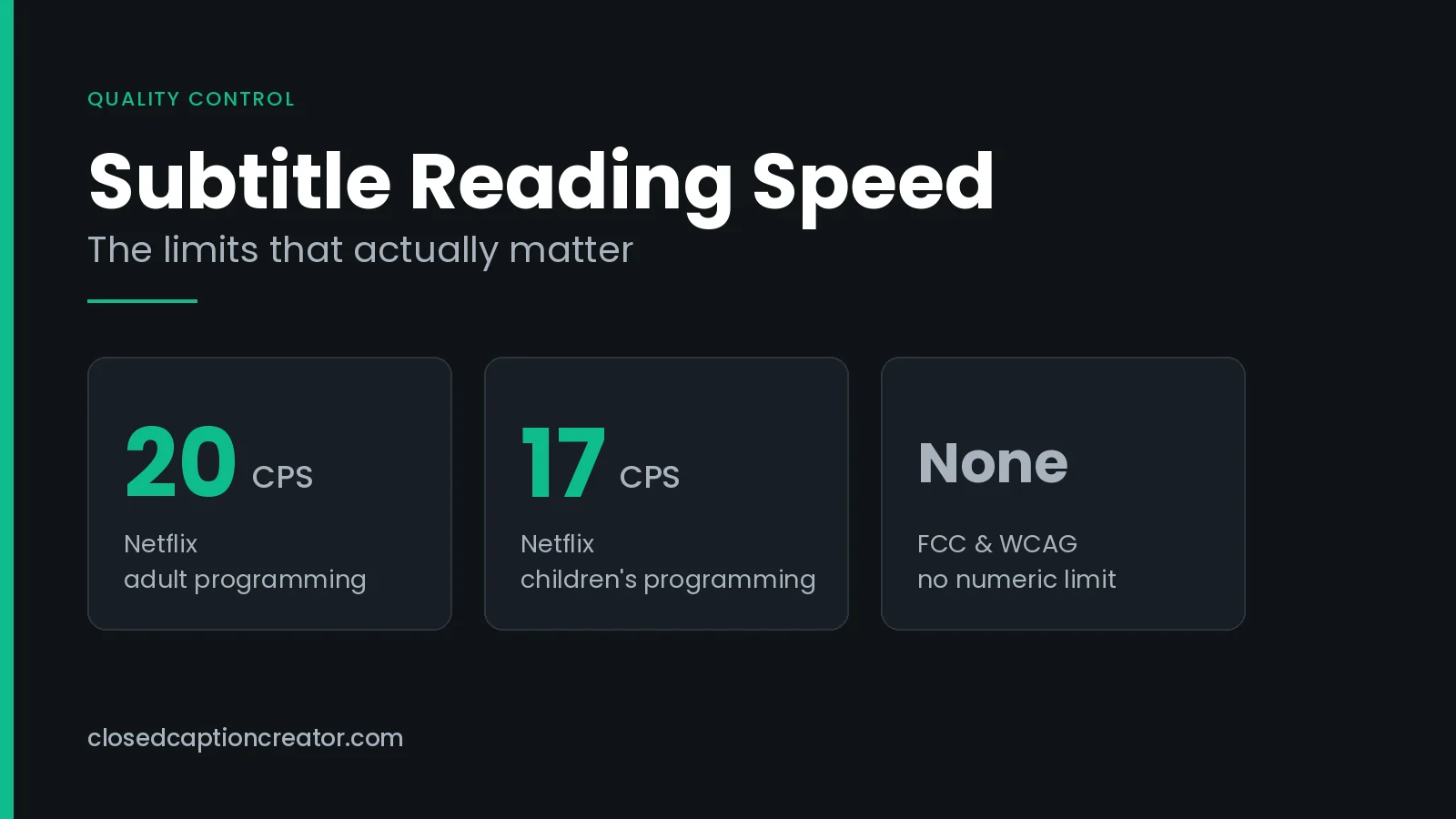
What are the subtitle reading speed limits?
Subtitle reading speed measures how much text a viewer must read per unit of time, usually in characters per second (CPS). Netflix caps adult content at 20 CPS and children's content at 17 CPS. Broadcast captions are limited further by the EIA-608 transport. Regulators require readable captions but set no numeric limit.
What Is Subtitle Reading Speed?
Reading speed is the rate at which text is pushed at a viewer. Take the characters in a subtitle event, divide by how long that event stays on screen, and you have a number you can test against a limit.
It is the single most common reason a subtitle file gets rejected in QC, and it is also the least visible. A file can be perfectly spelled, perfectly spotted to the audio, and still fail, because the viewer cannot physically read it in the time allowed.
Two things drive the number, and only two: character count and duration. Every fix available to you changes one or the other.
Reading speed also has a floor as well as a ceiling. A caption that flashes on for eight frames is unreadable no matter how few words it contains, which is why platform specs pair a CPS limit with a minimum event duration.
CPS or WPM: Which Should You Measure?
Both describe the same thing. They differ in what they assume about your language.
| Metric | What it counts | Strength | Weakness |
|---|---|---|---|
| Characters per second (CPS) | Every character, including spaces and punctuation, divided by event duration | Language-neutral and unambiguous; two files can be compared directly | Slightly penalises languages with long words |
| Words per minute (WPM) | Word count scaled to a per-minute rate | Intuitive; matches how speech rate is usually discussed | Depends on average word length, so it is not portable between languages |
Streaming platforms have converged on CPS. Netflix is explicit about this: its English style guide once expressed reading speed in words per minute, and the change log records that words per minute was removed in the October 2022 revision. The guide now states CPS limits only.
Broadcast subtitling in the UK still leans on WPM. The BBC Subtitle Guidelines set a word rate for live subtitles of 160–180 wpm, raised from an earlier 130–150 wpm.
Converting between CPS and WPM
English averages roughly six characters per word once you count the trailing space. That gives a rule of thumb worth memorising:
WPM ≈ CPS × 10 (English, assuming six characters per word including the space)
| CPS | ≈ WPM | Typical use |
|---|---|---|
| 12 | 120 | Conservative; young children, learners, complex technical material |
| 15 | 150 | Comfortable general-audience pace |
| 17 | 170 | Netflix children's ceiling |
| 20 | 200 | Netflix adult ceiling |
| 25 | 250 | Above most published limits; expect QC rejection |
Treat the conversion as an estimate. It is fine for sanity-checking a spec written in the other unit; it is not a substitute for measuring the file you actually have.
What Are the Reading Speed Limits by Platform?
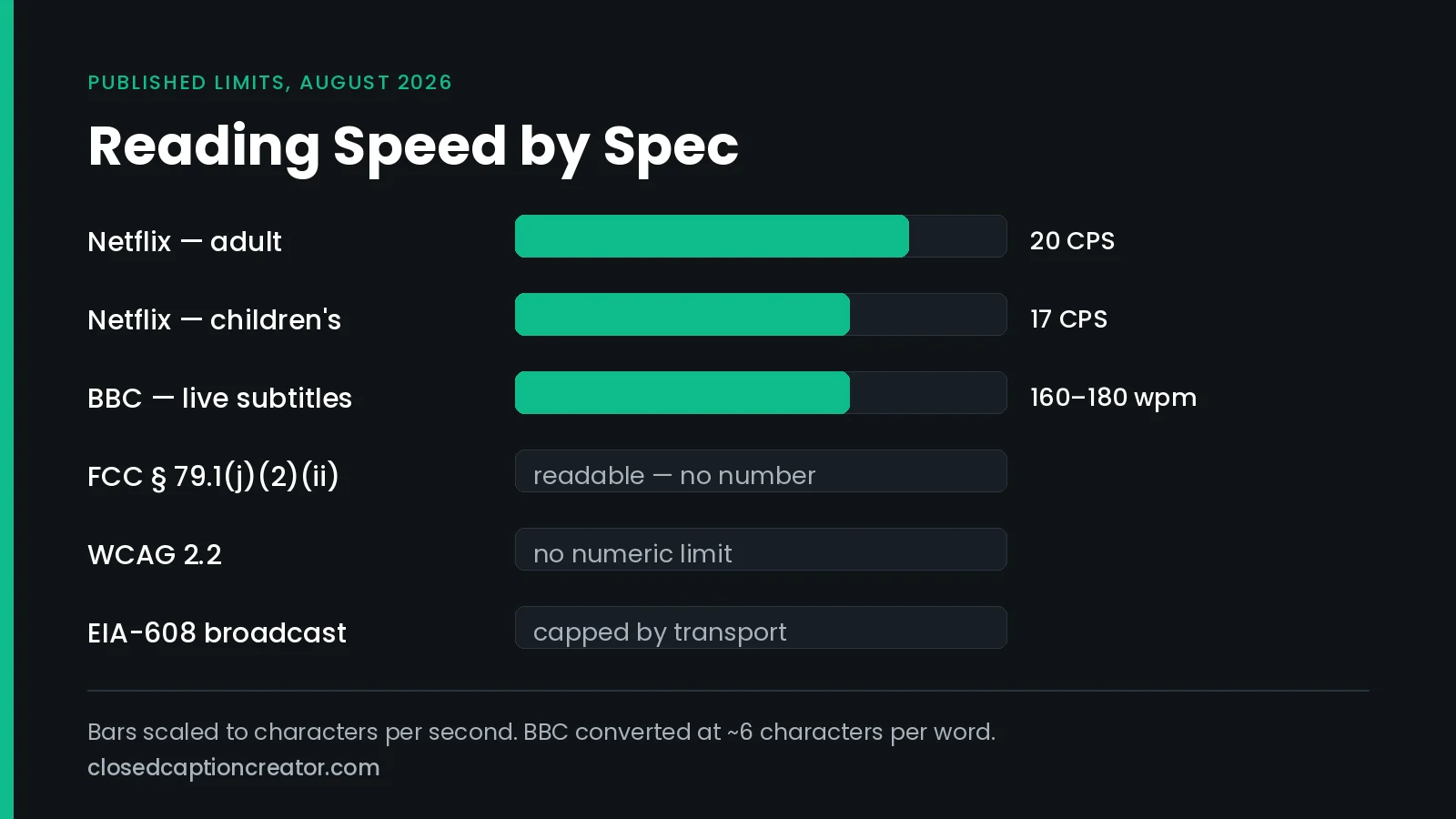
Published limits vary more than most style guides admit, and several widely quoted figures are not publicly documented at all. Here is what the primary sources say as of August 2026.
| Spec | Reading speed | Related constraints |
|---|---|---|
| Netflix — adult programming | Up to 20 CPS | 42 characters per line, 2 lines maximum; minimum event duration 5/6 second (20 frames at 24 fps); maximum 7 seconds; minimum 2-frame gap at any frame rate |
| Netflix — children's programming | Up to 17 CPS | |
| BBC — live subtitles | 160–180 wpm (≈16–18 CPS) | Raised from an earlier 130–150 wpm |
| Amazon Prime Video | Not published publicly | Language-specific style guides are distributed as a downloadable package rather than on the public technical page |
| EIA-608 / CEA-608 broadcast | Capped by the transport, not by a style rule | 32-column by 15-row grid; 4 lines on screen at once |
| FCC — 47 CFR § 79.1(j)(2)(ii) | No number. Captions must display "at a speed that permits them to be read by viewers" | Part of the synchronicity quality standard |
| WCAG 2.2 | No numeric limit in any success criterion | SC 1.2.2 (Level A) and 1.2.4 (Level AA) require captions, not a particular pace |
A note on secondhand specs. Several caption vendors publish confident per-platform CPS tables for services that do not document a public figure. If a number matters to your delivery, get it from the delivery spec your distributor sent you, not from a blog table — including this one.
What Does Netflix Actually Require?
Netflix is the most-cited spec in the industry because it is the most completely published one. Four numbers do most of the work.
- Reading speed. Up to 20 CPS for adult programming, up to 17 CPS for children's programming. The guide says "up to", which is a ceiling rather than a target.
- Minimum duration. 5/6 of a second per event, given as 20 frames at 24 fps.
- Maximum duration. 7 seconds per event.
- Gaps. A minimum of 2 frames between events at every frame rate. In 24 fps content, gaps of 3–11 frames must be closed to 2 frames.
Worth knowing: Netflix's General Requirements page gives the minimum duration as 5/6 second, while its Subtitle Timing Guidelines page describes the same 20-frame minimum as "4/5 sec". Twenty frames at 24 fps is 5/6 of a second. Work in frames rather than fractions and the ambiguity disappears.
The timing guide also names the technique Netflix expects when reading speed is uneven: borrowing time. Merge an over-dense event with a neighbour, then re-segment, rather than leaving one caption gasping and the next one idle.
If you are delivering to Netflix specifically, our walkthrough on conforming closed captioning for Netflix covers the file-level steps around these numbers.
Why Do Broadcast Captions Have a Hard Ceiling?
Streaming reading-speed limits are editorial policy. You could break them and the file would still play. Broadcast captions are different: EIA-608 imposes a limit in the transport itself.
Line 21 carries two bytes per frame. At 29.97 fps that is roughly 60 bytes per second, and those bytes are not all text. Positioning commands, colour and italic codes, and the control codes that swap the display and off-screen memories all draw from the same budget.
Pop-on captions compound it. The full caption must be transmitted into off-screen memory before it can be flipped into view, so a dense caption needs transmission time before the viewer sees anything.
The practical consequence: a 608 stream cannot deliver an arbitrarily fast caption even if your editor says the CPS is fine. When dialogue outruns the channel, captions arrive late and drift, and drift is a synchronicity failure under FCC rules. Our guide on embedding 608 and 708 captions covers the encode side of this.
CEA-708 has far more bandwidth and no 32-column grid, but a 708 stream carried alongside a 608 stream is still bounded by whatever the 608 service can express.
Do Regulators Set a Maximum Reading Speed?
No. Neither the FCC nor WCAG publishes a number, which surprises most teams the first time they look.
What the FCC says
Reading speed lives inside the synchronicity standard at 47 CFR § 79.1(j)(2)(ii). The rule requires captions to begin when speech begins, end approximately when it ends, and be "displayed on the screen at a speed that permits them to be read by viewers."
That is a performance requirement, not a threshold. A caption perfectly timed to the audio but on screen for half a second is out of compliance, and no CPS figure in the regulation will tell you so. Our FCC closed captioning requirements guide covers all four quality standards.
What WCAG says
SC 1.2.2 Captions (Prerecorded) at Level A and SC 1.2.4 Captions (Live) at Level AA require captions to exist and to be synchronised. Neither sets a pace. The W3C's own Understanding document points readers to external captioning style guides for that detail.
What this means for you
Because the law defines the outcome and not the number, the number has to come from your own house style or your client's delivery spec. Pick a limit, write it down, and enforce it automatically. An undocumented limit is one you will lose an argument about.
How Do You Calculate Subtitle Reading Speed?
Divide the characters in the event by its duration in seconds.
CPS = total characters (including spaces) ÷ duration in seconds
A worked example
A two-line subtitle contains 78 characters and is timed from 00:04:12:00 to 00:04:15:12 at 24 fps — a duration of 3.5 seconds.
- 78 ÷ 3.5 = 22.3 CPS
- Against a 20 CPS ceiling, this event fails.
- To pass by extending time: 78 ÷ 20 = 3.9 seconds minimum, so add roughly 10 frames.
- To pass by cutting text: 20 × 3.5 = 70 characters, so remove 8 characters.
Whether you buy time or cut text is an editorial call. Buying time is safer when the shot allows it; cutting text is the only option when the next event is already chained two frames behind.
One detail that trips people up: whether your tool counts line-break characters, and whether it counts the space that ends a line. Different tools answer differently, which is why the same file can read 19.8 CPS in one editor and 20.4 in another. Confirm the counting convention before you argue with a QC report.
How Do You Fix Captions That Exceed the Limit?
In rough order of how much they cost you editorially, least first.
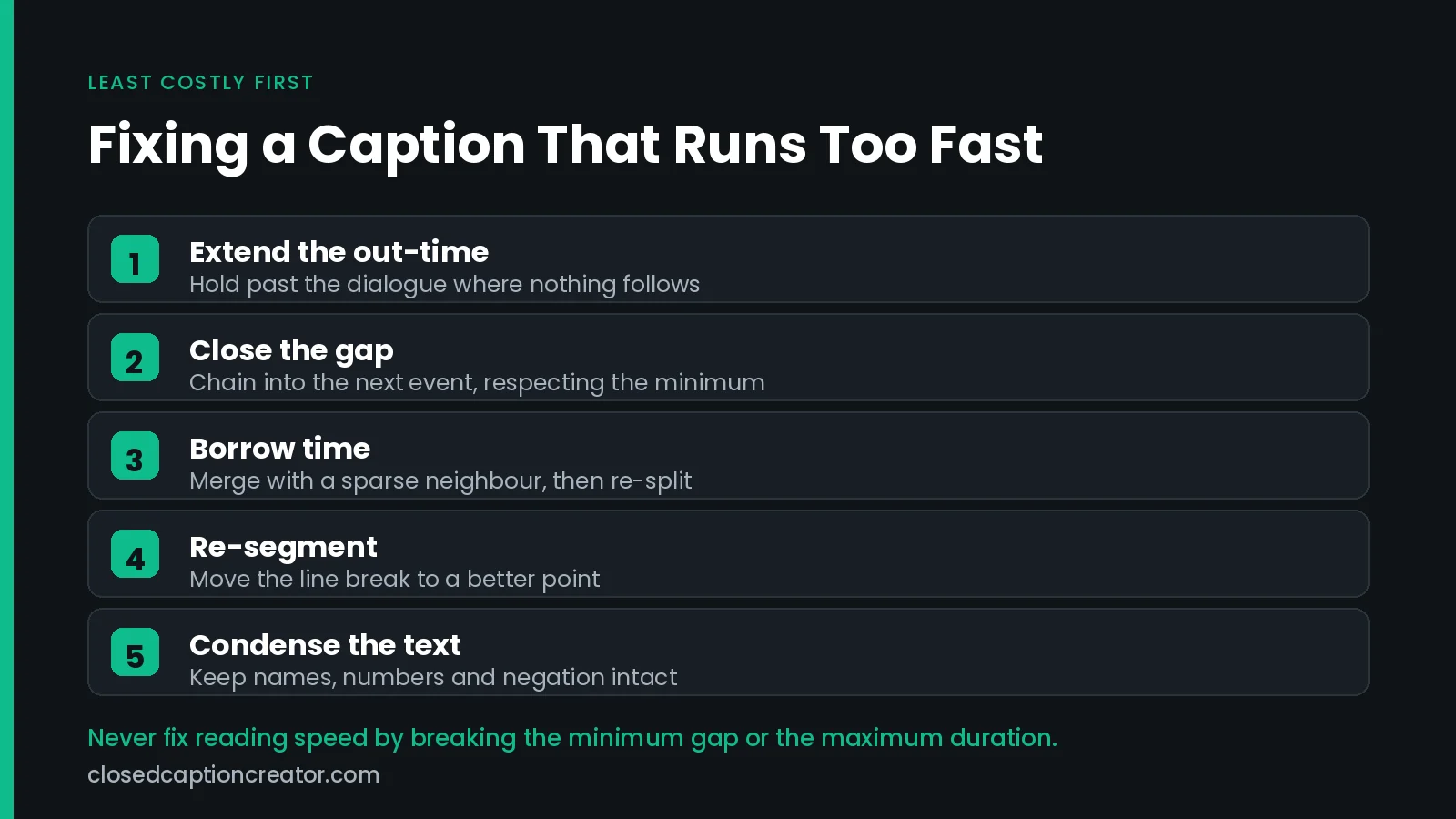
- Extend the out-time. The cheapest fix when there is silence after the line. Netflix explicitly encourages holding an event about half a second past the end of dialogue when nothing follows.
- Close the gap into the next event. Chaining recovers frames that were doing nothing. Watch the minimum gap for your spec.
- Borrow time by merging. Combine a dense event with a sparse neighbour, then re-split at a better point. This evens out the rhythm across a run rather than fixing one number in isolation.
- Re-segment the line break. Moving the split can drop a whole word into an event that has room for it. Break after punctuation, before conjunctions, before prepositions.
- Condense the text. Cut filler, contract where natural, drop redundant speaker tags. Preserve names, numbers, and negation — those are where condensing turns into an accuracy error.
- Re-time to the shot change. If the dialogue crosses a cut, aligning to the shot often frees frames while improving how the subtitle reads.
What not to do: shrink the gap below the spec minimum, or push an event past the maximum duration. Both trade one QC failure for another, and both are easier for an automated checker to catch than the reading speed problem you started with.
Translated files need extra headroom. Target languages that expand relative to the source will inflate CPS on lines that passed in the original, which is why reading speed has to be re-measured after translation rather than assumed. See translating subtitles for broadcast.
Common Reading Speed Mistakes
- Measuring the average instead of the outliers. A file averaging 14 CPS can still contain forty events over 25 CPS. Averages hide exactly the events that fail.
- Checking reading speed before translation instead of after. The source file's numbers tell you nothing about the target's.
- Applying an adult limit to children's content. Netflix's 17 CPS ceiling exists for a reason, and children's specs are commonly the stricter ones across platforms.
- Assuming ASR output is timed for reading. Automatic transcription timings follow the audio, not readability, so raw ASR frequently produces very short high-density events.
- Ignoring the minimum duration. A one-word caption at 4 CPS still fails if it is on screen for six frames.
- Forgetting vertical video. A narrower safe area forces more line breaks and more events, changing the density calculus entirely. See captioning for 9:16 video.
A Reading Speed QC Checklist
- Confirm the target CPS or WPM limit from the delivery spec, and confirm whether the content is classed as children's programming.
- Set the limit in your project metrics rather than checking by eye.
- Confirm the character-counting convention your tool uses.
- Sort events by CPS descending and work the outliers, not the average.
- Check the minimum event duration and the minimum gap at the delivery frame rate.
- Check the maximum event duration; over-long events usually indicate a missed split.
- Re-run the check after any translation pass.
- Watch a dense two-minute stretch back at full speed. Numbers pass that eyes fail.
For the wider pass this sits inside, see how to QC closed captioning and subtitles and our QC best practices for broadcast.
How Closed Caption Creator Handles Reading Rate
Reading speed is a settings problem before it is an editing problem. Define the limit once per project and the editor enforces it while you work.
- Project metrics. Set characters per second, words per minute, minimum and maximum duration, and line limits per project. See the event metrics documentation.
- Style guide manager. Save a house style or a client spec once and reuse it across jobs, so the limit travels with the work. See the style guide manager.
- Real-time error detection. Events that break the rule are flagged as you type, not discovered at delivery. See real-time error detection.
- Automatic reading speed correction. Extend out-times and close gaps across a whole file where the timeline allows it. See automatic reading speed correction.
- QC and review. Run the full pre-delivery check and share a review link. See QC and review.
- Frame-rate conform. Recalculate timings without drift when the delivery frame rate changes. See format support.
New to the workflow? Start with how to closed caption video, or browse the training videos.
Frequently Asked Questions
What is a good subtitle reading speed?
For general adult audiences, 15 to 17 characters per second is comfortable, and 20 CPS is a common ceiling rather than a target. Children's content is usually held at 17 CPS or lower. Always defer to the delivery spec you were given.
What is the Netflix reading speed limit?
Up to 20 characters per second for adult programming and up to 17 characters per second for children's programming. Netflix pairs these with a minimum event duration of 5/6 second, a maximum of 7 seconds, and a minimum 2-frame gap between events.
How do I convert CPS to WPM?
Multiply CPS by 60 and divide by your average characters per word. English averages about six characters per word including the trailing space, which simplifies to WPM being roughly CPS times ten. The conversion is an estimate and varies by language.
Does the FCC set a maximum caption reading speed?
No. 47 CFR § 79.1(j)(2)(ii) requires captions to be displayed at a speed that permits them to be read by viewers, as part of the synchronicity quality standard, but the Commission did not adopt a numeric threshold.
Does WCAG specify a subtitle reading speed?
No. WCAG 2.2 requires captions under SC 1.2.2 at Level A and SC 1.2.4 at Level AA, but no success criterion sets a characters-per-second or words-per-minute limit. The W3C points to external captioning style guides for that detail.
Why do my subtitles fail reading speed after translation?
Target languages often expand relative to the source, so a line that passed at 19 CPS in English can exceed 25 CPS once translated while keeping the original timings. Reading speed must be re-measured after every translation pass, not carried over.
Does reading speed apply to closed captions as well as subtitles?
Yes, and broadcast captions face an extra constraint. EIA-608 carries two bytes per frame on line 21, and control codes share that budget, so the transport itself limits how fast captions can be delivered regardless of your style guide.
Should I fix reading speed by cutting words or adding time?
Add time first where the timeline allows it, since it preserves the dialogue exactly. Cut text when the event is boxed in by a shot change or a chained neighbour. Preserve names, numbers, and negation when condensing.
This article is general information for media professionals, not legal advice, and platform specifications change. Verify limits against the delivery specification issued for your project. Want reading rate enforced automatically? Talk to our team or start a free trial.