Subtitles and Shot Changes: The Timing Rules That Actually Matter
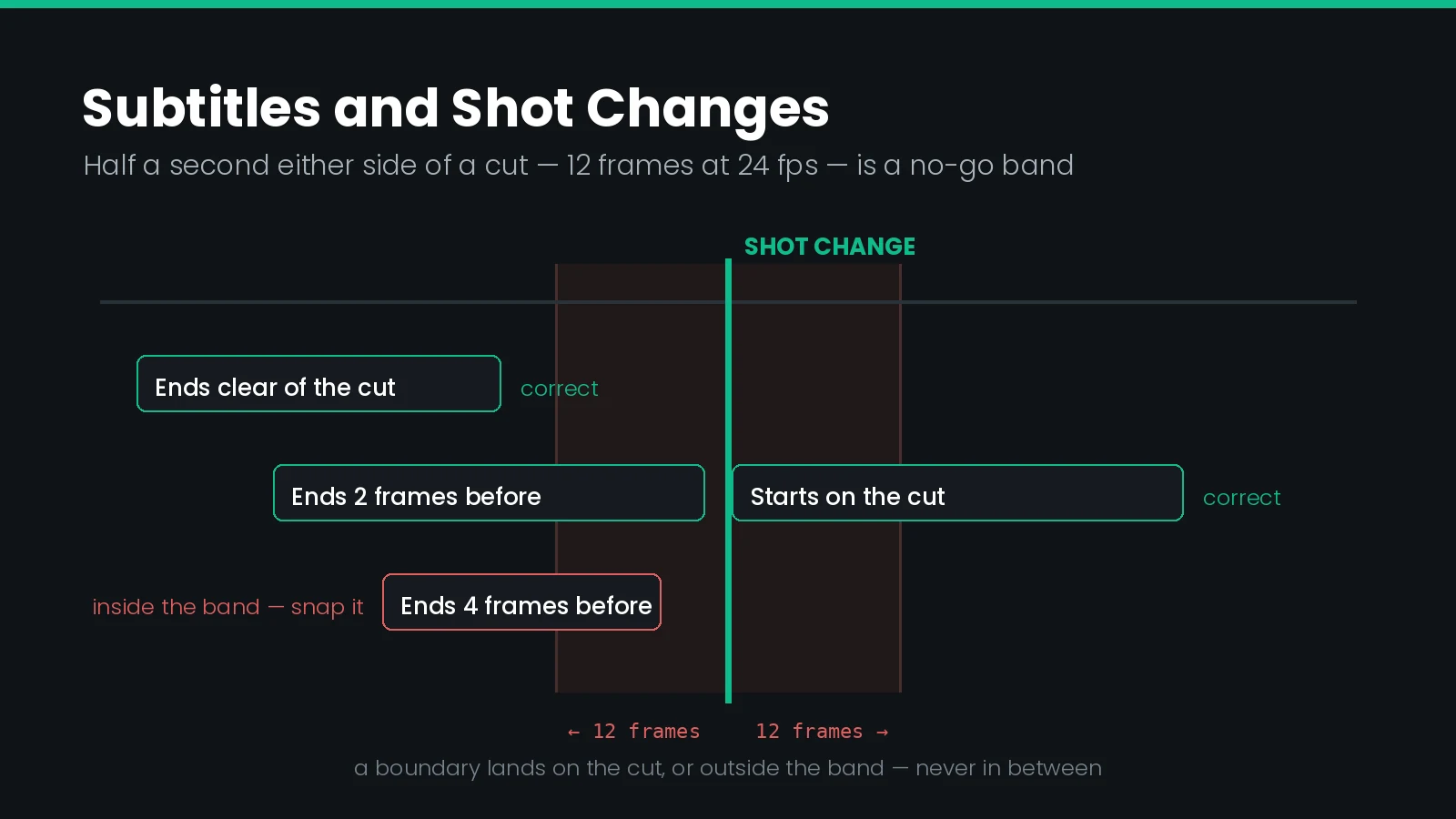
How close to a shot change can a subtitle start or end?
Half a second is the threshold — 12 frames in 24 fps content. A subtitle that would start or end closer than that to a cut should be moved onto the cut instead of left near it, and a subtitle that ends before a cut should finish two frames before it.
Every subtitling guideline in the industry says subtitles should respect shot changes. Almost none of them say by how much, in frames, at which frame rate, or what to do when the dialogue refuses to cooperate.
That vagueness is expensive. Shot change violations are one of the most common reasons a timed text file is rejected at delivery, and they are almost entirely mechanical — which means they are also almost entirely preventable. They sit alongside reading speed as the two timing faults that professional captioning work is judged on.
This guide sets out the actual numbers, where they come from, how they change with frame rate, and the one part of the received wisdom that the research does not support.
What Counts as a Shot Change
A shot is a single continuous run of the camera. A shot change, or cut, is the transition from the end of one shot to the start of the next.
Subtitling rules are written for straight cuts — instantaneous transitions, not gradual ones. That distinction matters, because detection tools and delivery specifications treat the two very differently.
| Transition | Counts as a shot change | How to time against it |
|---|---|---|
| Straight cut | Yes | Snap to the first frame of the new shot |
| Dissolve or cross-fade | Usually not | Time to the midpoint of the transition |
| Fade to black | Treated as a scene break | Do not carry a subtitle across it |
| Wipe or push | Usually not | Midpoint, as with a dissolve |
| Whip pan between shots | Yes, but hard to detect | Locate the cut frame by hand |
| Camera flash within a shot | No | Ignore — a common false positive |
There is a second distinction that the rules depend on and that detection software cannot make for you: a cut within a scene against a cut between scenes. A subtitle may cross a within-scene cut when the dialogue does. It should not cross a scene change at all, except in the narrow case where a character begins speaking before the change and the line lands in the new scene.
What the Research Actually Found
The standard justification for the rule is that a subtitle left on screen through a cut makes viewers start reading it again from the beginning, on the assumption that a new picture means new text. That claim traces to Robson's Closed Captioning Handbook (2004), which attributes it to research without citing it.
In 2013, Krejtz, Szarkowska and Krejtz tested it directly. They tracked the eye movements of 71 participants — 21 deaf, 19 hard of hearing, 31 hearing — across 20 subtitles displayed over within-scene cuts in news and documentary material at 25 fps.
| Measure | Before the cut | After the cut | Reading |
|---|---|---|---|
| Viewers looking at the subtitle's first words | 65% | 33% | Attention to the start halves |
| Fixations on those first words | 1.48 | 0.55 | Fewer, not similar |
| Gaze moving from subtitle to image | 0.11 | 0.19 | Nearly doubles |
| Returning to the start from mid-subtitle | 0.15 | 0.09 | Re-reading falls |
| First fixation duration | 196 ms | 220 ms | Brief check, then move on |
Only about a third of viewers looked at the beginning of a subtitle after a cut at all, and of those, roughly one in ten went back to re-read. The authors' conclusion was direct: most viewers do not re-read subtitles crossing shot changes.
The rule is right; the usual reason for it is wrong. What the eye tracking did find is that a cut pulls the eye off the subtitle and up to the image — gaze shifts from text to picture nearly doubled. The cost is interrupted reading, not repeated reading, and it lands hardest on viewers who depend on subtitles and have the least spare attention.
This is worth knowing for two practical reasons. It tells you what to weigh when a cut genuinely cannot be avoided: protect the viewer's reading time, because that is the resource a cut spends. And it explains why the rule survives as a delivery requirement regardless — a platform enforcing a frame threshold is enforcing evenness across a whole file, which is measurable, rather than a claim about one viewer's eyes.
The Half-Second Rule, Precisely
The most specific published rules are Netflix's, and the rest of the industry has largely converged on them. The guidelines are written for 24 fps content, where half a second is 12 frames.
Historically these were phrased as "the 12-frame rule". Netflix rewrote them in 2021 to say "half a second" throughout, precisely because the frame count was being copied unchanged onto content at other rates.
| Situation | What to do |
|---|---|
| Dialogue starts on the cut, or within half a second after it | Set the in-time to the first frame of the new shot |
| Out-time falls within half a second before the cut | Extend to two frames before the cut |
| Dialogue ends before the cut and nothing follows | Still end two frames before the cut |
| Dialogue starts 9, 10 or 11 frames before the cut | Move the in-time to 12 frames before, or onto the cut |
| Extending the out-time would cross a cut the dialogue does not | Snap the out-time to the cut and edit text for reading speed |
| Nothing else works | Out-time may go 12 frames past the cut, if it does not linger |
Read as a single instruction, it comes to this: a subtitle boundary should be either on the cut or clearly away from it, never just beside it. The band immediately around a cut is the one place a boundary must not sit.
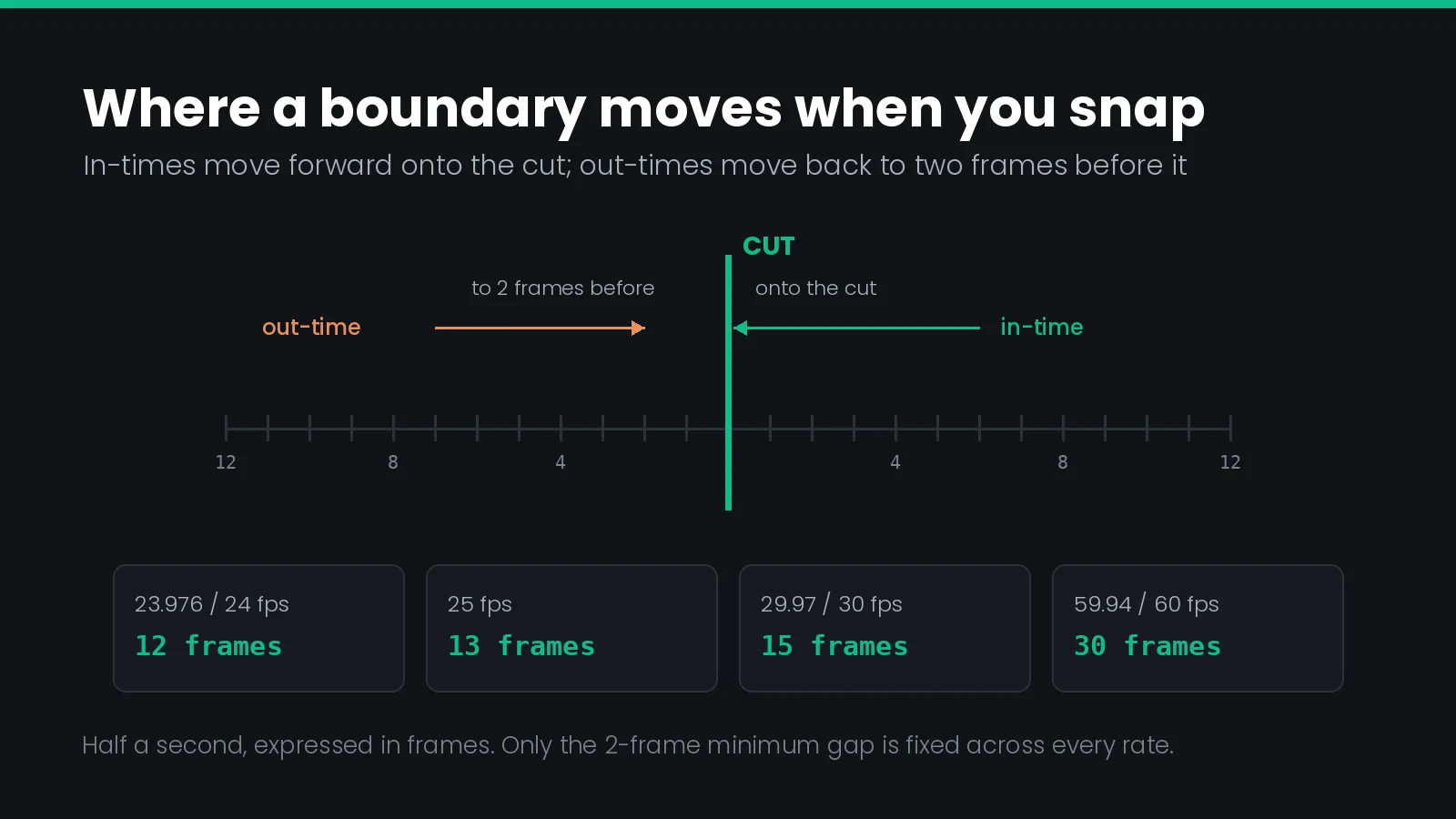
Note that this coexists with the ordinary rule for timing to audio: an in-time should be on the first frame of speech, or within one to two frames of it. The shot change rules override that tolerance when a cut is close enough to matter. Where automatic transcription produced the first pass, expect to re-time against the waveform before snapping anything.
When a Subtitle May Cross a Cut
A subtitle may cross a shot change when the dialogue it represents also crosses it. That is the whole test, and it is the one most often ignored in favour of a blanket ban.
When dialogue does cross, two constraints apply at once:
- The in-time must be at least half a second before the cut. If speech begins 9, 10 or 11 frames before it, pull the in-time back to 12 frames, or push it forward onto the cut. Do not leave it where the audio says.
- The out-time, if reading speed permits, should be either two frames before the cut or at least half a second after it. Again, not in between.
The exception is a scene change rather than a shot change. Subtitles should not cross one, other than where a speaker starts a line before the change and it finishes in the next scene — in which case the italics and segmentation conventions for off-screen speech apply.
Nobody keeps every subtitle inside a single shot. Professional subtitlers have put the realistic ceiling at about 90% on a favourable programme and nearer 60% on typical material. A file where no subtitle crosses a cut is usually a file where the dialogue has been re-segmented into something less readable.
Gaps, Chaining, and the Two-Frame Floor
The two-frame minimum gap between consecutive subtitles is the one figure that does not scale with frame rate. It is two frames at 23.976, at 25, at 29.97, at 50 and at 60.
Around that floor sits a rule that surprises people: gaps are not allowed to be merely small. In 24 fps content, any gap of 3 to 11 frames inclusive must be closed to 2 frames. A gap must be either 2 frames or half a second or more — nothing between.
Closing those gaps by extending the earlier subtitle's out-time is chaining. It removes a flicker of blank screen too brief to register as a pause but long enough to register as a glitch.
| Gap between events | Permitted | Action |
|---|---|---|
| 0–1 frames | No | Pull the out-time back to leave 2 frames |
| 2 frames | Yes | The chained state — leave it |
| 3–11 frames | No | Chain: extend the out-time to 2 frames |
| 12 frames or more | Yes | A real pause — leave it |
There is a limit on chaining. If an out-time has already been pushed half a second past the end of its audio, do not stretch it further to close a gap. Re-segment, merge the two events, or let the gap grow past half a second instead.
Where a cut falls between two subtitles, the two rules combine cleanly: the first ends two frames before the cut, the second starts on it. Our caption and subtitle QC guide covers where frame gap checks sit in a full QC pass.
Half a Second at Other Frame Rates
This is the most common way the rule is applied wrongly. "12 frames" was never the rule — half a second was, and 12 frames is what half a second happens to be at 24 fps.
| Frame rate | Half a second | Minimum gap | Typical use |
|---|---|---|---|
| 23.976 / 24 | 12 frames | 2 frames | Film-originated, most streaming |
| 25 | 13 frames | 2 frames | European broadcast, PAL heritage |
| 29.97 / 30 | 15 frames | 2 frames | North American broadcast |
| 50 | 25 frames | 2 frames | European high frame rate |
| 59.94 / 60 | 30 frames | 2 frames | Sport, high frame rate delivery |
At 25 fps, half a second is 12.5 frames. Round up to 13 rather than down, so the boundary is unambiguously outside the band. European broadcast work runs at 25 throughout, which our EBU-STL and teletext guide covers in delivery terms.
A threshold copied in frames breaks on conform; a threshold copied in seconds survives it. Move a file from 24 to 30 fps carrying a 12-frame rule and every boundary that was legal is now 0.4 seconds from the cut — inside the band, and invisible until QC. Store the tolerance as a duration and recompute it per project. The same trap is why frame rate and timecode mismatches cause so much silent damage.
Minimum Duration
Shot change snapping shortens subtitles. Pull an out-time back to two frames before a cut and the event gets shorter, which is why minimum duration belongs in the same conversation.
Netflix sets the floor at 20 frames and asks that it be reserved for one or two word events, with longer subtitles extended wherever possible. One footnote is worth carrying: the style guide describes 20 frames as "4/5 sec", but 20 frames at 24 fps is five sixths of a second, about 833 milliseconds. Where the two disagree, the frame count is the operative figure.
The BBC approaches it from the other end, working from reading speed rather than a fixed floor: roughly 0.3 seconds per word, so about 1.2 seconds for a four word subtitle. Our guide to subtitle reading speed covers how that interacts with characters per second.
When snapping to a cut would push an event under the minimum duration, the timing is not the problem. Merge it with a neighbour and borrow their time, or re-segment the line. Shortening the text to fit a 20-frame window produces a subtitle that is legal and unreadable.
How Other Specifications Differ
Netflix publishes the most prescriptive rules, which is why they have become the de facto reference. Other bodies differ in emphasis more than in substance.
| Source | Position on shot changes | Stated in frames |
|---|---|---|
| Netflix Timed Text Style Guide | Half-second band either side, 2-frame gap, snap or clear | Yes, explicitly |
| BBC Subtitle Guidelines | Avoid straddling a cut; if unavoidable, do not remove soon after it | No, editorial |
| ITC Guidance (1999) | Remain on screen several frames either side of a cut | Partly |
| Broadcast house styles | Usually inherit the half-second convention | Varies |
| Platform delivery specs | Frequently gated behind partner portals | Varies — read yours |
The BBC guidelines are also built for television rather than streaming, and their timing advice is framed in words per minute — 160 to 180 for a general audience — with shot changes listed as one of the legitimate reasons to vary timing rather than as a hard constraint.
If you are delivering to a specific platform, read that platform's own document. Several of the large ones sit behind partner logins and are not the same as the public summaries that circulate. When a spec is silent on shot changes, the half-second convention is the safe default.
How Shot Change Detection Works
Automatic detection compares consecutive frames — colour histograms, pixel differences, motion vectors — and marks a cut where the difference crosses a threshold. Straight cuts between visually different shots produce a large, abrupt change and are found very reliably.
The failures cluster predictably:
| Situation | Failure | Handling |
|---|---|---|
| Camera flash, lightning, strobing | False positive | Delete the marker before snapping |
| Dissolve or slow fade | False positive, or a miss | Place one marker at the midpoint |
| Cut between two similar shots | Missed cut | Lower the sensitivity and re-run |
| Whip pan or fast motion | Both, often in the same second | Mark the cut frame by hand |
| Heavy grain or compression | False positives throughout | Detect from a cleaner master |
| Animation with held frames | Missed cuts | Verify against the edit decision list |
The reason to care is that snapping is destructive. Sync every boundary to a marker list containing false positives and you have moved good timings onto frames where nothing happens — a fault that is harder to spot afterwards than the drift it replaced.
In Closed Caption Creator, detection runs from AI Tools → Detect Shot Changes, and snapping from Format → Sync To Shot Changes. Review the marker list between the two steps. Tools typically expose the threshold as a frame count — a threshold of 11 frames yields a minimum 12-frame separation, which is the same half-second rule expressed as tooling.
Shot markers are useful beyond subtitle timing. On a combined continuity and spotting list, the same detection pass drives shot descriptions.
The Order to Do This In
Shot change work is order-dependent. Doing it in the wrong sequence means doing it twice.
- Confirm the frame rate against the picture, not the paperwork. Everything below is expressed in frames, so a wrong rate invalidates all of it.
- Transcribe and segment first. Timing decisions depend on where lines break.
- Time to audio. Get in-times onto the first frame of speech before anything is snapped.
- Detect shot changes, then review the markers and remove false positives.
- Snap to cuts. Only now apply the half-second rule.
- Close gaps. Chain anything in the 3-to-11-frame band, respecting the cut rules you just applied.
- Check reading speed and minimum durations, since snapping changed both.
- Watch it back in full. No validator catches a subtitle that is legal and wrong.
Steps 5 to 7 interact, so expect one pass back through them. Our end-to-end captioning walkthrough places this sequence in a full project, and the Netflix conform guide covers the delivery checks that follow.
Broadcast Captions and Live Work
Everything above assumes pop-on subtitles in pre-recorded content, where every in-time and out-time is chosen deliberately. Much captioning is neither. The presentation modes themselves are a property of 608 and 708 caption encoding rather than of the subtitle file.
| Mode | Shot change rules apply | Why |
|---|---|---|
| Pop-on, pre-recorded | Fully | Every boundary is authored |
| Roll-up | No | Text scrolls continuously by design |
| Paint-on | Partly | In-times can be placed; reveal is progressive |
| Live and near-live | No | Captions already lag the picture |
| Forced narrative | Overridden | Timed to the on-screen text it translates |
Forced narratives are the interesting case. They follow the on-screen text they translate rather than the dialogue, so the shot rules are overridden — with one carry-over: if on-screen text stays up for a whole shot, still end the subtitle two frames before the cut. Where text fades, set the in and out points halfway through the fade.
If the distinction between subtitles and captions is itself the question, our guide to closed captions and subtitles covers it.
What Goes Wrong
| Symptom | Cause | Fix |
|---|---|---|
| Subtitle flickers off then on across a cut | Gap in the 3–11 frame band | Chain to 2 frames |
| QC reports shot change violations after a conform | Threshold copied in frames, not seconds | Recompute half a second at the new rate |
| Subtitles snapped to frames with no cut | False positives left in the marker list | Re-detect, prune, re-snap from the audio pass |
| Events fail minimum duration after snapping | Out-time pulled back to the cut | Merge with a neighbour or re-segment |
| Reading speed fails only near cuts | Snapping removed display time | Borrow time; condense text as a last resort |
| Subtitle appears a beat before the speaker | In-time pushed onto a cut ahead of the audio | Pull back to half a second before the cut |
| File passes automated QC but reads badly | Rules satisfied, scene changes crossed | Watch it back; check scene, not shot, boundaries |
| Detection finds far too many cuts | Grain, compression, or strobing content | Detect from a higher quality master |
Shot Change Timing Checklist
- Frame rate confirmed against picture, and half a second computed in frames for that rate
- Shot change markers reviewed by a human; flashes and dissolves removed
- Scene changes distinguished from within-scene cuts
- No in-time or out-time inside the half-second band without sitting on the cut
- Subtitles ending before a cut end exactly two frames before it
- Subtitles crossing a cut do so only where the dialogue does
- No gap between events in the 3-to-11-frame band at 24 fps
- Minimum gap of two frames holds everywhere
- No event under the minimum duration after snapping
- Reading speed re-checked after all timing changes
- Forced narratives timed to their on-screen text, not the dialogue
- File watched back in full before delivery
Frequently Asked Questions
What is a shot change in subtitling?
A shot change is the instantaneous transition from the end of one camera shot to the start of the next. Subtitling guidelines treat straight cuts as shot changes. Dissolves, fades and wipes are gradual and are usually timed to the midpoint of the transition instead.
How many frames from a shot change should a subtitle sit?
Half a second, which is 12 frames in 24 fps content. Anything closer than that should be pulled onto the cut itself rather than left hanging near it. The rule scales with frame rate, so half a second means 15 frames at 30 fps and 30 frames at 60 fps.
Can a subtitle cross a shot change?
Yes, when the dialogue it represents also crosses the cut. The subtitle must then start at least half a second before the shot change and, if reading speed allows, end either two frames before it or at least half a second after it.
Do subtitles over shot changes really make viewers re-read them?
Eye-tracking evidence says no. A 2013 study of 71 deaf, hard of hearing and hearing viewers found that most people do not re-read subtitles that cross a cut. What it did measure was a rise in gaze shifts away from the subtitle toward the image.
What is chaining in subtitle timing?
Chaining is extending the out-time of one subtitle so that only two frames separate it from the next. It removes the brief flicker of a blank screen between events. Netflix requires it for any gap of three to eleven frames in 24 fps content.
Why is the gap before a shot change exactly two frames?
Two frames is the smallest gap that still reads as a deliberate clear rather than a dropped subtitle. It lets one subtitle end and another begin across a cut without the two appearing to overlap. The figure holds at every frame rate, unlike the half-second rule.
Does the half-second shot change rule change at 25 or 30 fps?
The duration stays at half a second, so the frame count changes with the rate. That is 12 frames at 24 fps, 13 at 25 fps, 15 at 30 fps and 30 at 60 fps. Only the two-frame minimum gap is fixed in frames across every rate.
How reliable is automatic shot change detection?
Straight cuts between visually different shots are found very reliably, because the frame-to-frame difference is large and abrupt. Detection degrades on dissolves, whip pans, camera flashes, strobing and cuts between similar shots, all of which need a human pass before timing is committed.
What is the minimum duration for a single subtitle?
Netflix sets 20 frames, which is five sixths of a second in 24 fps content, and reserves that floor for one or two word events. The BBC works from reading speed instead, allowing roughly 0.3 seconds per word, which reaches about 1.2 seconds for a four word subtitle.
Do shot change rules apply to broadcast closed captions too?
They apply far more loosely. Roll-up captioning scrolls continuously and cannot respect cuts at all, and live captioning runs behind the picture by design. The rules are written for pop-on subtitles in pre-recorded content, where every in-time and out-time is chosen deliberately.
Shot change tolerances differ by platform and by frame rate, so recompute them per project rather than carrying a frame count between jobs. Want detection, snapping, and frame gap checks in one pass? Talk to our team or start a free trial.