Drop Frame vs Non-Drop Frame: Why Your Captions Drift
What does drop frame timecode actually change?
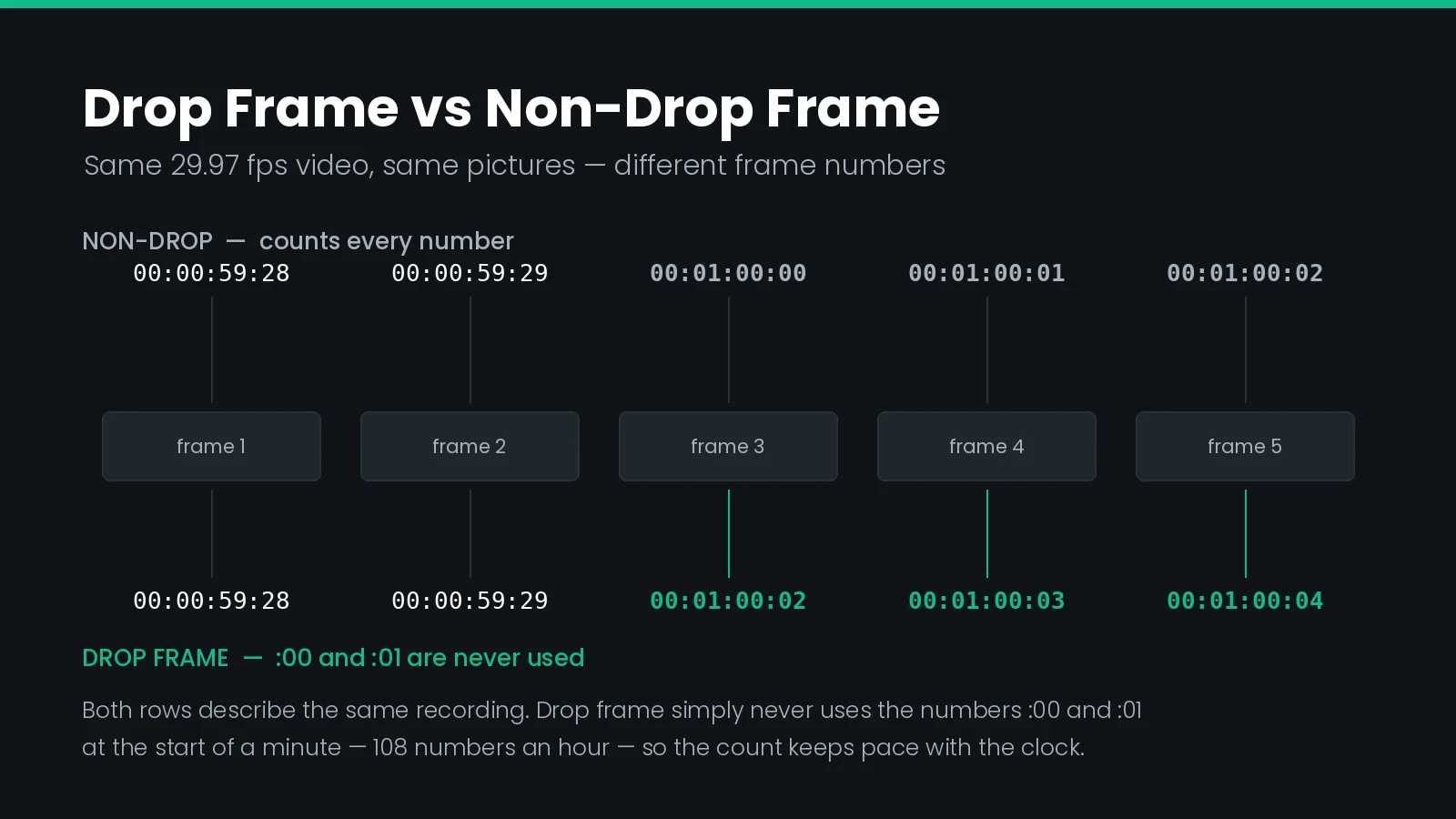
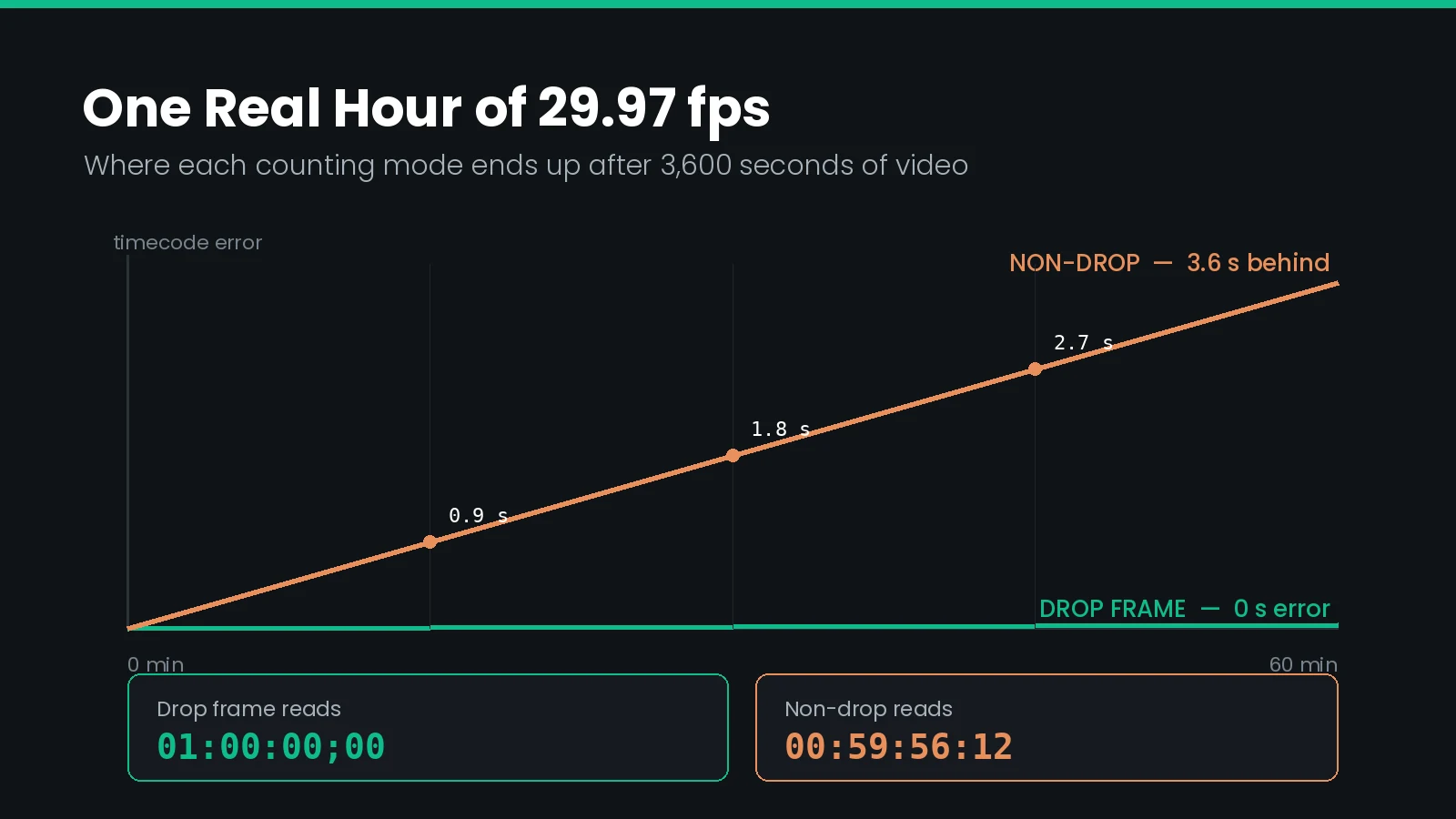
Drop frame changes numbers, not pictures. At 29.97 fps it skips two frame numbers at the start of every minute except every tenth minute — 108 numbers an hour — so that one hour of timecode matches one hour on the clock. No video is removed. Non-drop counts every number instead, and ends a real hour reading 00:59:56:12.
A caption file is a list of times. If the software writing those times and the software reading them disagree about what a second is, the captions will be wrong — and they will be wrong in a way that gets worse the further into the programme you go.
That disagreement almost always traces back to one decision made in 1953, and to a name that describes the wrong thing. Drop frame does not drop frames.
This guide covers what the frame count in a timecode means, why the fractional rates exist, and the specific ways the mismatch shows up in caption deliverables.
What Timecode Actually Is
SMPTE timecode, standardised as SMPTE ST 12-1, labels every frame of video with an address in the form hh:mm:ss:ff. The last pair is a frame number within the current second, counting from zero.
The critical point is that timecode is a counter, not a clock. It has no independent knowledge of elapsed time. It increments once per frame and rolls over to the next second when it reaches the frame rate. Whether that corresponds to a real second depends entirely on whether the frame rate is a whole number.
| Field | Range | Notes |
|---|---|---|
| Hours | 00–23 | Often used to identify the reel or programme part |
| Minutes | 00–59 | Where the drop frame rule is applied |
| Seconds | 00–59 | Rolls over when the frame count reaches the rate |
| Frames | 00 to rate minus one | 00–29 at 29.97, 00–24 at 25, 00–23 at 23.976 |
At 25 fps the counter reaches 24, rolls over, and one second of timecode has taken exactly one second. At 29.97 fps the counter still reaches 29 and rolls over, but only 29.97 frames actually elapsed in that time. The counter is running slightly fast against the world.
Why Video Is 29.97 fps and Not 30
Black-and-white NTSC television ran at exactly 30 fps. When colour was added, the colour subcarrier sat close enough to the audio carrier to produce visible interference on existing receivers.
The fix was to slow the frame rate by a factor of 1000/1001, moving the carriers apart. Existing sets could not tell the difference. The result is that the North American frame rate has been 30 × 1000/1001 = 29.97002997… ever since.
One decision produced every fractional rate in use. 29.97, 23.976, and 59.94 are all just 30, 24, and 60 multiplied by 1000/1001. That is why they all drift by the same proportion, and why a 3.6 second error per hour keeps reappearing in unrelated parts of a workflow.
The drift is small but relentless. Over one hour, a counter running at 30 numbers per second against video running at 29.97 frames per second accumulates a gap of exactly 108 frames, or about 3.6 seconds. Over a feature film it is more than five seconds — far beyond any caption sync tolerance.
What Drop Frame Does
Drop frame timecode is the correction. The rule is short:
- Skip frame numbers
00and01at the start of every minute. - Except every tenth minute — minutes 00, 10, 20, 30, 40, and 50 are not adjusted.
That is 2 numbers skipped in 9 of every 10 minutes, so 18 per ten minutes, so 108 per hour — precisely the accumulated error. At the minute boundary the count runs 00:00:59:29 then jumps straight to 00:01:00:02.
Nothing is missing from the video. The frame that would have been called 00:01:00:00 is still there; it is now called 00:01:00:02. The programme is the same length either way.
In an SCC file, drop frame is signalled by a semicolon before the frame count — 01:00:12;04 — and non-drop by a colon. It is a single character, it is easy to lose in a text editor, and it is the only frame rate information the format carries.
What Non-Drop Frame Does
Non-drop frame counts every number consecutively with no adjustment. It is simpler, and it is wrong about elapsed time by design.
Run non-drop 29.97 timecode for one real hour and it reads 00:59:56:12. The counter is 108 frames behind where the clock says it should be, because it has been running 0.1% slow relative to a true 30 fps count.
| Property | Drop frame | Non-drop frame |
|---|---|---|
| Actual frame rate | 29.97 fps | 29.97 fps |
| Frames in the file | Identical | Identical |
| Numbers skipped | 108 per hour | None |
| After one real hour | 01:00:00;00 | 00:59:56:12 |
| Matches wall clock | Yes | No, 3.6 s short per hour |
| SCC separator | Semicolon ; | Colon : |
| Typical use | Broadcast playout, programme durations | Post production, film-originated work |
Neither is more accurate about the picture. Both address exactly the same frames. Drop frame is more accurate about duration, which is why broadcasters use it: a commercial break has to be the length it says it is.
Which One to Use
Use whichever the delivery specification names, and if it does not say, match the video master. Guessing has a 50% success rate and the failure is silent.
| Context | Usual mode | Why |
|---|---|---|
| North American broadcast playout | Drop frame | Programme and break durations must be real durations |
| Film-originated post at 23.976 | Non-drop | Drop frame is not defined at 23.976 |
| Streaming and OTT delivery | Neither | Times are measured from zero in real seconds |
| European broadcast at 25 fps | Neither | Whole-number rate, no correction needed |
| Archive and legacy tape masters | Varies | Read the tape label, then verify against the picture |
23.976 and the Same Problem in a Different Coat
Film-originated material is usually mastered at 23.976 fps, which is 24 × 1000/1001. It has the same 0.1% offset as 29.97, and therefore the same 3.6 second per hour error against the clock.
What it does not have is a correction rule. Drop frame is defined only for 29.97 and 59.94. At 23.976 the timecode simply counts 0 to 23 and runs slow, and everyone downstream is expected to know.
24 and 23.976 are different frame rates, not two names for one. Treating them as interchangeable is the single most common cause of captions that start in sync and end four seconds out on a feature-length programme. The error is invisible in the first minute, which is exactly how far most people spot-check.
This is also why a request for a "23.98 fps SCC file" needs a conversation rather than a file. SCC carries no frame rate field and assumes 29.97. The established practice is to deliver a 29.97 non-drop SCC alongside 23.976 video, because the two rates share the same 1000/1001 relationship to their whole-number parents and captioning systems handle the mapping internally. A file genuinely retimed to 23.976 and labelled SCC will play wrong almost everywhere.
Which Caption Formats Carry a Frame Rate
Most caption formats do not store the frame rate they were authored against. That information lives in the delivery paperwork, or in someone's head.
| Format | Time stored as | Frame rate in file | Drop frame aware |
|---|---|---|---|
| SCC | SMPTE timecode | No, assumes 29.97 | Yes, via separator |
| MCC | SMPTE timecode | Yes, in the header | Yes |
| EBU-STL | SMPTE timecode | Yes, in the header | Not applicable at 25 fps |
| SRT | Real time, milliseconds | No | No |
| WebVTT | Real time, milliseconds | No | No |
| TTML / IMSC | Media time offset | Optional attribute | No, media time base only |
| CAP / PAC | SMPTE timecode | No, set on import | Varies by variant |
The split matters more than it looks. Timecode formats store a frame address, so the frame rate is needed to turn it into a time. Real-time formats such as SRT and WebVTT store milliseconds directly, so no frame rate is needed to read them — but one is needed to convert them back into a timecode format, which is where the error usually enters. WebVTT delivered over a stream adds a second offset of its own, which our guide to segmented WebVTT in HLS covers.
Our guide to TTML and IMSC covers the streaming side, where the media time base sidesteps drop frame entirely, and the EBU-STL guide covers the 25 fps European equivalent.
What Happens When You Change Frame Rate
There are two operations that get called the same thing, and confusing them causes most of the damage.
| Relabelling | Conforming | |
|---|---|---|
| Example | Drop frame to non-drop at 29.97 | 25 fps to 29.97 fps |
| Underlying rate | Unchanged | Changed |
| Caption times | Same picture frames | Must be recalculated |
| Risk | Low | High if the source rate is wrong |
| Visible if wrong | Immediately, by a few frames | Grows across the programme |
A conform needs the source rate as much as the target. Get the source wrong and every calculated time is scaled by the wrong factor, and the error compounds linearly from the first cue to the last. This is why a caption file can pass a spot-check on the opening titles and fail badly at the end reel.
Where a specific pair is involved, the STL to SCC conversion guide and the SCC to STL guide set out what survives each direction, and the SCC format reference covers compatibility.
The One Hour Offset
Broadcast masters conventionally start at 01:00:00:00 rather than zero, leaving an hour of headroom for bars, tone, slate, and countdown ahead of the programme.
Caption files authored against those masters inherit the offset. That is correct for broadcast, and wrong for everything else. Streaming formats measure from the first frame of media, so an unremoved hour offset places every cue an hour into a programme that may only run forty minutes.
If no captions appear at all, suspect the hour offset before anything else. The file is structurally valid, no validator complains, and the player has nothing to display because every cue is beyond the end of the media. It is the fastest fault to check and one of the most common.
The offset is a constant, so it is trivially removable: subtract one hour from every time. What makes it dangerous is that it produces total failure rather than partial failure, which people instinctively diagnose as a broken file rather than a shifted one.
How Much Drift, and How Fast
Not every frame rate mistake is equally serious. Knowing the expected magnitude tells you which mistake you are looking at before you open anything.
| Mistake | Error after 1 hour | Diagnosis |
|---|---|---|
| Drop frame read as non-drop, or the reverse | 3.6 s | Gradual; last reel noticeably out |
| 24 fps read as 23.976, or the reverse | 3.6 s | Gradual; identical signature |
| 30 fps read as 29.97 | 3.6 s | Gradual |
| 23.976 read as 25 | 2 min 27 s | Obvious within a few minutes |
| 25 fps read as 29.97 | 9 min 57 s | Wrong from the opening scene |
| 29.97 read as 25 | 11 min 56 s | Wrong from the opening scene |
| Unremoved hour offset | Exactly 1 h, constant | Nothing displays at all |
The pattern is worth internalising. A few seconds of gradual drift is a 1000/1001 error. Minutes of error is a whole-rate mismatch between regions. A constant offset with nothing on screen is the hour start. Three symptoms, three causes, and the size of the error tells you which one you have before you open the file.
Catching It in QC
Frame rate faults are cheap to catch and expensive to miss, because nothing about them is visible in the file itself. The only reliable test is playback against the actual picture, at the end of the programme rather than the beginning.
Three checks catch nearly everything:
- Check the last cue, not the first. A 1000/1001 error is a few frames at the start and several seconds at the end. Spot-checking the opening proves nothing.
- Compare the file's final timecode against the master's duration. If they disagree by roughly 3.6 seconds per hour, you have a drop frame or 1000/1001 mismatch.
- Confirm the start. Zero or an hour, and whether that matches what the target expects.
Closed Caption Creator sets the frame rate and timecode mode per project, converts between them on export, and plays captions against the loaded video so drift is visible rather than theoretical. The wider procedure is in our caption and subtitle QC checklist.
What Goes Wrong
Every fault below produces a structurally valid file. That is what makes them survive to delivery.
| Symptom | Cause |
|---|---|
| In sync at the start, seconds out at the end | Drop frame, 1000/1001, or 24 against 23.976 mismatch |
| Wrong from the first cue, by minutes | Whole-rate mismatch, usually 25 against 29.97 |
| No captions display at all | Unremoved 01:00:00:00 start offset |
| Captions run out before the programme ends | Source read at a higher rate than authored |
| Programme duration reported wrongly | Non-drop timecode read as a real duration |
| SCC rejected by playout | Colon and semicolon separators mixed within one file |
| Round trip loses a frame per cue | Repeated rounding between frame and millisecond formats |
| Only the converted version drifts | Source frame rate assumed rather than confirmed |
The last one deserves emphasis. When a conversion tool asks for the source frame rate, it is not being pedantic — for formats that carry no rate field, that answer is the only thing standing between a correct file and a linearly compounding error.
Timecode Checklist
Run this before any delivery that involves a timecode-based caption format.
- The frame rate is confirmed against the master, not assumed from the file extension or a previous job.
- Drop frame or non-drop is stated explicitly, and matches what the target expects.
- The start timecode is correct — zero for streaming, the master's hour start for broadcast.
- 23.976 and 24 have not been used interchangeably anywhere in the chain.
- The last cue lands on the right picture, verified by playback rather than arithmetic.
- The file's total duration matches the master's within tolerance.
- SCC separators are consistent, all colons or all semicolons.
- Conversions record the source rate, so a later round trip does not have to guess.
- Real-time formats were converted with a stated rate, not a default one.
- Someone watched the end of the programme, not only the opening.
Frequently Asked Questions
What is drop frame timecode?
Drop frame timecode is a counting rule for 29.97 fps video that skips two frame numbers at the start of every minute, except every tenth minute. Skipping 108 numbers per hour keeps the timecode display aligned with the clock. No picture is removed, only labels.
What is the difference between drop frame and non-drop frame?
Both run at 29.97 fps and contain identical pictures. Drop frame skips frame numbers so one hour of timecode equals one hour of clock time. Non-drop counts every number consecutively, so after a real hour it reads 00:59:56:12, roughly 3.6 seconds short.
Does drop frame timecode delete video frames?
No. Drop frame removes numbers from the counting sequence, never pictures from the video. The recording is untouched and the duration is unchanged. The name causes more confusion than any other term in post production, because it describes a labelling rule rather than an edit.
Why is NTSC video 29.97 fps instead of 30?
When colour was added to black-and-white NTSC television, the frame rate was slowed by a factor of 1000/1001 to stop the colour subcarrier interfering with the audio carrier. That single compatibility decision produced 29.97, 23.976, and 59.94, and every drift problem that follows from them.
How can I tell if a caption file uses drop frame timecode?
In an SCC or MCC file, the separator before the frame count tells you: a semicolon means drop frame, a colon means non-drop. Most other formats carry no marker at all. SRT and WebVTT store real time, so the question does not apply to them.
Is 23.976 fps drop frame?
No. Drop frame is defined only for 29.97 and 59.94 fps. At 23.976 the timecode simply counts 0 to 23 and runs slow against the clock by about 3.6 seconds per hour. The error is identical in size to non-drop 29.97, but there is no correction rule for it.
How much do captions drift if the frame rate is wrong?
It depends entirely on the size of the mismatch. Confusing 24 with 23.976, or drop with non-drop, costs about 3.6 seconds per hour. Reading a 25 fps file as 29.97 costs nearly ten minutes per hour, which is obvious immediately rather than at QC.
Do 25 fps and 24 fps use drop frame timecode?
No, and they do not need it. Both are whole numbers, so a second of timecode is exactly a second of clock time and the count never diverges. Drop frame exists only to correct fractional rates. European 25 fps workflows never encounter the problem at all.
Why do my captions start one hour late?
Because the broadcast master started at 01:00:00:00 and the offset was never removed. Streaming formats measure from zero, so an hour-start caption file places every cue an hour into a programme that is shorter than that. Nothing renders, and no validator reports an error.
Can you convert drop frame to non-drop frame without retiming?
Yes, because both are 29.97 fps and every caption still lands on the same picture frame. Only the label changes. That is genuinely different from a frame rate conform, such as 25 to 29.97, where the underlying timing must be recalculated.
Frame rate expectations differ by platform and by title, so confirm the rate against the master you were given rather than the one you had last time. Need the same captions at 29.97, 25, and 23.976? Talk to our team or start a free trial.