HLS Subtitles: How Segmented WebVTT Actually Works
Why do WebVTT subtitles drift in an HLS stream?
Because HLS splits subtitles into segments whose cue times are local to the file, not the media timeline. Each segment carries an X-TIMESTAMP-MAP header tying a cue time to a 90 kHz MPEG-2 timestamp. Drop that header, or concatenate segments without applying it, and every cue lands at the wrong time.
A subtitle file delivered to a streaming platform stops being a file. The packager cuts it into pieces, writes a playlist that indexes them, and from that point the player never sees the document you authored.
That matters because most sync faults in streamed subtitles are not authoring faults at all. The caption file was correct when it left the editor; the packaging stage lost the relationship between cue time and media time.
This guide covers how a subtitle rendition is declared, what a subtitle segment actually contains, what X-TIMESTAMP-MAP does, and which faults come from which stage.
Why HLS Segments Subtitles at All
HTTP Live Streaming is built around small, independently fetchable chunks of media. That is what lets a player change bitrate mid-programme, start at an arbitrary point, and recover from a failed request without reloading anything else.
Subtitles are a rendition like any other, so they are cut on the same timeline as the video. A viewer who joins a ninety-minute programme at the eighty-minute mark should not have to download eighty minutes of text they will never see.
Two consequences follow, and between them they explain nearly every streaming subtitle fault:
- Each segment has to stand alone. A player may fetch segment 47 without having seen segments 1 to 46, so the segment must carry everything needed to render it.
- Cue times have to be reconcilable with the media timeline. The text says 00:00:02.000, and something has to tell the player what that means in terms of the video it is already playing.
What an HLS Subtitle Track Is Made Of
Four things, in a chain. Each one is a common place for a delivery to break.
| Component | What it is | What breaks here |
|---|---|---|
| Multivariant playlist | The top-level .m3u8 that lists variants and renditions | Subtitle group never referenced, so no menu entry appears |
| Subtitle media playlist | One .m3u8 per language, listing segments and durations | Durations that do not match the video timeline |
| Subtitle segments | The .vtt files, or fragmented MP4 fragments | Missing timestamp map, dropped cues, empty gaps |
| Initialisation section | The WebVTT header line, or an EXT-X-MAP init segment | fMP4 segments delivered with no init segment |
The second edition of the HLS specification renames the top-level playlist from master playlist to Multivariant Playlist. Both names are still in wide use, and tooling documentation has not caught up evenly, so expect to see them used interchangeably in delivery specifications.
How Subtitles Are Declared in the Playlist
A subtitle rendition is declared with an EXT-X-MEDIA tag, and then claimed by each variant through a SUBTITLES attribute pointing at the group.
#EXTM3U
#EXT-X-VERSION:7
#EXT-X-MEDIA:TYPE=SUBTITLES,GROUP-ID="subs",NAME="English",LANGUAGE="en",DEFAULT=YES,AUTOSELECT=YES,FORCED=NO,CHARACTERISTICS="public.accessibility.transcribes-spoken-dialog",URI="subs/en/index.m3u8"
#EXT-X-STREAM-INF:BANDWIDTH=3000000,CODECS="avc1.640028,mp4a.40.2",RESOLUTION=1280x720,SUBTITLES="subs",CLOSED-CAPTIONS=NONE
video/720p/index.m3u8
Every tag occupies exactly one line. The example above is wrapped for reading only; a line break inside an attribute list produces a playlist that most players reject outright.
| Attribute | Purpose | Notes |
|---|---|---|
GROUP-ID | Name of the rendition group | Must match the SUBTITLES value on the variant tags |
LANGUAGE | RFC 5646 language tag | What the player uses to preselect a track |
NAME | Human-readable menu label | Required, and shown to the viewer as written |
DEFAULT | Play this rendition if nothing else applies | At most one per group should be YES |
AUTOSELECT | May be chosen on language preference alone | Cannot be NO when DEFAULT is YES |
FORCED | Forced-narrative subtitles only | Valid only on TYPE=SUBTITLES |
CHARACTERISTICS | Accessibility signalling | Comma-separated Uniform Type Identifiers |
URI | The subtitle media playlist | Required for subtitles, unlike some other rendition types |
The CLOSED-CAPTIONS attribute on the variant tag is a separate question from subtitles entirely. It refers to CEA-608 and CEA-708 data carried inside the video elementary stream, which our guide to embedding 608 and 708 captions covers. Setting it to NONE declares that no such data exists, and if you set it at all it has to be set on every variant.
Inside the Subtitle Media Playlist
The subtitle media playlist has the same shape as a video one, minus the codec information.
#EXTM3U
#EXT-X-VERSION:7
#EXT-X-TARGETDURATION:6
#EXT-X-PLAYLIST-TYPE:VOD
#EXT-X-MEDIA-SEQUENCE:0
#EXTINF:6.00000,
seg0.vtt
#EXTINF:6.00000,
seg1.vtt
#EXTINF:6.00000,
seg2.vtt
#EXT-X-ENDLIST
Nothing requires subtitle segments to be the same length as video segments, but making them the same length is the sane default. Apple's authoring guidance for its own devices settles on six-second media segments, and matching that keeps the two playlists the same length, which turns a missing subtitle segment into an obvious off-by-one rather than a subtle drift.
A subtitle segment with no cues is not a broken segment. Every period in the playlist needs a segment, and a period with nothing to say is a valid WebVTT file containing only the header. Packagers that skip these leave holes in the timeline that some players will not recover from.
X-TIMESTAMP-MAP: the Part Everyone Gets Wrong
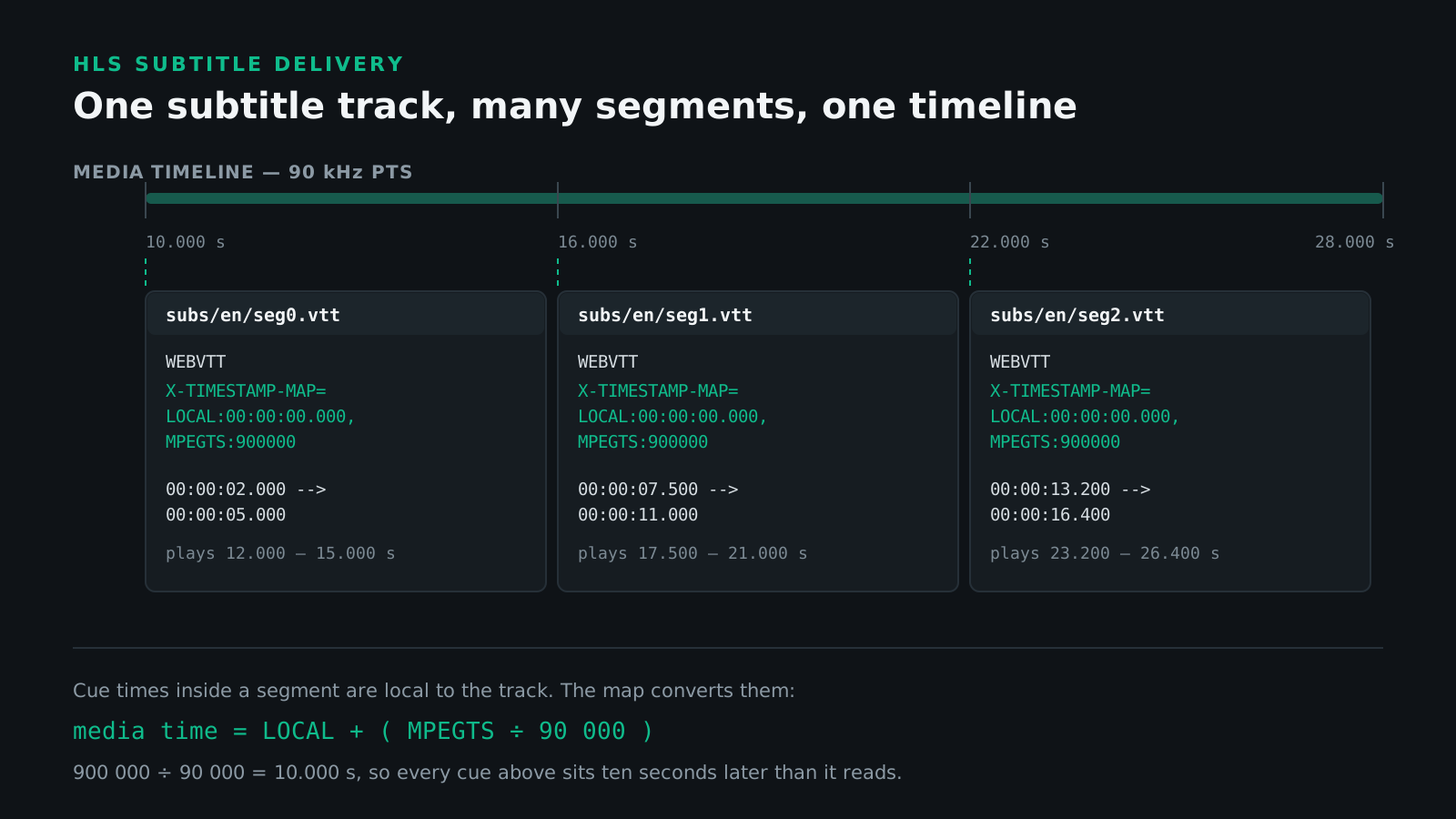
A WebVTT segment is a section of a WebVTT file, and the cue times inside it are written against the track's own clock rather than the media timeline. Something has to relate the two. That something is a metadata header placed immediately after the WEBVTT line.
WEBVTT
X-TIMESTAMP-MAP=LOCAL:00:00:00.000,MPEGTS:900000

00:00:02.000 --> 00:00:05.000
The mapping is what keeps this line on the right shot.
The header says: the cue time in LOCAL corresponds to the media timestamp in MPEGTS. Everything else follows from that single anchor point. It must sit among the non-blank lines directly after the header line, and that block must be followed by a blank line before the first cue.
| Segment | Cue time in the file | Map | Media time |
|---|---|---|---|
| seg0.vtt | 00:00:02.000 | LOCAL:0, MPEGTS:900000 | 12.000 s |
| seg1.vtt | 00:00:07.500 | LOCAL:0, MPEGTS:900000 | 17.500 s |
| seg2.vtt | 00:00:13.200 | LOCAL:0, MPEGTS:900000 | 23.200 s |
The arithmetic is media time = LOCAL + (MPEGTS ÷ 90000). Here 900000 divided by 90000 is ten seconds, so every cue plays ten seconds later than it reads. That ten-second head start is a common packager default, which is why a ten-second error is the single most recognisable signature of a mishandled map.
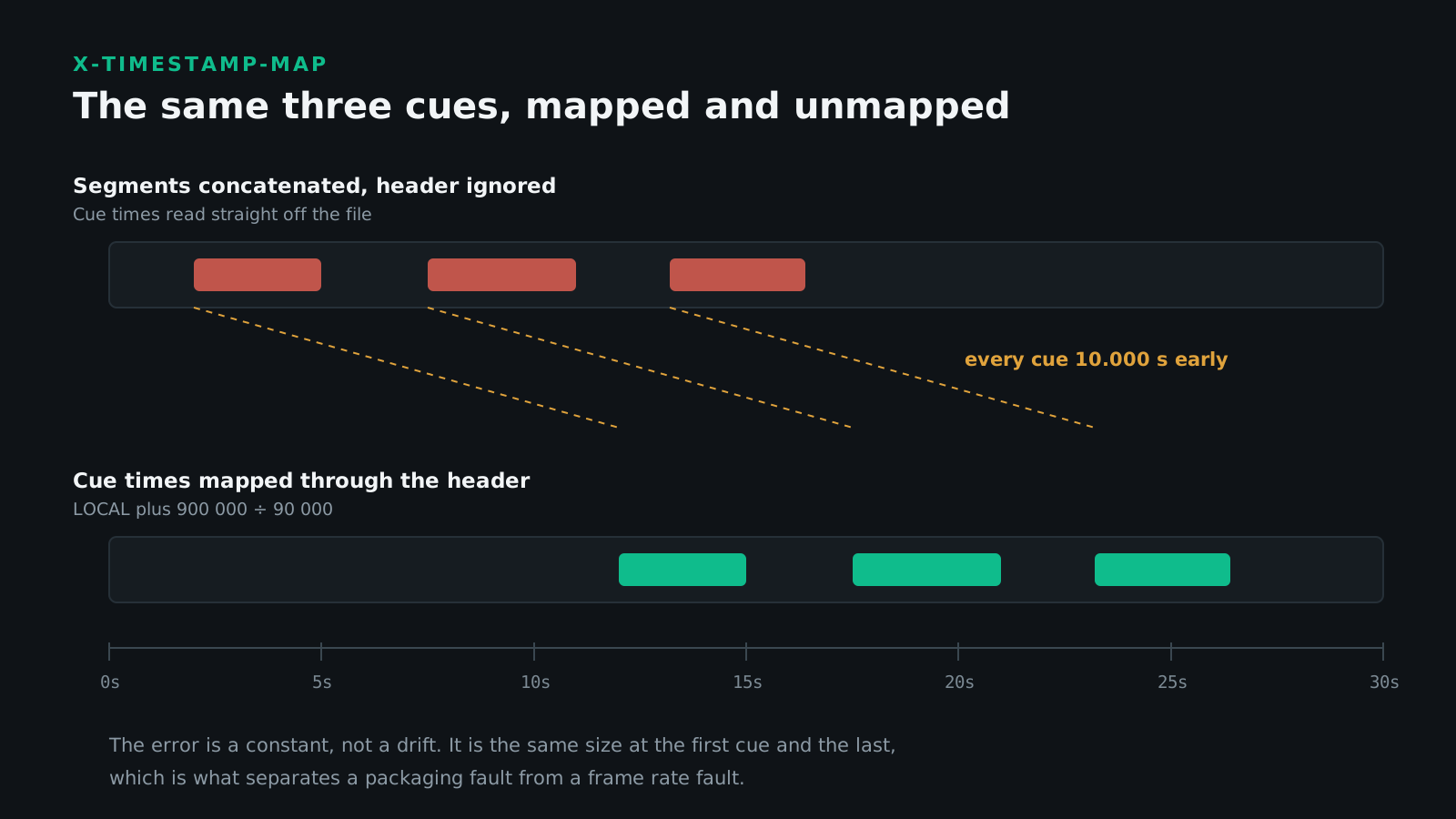
When the header is absent, the client must assume that a cue time of zero maps to a media timestamp of zero. That assumption is correct for a packager that started its timeline at zero, and wrong for every packager that did not — which is how a subtitle track ends up uniformly early with no error reported anywhere.
One further detail catches people out: the cue timestamp named in LOCAL is allowed to fall outside the time range the segment covers. It is an anchor, not a claim about the segment's contents, and tools that validate it as though it were will reject perfectly legal files.
The 90 kHz Clock and the 33-Bit Wrap
The MPEGTS value is measured in 90 kHz ticks, and it must be, even when the media segments alongside it use a different timescale.
The choice is not arbitrary. 90,000 divides evenly by every frame rate in professional use, which means a frame boundary is always a whole number of ticks:
| Frame rate | Ticks per frame | Whole number |
|---|---|---|
| 24 fps | 3,750 | Yes |
| 25 fps | 3,600 | Yes |
| 30 fps | 3,000 | Yes |
| 50 fps | 1,800 | Yes |
| 60 fps | 1,500 | Yes |
| 29.97 fps | 3,003 | Yes, because 29.97 is 30 × 1000/1001 |
That last row is the interesting one. The fractional broadcast rates land on whole ticks too, which is why a 90 kHz clock survives contact with NTSC-derived material. What it does not do is remove the need to know which rate you authored against in the first place — see our guide to drop frame and non-drop frame timecode for the errors that produces upstream.
MPEG-2 presentation timestamps are 33 bits, so the counter wraps at 233 ticks. That is 8,589,934,592 ÷ 90,000, or roughly 26 hours and 31 minutes. When it wraps, the segment written at that moment should carry a new timestamp map relating the current WebVTT time to the new, low-valued timestamp.
For on-demand programming this never happens. For a 24/7 linear channel packaged as HLS it happens a little over once a day, and a packager that does not handle it produces a subtitle track that fails at the same time every day for no visible reason.
What Happens to a Cue That Crosses a Segment Boundary
A six-second segment and a four-second caption will collide eventually. The specification is explicit about the on-demand case: each segment must contain every cue intended to be displayed during that segment's period, and each cue's start and end must indicate its total display time even where part of that range falls outside the segment.
In practice that means the cue is repeated, in full and with its real times, in every segment it overlaps.
| Approach | On demand | Live |
|---|---|---|
| Repeat the whole cue in both segments | Correct | Not always possible |
| Clip the cue to the segment period | Permitted only where duration is unknown | Accepted practice |
| Split into two cues at the boundary | Causes a visible re-render | Causes a visible re-render |
| Place the cue in the first segment only | Wrong | Wrong |
The live exception exists because a caption's end time may genuinely not be known when the segment is written. Outside that case, clipping and splitting both cost something: the viewer sees the caption blink or reflow at the boundary, and a viewer who joined mid-cue sees nothing at all.
Text Segments or Fragmented MP4
There are two ways to carry the same subtitle text through HLS, and they behave quite differently.
| Segmented WebVTT | fMP4 WebVTT | fMP4 IMSC | |
|---|---|---|---|
| Segment file | .vtt text | .m4s fragment | .m4s fragment |
| Sample entry | Not applicable | wvtt | stpp |
Needs EXT-X-MAP | No | Yes | Yes |
Uses X-TIMESTAMP-MAP | Yes | No | No |
| Timing source | The header | Movie timescale | Movie timescale |
| Styling range | WebVTT cue settings | WebVTT cue settings | Full IMSC styling |
| Shares segments with DASH | No | Yes, via CMAF | Yes, via CMAF |
X-TIMESTAMP-MAP is a text-segment mechanism only. Subtitles carried in fragmented MP4, whether as wvtt or stpp, take their timing from the movie timescale in the initialisation segment. The header does not appear in those files, and cannot be the cause of a sync fault in them.
The carriage rules for both sample entries are defined in ISO/IEC 14496-30, the same specification CMAF and DASH build on. That is the practical argument for fMP4: one set of subtitle segments can serve an HLS and a DASH manifest at once, instead of packaging the same text twice.
When IMSC Is the Right Answer
An IMSC segment is a fragmented MP4 media segment carrying subtitle media according to MPEG-4 Part 30, and that media must comply with the Text Profile of IMSC1.
Two constraints follow, and both are routinely missed:
- Each segment must contain every sample intended to display in its period, exactly as with WebVTT segments.
- Each segment must define every style it applies, rather than referencing a style defined in an earlier segment. A player that starts at segment 47 has never parsed segment 1.
Choose IMSC when the delivery specification asks for it, when the subtitles need positioning or styling beyond what WebVTT cue settings express, or when the same assets have to serve a DASH manifest. Our guide to TTML, DFXP, and IMSC covers the profile differences, the IMSC format reference covers compatibility, and converting SCC to IMSC covers bringing a broadcast caption file into the streaming world. For the text-first case, the WebVTT format reference sets out what the format can and cannot express.
Signalling Accessibility in the Playlist
A subtitle track that is present but unsignalled is, for compliance purposes, often treated as absent. Platform validators and assistive technology read the playlist attributes, not the subtitle text.
| Value | Meaning | Use for |
|---|---|---|
public.accessibility.transcribes-spoken-dialog | The track transcribes what is said | Same-language captions and SDH |
public.accessibility.describes-music-and-sound | The track describes non-speech audio | SDH, alongside the value above |
public.easy-to-read | Simplified for easier reading | Easy-read renditions, rarely used |
FORCED=YES | Forced narrative only | Foreign dialogue and on-screen text |
A forced rendition should contain only forced-narrative cues — translated signage, a scene in another language — and never the full dialogue track. Players show it automatically, so a full transcript signalled as forced puts captions on screen for viewers who did not ask for them.
The regulatory backdrop differs by market. Our summaries of FCC closed captioning requirements and European Accessibility Act requirements for video cover which obligations attach to streamed delivery, and captions against subtitles and SDH covers what belongs in each track.
Authoring Captions That Segment Cleanly
Packaging faithfully reproduces whatever it was given. Most of what makes a stream behave well is decided before the packager runs.
- Author in real time, not timecode. WebVTT stores milliseconds from zero. A file carrying a broadcast hour start will be segmented exactly as written, and nothing will display.
- Remove the hour offset before packaging, not after. It is a constant, so it is trivial to subtract, and impossible to spot once the file is in pieces.
- Keep cues shorter than a segment where the content allows. Fewer boundary crossings means fewer chances for a packager to make the wrong call.
- Respect reading speed limits. Our guide to CPS and WPM limits covers the thresholds most platforms validate against.
- Validate the single file first. A malformed cue in the source becomes a malformed cue in one segment, which is far harder to find.
Closed Caption Creator writes WebVTT directly and converts from timecode-based formats with the source frame rate stated explicitly rather than assumed. The wider procedure is in our caption and subtitle QC checklist, format support lists what reads and writes, and automating segmentation and conform covers doing this at volume rather than a title at a time.
Getting a Single VTT Back Out of a Stream
Going the other way — recovering an editable file from a packaged stream — is where the timestamp map does the most damage, because the failure is silent.
- Fetch the subtitle media playlist named by the rendition's
URI. - Download every segment it lists, in order, including the ones that look empty.
- Convert each segment's cues to media time using that segment's own map. Do not assume one map covers the track.
- Remove cues repeated across boundaries, matching on time and text rather than on position.
- Rebase to zero if the result is destined for a player that measures from the first frame.
Skipping step three is the classic error, and it produces a file that is valid, opens cleanly, and is wrong by a constant from the first cue to the last. Where the target is a broadcast format rather than another sidecar, the caption file converter handles the frame rate side of the conversion, and format-specific conversion guides cover what survives each direction.
What Goes Wrong
Every fault below produces a stream that plays. That is what lets them reach an audience.
| Symptom | Cause |
|---|---|
| Whole track a constant few seconds early | Timestamp map missing or ignored when merging |
| Whole track exactly ten seconds early | Packager timeline starts at MPEGTS:900000 |
| Drift that grows across the programme | Frame rate fault upstream, not a packaging fault |
| No subtitle option in the player menu | Variant tags missing the SUBTITLES attribute |
| Empty caption menu entry that does nothing | CLOSED-CAPTIONS not set to NONE with no 608 data present |
| Captions vanish for a few seconds, then return | Missing or skipped segment where a period had no cues |
| A caption blinks or reflows mid-display | Cue split at a segment boundary instead of repeated |
| Captions appear for viewers who never enabled them | Full dialogue track signalled FORCED=YES |
| Track fails at the same time each day on a linear channel | 33-bit timestamp wrap not handled with a new map |
If the error is a constant, look at the packaging. If it grows, look at the authoring. A uniform offset points at the timestamp map or an unremoved hour start. Drift that is invisible in the first minute and obvious in the last is a frame rate mismatch, and no amount of playlist work will fix it.
HLS Subtitle Delivery Checklist
Run this before signing off a streamed subtitle deliverable.
- Every variant tag references the subtitle group, not just the top bitrate.
- The subtitle playlist has a segment for every period, including periods with no cues.
- Every text segment carries a timestamp map, or the timeline genuinely starts at zero.
- Segment durations match the video playlist, or the difference is deliberate and documented.
- Cues crossing boundaries are repeated in full, with their real start and end times.
- Accessibility characteristics are set on any track intended to satisfy a captioning obligation.
- Forced renditions contain only forced narrative, never the complete dialogue.
CLOSED-CAPTIONSis consistent across every variant tag in the playlist.- fMP4 renditions have an
EXT-X-MAPand each segment defines its own styles. - Someone watched the last five minutes, not only the opening.
Frequently Asked Questions
What is X-TIMESTAMP-MAP in WebVTT?
It is a metadata header in an HLS WebVTT segment that ties a cue time to a media time, written as X-TIMESTAMP-MAP=LOCAL:00:00:00.000,MPEGTS:900000. The MPEGTS value uses a 90 kHz clock, so 900000 is ten seconds. Without it, a player cannot place segmented cues on the media timeline.
What happens if a WebVTT segment has no X-TIMESTAMP-MAP?
The client must assume that a cue time of zero maps to a media timestamp of zero. That is correct only when the packager started the media timeline at zero. Many packagers start at ten seconds, so the whole subtitle track then plays ten seconds early.
Why does HLS use a 90 kHz timescale for subtitles?
Because it is the MPEG-2 presentation timestamp clock, and it divides evenly by every broadcast frame rate: 3,750 ticks at 24 fps, 3,600 at 25, and 3,000 at 30. The specification requires 90 kHz for the MPEGTS value even when the media segments use a different timescale.
How long should HLS subtitle segments be?
Match the video segment duration, which for Apple device delivery is usually six seconds. Nothing in the specification forces the two to be equal, but aligning them keeps the playlists the same length and makes a missing or empty subtitle segment obvious during QC.
What happens to a subtitle cue that spans two HLS segments?
For on-demand content it should appear in full in every segment it overlaps, carrying its real start and end times even where those fall outside the segment. Live streams may clip the cue to the segment, because the duration is not known when the segment is written.
Can HLS carry IMSC subtitles instead of WebVTT?
Yes. An IMSC segment is a fragmented MP4 carrying subtitle media per MPEG-4 Part 30, complying with the Text Profile of IMSC1. It needs an EXT-X-MAP initialisation segment, and each segment must define every style it uses rather than referencing one defined elsewhere.
What is the difference between SUBTITLES and CLOSED-CAPTIONS in an HLS playlist?
SUBTITLES names a group of separate subtitle renditions delivered as their own segments. CLOSED-CAPTIONS refers to CEA-608 or CEA-708 caption data carried inside the video elementary stream. They are different delivery mechanisms, and a stream can legitimately offer one, both, or neither.
Do I need CLOSED-CAPTIONS=NONE in my playlist?
Only if there are no CEA-608 or CEA-708 captions embedded in the video. It tells players to stop looking, which prevents an empty caption menu entry. If you use it, every variant stream tag in the playlist has to carry it, not just some of them.
How do I mark an HLS subtitle track as SDH?
Add CHARACTERISTICS to the EXT-X-MEDIA tag. A track transcribing dialogue uses public.accessibility.transcribes-spoken-dialog; add public.accessibility.describes-music-and-sound when it also carries sound effects and music cues. Both together are what players and platform validators read as subtitles for the deaf and hard of hearing.
How do I extract subtitles from an HLS stream?
Read the subtitle media playlist, download every segment, and convert each segment's cue times to media time using its own X-TIMESTAMP-MAP before merging. Then remove cues repeated across segment boundaries and rebase the result to zero. Concatenating the segments without that step misplaces every cue.
Streaming specifications change more often than broadcast ones, so confirm the packaging requirements against the platform's current delivery document rather than the one you used last year. Need the same subtitles as WebVTT, IMSC, and a broadcast sidecar? Talk to our team or start a free trial.