Delivering Subtitles to Streaming Platforms: What Each Destination Requires
What does a streaming platform need before it will accept your subtitles?
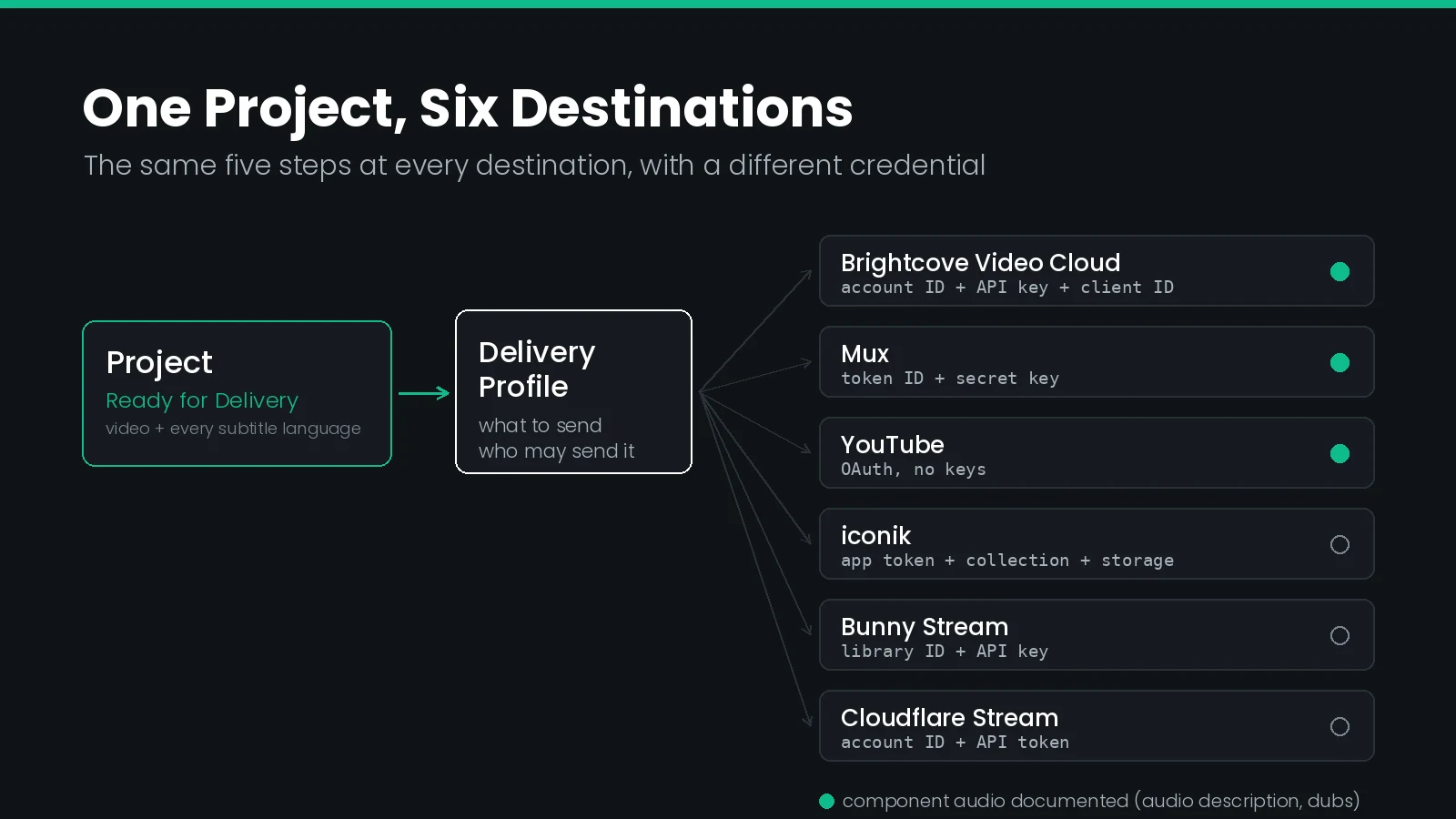
A credential it trusts, a definition of which files to send, and a finished project to send them from. What changes between destinations is chiefly the credential: YouTube uses OAuth, Brightcove wants an account ID with an API key and client ID, and iconik also needs collection, storage and base URL values.
Most captioning teams solve delivery the same way twice: once properly, and once by hand at 6pm on a Friday. The proper version is a stored credential and a reusable profile. The Friday version is somebody downloading six SRT files to a laptop, renaming them, and dragging them into a browser one platform at a time.
The manual version does not scale, and it is where nearly all delivery errors come from. A language gets skipped. A file lands on the wrong asset. Somebody uploads the draft rather than the approved version. None of those are caption faults — the file was fine when it left the captioning tool. They are delivery faults, and they are the ones a client actually sees.
This guide covers what six named destinations require, how they differ, and the part almost nobody checks until it is too late: which of them will carry an audio description track alongside the subtitles.
The Same Five Steps, Every Destination
Every platform integration in this guide follows one shape. Learn it once and the sixth setup takes three minutes rather than an afternoon.
- Create the credential at the destination. An API token, a key-and-client-ID pair, or an OAuth consent. This is the only step that happens outside your own system.
- Store it as an access provider. One record per destination account, created once by an administrator, referenced by name afterwards. Nobody on the production team ever handles the secret.
- Build a delivery profile. The profile says where the files go and which files go — original video, subtitles in all languages, audio, thumbnails, attachments — plus who is allowed to use it.
- Deliver from the finished project. Select one or more projects that have reached Ready for Delivery, pick the profile, give the asset a title, and send.
- Verify at both ends. Confirm the delivery workflow and its linked job completed on your side, then open the asset on the platform and check every language arrived.
The separation in step two is the whole point. Credentials live with administrators; profiles are what production staff see. A captioner delivering to Brightcove never learns the client ID, and rotating that key later changes one record rather than briefing six people.
What Each Destination Asks For
This is the part that is genuinely different per platform, and the part no vendor documentation collects in one place. Every value below is set once per destination account.
| Destination | Auth method | Values you store | Where to get them | Extra configuration |
|---|---|---|---|---|
| YouTube | OAuth | None | Sign in to the channel account and grant access | — |
| Brightcove Video Cloud | API key + client ID | Account ID, API key, client ID | Account ID in the dashboard user drop-down; key and client ID under Settings → API Authentication | Ingest profile and folder ID, both optional |
| Mux | Access token | Token ID, secret key | Settings → Access Tokens in the Mux dashboard | — |
| Bunny Stream | API key | Video library ID, API key | The API page of the Bunny Stream dashboard | Collection ID, optional |
| Cloudflare Stream | Account API token | Account ID, API token | Manage Account → Account API Tokens | — |
| iconik | Service account application token | Application ID, token | Admin → Settings → Application Tokens, linked to a user with upload and register rights | Collection ID, storage ID and base URL, all required |
Two entries in that table are worth pausing on.
YouTube is the easiest and the most fragile. OAuth means no secrets to copy and nothing to paste wrong, which removes the most common setup error outright. It also means the connection is tied to a signed-in human account rather than a service identity, so it can be revoked by someone changing their own password settings. Convenience at setup, a dependency later.
iconik is the most demanding and the most precise. It is the only destination here that wants three configuration values rather than credentials alone, because it is a media asset manager rather than a player: it registers an asset into a named collection on a named storage, so it needs to be told both. The collection ID comes out of the collection's URL; the storage ID comes from Admin → Storages.
Which Destinations Take Audio Description
Subtitles are the easy part — every destination here accepts them in every language you have. Component audio is where destinations diverge, and it decides whether an audio description deliverable can ride along or has to be handled separately.
| Destination | Video | Subtitles, all languages | Component audio | Other |
|---|---|---|---|---|
| Brightcove Video Cloud | Yes | Yes | Yes — description and dubs in the same delivery | — |
| Mux | Yes | Yes | Yes — every file appears as a track on the asset | — |
| YouTube | Yes | Yes | Yes — multi-language audio, including dubs | — |
| iconik | Yes | Yes | Audio files accepted | Thumbnails, attachments |
| Bunny Stream | Yes | Yes | Not documented in the setup guide | — |
| Cloudflare Stream | Yes | Yes | Not documented in the setup guide | — |
Check component audio before you quote the job, not after you author it. A described master is expensive to produce and worthless if the destination cannot expose the second audio rendition to the player. Where a platform will not carry it, the description has to ship as a separate deliverable or a mixed video — a different quote and a different timeline.
The blank cells above are honest blanks. They mean the setup guide for that destination covers video and subtitles only; they are not a statement that the platform's own API refuses audio. If description is part of the contract, test one asset end to end before committing.
What Has to Happen Before You Can Deliver
Delivery is the last step of a pipeline, and a project cannot be delivered until the asset underneath it has finished being processed. Ingest is not just a file copy.
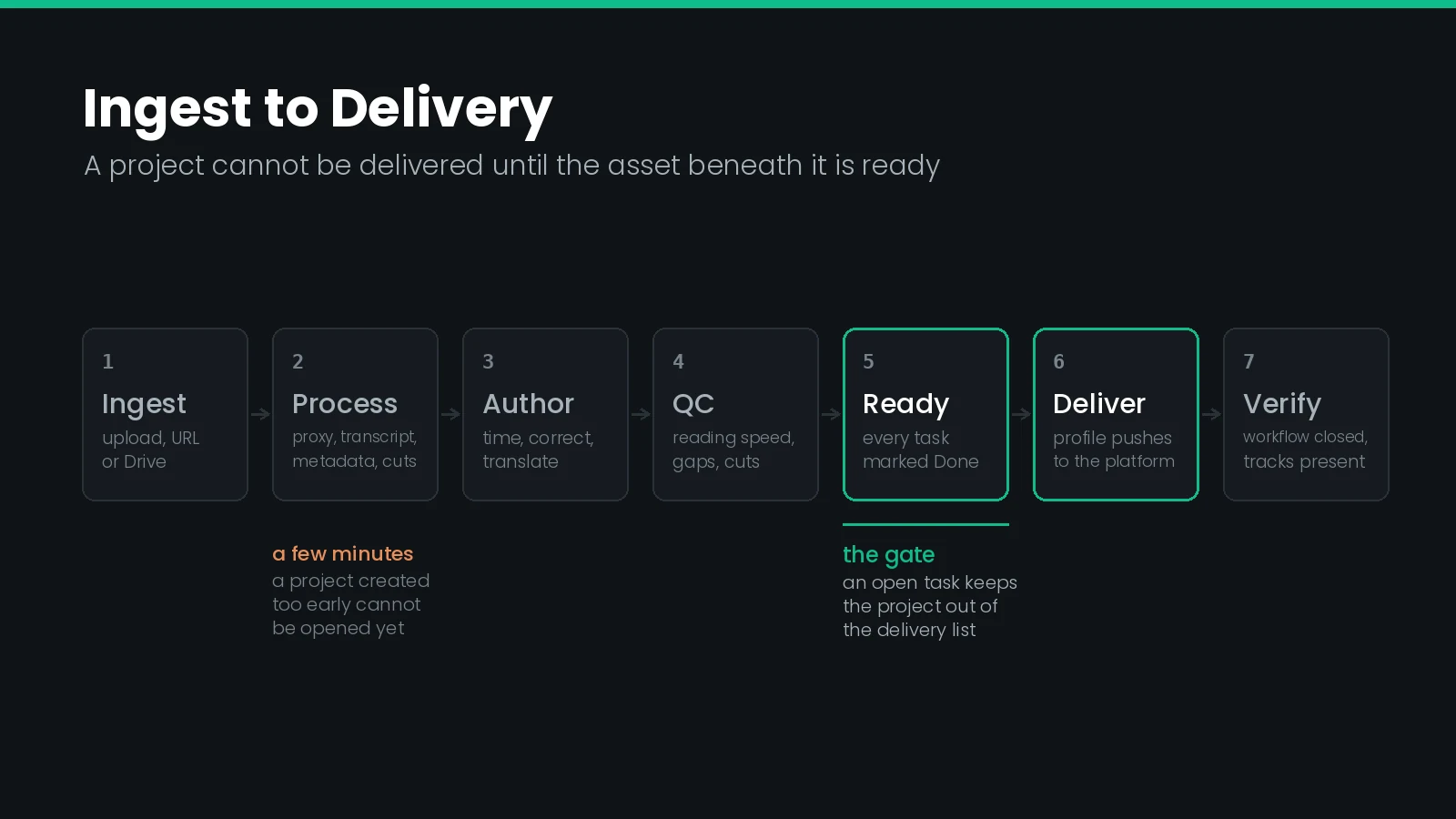
A video arrives from a computer, a public URL or a connected Google Drive account, and the default workflows run before the asset is usable:
- Proxy generation — a lightweight version for editing and review, so nobody scrubs a 40 GB mezzanine over a VPN.
- Automatic transcription — a first-pass transcript to time and correct rather than type from nothing.
- Metadata extraction — frame rate, duration and timecode, which is exactly the information that drop-frame mistakes come from getting wrong.
- Shot change detection — marker data the editor uses to enforce shot change timing rules without hand-checking every cut.
Thumbnails, extracted audio tracks and audio peak data are produced along the way. The practical consequence is that an asset uploaded two minutes ago is not ready, and a project created against it cannot be opened yet. On a bulk ingest this is the difference between a smooth morning and a queue of confused captioners.
Translation fits here too, before delivery rather than after. Running automatic translation against a finished source subtitle produces the target-language files as new files on the same asset, which is what lets one delivery carry twelve languages. Broadcast translation work still needs a human pass, but the machine pass is what gets the files onto the asset in the first place.
What Ready for Delivery Means
Delivery filters on project state, and that state is derived rather than set by hand.
A project is a container for tasks — transcribe, time, review, translate, QC — and tasks are what get assigned to people. Completing a task moves it to the next state in the workflow. When every task in the project reaches Done, the project itself becomes Ready for Delivery, and only then does it appear in the delivery list.
That design removes an entire category of mistake. You cannot deliver a project whose QC pass is still open, because the project is not eligible until the QC task is closed. The gate is structural, not a reminder in a spreadsheet.
Projects do not require an order. An order groups projects under a customer, which is what makes reporting and invoicing coherent, and adding assets to an order creates the projects automatically. But a standalone project can be created straight from an asset when someone just needs one file captioned.
Why a Profile Beats an Ad-Hoc Upload
A delivery profile looks like configuration overhead the first time and stops looking like it around the third delivery.
| Concern | Manual upload | Delivery profile |
|---|---|---|
| Who can deliver | Whoever holds the platform password | Anyone the profile's access control allows |
| Credential exposure | Shared login, often in a password manager note | Stored once by an administrator, never seen by the team |
| Languages sent | Whatever the operator remembers to select | Every language on the asset, by definition |
| Version risk | Whatever file is in the Downloads folder | The approved file currently attached to the asset |
| Audit trail | Platform-side upload log, if any | A delivery record with a workflow and a linked job |
| Repeating it next month | Same clicks, same duration | Select project, choose profile, send |
| Automating it | Not possible | The profile is the target of a trigger or an API call |
The version-risk row is the one that bites hardest in practice. A profile sends the file that is currently attached to the asset, which is by construction the approved one. A human sends the file that is currently in their Downloads folder, which is whichever revision they happened to export last.
Setup, Destination by Destination
The walkthroughs below are recorded in Closed Caption Unity, our project management and delivery platform for captioning teams — assets, orders, projects, tasks and deliveries in one system, with Closed Caption Creator as the editor behind the tasks. The terminology in this guide (access providers, delivery profiles, Ready for Delivery) is Unity's, but the underlying requirements are the platforms' own: the credentials in the table above are what Brightcove, Mux and the rest ask of any system pushing files at them.
Each video runs under four minutes and shows the whole path: create the credential, store it, build the profile, deliver, verify.
Brightcove Video Cloud
The account ID hides in the user drop-down rather than the settings pages, which catches most people once. The optional ingest profile and folder ID go in the custom JSON configuration — leave either out to fall back to the account default.
Mux
A Mux access token is a pair — token ID and secret key — and the secret is shown once at creation. On the Mux side, Asset Details lists every delivered file as a track, which makes it the quickest destination for confirming a multi-language delivery landed intact.
Bunny Stream
Bunny asks for the video library ID as well as the API key, because a Bunny account can hold several libraries and the key alone does not say which one you mean. Add a collection ID to the JSON configuration to land deliveries in a specific collection rather than the library root.
YouTube
The only OAuth destination in the set: click through the consent prompt and the channel is connected. Afterwards the videos appear on the Content page in YouTube Studio, where the default language still has to be set by hand, and YouTube's own processing has to finish before playback works.
iconik
The one that rewards reading the instructions first. Create a service account application token rather than a personal one, and link it to a user that actually holds upload and register permissions — a token linked to an under-privileged user authenticates fine and then fails at registration, which is a confusing way to lose an hour.
Cloudflare Stream
An Account API token plus the account ID, both from the Cloudflare dashboard. Scope the token to Stream rather than reusing a broad account token, on the same principle that applies to every key in this list.
Those six are the ones with published walkthroughs. The wider destination list also covers Vimeo, Frame.io, Google Drive, Telestream Vantage, Evertz Mediator, MediaValet, Grass Valley and object storage on S3, R2, Azure Blob, Google Cloud, Backblaze B2 and Wasabi — the same five-step shape, different credential.
Triggering Delivery Without a Human
Once a profile exists, it becomes something a rule can point at. That is the step from faster manual delivery to no manual delivery.
The model is trigger, then action. A trigger is an event: a file uploaded, a tag applied, a status changed — narrowed by file type, folder or metadata value so the rule fires on the right assets only. An action is what follows: start a transcription, notify a team member, schedule a transcode, or push to a delivery platform. Chain several and you have a pipeline nobody has to remember to run.
| When this happens | Do this | Why |
|---|---|---|
| A video lands in a client's watch folder | Transcribe, then create a project | Work is queued before anyone opens the system |
| A source subtitle file is published to an asset | Run automatic translation into the contracted languages | Target files exist before the translation task is assigned |
| A project reaches Ready for Delivery | Push to the client's delivery profile | Approval is the release, with no separate send step |
| An asset is tagged for publication | Deliver to YouTube and to the CDN profile | One tag fans out to every destination that title needs |
| A delivery job fails | Notify the operations channel | A silent failure is worse than a late delivery |
For anything the rule builder will not express, there is a REST API, which is the same argument made at more length in automating closed caption workflows and in the note on testing those integrations. If you are choosing between building this and buying it, the comparison in the best media and video APIs for broadcast is the relevant one, and the work order API is how external systems queue captioning work.
Automate delivery last, not first. An automated push to six platforms multiplies whatever your QC gate misses. Get the gate right — reading speed, line length, frame gaps, shot changes — and then let the trigger fire on approval. Teams that reverse this order spend their first automated month issuing corrections.
Confirming the Delivery Landed
A delivery has two halves and both can lie to you. The push can succeed while the platform rejects the file, and the platform can hold a file it has not finished processing.
On your side, a delivery creates a record with a workflow and a linked job. The information panel on the asset shows both, and the Deliveries tab on the asset's detail page is where you confirm the delivery has closed and its job has completed. A delivery still open after several minutes on a small file is a failure that has not surfaced yet.
On the platform side, open the new asset and count the tracks. Every subtitle language you sent should appear as its own track, and playback should let you switch between them. Test in the embedded player before making the video public — a missing language is a two-minute fix while the asset is private and a client email once it is not.
Two platform-specific notes worth knowing. YouTube needs to finish processing before playback works at all, so an apparently broken delivery is often just an early check. And on iconik the asset shows a preview plus file details listing every delivered track, which is the clearest per-language confirmation of the six.
Originals, Proxies, and What You Send
Ingest produces several files per asset, and delivery does not need all of them. This matters for storage cost and for platforms that cap upload size.
| File | Created at | Needed for delivery? |
|---|---|---|
| Original media | Upload | Only when the destination wants the high-resolution source |
| Proxy | Ingest | Often sufficient, and required where upload size is capped |
| Subtitle files | Authoring and translation | Always — this is the deliverable |
| Audio tracks | Ingest and description authoring | Where the destination accepts component audio |
| Thumbnails | Ingest | Accepted by iconik; ignored elsewhere |
| Marker data (shot changes) | Ingest | No — used by the editor, not the platform |
| Peak data (waveform) | Ingest | No — used by the editor, not the platform |
Because many workflows only ever touch the proxy, originals are usually the largest recoverable cost in the system. Storage management lists usage by file type and by extension and lets you remove a whole class of file — original media in particular — either permanently or to a recycle bin. Delete originals only once you are certain no destination in the account needs them, since re-ingesting a mezzanine is far more expensive than storing it.
One format caveat that sits underneath all of this: what you send still has to be right for the player. Streaming destinations generally want WebVTT or TTML and IMSC, and a segmented HLS delivery has requirements of its own that a sidecar upload does not. The format support list covers which formats can be produced for which destination.
What Goes Wrong
| Symptom | Likely cause | Fix |
|---|---|---|
| The project is not in the delivery list | A task is still open, so the project is not Ready for Delivery | Close the remaining task, usually a review or QC pass |
| Authentication succeeds, registration fails | The token is linked to a user without upload or register rights | Relink the service account token to a sufficiently privileged user |
| Delivery lands in the wrong place | Missing or stale collection, folder or library ID | Re-copy the ID from the destination's URL or admin page |
| Only one language arrived | The profile sends a single subtitle file rather than all available | Edit the profile's file requirements to include every language |
| The audio description track is missing | The destination does not carry component audio | Check the destination's support and ship description separately if needed |
| The delivered subtitles are an older revision | An operator uploaded from a local folder instead of delivering | Remove the manual path; deliver from the asset |
| A new project cannot be opened | Ingest workflows have not finished on the asset | Wait for proxy, transcription and detection to complete |
| Upload rejected for file size | The original mezzanine exceeds the platform's limit | Deliver the proxy instead of the original |
| Video present, playback fails | The platform has not finished its own transcode | Re-check after processing; this is not a delivery fault |
Delivery Setup Checklist
Run this once per destination account, before the first real job.
- Credential created at the destination, scoped as narrowly as the platform allows.
- Credential stored as an access provider by an administrator, not pasted into a shared note.
- For iconik: collection ID, storage ID and base URL all present in the configuration.
- For Brightcove and Bunny: decided whether the optional folder, ingest profile or collection ID is needed.
- Delivery profile set to send every subtitle language, not a single file.
- Component audio confirmed if description or dubs are in scope.
- Original versus proxy decided against the destination's size limits.
- Profile access control opened to the team members who deliver, not just its author.
- One test asset delivered end to end and verified on the platform.
- A failure notification configured before any delivery is automated.
Frequently Asked Questions
How do you deliver subtitles to a streaming platform without uploading them by hand?
Store the platform credential once, define a reusable profile listing which files to send, then trigger it from the finished project. The platform's API receives the video and every subtitle track in one call, so nobody downloads a file locally and re-uploads it through a browser.
What credentials does Brightcove need to accept a subtitle delivery?
Three values: the account ID, an API key and a client ID. The account ID sits in the user drop-down at the top right of the Brightcove dashboard, and the key and client ID are generated under Settings, API Authentication. An ingest profile and folder ID are optional.
Does YouTube need an API key for automated subtitle delivery?
No. YouTube authorises through OAuth instead, so you sign in to the channel account once and grant access. There are no keys or secrets to copy, and no credential to rotate later. Every other destination in this guide uses keys or tokens that you paste in manually.
What is a delivery profile?
A reusable template that records where a delivery goes and which files travel with it. It names the destination, the credential to authorise with, the file types to include, the languages to include, and who on the team is allowed to use it. Profiles are built once and reused.
Which streaming platforms accept audio description as a separate audio track?
Brightcove, Mux and YouTube all take component audio, so a single delivery can carry the video, every subtitle language and extra audio renditions such as audio description or a dub. iconik accepts audio files alongside thumbnails and attachments. Confirm support before you promise a description deliverable.
Why does iconik need a collection ID and a storage ID?
Because iconik registers assets rather than simply storing them. The collection ID names the folder the asset is filed into, and the storage ID names which connected storage receives the bytes. A base URL is required too, which makes iconik the only destination here needing three configuration values.
When is a captioning project ready to deliver?
When every task inside it reaches Done. A project is a container for tasks, and completing the last one moves the whole project to Ready for Delivery automatically. That state is what the delivery step filters on, so an unfinished review task will keep a project out of the list.
Can one delivery carry subtitles in every language at once?
Yes, and that is the normal configuration. A profile set to send all available subtitles pushes every language present on the asset in a single operation, so a twelve-language title is one delivery rather than twelve uploads. The destination registers each language as its own track.
Should you send the original video file or the proxy?
Send the original when the destination is a mezzanine store or a platform that transcodes for you. Send the proxy when the platform caps upload size or when the video already exists there and only subtitles are new. Many captioning workflows never need the original after ingest.
How do you confirm a subtitle delivery actually landed?
Check both ends. On your side, the delivery record should show its workflow closed and its linked job complete. On the platform side, open the new asset and confirm every subtitle language appears as a track, then play it back in the embedded player before making the video public.
Delivery requirements change without notice, so verify one asset end to end whenever a destination is added or a credential is rotated. Want ingest, captioning, translation and multi-platform delivery in one pipeline? Talk to our team or start a free trial.