Feature Highlight
Machine Translation
Automatically translate your subtitles and closed captioning to more than 70 different languages.
Powered by:



Which plans include machine translation, and how much is included?
Machine translation is included on the Pro and Enterprise plans; Starter does not include it. Pro accounts receive 500,000 translation characters per month, and usage beyond that is billed at $0.00005 per character, which works out to $50 per million characters.
Automatic Translation
Reach a global audience with multilingual subtitles
Translate closed captioning and subtitles to over 70 different languages in just a few clicks.
Closed Caption Creator can be used to automatically translate subtitles, closed captioning, and transcripts into multiple languages. We've included access to three of the best machine translation (automatic translation) services available. DeepL, ModernMT, and Google Translate have changed the translation and localization landscape for everyone.
Machine Translation can help:
- Create subtitles in other languages
- Generate pivot (or bridge) languages for human translators
- Meet accessibility requirements in other regions
- Accelerate localization workflows
Automatic Translation is included in our Pro and Enterprise plans. Sign up for a free 7-day trial to get started:
For professional AV Translators
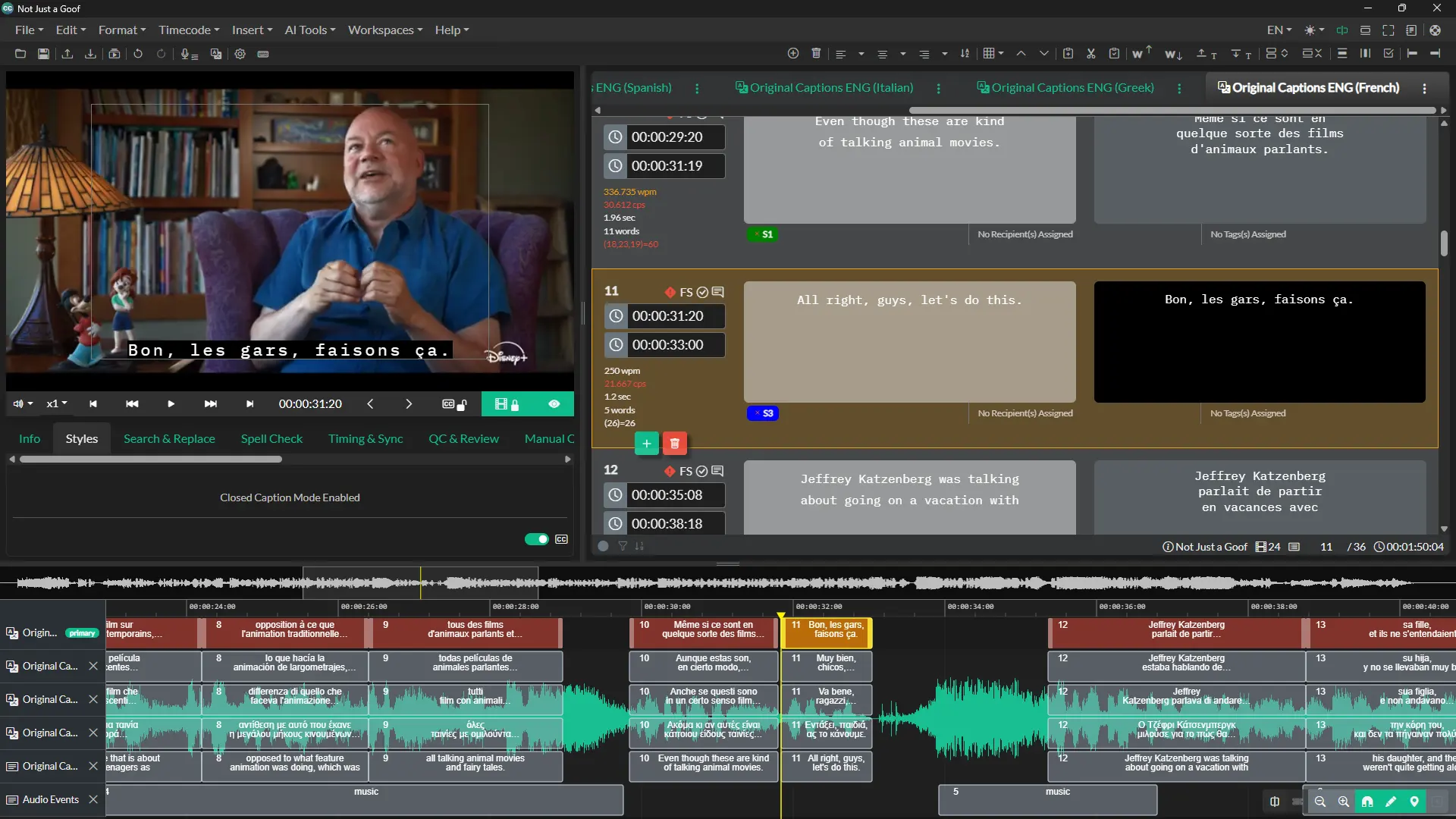
Take control with our dedicated Translation UI
Discover our dedicated Translation UI for AVT professionals, enabling seamless translation and localization. Translators can view the original source language or pivot language alongside the translated text, ensuring precision and accuracy.
Translators can even add custom tags, notes, and speaker IDs to help in their translation workflow so that translated phrases can easily be references at a later time.
Supported Languages
EnglishFrenchSpanishArabicBulgarianCatalanCroatianCzechDanishDutchFarsiFinnishGermanGreekHebrewHindiHungarianIndonesianItalianJapaneseKoreanLatvianLithuanianMalayChinese, SimplifiedNorwegianPolishPortuguese (Brazil)RomanianRussianSlovakSlovenianSpanishSwedishTamilTeleguTurkish
and many more
Ready to get started?
Sign up for a free 7-day trial of Closed Caption Creator and receive access to our video tutorials and courses.
Create closed captioning, subtitles, transcripts, and audio descriptions all in one application. Closed Caption Creator is made for broadcast and captioning teams who are committed to delivering high-quality, accessible video. Sign up now, or contact us for a live demo.
Machine translation questions
Answers about translation engines, language coverage, plan limits, and the dedicated Translation UI built for professional reviewers.
Three machine translation services are integrated: DeepL, ModernMT, and Google Translate. Users can translate subtitles, closed captions, and transcripts automatically with these engines, then review and edit the results inside the dedicated Translation UI before exporting the finished files for delivery.
Subtitles and closed captions can be automatically translated into more than 70 languages. The supported list includes English, French, Spanish, German, Italian, Arabic, Hindi, Japanese, Korean, Polish, Russian, Swedish, Turkish, Portuguese (Brazil), Chinese (Simplified), Catalan, Croatian, Danish, Dutch, Finnish, and Greek, among many others.
Pro includes 500,000 characters per month, while Enterprise allowances are custom. Additional usage is charged at $0.00005 per character, equivalent to $50 per million characters. Characters do not carry over between months, so the included allowance resets each billing cycle.
Yes. A dedicated Translation UI for AVT professionals displays the original source language or a pivot language alongside the translated text. Translators can add custom tags, notes, and speaker IDs to translated phrases so work can be referenced later in their workflow.
Yes. Generating pivot, or bridge, languages for human translators is one of the listed uses, along with creating subtitles in other languages, meeting accessibility requirements in other regions, and accelerating localization workflows. The Translation UI then lets reviewers compare the pivot text against the translated version side by side.
Listed uses include generating pivot or bridge languages for human translators, meeting accessibility requirements in other regions, and accelerating localization workflows. Transcripts can be translated as well as subtitles and closed captions, all inside the same application used for caption editing.