Integration by Closed Caption Creator
ElevenLabs Speech Synthesis & Voice Studio

The best-quality synthetic voices.
Now available in Closed Caption Creator.
Create your own voice or use any of the marketplace voices. Powered by ElevenLabs.
How It Works
From account to audio description in three steps
The ElevenLabs integration lives inside the Audio Description Plugin, so your AD script and voice generation stay in one project.
STEP 1
Connect
Connect your ElevenLabs account to Closed Caption Creator — easy to configure and use.
STEP 2
Choose a Voice
Pick from ElevenLabs' marketplace voices, or use a voice you've trained yourself in Voice Studio.
STEP 3
Generate & Export
Preview text-to-speech live against your AD script, then export script files in multiple formats.
Train your own voices, or use high quality voices from ElevenLabs
Access voices from ElevenLabs inside of Closed Caption Creator
The integration brings custom and pre-trained ElevenLabs voice models into your audio description and described video projects, so immersive narration never leaves your editing workflow.
- Easy to configure and use
- Explore and preview synthetic voices from ElevenLabs inside of Closed Caption Creator
- Export script files in multiple formats
- Live preview of text-to-speech results
- Available for all platforms
- Track usage inside of the ElevenLabs dashboard
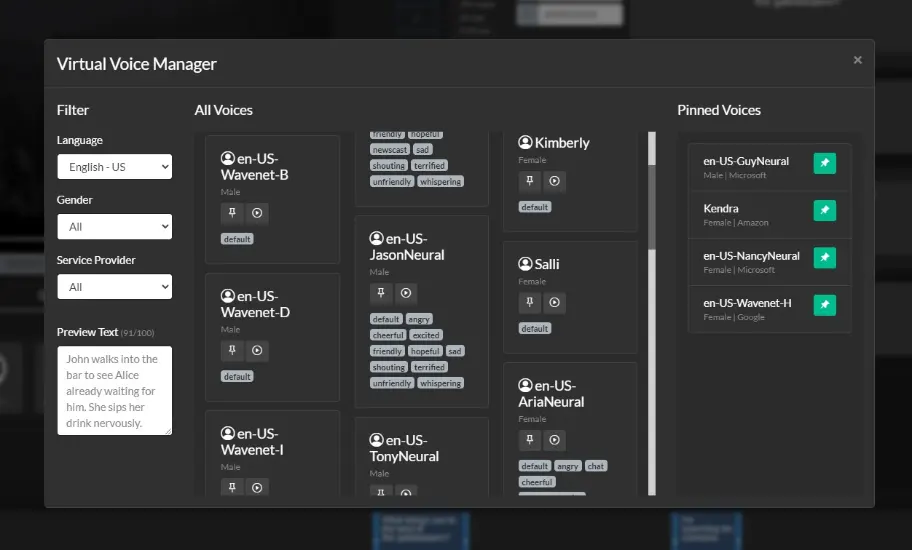
In-Product Voice Manager
Browse, preview, and pick the right voice without leaving your project
The Virtual Voice Manager puts your entire ElevenLabs voice library inside Closed Caption Creator.
Audition voices against your actual AD script with a live text-to-speech preview, then lock in the voice that fits the program — whether it's a marketplace voice or one you trained yourself.
- Marketplace and custom-trained voices in one list
- Live text-to-speech preview against your script
- Export script files in multiple formats
- Usage tracked in your ElevenLabs dashboard
Why ElevenLabs
Built for audio description teams
Voice Quality
The best-quality synthetic voices — use marketplace voices or train your own in Voice Studio.
Fast Turnaround
Live preview of text-to-speech results keeps AD scripting and review moving.
Usage Tracking
Track every generation inside of the ElevenLabs dashboard you already use.
Powered by the AD Plugin
Requires Closed Caption Creator plus the Audio Description Plugin — see pricing.
Ready to integrate?
Sign up for Closed Caption Creator and our Audio Description Plugin.
You will need an ElevenLabs account, along with a subscription to Closed Caption Creator + AD Plugin. Once you're signed up, integration is easy. Watch the video at the top of this page to learn more.
Sign Up NowMore Solutions
ElevenLabs integration questions
Common questions about using ElevenLabs voices for audio description in Closed Caption Creator.
You need an ElevenLabs account, along with a subscription to Closed Caption Creator and the Audio Description Plugin. Once you're signed up, the integration is easy to configure and use.
Yes. The integration supports both custom voices trained in ElevenLabs Voice Studio and pre-trained marketplace voices, all accessible inside Closed Caption Creator.
Yes. You can explore and preview synthetic voices from ElevenLabs inside Closed Caption Creator, with a live preview of text-to-speech results against your script.
The integration is available for all platforms that Closed Caption Creator supports.
Usage can be tracked inside of the ElevenLabs dashboard, alongside the rest of your ElevenLabs account activity.