What Is a TTML File? TTML, DFXP, and IMSC Explained
What does a TTML file store?
A TTML file is an XML document that stores subtitles or captions as timed text, along with their styling and screen position. DFXP, SMPTE-TT, EBU-TT, and IMSC are all profiles of TTML — the same XML with different rules about which features you may use. IMSC is the profile most streaming platforms now ask for.
Open a caption deliverable spec and you will meet an acronym pile: TTML, TTML2, DFXP, SMPTE-TT, EBU-TT-D, IMSC 1.0.1, IMSC 1.1, sometimes CFF-TT. They arrive as .xml, .ttml, or .dfxp, and they all look roughly the same inside.
The confusion is understandable, because most of them are the same thing. TTML is one standard. The rest are subsets of it, each written to make a specific delivery path predictable.
This is the streaming counterpart to the two binary broadcast formats we have already covered: SCC in North America and EBU-STL in Europe. Here is what is actually in the file, and what gets a delivery rejected.
What Is a TTML File?
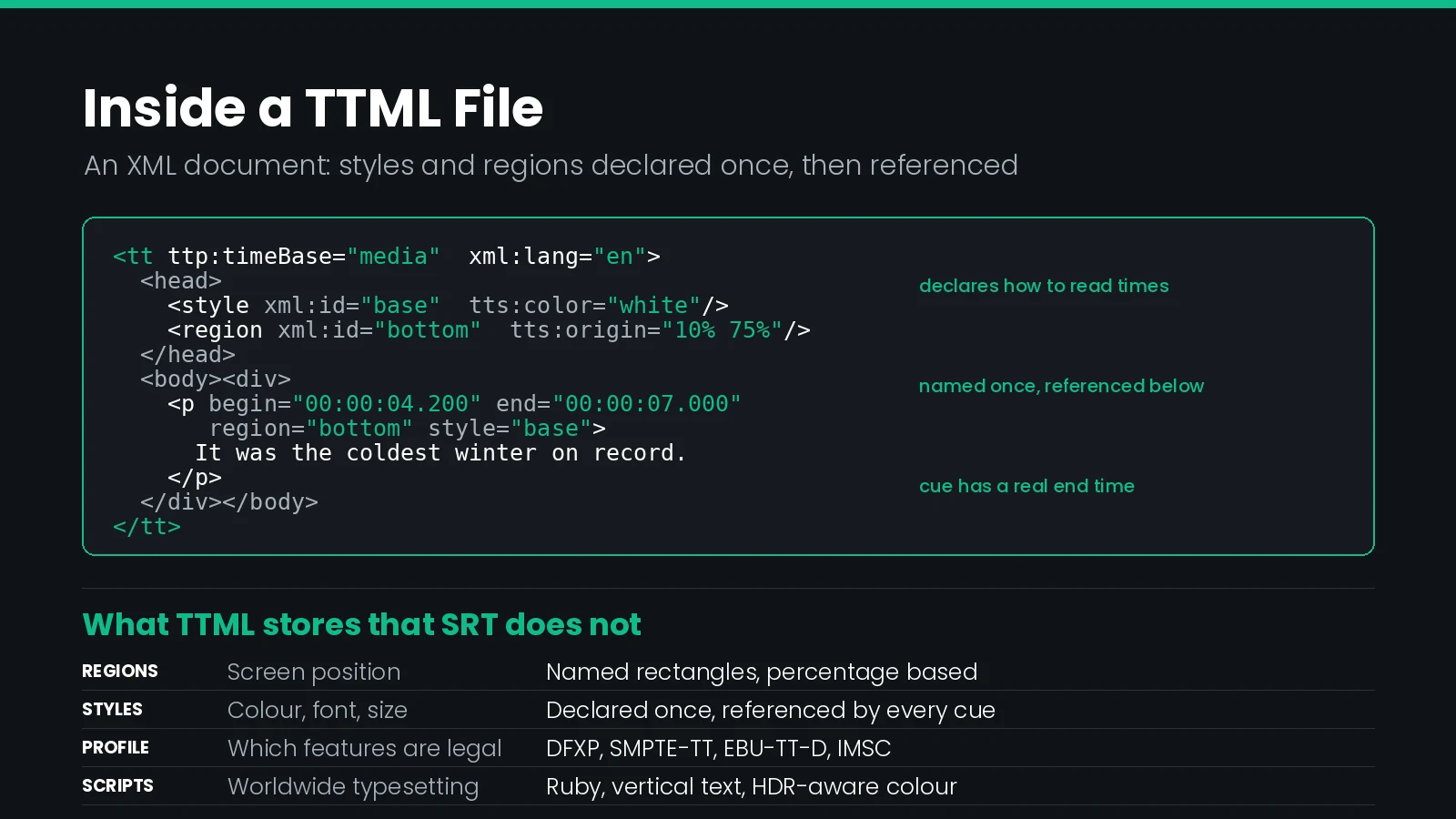
TTML stands for Timed Text Markup Language. It is a W3C standard for representing subtitles, captions, and other timed text as XML. Where SRT is a numbered list of times and lines, TTML is a document with a head and a body: reusable styles and layout regions are declared once at the top, then referenced by every subtitle below.
That structure is the whole point. It means a TTML file can say "put this line in the region I called bottom, in the style I called italic-white" instead of repeating formatting on every cue.
| Property | Value |
|---|---|
| Full name | Timed Text Markup Language |
| Extension | .ttml, .xml, .dfxp |
| Encoding | XML, UTF-8 |
| Published by | W3C |
| Frame rate | Any, declared in the file |
| Positioning | Named regions, percentage or pixel based |
| Styling | Colour, font, size, alignment, opacity, outline |
| Carries images | Yes, in the IMSC image profile |
TTML is also the only common subtitle format that survives being embedded in a streaming container. In MPEG-DASH it is carried in fragmented MP4 alongside the video, which is why the format list includes an MP4-packaged IMSC option rather than only sidecar files.
TTML, DFXP, SMPTE-TT, IMSC: What Is the Difference?
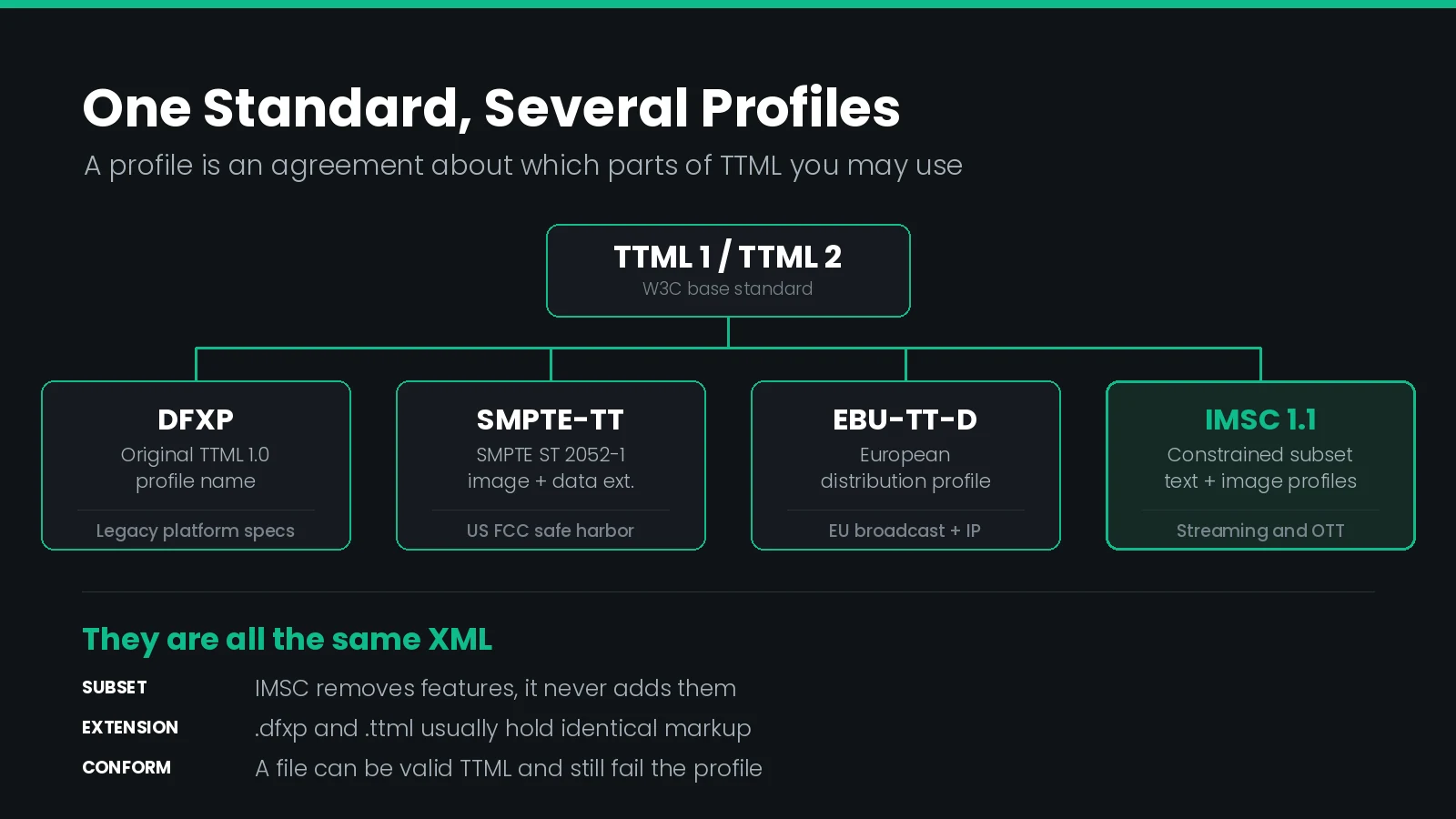
This is the question the acronyms exist to confuse. The answer is that there is one standard and several profiles. A profile is a written agreement about which parts of TTML you are allowed to use.
| Name | What it is | Where you meet it |
|---|---|---|
| TTML 1 / TTML 2 | The base W3C standard | Rarely delivered raw; everything below derives from it |
| DFXP | Distribution Format Exchange Profile, the original profile name for TTML 1.0 | The .dfxp extension, legacy platform specs |
| SMPTE-TT | SMPTE ST 2052-1, a TTML profile adding image and binary data extensions | US FCC safe harbor deliverables |
| EBU-TT-D | European distribution profile, aligned with EBU-STL practice | European broadcaster and IP delivery |
| IMSC 1.0.1 / 1.1 | Constrained TTML profiles for worldwide subtitles and captions | Streaming and OTT delivery specs |
Two of these carry regulatory weight. SMPTE-TT was adopted by the FCC as a safe harbor interchange and delivery format, which is why it appears in US compliance paperwork rather than in engineering conversations. If that is the context you are working in, our guide to the FCC closed captioning requirements covers the obligation the format satisfies.
IMSC is where the industry has landed for streaming. IMSC 1.1 reached W3C Recommendation status in November 2018 and was edited in place in April 2020. Work has continued since; the W3C invited implementations of IMSC Text Profile 1.3 in 2025.
IMSC is a subset, not a superset. It exists to remove features, not add them. TTML is large enough that two conformant players can legitimately render the same file differently. IMSC narrows the vocabulary until that ambiguity mostly disappears — which is exactly what a platform ingesting thousands of subtitle files a day needs.
What Does a TTML File Actually Look Like?
Every TTML document has the same skeleton: a <tt> root carrying namespace declarations, a <head> holding styles and layout, and a <body> holding the subtitles.
<tt xmlns="http://www.w3.org/ns/ttml"
    xmlns:tts="http://www.w3.org/ns/ttml#styling"
    xmlns:ttp="http://www.w3.org/ns/ttml#parameter"
    xmlns:itts="http://www.w3.org/ns/ttml/profile/imsc1#styling"
    ttp:timeBase="media"
    xml:lang="en">
  <head>
    <styling>
      <style xml:id="base" tts:fontFamily="sansSerif"
             tts:fontSize="80%" tts:color="white"
             tts:textAlign="center"/>
    </styling>
    <layout>
      <region xml:id="bottom" tts:origin="10% 75%"
              tts:extent="80% 20%" tts:displayAlign="after"/>
    </layout>
  </head>
  <body>
    <div>
      <p begin="00:00:04.200" end="00:00:07.000"
         region="bottom" style="base">
        It was the coldest winter on record.
      </p>
    </div>
  </body>
</tt>
Four things in that file do all the work, and three of them are cross-references:
ttp:timeBasedeclares how to read the times. Get this wrong and every subtitle is offset.xml:idon styles and regions. These are names. The<p>elements point at them.regionandstyleattributes on each subtitle, referencing those names.beginandendon each<p>, giving the cue its duration.
Unlike SCC, a TTML subtitle has a real end time. There is no decoder state machine to reason about, and no erase command. A cue appears at begin and disappears at end.
The cost of that clarity is the cross-referencing. Mistype a region name and nothing errors: the player simply falls back to its default placement, and your carefully positioned subtitle lands over the lower third.
Why Do the Timecodes Not Match Your Master?
TTML supports more than one way of expressing time, and this is the single most common source of a delivery that plays with everything offset by exactly one hour.
| Time base | Times mean | Allowed in IMSC |
|---|---|---|
media | Offset from the first frame of the media | Yes — the only option |
smpte | SMPTE timecode, with drop frame handling | No |
clock | Wall clock time | No |
IMSC documents must use the media time base. Times are offsets from the start of the media, so the first frame is 00:00:00.000, not 01:00:00:00. Drop frame does not apply, because there is no timecode to drop numbers from.
That matters when your source is a broadcast master with an hour-start timecode. Convert a caption file straight from an SCC starting at 01:00:00;00 and the resulting IMSC will place every subtitle an hour into a programme that is only forty minutes long. Nothing will be visible, and nothing will report an error.
If your subtitles do not appear at all, check the hour offset first. An unremoved 01:00:00 start is the most common single fault in TTML deliveries converted from broadcast masters, and it is invisible in a text editor because the file is otherwise valid.
Frame rate still appears in TTML via ttp:frameRate and ttp:frameRateMultiplier, which matter when times are written in frames rather than fractional seconds. Writing times as fractional seconds sidesteps the question, and is what most delivery specifications now ask for.
How Does TTML Position a Subtitle?
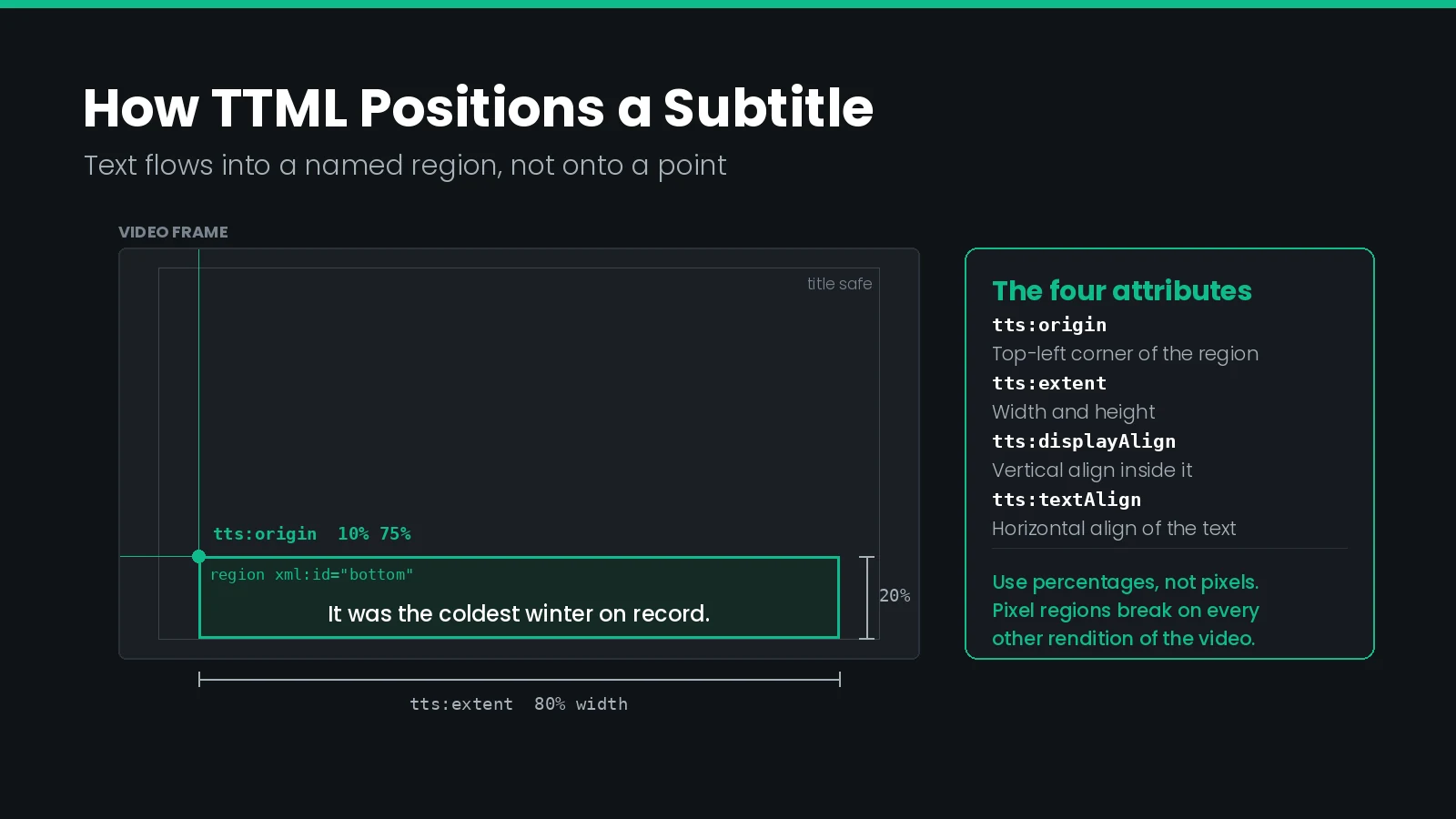
TTML does not place text at a point. It places text inside a region: a rectangle defined by an origin and an extent, into which the text flows.
| Attribute | Controls | Typical value |
|---|---|---|
tts:origin | Top-left corner of the region | 10% 75% |
tts:extent | Width and height of the region | 80% 20% |
tts:displayAlign | Vertical alignment inside the region | after (bottom) |
tts:textAlign | Horizontal alignment of the text | center |
tts:writingMode | Text direction and flow | lrtb, or tbrl for vertical Japanese |
Use percentages, not pixels. A region defined in percentages scales with the video; one defined in pixels assumes a specific frame size and breaks the moment the same file is used for a different rendition. Since a streaming package usually carries one subtitle file across every bitrate ladder rung, this is not a hypothetical.
Keep regions inside the title safe area. A region flush to the frame edge will be clipped on displays with overscan, and will collide with player chrome on most apps. The same placement discipline we cover for vertical and 9:16 video applies here, where the safe area is far less forgiving.
Which Styles Actually Survive?
TTML can express a great deal of styling. Players implement a subset of it, and delivery specs narrow it further. The reliable core is small. Which subset applies depends on where the file is going, and each destination asks for something different.
| Attribute | Effect | Support |
|---|---|---|
tts:color | Text colour | Reliable |
tts:fontStyle | Italic | Reliable |
tts:fontWeight | Bold | Reliable |
tts:fontSize | Size, best as a percentage | Reliable |
tts:backgroundColor | Box behind the text | Reliable, but rendered inconsistently |
tts:textOutline | Outline or drop shadow | Varies by player |
tts:fontFamily | Typeface | Use generic names only |
tts:opacity | Transparency | Varies by player |
Two rules save most of the trouble. Specify tts:fontFamily using the generic names TTML defines — sansSerif, monospace, proportionalSansSerif — rather than naming a font the playback device will not have. And express tts:fontSize as a percentage so it scales with the region rather than the frame.
Italics deserve particular care, because they carry meaning rather than decoration: song lyrics, off-screen speech, foreign words. The rules are the same ones we set out for caption formatting, italics and colour, and TTML is the format most likely to preserve them intact.
What Does IMSC Add to TTML?
IMSC mostly subtracts. But it does define a small set of attributes in its own namespaces that solve real delivery problems TTML alone does not address.
| Attribute | What it does |
|---|---|
itts:forcedDisplay | Marks a subtitle as forced narrative, shown even when subtitles are off |
itts:fillLineGap | Closes the gap between background boxes on consecutive lines |
ittp:activeArea | Declares the area of the frame the subtitles were authored against |
ittp:progressivelyDecodable | Signals the document can be processed as a stream, without loading it whole |
ittm:altText | Text alternative for an image subtitle, for accessibility |
itts:forcedDisplay is the one worth knowing. Forced narrative — the subtitles that appear regardless of the viewer's subtitle setting, for foreign dialogue or on-screen text — has traditionally meant delivering a second file. IMSC lets you flag those cues inside the main document instead.
IMSC also permits two attributes borrowed from the European profile, ebutts:linePadding and ebutts:multiRowAlign, which exist to reproduce the look of teletext-style subtitling. Their presence is a direct nod to the EBU-STL and teletext practice they replaced.
IMSC 1.1 in particular added the features needed for Japanese typesetting — ruby annotations, text emphasis marks, vertical writing, and slanted text — plus HDR-aware luminance and stereoscopic 3D positioning. Those are not niceties. They are the reason a single format can serve worldwide delivery.
Text Profile or Image Profile?
IMSC 1.1 defines two profiles, and a document conforms to one or the other. The choice is usually made for you by the delivery spec, but it is worth understanding why both exist.
| Text profile | Image profile | |
|---|---|---|
| Carries | Unicode text | PNG bitmaps |
| Rendered by | The player, using its fonts | Composited as supplied |
| File size | Kilobytes | Megabytes |
| Searchable | Yes | No, unless ittm:altText is present |
| Viewer resizing | Supported | Not supported |
| Typography | Depends on the device | Exact, as authored |
Text is the right default almost always. It is smaller, it is accessible, it lets viewers change size and colour, and it works with search and indexing.
The image profile earns its place where typography cannot be delegated to an unknown device: complex scripts, or a title with a specific subtitle look that must be reproduced exactly. If you deliver image subtitles, supply ittm:altText. Without it, the subtitle content is invisible to assistive technology and to every downstream process that needs the words.
What Do the Streaming Platforms Actually Require?
Here is where general knowledge stops being useful. Delivery specifications are per-platform, per-title, and revised often.
Netflix is the instructive example, because its requirements are public and more specific than most people assume. Netflix publishes an IMSC 1.1 Text Profile specification and requires conformance to a defined subset of it. At the time of writing, Netflix accepts IMSC 1.1 as a valid delivery format for Japanese timed text, with other languages to follow as the delivery specs are updated. Its wider subtitle deliveries continue to use TTML-based formats.
Two Netflix rules generalise well:
- Media time base only. IMSC documents must use media time, not SMPTE timecode, and
ttp:dropModedoes not apply. - The profile identifier is optional but encouraged in
ttp:contentProfiles. Including it costs nothing and makes the document self-describing.
Read the spec you were sent, for the title you are working on. "Netflix wants IMSC" is the kind of second-hand summary that gets a delivery rejected. Platform requirements differ by language and by content type, and they change. Our walkthrough of conforming captions for Netflix covers the timing side of the same problem.
How Do You Export a Valid IMSC File?
The practical workflow is the same regardless of which profile you are targeting: build the subtitles once against the picture, then export to the profile the spec names.
Closed Caption Creator reads and writes the TTML family directly, including DFXP, SMPTE-TTML, IMSC Text Captions, IMSC Text Subtitles, Netflix DFXP, and MP4-DASH packaged IMSC. The full format list covers 30-plus caption and subtitle formats, so the same session can produce the streaming deliverable and the broadcast one.
Three things to set before you export:
- Zero the start timecode if your source came from a broadcast master. This is the hour-offset problem from earlier.
- Check regions against the safe area on the actual aspect ratio being delivered, not on the edit timeline.
- Confirm the profile, since IMSC text and IMSC image are different deliverables with the same file extension.
TTML vs SCC vs EBU-STL vs SRT vs WebVTT
Five formats you will be asked for, and what each is actually good at.
| Format | Type | Frame rates | Styling | Used for |
|---|---|---|---|---|
| IMSC / TTML | XML | Any | Full | Streaming, OTT, worldwide delivery |
| SCC | Hex text | 29.97 only | 608 control codes | North American broadcast, legacy playout |
| EBU-STL | Binary | 25 fps typically | Teletext colours | European broadcast |
| SRT | Plain text | None declared | Minimal | Web video, interchange, working files |
| WebVTT | Plain text | None declared | Moderate, via CSS | HTML5 players, HLS |
The pattern is consistent. The XML formats carry the most information and cost the most to author correctly. The plain text formats are trivially portable and lose everything but the words and the times.
Converting downward is safe and lossy: IMSC to SRT works and discards styling. Converting upward invents nothing, so an SRT promoted to IMSC will be correctly timed and unstyled, sitting in the player's default region. If a spec asks for positioned IMSC, an upconverted SRT will not satisfy it. Our comparison of closed caption converters goes into which tools preserve what.
For the underlying distinction between captions, subtitles, and SDH — which determines what belongs in the file before you worry about the format — see closed captions vs subtitles. How either format is then cut up and delivered over a stream is covered in our guide to subtitles in HLS.
What Actually Fails a TTML Delivery
In practice, rejections cluster around a handful of faults. None of them make the XML invalid, which is why they survive to QC.
| Symptom | Cause |
|---|---|
| No subtitles appear at all | Unremoved one-hour start offset, or wrong ttp:timeBase |
| Subtitles in the default position | A region attribute pointing at an xml:id that does not exist |
| Placement shifts between renditions | Regions defined in pixels rather than percentages |
| Wrong or fallback typeface | tts:fontFamily naming a font the device does not have |
| Rejected as non-conformant | TTML features used that the target IMSC profile excludes |
| Text clipped at the frame edge | Region extending outside the title safe area |
| Forced narrative missing | itts:forcedDisplay omitted, and no separate forced file supplied |
| Reading speed failures | Cue durations too short for the character count |
That last one is a content problem rather than a format problem, but it fails deliveries just as reliably. TTML will happily hold a 90-character subtitle on screen for half a second. The reading speed limits in the spec still apply, and most platforms measure them.
A structured pass before delivery catches nearly all of the above. Our guide to QC for captions and subtitles covers the checks in order.
IMSC Delivery Checklist
Run this before every TTML or IMSC delivery.
- Time base is
media, and the first subtitle is an offset from zero, not from an hour. - Every
regionandstylereference resolves to anxml:iddeclared in the head. - Regions are expressed in percentages and sit inside the title safe area.
tts:fontFamilyuses generic names, andtts:fontSizeis a percentage.xml:langis set correctly on the root, and matches the language you are delivering.- The document conforms to the named profile — text or image, IMSC 1.0.1 or 1.1 — not merely to TTML.
- Forced narrative is handled, either via
itts:forcedDisplayor as the separate file the spec asks for. - Reading speed and line length pass the platform's limits.
- The file is UTF-8 without a byte order mark, unless the spec says otherwise.
- It has been played back against the actual video, not just validated.
Frequently Asked Questions
What is a TTML file?
A TTML file is an XML document that carries subtitles or captions as timed text. It stores the words, their in and out times, and styling and position information as XML elements and attributes. TTML is the base standard behind DFXP, SMPTE-TT, EBU-TT, and IMSC, which are all profiles of it.
What is the difference between TTML and DFXP?
There is almost none in practice. DFXP, the Distribution Format Exchange Profile, was the original profile name for TTML 1.0, and the .dfxp extension stuck. A file named .dfxp and a file named .ttml usually contain the same XML. Treat DFXP as an extension convention rather than a separate format.
What is IMSC?
IMSC stands for TTML Profiles for Internet Media Subtitles and Captions. It is a constrained subset of TTML published by the W3C that removes ambiguous and rarely implemented features. By narrowing what an author may use, IMSC makes it far more likely that two different players render the same file identically.
What is the difference between IMSC text profile and image profile?
The text profile carries subtitles as Unicode characters that the player renders with its own fonts. The image profile carries them as PNG bitmaps positioned on screen. Text is smaller, searchable, and resizable. Images guarantee exact typography and are used where scripts or house fonts must be reproduced precisely.
Does IMSC use SMPTE timecode?
No. IMSC documents use the media time base, so times are expressed as offsets from the start of the media rather than as SMPTE timecode. There is no drop frame handling to get wrong. If your TTML carries an hour-start timecode of 01:00:00:00, that offset must be removed before delivery.
What does itts:forcedDisplay do?
It marks individual subtitles as forced narrative, meaning they display even when the viewer has subtitles switched off. It is how foreign dialogue and on-screen signs are handled inside a single document. Without it, a separate forced narrative file is required, which many delivery specifications still ask for anyway.
Why do my TTML subtitles appear in the wrong position?
Almost always because the regions are wrong rather than the text. TTML positions subtitles inside named regions defined by tts:origin and tts:extent, usually as percentages of the video frame. If a cue references a missing region, or the region sits outside the safe area, the player falls back to its own default placement.
Is TTML better than WebVTT?
They serve different jobs. WebVTT is simpler and native to HTML5 video, which suits web playback. TTML carries precise positioning, richer styling, image subtitles, ruby text, and HDR-aware colour, which is why studio and broadcast delivery specifications ask for it. Choose whichever the delivery specification names.
Can I open a TTML file in a text editor?
Yes. TTML is plain XML, so any text editor will show the markup and the subtitle text is directly readable. Editing it by hand is risky, because styling, regions, and timing are cross-referenced by xml:id. Breaking one reference silently changes placement rather than producing an error.
Should I deliver IMSC or SCC?
Deliver what the specification names. SCC carries EIA-608 data for North American broadcast and legacy playout at 29.97 fps only. IMSC is the streaming and OTT deliverable, with arbitrary frame rates, full styling, and worldwide script support. They are not interchangeable, and converting between them loses information.
Profile requirements differ by platform, by language, and by title, so validate against the specification you were sent rather than against a previous delivery. Need IMSC, SCC, and EBU-STL out of the same master? Talk to our team or start a free trial.