EBU-STL and Teletext Subtitles: A Broadcast Delivery Guide
How is an EBU-STL file structured?
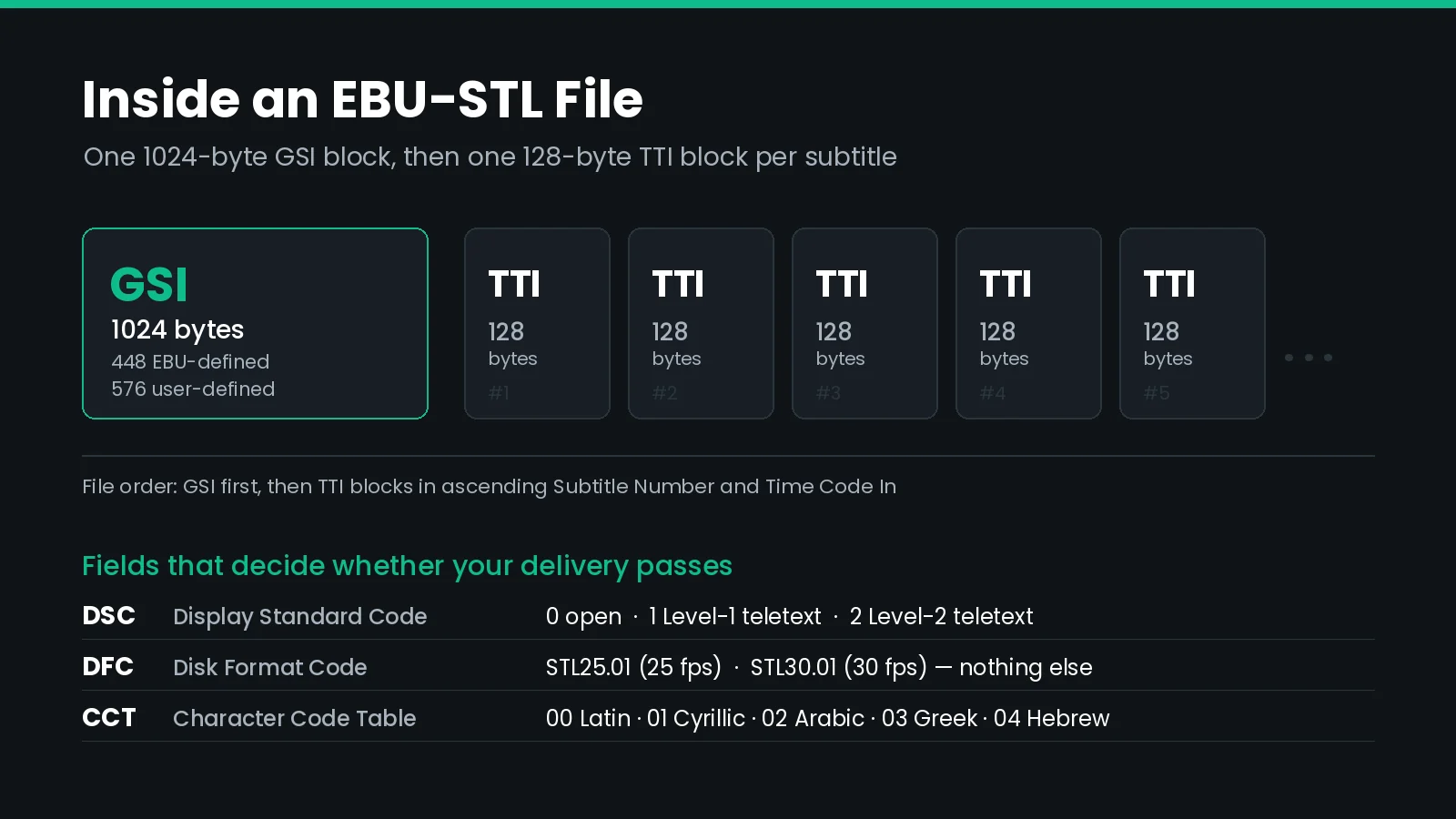
EBU-STL (EBU Tech 3264) is the binary subtitle exchange format used across European broadcast. Each file holds one 1024-byte GSI header block, then one 128-byte TTI block per subtitle. The Display Standard Code in the GSI declares open subtitling, Level-1 teletext, or Level-2 teletext — setting it wrong is the most common cause of a rejected delivery.
STL is a format from 1991 that will not go away, and for good reason. It is still the interchange currency between European broadcasters, subtitling houses, and playout systems, and most teletext subtitle chains still start with an .stl file.
It is also unforgiving. The spec is binary, fixed-width, and older than most of the tools that read it, so a file can be structurally valid and still fail on air. Here is what is actually in the format, how teletext carries it, and the specific things that break.
If you work on the other side of the Atlantic, the North American equivalent is the SCC file format, which carries EIA-608 captions instead of teletext.
What Is an EBU-STL File?
EBU-STL is the EBU Subtitling data exchange format, specified in EBU Tech 3264 and published in February 1991. It was written so a broadcaster could buy a programme with subtitles already made, or send a job to an outside subtitling house, and have the file open correctly at the other end.
Two things make it different from the text formats you are probably used to:
- It is binary, not text. Open an STL in a text editor and you get garbage. Every field sits at a fixed byte offset.
- It carries a display standard, not just text and timing. An STL file knows whether it is meant to become teletext or burned-in open subtitles, and teletext files carry teletext control codes inline.
That second point is the whole reason STL survives. Formats like SRT and WebVTT describe words on a timeline. STL describes a page on a broadcast display.
| Property | Value |
|---|---|
| Specification | EBU Tech 3264 (February 1991) |
| Extension | .stl |
| Encoding | Binary, fixed-width blocks |
| Header | One 1024-byte GSI block |
| Subtitle records | 128-byte TTI blocks, one or more per subtitle |
| Frame rates | 25 fps or 30 fps only |
| Display standards | Open subtitling, Level-1 teletext, Level-2 teletext |
| Character sets | Latin, Cyrillic, Arabic, Greek, Hebrew |
What Does the GSI Block Control?
The General Subtitle Information block is the first 1024 bytes of the file. The EBU defines the first 448 bytes; the remaining 576 are a user-defined area that vendors fill with whatever they like.
Most of the GSI is metadata — programme title, translator, publisher, creation date. Three fields decide whether the file works.
Display Standard Code (DSC)
One byte, and the field that causes the most rejected deliveries.
| DSC value | Display standard | What it means in practice |
|---|---|---|
| Blank | Undefined | Many systems refuse the file outright |
| 0 | Open subtitling | In-vision or burned-in; italics and underline are available |
| 1 | Level-1 teletext | Teletext control codes in the text field |
| 2 | Level-2 teletext | Teletext control codes, richer presentation level |
This is not a cosmetic flag. It changes how the text field is interpreted. A file authored for open subtitling carries italic and underline codes at bytes 80h–85h. A teletext file carries teletext control codes at 00h–1Fh instead. Set the wrong one and the receiving system reads your styling as the wrong kind of instruction — which is why "the italics worked last time" is such a common complaint with STL.
Disk Format Code (DFC)
STL accepts exactly two frame rates: STL25.01 for 25 fps and STL30.01 for 30 fps. There is no drop-frame flag, no 23.976, no 29.97, no 50 or 59.94. Both supported rates are whole numbers, which is why European workflows never meet the drop frame problem at all.
That matters more than it sounds. If your master is 23.976 or 29.97 drop-frame, the timecodes have to be conformed before export, not after. Handing a 29.97 job to an STL writer that stamps STL30.01 gives you a file that drifts roughly 1.8 frames per minute — about three seconds across a feature. See conforming caption timing between frame rates for how that arithmetic works.
Character Code Table (CCT)
The CCT number in the GSI tells the reader which character set the text fields use.
| CCT | Language group | ISO standard |
|---|---|---|
| 00 | Latin | ISO 6937/2 |
| 01 | Latin / Cyrillic | ISO 8859-5 |
| 02 | Latin / Arabic | ISO 8859-6 |
| 03 | Latin / Greek | ISO 8859-7 |
| 04 | Latin / Hebrew | ISO 8859-8 |
There is no Unicode option and no CJK table. If your translation workflow produces Japanese, Chinese, or Korean, STL is the wrong container — you need EBU-TT or IMSC.
The Latin table also handles accents unusually. Accented characters are built with a floating accent: the diacritic is sent first, then the base letter, and the pair occupies two bytes. So Ä is C8h 41h and ê is C3h 65h. Tools that treat STL as a single-byte encoding mangle exactly these characters, which is why Nordic and French files so often come back with missing diacritics.
What Is Inside a TTI Block?
Each Text and Timing Information block is 128 bytes: 16 bytes of control data, then a 112-byte text field.
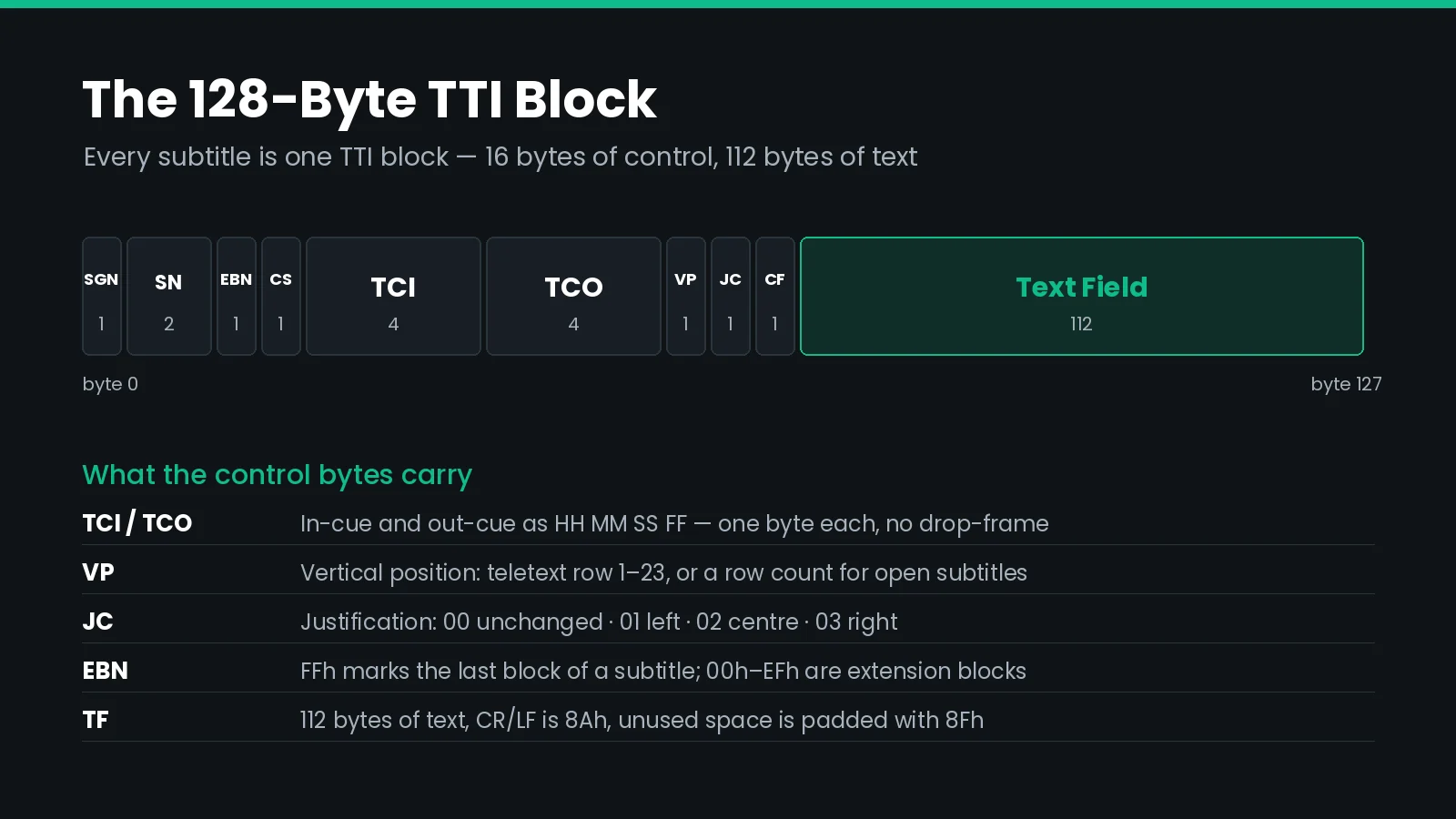
| Bytes | Field | Purpose |
|---|---|---|
| 0 | SGN | Subtitle Group Number |
| 1–2 | SN | Subtitle Number |
| 3 | EBN | Extension Block Number — FFh marks the last block of a subtitle |
| 4 | CS | Cumulative Status, for add-on subtitles that stack on screen |
| 5–8 | TCI | Time Code In, as hours / minutes / seconds / frames |
| 9–12 | TCO | Time Code Out, same layout |
| 13 | VP | Vertical Position — teletext row 1–23, or a row count for open subtitles |
| 14 | JC | Justification: 00 unchanged, 01 left, 02 centre, 03 right |
| 15 | CF | Comment Flag — 01h marks a block that must not be transmitted |
| 16–127 | TF | Text Field, 112 bytes |
Three details in the text field trip people up regularly:
- Line breaks are 8Ah, not
\n. A CR/LF byte starts the second and subsequent rows of the subtitle. - Unused space is padded with 8Fh, and the last block of a subtitle must end with 8Fh. Parsers that expect null padding read trailing junk.
- 112 bytes is a hard ceiling per block. A longer subtitle spills into extension blocks, up to 256 TTI blocks for a single subtitle. Only the first block of the set carries valid timing and position — extension blocks carry text only.
Note also that one byte does not equal one character in the Latin table, because of floating accents. A line of accented French can use noticeably more of the 112 bytes than the same line in English.
Author and deliver EBU-STL without hand-editing bytes
Closed Caption Creator writes EBU-STL with the Display Standard Code, character table, and frame rate set explicitly, so teletext and open subtitling files leave the building correctly the first time. Batch conversion is available through Closed Caption Converter and its API.
How Do Teletext Subtitles Reach the Viewer?
Teletext subtitling is a page in a teletext service. The viewer opens a page number and the subtitle rows appear over the picture.
The underlying system is World System Teletext (ITU-R BT.653 System B), and its Level-1 page is a fixed grid: 40 columns by 25 rows, of which 23 rows are addressable for subtitle text once the page header and Fast Text rows are suppressed. The palette is eight fixed colours — black, red, green, yellow, blue, magenta, cyan, white — applied per character cell.
In the UK and much of Europe, the subtitle service sits on page 888 by convention. That is a habit rather than a rule, but it is a strong enough habit that receivers and EPGs assume it.
Where the data physically lives
| Path | Carriage | Reference |
|---|---|---|
| SD baseband | VBI lines 21 and 334 | Free TV OP-42 practice |
| HD-SDI | Subtitling Distribution Packet in the vertical ancillary space | OP-47 / SMPTE RDD 8 |
| DVB transmission | System B teletext in the DVB bitstream | ETSI EN 300 472 |
| Enhanced teletext | Page and presentation levels above Level 1 | ETSI ETS 300 706 |
OP-47 is the one you will meet most often on a modern plant. It began as a Free TV Australia operational practice and was published by SMPTE as RDD 8, and it defines how WST teletext rides in the VANC of an HD-SDI signal. Each Subtitling Distribution Packet carries up to five VBI-equivalent teletext lines, with DID 143h and SDID 102h. In Australian practice, 1080i captions are inserted on line 12 of field 1 and line 575 of field 2, and data must be present on both fields.
OP-42 is the older standard-definition practice that OP-47 was built to extend. If someone asks whether you deliver "OP-42 or OP-47," they are asking whether the file is going to an SD or an HD chain — the subtitle content is the same WST data either way.
If you also deliver to North America, the equivalent problem is embedding 608 and 708 caption data, which uses a completely different ancillary packet and a completely different character model.
Why Do Teletext Control Codes Change Your Line Length?
This is the failure that costs the most time, because nothing about it looks wrong until the file is on air.
In teletext, formatting codes for colour, background, and flashing are spacing attributes. Each control byte occupies a real character cell on the row and pushes everything after it one column to the right. A caption that fits inside 40 columns in your editor can overflow on air, and a left-aligned caption can appear indented even though you never added a space.
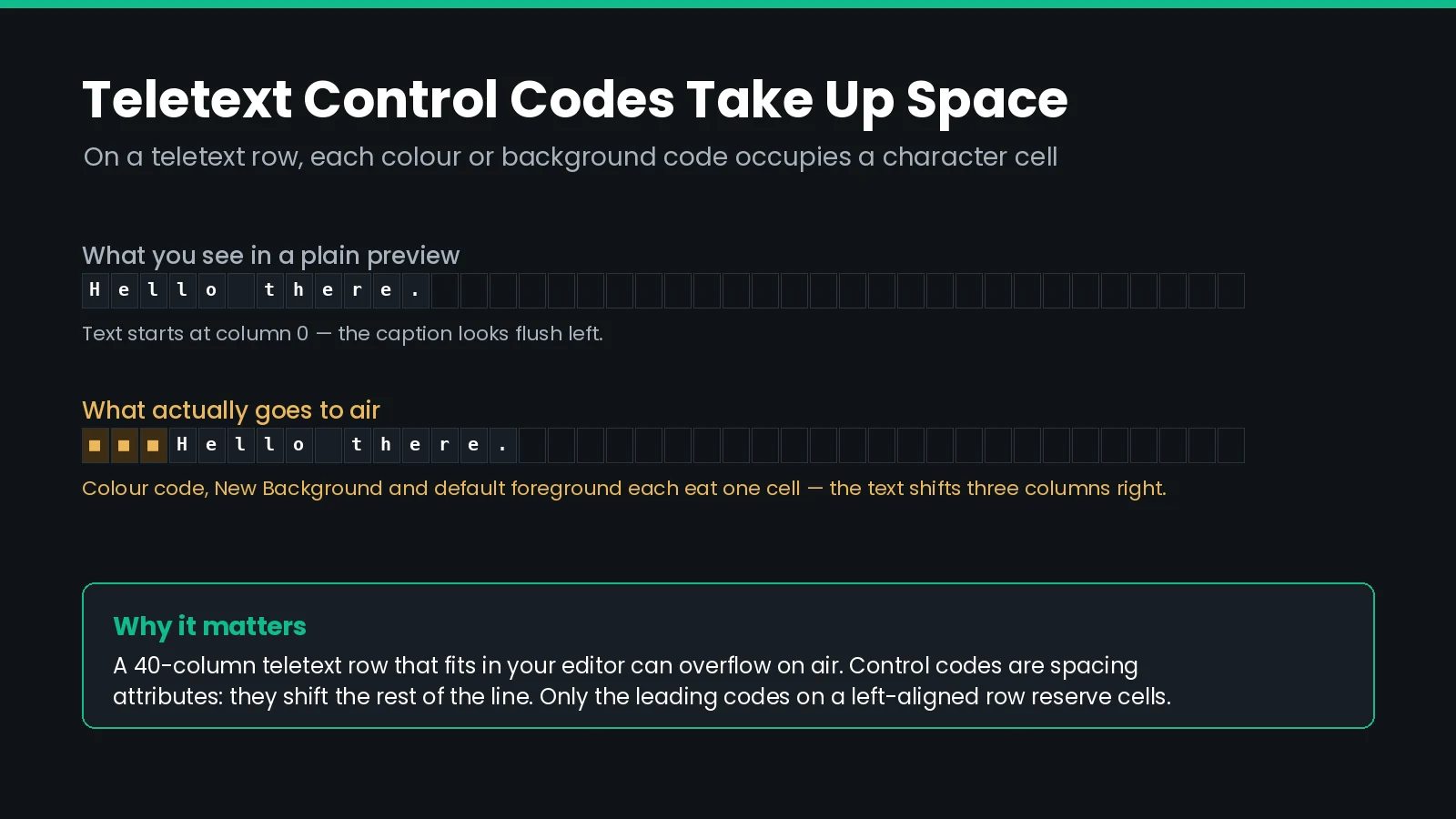
A typical background-only styling emits three control bytes at the start of the row: the colour code, a New Background code, and a default foreground code. That is three character cells gone before the first letter appears.
Two things soften the problem, and both are worth knowing:
- Only leading codes cost you columns. A colour change in the middle of a line overwrites an existing character position rather than pushing the rest of the row over.
- Centred rows are not affected the same way. A centred teletext row is not shifted by its leading colour codes, so the indent problem is specific to left-aligned text.
The practical consequence: your character-per-line validation and your on-air line length are two different numbers. Treat the validation limit as an authoring constraint and the teletext grid as the physical one.
How Do You Preview Teletext Spacing Before Export?
Guessing at this is miserable. The fix is to make the preview lie less.
Closed Caption Creator has a Teletext Spacing option under Edit → Options → Display. Turn it on and the Closed Caption preview reserves monospace cells for the control codes that an EBU-STL teletext export would actually emit, so what you see matches what goes out.
A few things to set alongside it:
- Match the display grid to your teletext canvas. The default grid is 32 characters wide, which suits North American closed captioning. Teletext work usually wants up to 40.
- Set the caption background to suit the region. Black is the North American convention; transparent matches European presentation.
- Check horizontal and vertical padding. Both default to 10% and define your safe area — they do not change the export, but they change what you believe is safe.
- Set the Display Standard Code at export, to Level-1 or Level-2 teletext. The preview setting does not do this for you.
Worth being explicit about the boundary: Teletext Spacing changes the preview only. It does not change the exported file, the character-count validation, or the editor layout. It exists so your eyes and your output agree.
Teletext Subtitles vs DVB Bitmap Subtitles
On a DVB transmission you have two ways to carry subtitles, and they behave very differently.
| DVB teletext (DVB-TXT) | DVB bitmap (DVB-SUB) | |
|---|---|---|
| Standard | ETSI EN 300 472 | ETSI EN 300 743 |
| What is transmitted | Character codes on a fixed grid | Rendered images of each subtitle row |
| Typeface control | None — the receiver decides | Full, decided by the broadcaster |
| Colours | Eight, fixed | Palette per region |
| Character set | Limited by teletext tables | Any script the renderer supports |
| Bandwidth | Very low | Higher |
| Typical use | Legacy chains, receivers with teletext decoders | Preferred for new DVB deployments |
Bitmap subtitles hand presentation control to the broadcaster, which is why they are generally preferred for new work. Teletext survives because the installed base of decoders is enormous and the bandwidth cost is close to nothing.
In practice most European chains still produce STL, then convert it downstream to whatever the transmission path needs. That is exactly why the STL you deliver has to be right — it is the source for several outputs, not the final artifact.
Should You Deliver STL, EBU-TT, or EBU-TT-D?
The EBU published XML successors to STL, and the naming confuses everyone. They are not interchangeable.
| Format | Spec | Built for | Deliver it when |
|---|---|---|---|
| EBU-STL | Tech 3264 | Exchange and teletext authoring | The spec says STL, or the chain ends in teletext |
| EBU-TT | Tech 3350 | Production, interchange, archiving | You need Unicode, richer styling, or a long-lived master |
| EBU-TT-D | Tech 3380 | Online distribution | The target is OTT, MPEG-DASH, or a web player |
EBU Tech 3360 defines how to map an existing STL file into EBU-TT, which is the sanctioned route for migrating an archive rather than re-authoring it.
Both EBU-TT and EBU-TT-D are profiles of TTML, so the XML they contain follows the same rules as every other member of that family. Our guide to TTML, DFXP, and IMSC covers regions, time bases, and how profiles constrain what you may use.
The honest answer for 2026: author once, deliver in whatever the spec names. If your obligations include EU distribution, you are likely delivering more than one of these already — see our European Accessibility Act guide for what the regulation expects of video services, and batch conversion for turning one master into the set.
What Actually Fails an EBU-STL Delivery
Ranked by how often we see them.
- Wrong or blank Display Standard Code. The file opens, the text is right, and the receiving system rejects it or renders control codes as characters. Check this first, always.
- Frame rate mismatch. A 29.97 or 23.976 master exported as
STL30.01orSTL25.01without conforming. Drift accumulates, so early events look fine and late events are seconds off. - Lines that overflow once control codes are counted. Passes validation in the editor, overflows on the teletext grid.
- Mangled accents. A tool that ignores the floating-accent convention writes single bytes and the diacritics disappear or turn into stray symbols.
- Vertical position outside 1–23. Teletext row numbers are bounded. A converter that carries a pixel position or a 0-based row through into VP produces subtitles that land off-page.
- Comment blocks transmitted. Translator notes with the Comment Flag unset go to air. It is rare and extremely visible.
- Extension blocks with duplicate timing. Only the first block of a subtitle carries valid timing and position. Writers that repeat timing on every block create phantom events in strict readers.
Most of these are catchable before delivery. Our caption and subtitle QC checklist covers the general pass; the list below is the STL-specific layer on top of it.
EBU-STL Delivery Checklist
| # | Check | Automatable? |
|---|---|---|
| 1 | Display Standard Code matches the delivery spec (0, 1, or 2 — never blank) | Yes |
| 2 | Disk Format Code matches the master frame rate, and the master is genuinely 25 or 30 fps | Yes |
| 3 | Character Code Table matches the language of the text | Yes |
| 4 | Accented characters survive a round trip through the writer | Yes |
| 5 | No line exceeds the teletext grid once leading control codes are counted | Yes |
| 6 | Vertical Position values fall within teletext rows 1–23 | Yes |
| 7 | Comment Flag set on every non-transmitting block | Yes |
| 8 | Reading speed within the broadcaster's limit | Yes |
| 9 | Timecode start matches the programme start, not 00:00:00:00 by default | Partly |
| 10 | Colour and placement reviewed against a teletext-accurate preview | No |
Items 1 through 8 belong in an automated pre-flight. If you are running volume, the work order API can validate and convert on ingest rather than at delivery, which is where you want the failure to surface.
Frequently Asked Questions
What is an EBU-STL file?
An EBU-STL file is a binary subtitle exchange file defined by EBU Tech 3264. It contains one 1024-byte GSI header block holding programme metadata and display settings, followed by 128-byte TTI blocks that each carry one subtitle's timing, position, and text. It is the standard interchange format for European broadcast subtitling.
What frame rates does EBU-STL support?
Only two: 25 fps, written as STL25.01, and 30 fps, written as STL30.01. The format has no representation for 23.976, 29.97, drop-frame, 50, or 59.94. Material at those rates has to be conformed to 25 or 30 before the STL is written, or the timing will drift.
What is the Display Standard Code in an STL file?
It is a single byte in the GSI block that declares what the file is for: 0 for open subtitling, 1 for Level-1 teletext, 2 for Level-2 teletext, or blank for undefined. It changes how the text field is interpreted, so a wrong value causes control codes to be misread. It is the most common cause of a rejected STL delivery.
What is the difference between OP-42 and OP-47?
Both describe how World System Teletext data is carried through a broadcast plant. OP-42 covers standard definition, using VBI lines 21 and 334. OP-47 covers high definition, packing the same teletext data into the vertical ancillary space of HD-SDI. OP-47 was published by SMPTE as RDD 8. The subtitle content is identical either way.
Is teletext still used for subtitles in 2026?
Yes, widely. DVB bitmap subtitling is preferred for new deployments because it gives the broadcaster control over presentation, but teletext subtitles are still transmitted across Europe because the installed base of decoders is huge and the bandwidth cost is negligible. Most European subtitle files still start life as EBU-STL.
How many characters fit on a teletext subtitle line?
A World System Teletext Level-1 page is 40 columns by 25 rows, with 23 rows addressable for subtitles. In practice you get fewer than 40 usable characters on a left-aligned row, because leading colour and background control codes each occupy a character cell and shift the text right.
Why do my teletext subtitles look indented on air but not in my editor?
Because teletext control codes are spacing attributes. The colour, background, and foreground codes at the start of a row each take one character cell. A plain preview paints styled text without reserving those cells, so the caption looks flush left in the editor and indented on air. Enabling a teletext-accurate preview mode resolves the mismatch.
Why does my STL file lose accented characters?
Because the Latin character table uses floating accents: the diacritic byte is written first, then the base letter, so each accented character takes two bytes. A tool that treats STL as a single-byte encoding writes or reads these incorrectly, and the accents vanish or become stray symbols. Round-trip a test file with accented text before committing to a workflow.
Can EBU-STL carry italics?
Only for open subtitling. Italics, underline, and boxing live at bytes 80h through 85h in the text field and are defined for in-vision subtitles. Teletext files use teletext control codes instead, and how a given tool maps italics onto those codes varies. That inconsistency is why STL italics work on one delivery and not the next.
Should I deliver EBU-STL or EBU-TT-D?
Deliver what the spec names. EBU-STL for broadcast exchange and teletext chains, EBU-TT (Tech 3350) for production and archiving where you need Unicode, and EBU-TT-D (Tech 3380) for online distribution such as MPEG-DASH and OTT players. EBU Tech 3360 defines how to map an existing STL archive into EBU-TT.
Delivery specifications vary between broadcasters, so confirm the Display Standard Code, frame rate, and character table against the spec you were sent rather than against a previous job. Need STL and EBU-TT out of the same master? Talk to our team or start a free trial.