What Is an SCC File? Inside the Scenarist Closed Caption Format
How does an SCC file store caption data?
An SCC (Scenarist Closed Captions) file is a plain text file that carries EIA-608 caption data as hexadecimal byte pairs, one pair per video frame. Each line holds a SMPTE timecode followed by the bytes transmitted from that frame onward. SCC is 29.97 fps only, and every byte carries odd parity.
SCC looks simple. It is a text file you can open in Notepad, and the whole spec fits on one page. That simplicity is misleading.
Everything that makes a caption work — where it sits, what color it is, when it appears, when it clears — is encoded in two-byte commands mixed into the same stream as the letters. Get one byte wrong and the decoder either ignores it or draws a solid block on air.
This is the North American counterpart to EBU-STL and teletext subtitling. Here is what is actually in the file, and what breaks.
What Is an SCC File?
SCC stands for Scenarist Closed Captions. Sonic Scenarist and Spruce Maestro used it to import caption data during DVD authoring, and the format outlived both applications. It is now the default closed caption deliverable across North American broadcast and post.
The file holds EIA-608 data, also written CEA-608 or "line 21" captions. The decoder requirements are published for free in the US Code of Federal Regulations at 47 CFR 15.119, which is why the format has stayed so stable.
| Property | Value |
|---|---|
| Full name | Scenarist Closed Captions |
| Extension | .scc |
| Encoding | Plain text, ASCII |
| Caption standard | EIA-608 / CEA-608 |
| Frame rate | 29.97 fps only, drop or non-drop |
| Grid | 32 columns by 15 rows |
| Data rate | Two bytes per frame, per field |
| Caption channels | CC1 to CC4, plus text services |
One thing SCC is not: a subtitle format. It describes a decoder state machine, not a list of text cues. If you want the distinction spelled out, see closed captions vs subtitles vs SDH.
What Does an SCC File Actually Look Like?
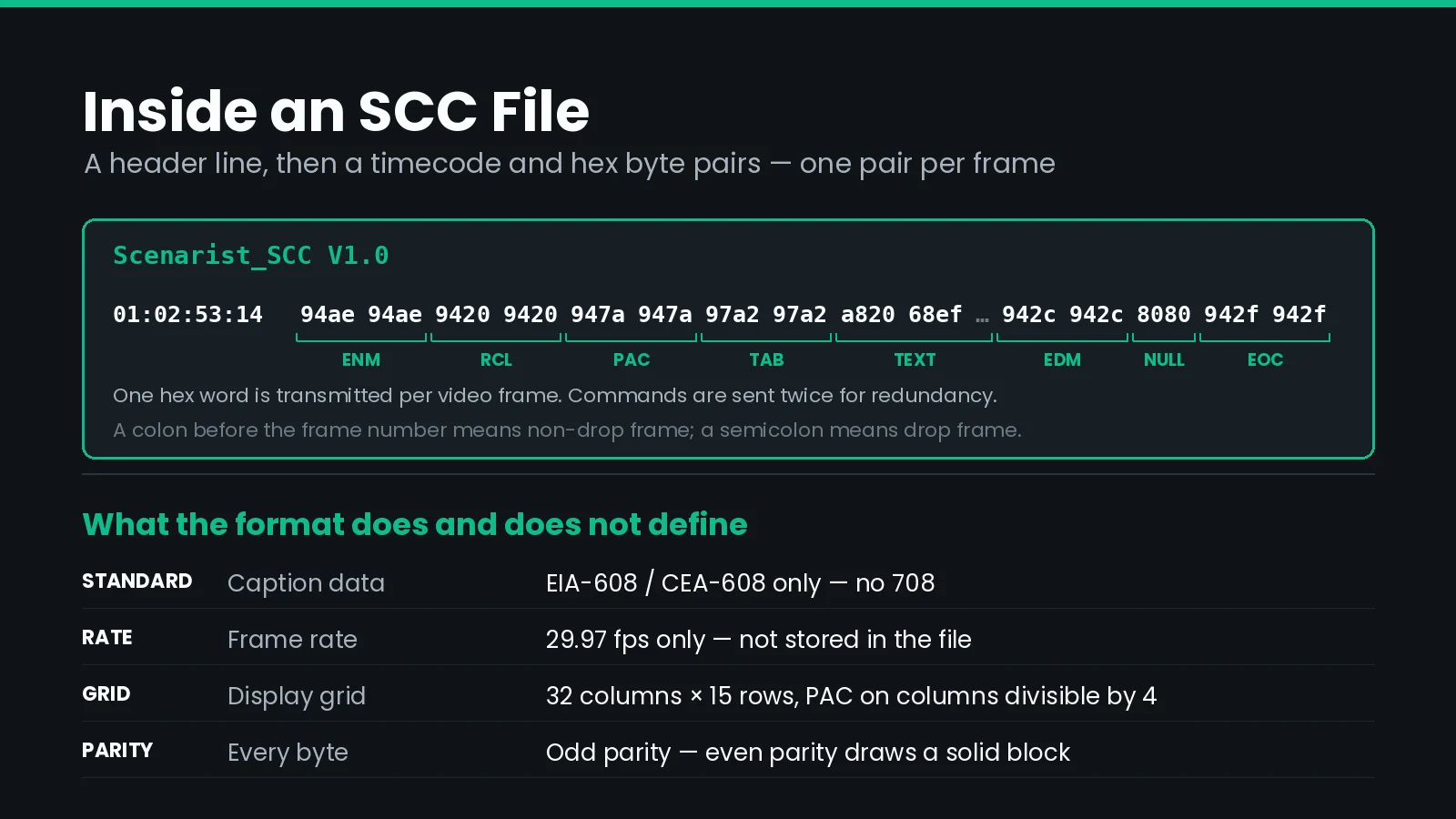
Every SCC file starts with the same header line, then alternates blank lines with data lines.
Scenarist_SCC V1.0

01:02:53:14	94ae 94ae 9420 9420 947a 947a 97a2 97a2 a820 68ef f26e 2068 ef6e 6be9 6e67 2029 942c 942c 8080 8080 942f 942f

01:02:55:14	942c 942c
Three rules govern the layout, and tools are strict about all three:
- The header must read exactly
Scenarist_SCC V1.0. Not V1.1, not lowercase. Readers use it to identify the file. - Data lines are separated by blank lines. The file is double-spaced. Strip the blank lines and many parsers fail.
- A tab separates the timecode from the data. Spaces are not a substitute.
After the tab comes the payload: space-separated hexadecimal words, two bytes each. Each word is transmitted in one video frame, starting at the timecode on that line. The first line above says "at 01:02:53:14, start sending these 22 words, one per frame."
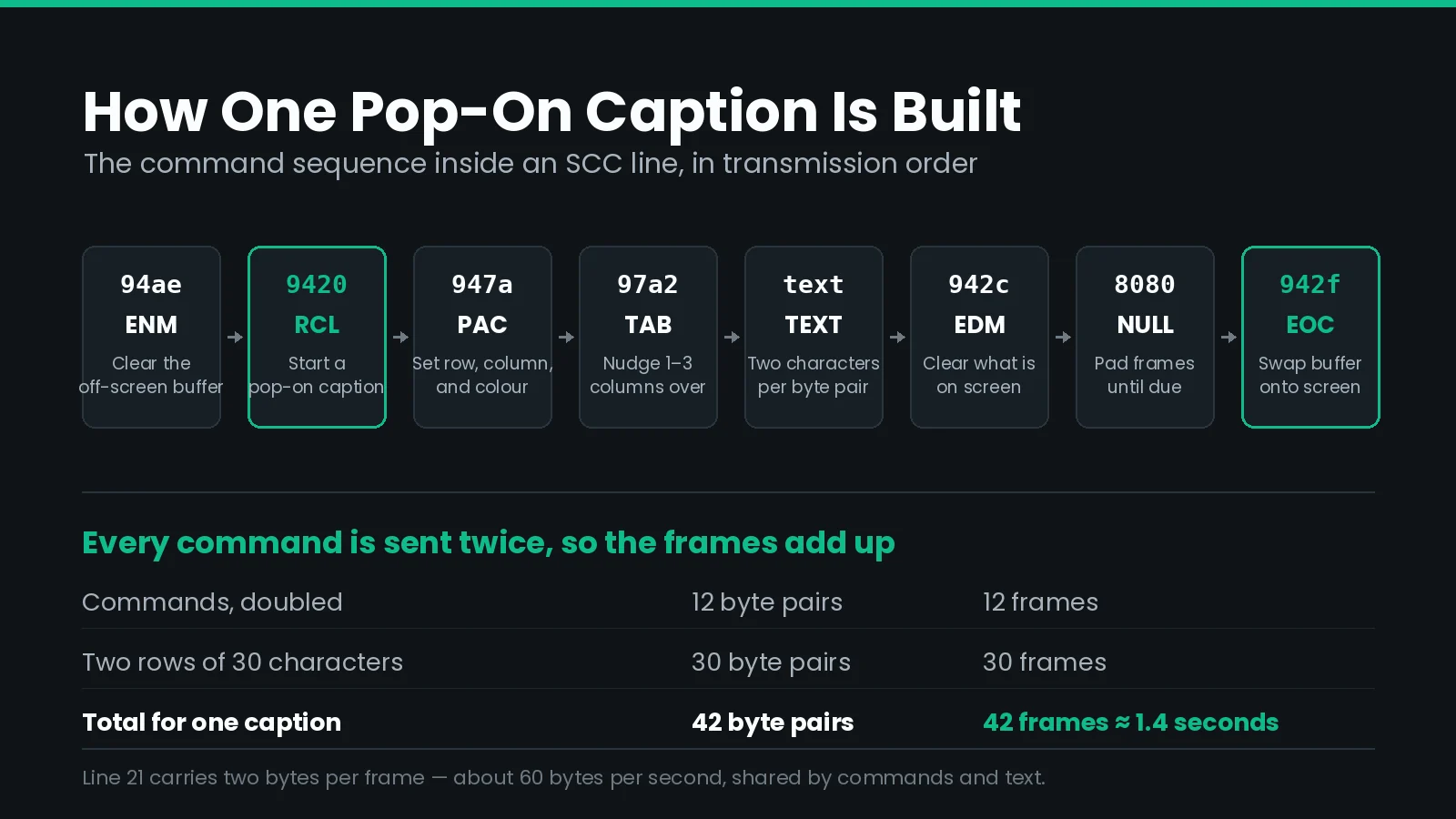
That decoding gives you: clear the off-screen buffer, start a pop-on caption, move to row 15 column 22, write ( horn honking ), clear the screen, wait two frames, show the caption.
Nothing in the file says where a caption ends. There is no duration field and no end timecode. A caption stays on screen until a later line sends an erase command. That is the single biggest conceptual difference between SCC and formats like SRT or TTML.
Why Does the Timecode Use a Semicolon?
The separator before the frame number is the only frame rate information in the entire file.
| Written as | Means | Behaviour |
|---|---|---|
01:00:00:00 | Non-drop frame | Counts every frame. Timecode falls behind clock time. |
01:00:00;00 | Drop frame | Skips frame numbers 00 and 01 each minute, except every tenth minute. |
Both run at 29.97 fps. Drop frame does not drop pictures — it drops numbers, so that an hour of timecode matches an hour on the clock.
Swap the two and your captions drift by roughly 3.6 seconds per hour. At the start of a programme nobody notices. By the third act the captions are a line behind. Our guide to drop frame and non-drop frame timecode works through where that figure comes from and how to tell it apart from a whole-rate mismatch. If you are moving material between rates, the arithmetic in our guide to conforming caption timing applies here too.
Match the separator to the master. Broadcast material is usually drop frame. Material built from scratch in post is usually non-drop.
What Is Odd Parity, and Why Does It Break Files?
EIA-608 uses seven bits per byte for data and reserves the eighth as a parity bit. The parity bit is set so that the count of 1 bits in the byte is always odd.
A decoder that receives a byte with an even number of 1 bits treats it as corrupt. Most decoders then draw a solid block character in its place. This is deliberate: over an analogue broadcast path, a visible block tells the viewer that data was lost rather than silently showing the wrong word.
| Character | 7-bit value | Byte in the SCC file |
|---|---|---|
| Null / filler | 00 | 80 |
A | 41 | c1 |
H | 48 | c8 |
E | 45 | 45 |
| Space | 20 | 20 |
Note that 45 and 20 are unchanged, because those values already have odd parity. That inconsistency is exactly why hand-editing an SCC file goes wrong. You cannot type ASCII into the hex and expect it to work.
If you are seeing solid blocks on air, broken parity is the first thing to check.
Which Control Codes Build a Caption?
Everything except the letters themselves is a two-byte command. Here are the ones you will meet in almost every file.
| Code | Name | What it does |
|---|---|---|
94ae | ENM | Erase Non-displayed Memory — clears the off-screen buffer |
9420 | RCL | Resume Caption Loading — declares a pop-on caption |
942c | EDM | Erase Displayed Memory — clears what is on screen |
942f | EOC | End Of Caption — swaps the buffer onto the screen |
9425 9426 94a7 | RU2 RU3 RU4 | Roll-Up with 2, 3, or 4 rows |
9429 | RDC | Resume Direct Captioning — declares paint-on |
94ad | CR | Carriage Return — rolls the display up one row |
97a1 97a2 9723 | TO1 TO2 TO3 | Tab Over 1, 2, or 3 columns |
8080 | Null | Transmits nothing — used as padding |
Why every command appears twice
Look at any real SCC file and you will see 94ae 94ae 9420 9420 rather than 94ae 9420. Commands are doubled on purpose.
Over a broadcast path, a single dropped byte pair would lose a whole command. Sending it twice means the second copy still lands. Decoders are built to ignore a repeated command that arrives immediately after the first, so the doubling costs nothing on screen.
It does cost transmission time, which matters more than people expect. See why SCC runs out of room below.
Read and write SCC without touching hex
Closed Caption Creator decodes EIA-608 byte pairs into an editable timeline, then writes them back with correct parity, doubling, and drop frame handling. Batch conversion between SCC, MCC, STL, SRT, and TTML runs through Closed Caption Converter and its API.
How Big Is the Caption Grid?
EIA-608 draws into a fixed grid inside the title safe area: 32 columns wide by 15 rows tall. Every character occupies one cell, in a monospaced font chosen by the decoder rather than by you.
The cursor is positioned by a Preamble Address Code, or PAC. A PAC sets three things at once: the row, the starting column, and the color or underline state for what follows.
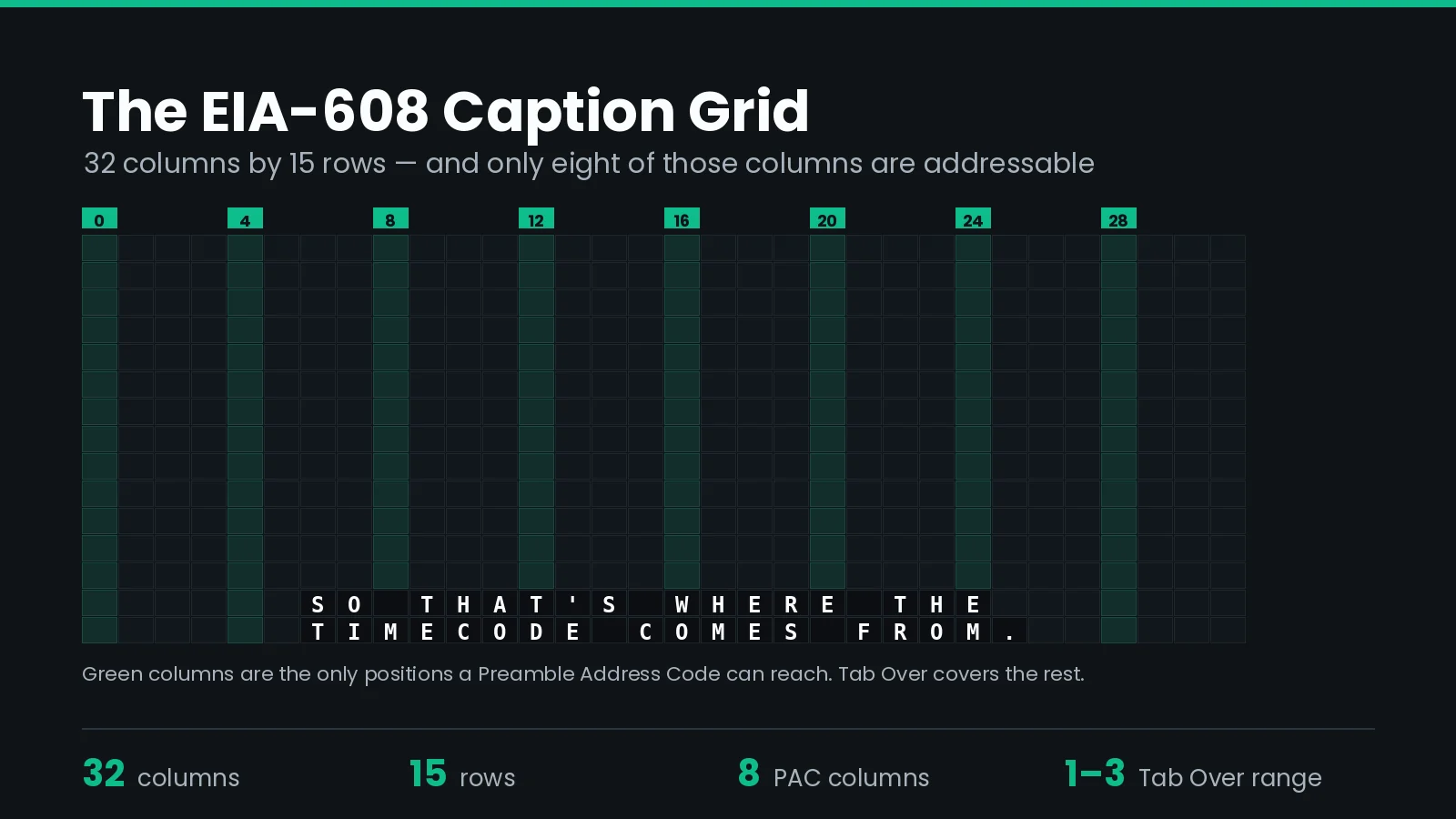
Here is the constraint that surprises people: a PAC can only land on a column divisible by four. Columns 0, 4, 8, 12, 16, 20, 24, and 28 are addressable. Nothing else is.
To start a caption at column 22, an encoder writes the PAC for column 20 and follows it with a Tab Over code (97a2) to shift two more columns. Tab Over handles offsets of one, two, or three columns — which is all you need, because everything else is reachable by a PAC.
Two practical consequences:
- Centring is approximate. A caption is centred by computing the nearest addressable column and tabbing over. On a 32-column grid, that is close enough to look right, but it is never pixel-exact.
- Position is per-row, not per-caption. Each row of a multi-line caption needs its own PAC. Miss one and the second line lands wherever the cursor happened to be.
Pop-On, Roll-Up, or Paint-On?
EIA-608 supports three caption styles, and the control codes differ for each. The choice is usually made by the delivery spec, not by preference.
| Style | How it behaves | Typical use | Key code |
|---|---|---|---|
| Pop-on | Built off screen, then swapped in whole | Scripted and pre-recorded programming | 9420 |
| Roll-up | Text scrolls up 2, 3, or 4 rows at a time | Live news, sports, and events | 9425 to 94a7 |
| Paint-on | Characters appear one by one, in place | Rare — occasional live and promo use | 9429 |
Pop-on is what almost every offline deliverable uses, because it lets you place captions precisely and time them to the frame. Roll-up exists because a live captioner cannot know what the sentence will be before it is finished.
Mixing styles inside one file is legal but rarely a good idea. A decoder switching modes mid-programme can leave residue on screen.
Why Does SCC Run Out of Room?
Line 21 carries two bytes per frame, per field. At 29.97 fps that is about 60 bytes per second. Everything — commands, positioning, and text — shares that budget.
Work through a normal two-line caption of 60 characters:
| Element | Byte pairs | Frames |
|---|---|---|
| ENM, doubled | 2 | 2 |
| RCL, doubled | 2 | 2 |
| PAC for row 1, doubled | 2 | 2 |
| Row 1 text, 30 characters | 15 | 15 |
| PAC for row 2, doubled | 2 | 2 |
| Row 2 text, 30 characters | 15 | 15 |
| EDM, doubled | 2 | 2 |
| EOC, doubled | 2 | 2 |
| Total | 42 | 42 frames, about 1.4 seconds |
That is 1.4 seconds of transmission before the caption can appear. The loading happens invisibly, in the off-screen buffer, so the viewer sees nothing until 942f fires — but the frames still have to exist.
This is why back-to-back captions fail. If two captions are 20 frames apart, the second one cannot finish loading before it is due. The encoder either truncates it, delays it, or drops it. Leave enough space between events, and keep an eye on reading speed at the same time — the two constraints usually bite together.
Long captions with heavy positioning are the worst case. Every extra PAC costs two more frames.
Can an SCC File Be 23.976 or 25 fps?
Not properly, no.
SCC was written when every North American broadcast was 29.97 fps, and the format carries no frame rate field at all. The only rate information is the drop frame separator. A reader has nothing else to go on, so it assumes 29.97.
Tools will happily write a file with 23.976 timecodes in it. Some downstream systems will even read it. But the file is non-standard, and a decoder that assumes 29.97 will place every caption in the wrong frame.
When a spec asks for a "23.98 SCC," it usually means something more specific:
- Most often: a 29.97 non-drop SCC paired with a 23.976 picture. This is the common industry practice, and it works because the two are related by 2:3 pulldown.
- Sometimes: an MCC file, which does carry a frame rate.
- Occasionally: nobody has checked, and the spec is repeating language from an older document.
Ask before you export. Guessing here is expensive, because the file will look valid and fail on air.
For 25 fps material, SCC is simply the wrong container. Use EBU-STL or a TTML-family format instead.
How Do You Export a Valid SCC File?
The encoder has to make several decisions that are invisible in the finished file: which caption channel to use, whether to double commands, how to round positions onto the grid, and where to start the timecode.
In Closed Caption Creator, those settings live in the export profile, so a delivery spec can be saved once and reused across a series.
Four settings to confirm before every delivery:
- Caption channel. CC1 is the default for the primary language. CC3 is the usual home for a second language. Putting English on CC3 means most viewers never see it.
- Drop frame. Must match the master, not the project you happen to be working in.
- Start timecode. If the master starts at 01:00:00:00, the SCC must too. Files that start at zero are the most common redelivery.
- Maximum rows. Two or three rows, depending on the spec. Four is legal and almost always rejected.
If the deliverable is an embedded track rather than a sidecar file, our guide to embedding 608 and 708 captions for broadcast covers the next step.
SCC vs MCC vs EBU-STL vs SRT
These formats are not tiers of quality. They target different transmission systems, and substituting one for another is a delivery failure rather than a compromise.
For the streaming side of the same question — where deliverables are XML rather than hex or binary — see our guide to TTML, DFXP, and IMSC.
| Format | Standard | Carries | Frame rates | Styling |
|---|---|---|---|---|
| SCC | EIA-608 | 608 only | 29.97 only | Color, italics, underline via control codes |
| MCC | CEA-708 | 708 and 608, plus OP-47 | Multiple, stored in the file | Full 708 styling |
| EBU-STL | EBU Tech 3264 | Teletext or open subtitles | 25 and 30 only | Teletext control codes |
| SRT | De facto | Text and timing | Any | Effectively none |
| TTML / IMSC | W3C | Text, timing, style, position | Any | Full |
The practical rule: if the spec says 708 or HD, SCC is not enough. SCC carries no 708 data whatsoever. Encoders commonly up-convert 608 into a 708 service on ingest, but that happens downstream and the styling you get is whatever the encoder decides.
Converting between all of these is routine work. Our comparison of caption file converters covers the options, and how we compare to MacCaption goes into the 608 and 708 workflow specifically.
What Actually Fails an SCC Delivery
Ranked by how often we see them.
- Wrong start timecode. The file starts at 00:00:00:00 and the master starts at 01:00:00:00. Everything is an hour out.
- Drop frame mismatch. Colon where a semicolon belongs. Drift builds through the programme.
- Broken parity. Almost always from hand-editing hex. Shows as solid blocks.
- Missing erase commands. Two captions overlap because no
942ccleared the first. - Captions too close together. Not enough frames to load the buffer, so events get dropped.
- Lines over 32 characters. The decoder wraps or truncates, and the placement collapses.
- Wrong caption channel. Primary language on CC3 instead of CC1.
- Four-row captions. Legal in the standard, rejected by most broadcasters.
Almost all of these are catchable before delivery. Our caption and subtitle QC checklist covers the general pass; the list below is the SCC-specific layer on top.
SCC Delivery Checklist
| # | Check | Automatable? |
|---|---|---|
| 1 | Header line reads exactly Scenarist_SCC V1.0 | Yes |
| 2 | Timecode separator matches the master's drop frame setting | Yes |
| 3 | First caption timecode aligns with the master start, not 00:00:00:00 | Yes |
| 4 | Every byte passes an odd parity check | Yes |
| 5 | No line exceeds 32 characters | Yes |
| 6 | Row count per caption is within the spec, usually two or three | Yes |
| 7 | Every displayed caption is cleared by a later erase command | Yes |
| 8 | At least 40 frames between the load and display of consecutive captions | Yes |
| 9 | Caption data lands on the channel the spec names | Yes |
| 10 | Decoded playback reviewed against picture, end to end | No |
Items 1 through 9 belong in an automated pre-flight. At volume, the work order API can validate and convert on ingest, which is where you want a failure to surface — not at delivery.
Frequently Asked Questions
What is an SCC file?
An SCC (Scenarist Closed Captions) file is a plain text file that carries EIA-608 caption data as hexadecimal byte pairs, one pair per video frame. Each line holds a SMPTE timecode followed by the bytes transmitted from that frame onward. It is the standard closed caption deliverable in North America.
How do I open an SCC file?
Any text editor will open it, because an SCC file is plain text. What you will see is timecodes and hex, not readable words, since the caption text is encoded as byte pairs with odd parity. To read or edit the captions, open the file in a caption editor that decodes EIA-608, such as Closed Caption Creator.
What frame rate is an SCC file?
29.97 fps. The format was written for NTSC line 21 captioning and has no field for frame rate. The only rate information in the file is the timecode separator, which indicates drop frame or non-drop frame. Files labelled 23.976 or 25 fps SCC are non-standard and will drift on most decoders.
What is the difference between a colon and a semicolon in an SCC timecode?
The colon in 01:00:00:00 means non-drop frame. The semicolon in 01:00:00;00 means drop frame. Both run at 29.97 fps, but drop frame skips two frame numbers each minute except every tenth minute so the timecode tracks clock time. Using the wrong one drifts about 3.6 seconds per hour.
What does 8080 mean in an SCC file?
8080 is the null byte pair. It is 00h twice with odd parity applied, and it transmits nothing. Encoders use it as padding to fill frames while waiting, most often between the point where a caption finishes loading and the frame where it should appear. Gaps between timecodes are filled with 8080 automatically.
What is odd parity in an SCC file?
EIA-608 uses seven data bits per byte and reserves the eighth as a parity bit. The parity bit is set so the total number of 1 bits in the byte is odd. A decoder that receives a byte with even parity treats it as corrupt and usually draws a solid block instead. This is why hand-edited SCC files show block characters.
Can an SCC file contain CEA-708 captions?
No. SCC carries EIA-608 data only. If a delivery spec asks for 708, you need an MCC file, an embedded caption track in the master, or a TTML-family format. Most encoders will up-convert 608 into a 708 service on ingest, but the SCC file itself contains no 708 data.
Can SCC captions use lowercase letters and colors?
Yes. EIA-608 supports mixed case, italics, underline, and seven colors besides white, all set through control codes. Broadcast practice still favours white uppercase text because older decoders handled it most reliably. Check the delivery spec before using color, since many broadcasters reject anything but white.
How many characters fit on an SCC caption line?
The EIA-608 grid is 32 columns wide and 15 rows tall, so 32 characters is the hard limit per row. Most broadcasters cap lines lower, around 32 characters including spaces, and limit a caption to two or three rows. Preamble address codes can only place the cursor on columns divisible by four.
Should I deliver SCC or MCC?
Deliver what the spec names. SCC is right for standard definition, DVD, legacy broadcast, and any spec that says 608. MCC is right when the spec asks for CEA-708, high definition, or frame rates other than 29.97. When a spec is ambiguous, ask, because the two are not interchangeable.
Delivery specifications vary between broadcasters, so confirm the frame rate, caption channel, and start timecode against the spec you were sent rather than against a previous job. Need SCC, MCC, and TTML out of the same master? Talk to our team or start a free trial.