Closed Caption Creator vs. MacCaption
The MacCaption replacement for teams that never wanted to leave the Mac
Telestream retired MacCaption in 2023. Its two official migration paths both come with a catch. Closed Caption Creator opens your existing .mcc files natively on macOS, Windows, Linux, and the web.
Free 7-day trial · Cancel Anytime
What is the best alternative to MacCaption?
Closed Caption Creator is the closest replacement for MacCaption on macOS. Telestream ended MacCaption support on May 1, 2023 and now points users to CaptionMaker, which is Windows-only, or Stanza. Closed Caption Creator runs natively on macOS, Windows, and Linux, imports MacCaption .mcc files directly, and starts at $25 per month.
What happened to MacCaption?
Telestream published a retirement notice in March 2022 announcing the end of MacCaption. Sales stopped first, then support. The final release was version 8.1.1 in January 2023.
-
April 30, 2022
Last date to purchase a new MacCaption license, in any edition.
-
April 30, 2022
Last date to order a one-year support contract. Existing contracts were co-termed to April 30, 2023.
-
January 11, 2023
MacCaption 8.1.1 released — the final version.
-
May 1, 2023
End of support. Telestream stopped issuing new versions and closed support for all MacCaption editions.
Source: Telestream, MacCaption Retirement Notice (PDF, March 31, 2022).
Existing installations still launch. But there are no security patches, no macOS compatibility updates, and no support line — which is a growing risk every time Apple ships a new major OS release.
What are my options now that MacCaption is gone?
Telestream's retirement notice names two migration paths. Both are legitimate, and both have a trade-off worth knowing before you commit.
CaptionMaker
Your MacCaption license key works on CaptionMaker, and CaptionMaker opens MacCaption project files. It is a mature, capable broadcast tool with deep format coverage.
The catch: CaptionMaker is Windows-only.
Telestream labels this on its own captioning pages. If you retired MacCaption because you work on a Mac, this path means new hardware or a virtual machine.
Stanza
Stanza launched in 2022 as a subscription, multi-platform caption and subtitle editor running on Windows, macOS, and Linux. Telestream offered migration terms to MacCaption customers under an active support contract.
The catch: it is a different application.
Stanza is a ground-up rebuild rather than a MacCaption continuation, so the interface and workflow are new regardless. Pricing is quote-based rather than published.
Closed Caption Creator
If you are learning a new application either way, it is worth checking what else exists. Closed Caption Creator runs natively on macOS, Windows, and Linux, plus a browser version, and reads MacCaption .mcc files directly.
Published pricing: $25–$60 per month.
Automatic captioning, QC, and 24/7 support are included rather than sold as add-ons.
Will my existing MacCaption files still open?
Yes. Closed Caption Creator reads the MacCaption 608/708 .mcc format natively, along with the other broadcast interchange formats a MacCaption library tends to accumulate over the years.
The import dialog exposes the settings that matter when moving legacy broadcast files: source frame rate, drop-frame conversion, file encoding, and whether the incoming events merge with or replace the current group.
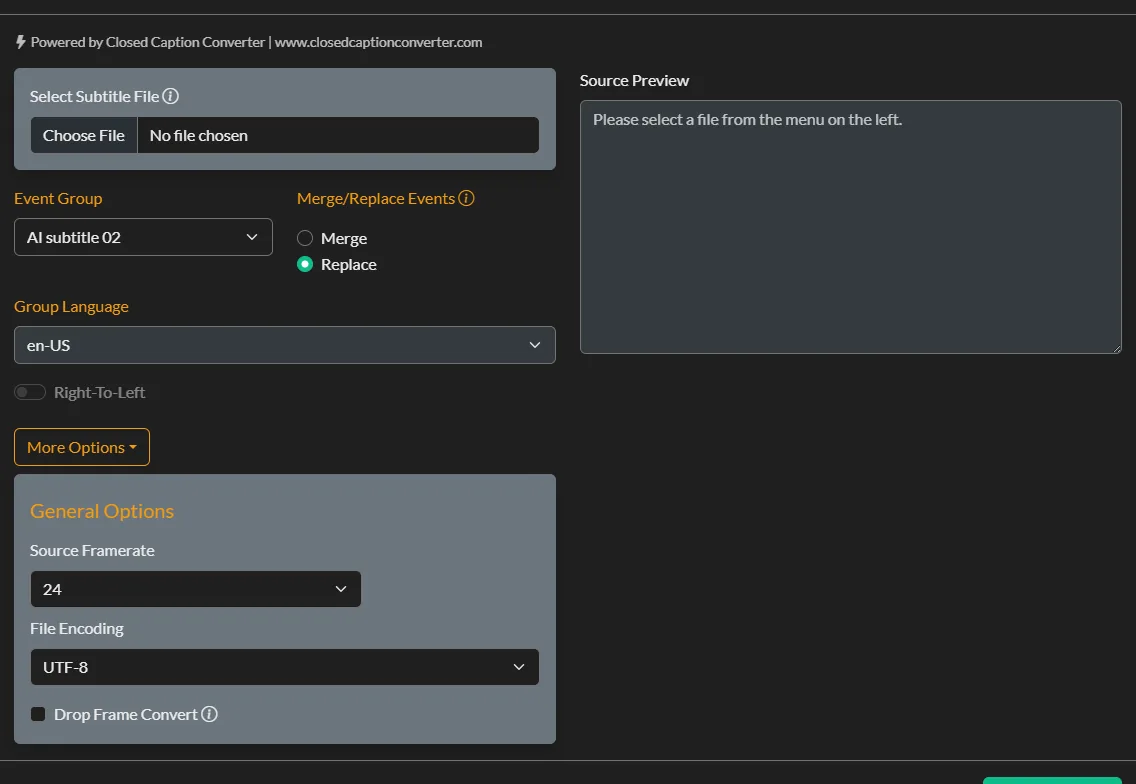
Importing a legacy caption file with frame rate and drop-frame controls.
| Format | Extension | Status in Closed Caption Creator |
|---|---|---|
| MacCaption 608/708 | .mcc | Import and export |
| Scenarist V1.0 | .scc | Import and export |
| EBU-STL | .stl | Import and export |
| Cheetah (binary and ASCII) | .cap .asc | Import and export |
| ScreenSystems Poliscript | .pac | Import and export |
| Cavena 890 | .890 | Import and export |
| Timed Text / TTML / DFXP | .ttml .xml .dfxp | Import and export |
| WebVTT and SubRip | .vtt .srt | Import and export |
| Apple iTunes Timed Text | .itt | Import and export |
| Avid DS / Adobe Encore / DVD Studio Pro | .txt | Import and export |
That is a partial list. Closed Caption Creator supports more than 30 caption and subtitle formats in total, including the Netflix and IMSC streaming profiles that did not exist when most MacCaption workflows were built. See the full format list.
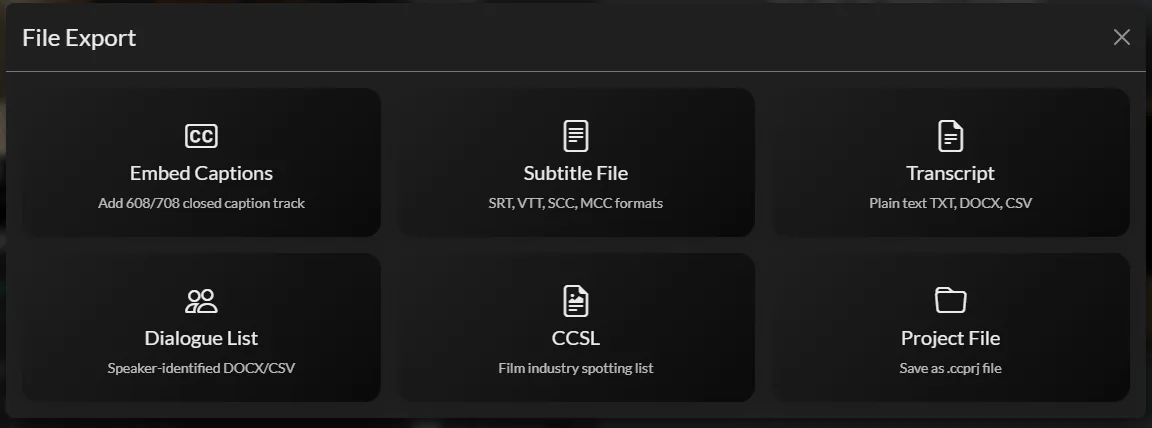
Delivery options in one screen — including SCC and MCC broadcast formats.
Delivery is one screen, not one edition
Embedded 608/708, subtitle files, plain transcripts, speaker-identified dialogue lists, and CCSL spotting lists are all reachable from the same export dialog.
With CaptionMaker, broadcast embedding and interchange formats sit behind the Pro edition, and batch or command-line work behind Enterprise. Here they are plan features, not separate products.
One honest limitation
MacCaption project files (.mcp) are a proprietary Telestream format and do not open directly. Export your captions to .mcc or .scc from MacCaption first — those come across cleanly with timing and positioning intact.
Closed Caption Creator vs. CaptionMaker at a glance
Compared against CaptionMaker, since it is the product Telestream currently sells and recommends to MacCaption users.
| Closed Caption Creator | CaptionMaker | |
|---|---|---|
| Operating systems | Windows, macOS, Linux | Windows only |
| Browser version | Yes, via Google Chrome | No |
| Licensing model | Subscription, monthly or annual | Perpetual licence plus annual support |
| Entry price | $25/month billed annually ($300/year) | $1,795 licence + $248/year support |
| Price with broadcast embedding | $50/month billed annually ($600/year) | $6,495 Pro licence + $908/year support |
| Price with batch and CLI automation | $50/month billed annually ($600/year) | $14,495 Enterprise licence + $2,025/year support |
| Support cost | Included at every tier | $248–$2,025 per year depending on edition |
| Automatic captioning | 300–600 minutes/month included; $0.10/minute beyond | Via Telestream Cloud Timed Text Speech, billed separately |
| Machine translation | 500,000 characters/month on Pro | Not included |
| Audio description | Optional add-on, includes text-to-speech | Not included |
| Team projects and collaboration | Included on Pro, 1–25 users | Not included |
| 608/708 broadcast embedding | Included on Pro; $2.00/file + $0.40/GB uploaded | Included on Pro and Enterprise editions |
| Live captioning | Not supported | Supported on Pro and Enterprise |
| DVD and Blu-ray subtitling | Image-based subtitle export | Supported on Pro and Enterprise |
| Free trial | 7 days | Yes |
608/708 embedding without a licence upgrade
Point at an MP4, MOV, GXF, MPEG, or MXF file, choose the caption track and target frame rate, and the embed job runs in the cloud.
It is included on the Pro plan, billed per job at $2.00 per file plus $0.40 per GB uploaded — rather than requiring the $6,495 Pro edition licence.
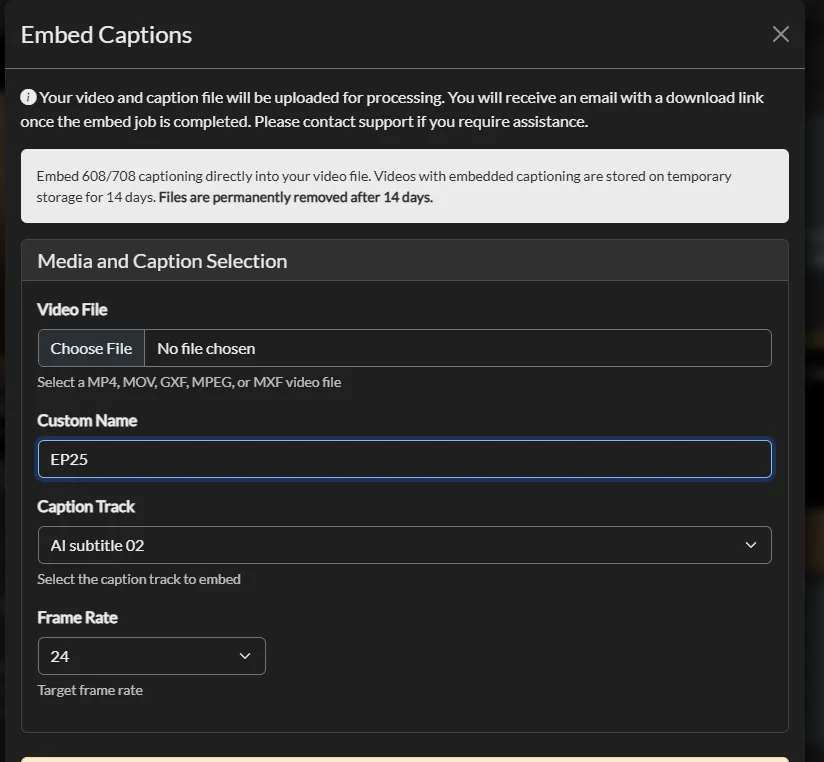
Embedding 608/708 captions directly into a broadcast video file.
CaptionMaker pricing sourced from the Telestream online store, verified August 2026. Prices are list and may vary by region or reseller. Live captioning and disc-based subtitling are areas where CaptionMaker Pro does things Closed Caption Creator does not — if either is central to your work, it is the better fit.
Why MacCaption users choose Closed Caption Creator
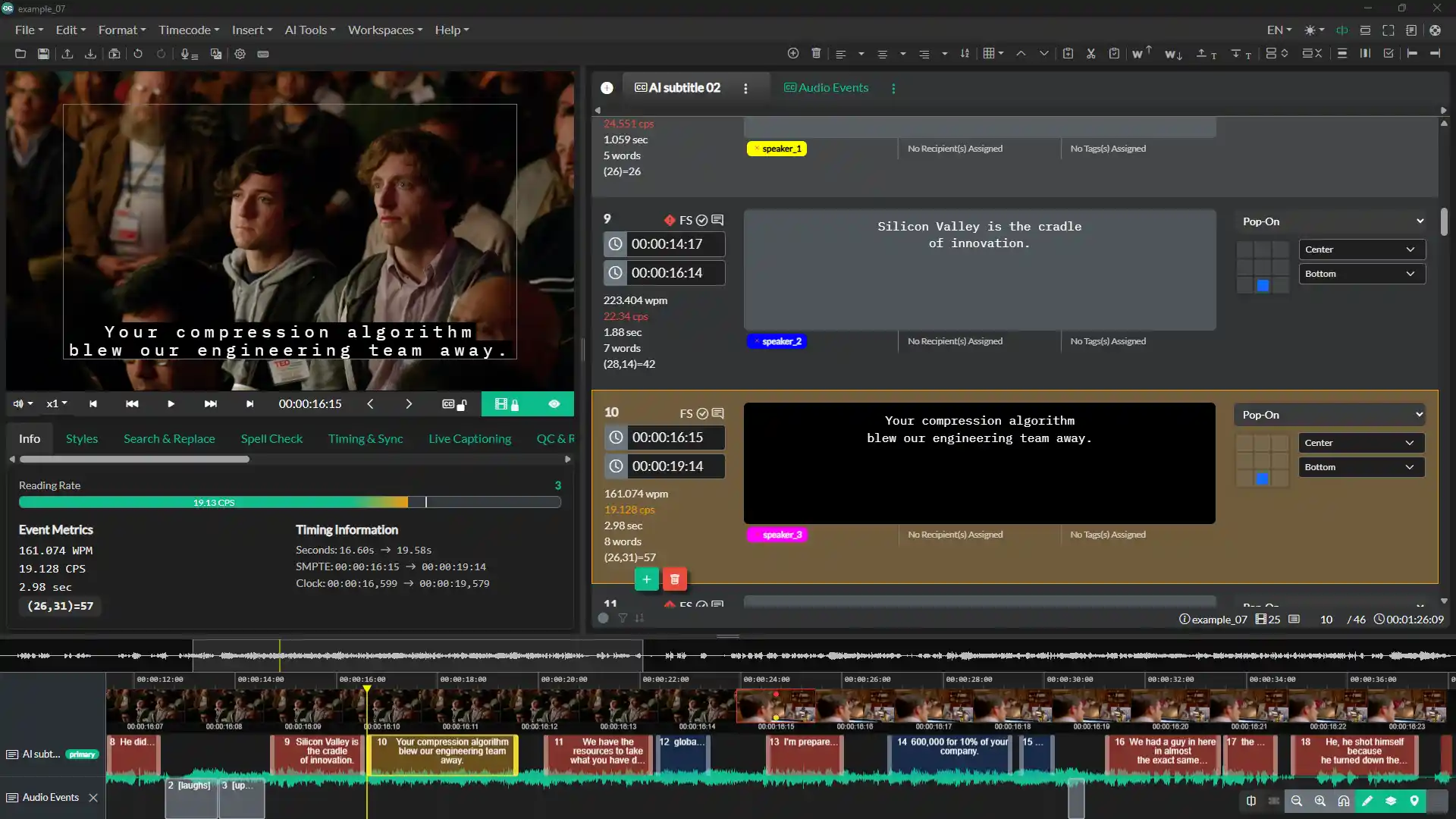
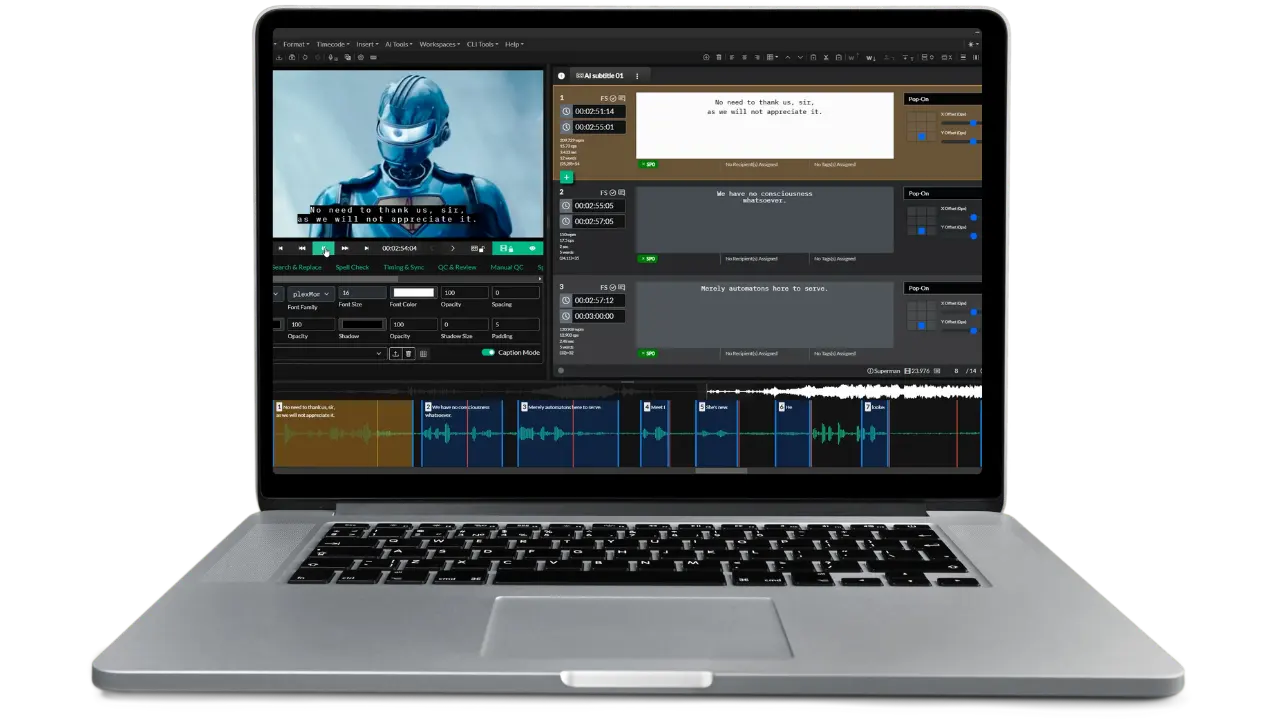
The editing workspace: video preview, event list with reading-rate metrics, positioning grid, and waveform timeline.
You keep your Mac
Native desktop builds for macOS, Windows, and Linux from a single subscription, plus a browser version for machines you can't install software on.
Predictable cost
One subscription covers the application, updates, and support. No separate support contract, no per-edition upgrade to unlock broadcast formats.
Still being built
Monthly releases. Newer delivery profiles like Netflix TT and IMSC ship as platforms adopt them, rather than arriving after a product has stopped receiving updates.
MacCaption migration questions
Common questions from teams moving off MacCaption.
No. Telestream ended support for MacCaption on May 1, 2023, and stopped selling new licences on April 30, 2022. The final release was version 8.1.1 in January 2023. Existing installations still run, but there are no updates, no security patches, and no support channel.
Telestream's retirement notice names two: CaptionMaker, which accepts MacCaption licence keys and opens MacCaption project files but runs on Windows only, and Stanza, a newer subscription product for Windows, macOS, and Linux. Migration terms were offered to customers with an active support contract at the time.
Yes. Closed Caption Creator imports and exports the MacCaption 608/708 .mcc format natively, along with .scc, .stl, .cap, .pac, .890, TTML, WebVTT, and more than 30 other formats. Timing and positioning carry across.
Not directly. MacCaption project files are a proprietary Telestream format. Export your work to .mcc or .scc from MacCaption first, then import that into Closed Caption Creator. Caption text, timing, and positioning come through intact.
Yes, natively. There are desktop builds for macOS, Windows, and Linux, plus a browser version that runs in Google Chrome. One subscription covers all of them, so you can move between machines without buying another licence.
Closed Caption Creator is $25 per month billed annually for Starter and $50 per month billed annually for Pro, with support included. CaptionMaker is a perpetual licence: $1,795 for Desktop, $6,495 for Pro, or $14,495 for Enterprise, plus $248 to $2,025 per year for support.
Yes. SCC, MCC, and STL export and 608/708 embedding are on the Pro plan. Starter covers the common streaming and web formats such as SRT, WebVTT, and TTML. Embedding also carries a usage fee of $2.00 per file plus $0.40 per GB uploaded.
No. Live captioning is one area where CaptionMaker Pro and Enterprise do something Closed Caption Creator does not. If live work is central to your operation, that is worth weighing. Closed Caption Creator is built for file-based post-production captioning.
Included. Starter comes with 300 minutes per month and Pro with 600 minutes per month, using Deepgram, Speechmatics, and AssemblyAI. Additional minutes are $0.10. There is no separate cloud service to subscribe to.
Yes, on the Pro plan, which covers 1 to 25 users with shared team projects, QC and review tools, and a Key Names and Phrases manager for consistent terminology. Enterprise removes the user limit.
Most MacCaption users are productive within a day. The editing model is familiar — timeline, waveform, event list, and a foot pedal option. Free video courses and a full user guide are included, and 24/7 email and live chat support comes with every plan.
How Closed Caption Creator compares to other captioning tools
Try it on your own MacCaption files
Import an existing .mcc or .scc file and see how the timing and positioning carry across. The trial includes the video courses and the full user guide.