Closed Caption Creator vs. HappyScribe
A HappyScribe alternative for when the captions are the deliverable
HappyScribe turns meetings and interviews into text in 150+ languages. Closed Caption Creator is a professional caption and subtitle editor — with broadcast formats, 608/708 embedding and QC that a transcript-first tool does not carry.
Free 7-day trial · Cancel Anytime
What is the best alternative to HappyScribe?
Closed Caption Creator is the strongest alternative to HappyScribe for professional caption and subtitle work. HappyScribe is an AI transcription and meeting-notes platform that produces transcripts and draft subtitles in 150+ languages from $8.50 per month, but its exports stop at web formats such as SRT, VTT and STL. Closed Caption Creator adds the authoring and delivery layer — SCC, MCC and EBU-STL, EIA-608/708 embedding, QC validation, and desktop apps for macOS, Windows and Linux — from $35 per month.
What does HappyScribe cost?
HappyScribe is a subscription with a shared pool of AI minutes covering transcription, subtitling and translation, plus per-minute top-ups and optional human services. Annual billing cuts the listed rate by roughly a third to a half.
-
Free — 10-minute AI trial
Unlimited meeting recordings capped at 45 minutes each, TXT and SRT export, and watermarked MP4 video.
-
Basic — $8.50/mo billed annually ($17 monthly)
120 AI minutes per month across transcription, subtitling and translation; 90-minute recording cap; 1 seat; watermark-free exports.
-
Pro — $19/mo billed annually ($29 monthly)
600 AI minutes per month and 3 seats. Unlocks all 15+ export formats including VTT, STL, XML, FCPXML and EDL, plus API access and custom summary templates.
-
Business — $59/mo billed annually ($89 monthly)
6,000 AI minutes per month and 5 seats, with workspace roles, unlimited style guides and glossaries, priority support and 5% off human proofreading.
-
Top-ups — $0.20/min
Plan credits reset at the end of each billing cycle; only topped-up credits carry over.
-
Human services — from $2.00/min
Human proofreading and professional subtitling and translation in 65+ languages, billed per minute on top of the subscription.
Is a transcript generator or a caption editor the better fit?
HappyScribe and Closed Caption Creator overlap at exactly one point: turning speech into timed text. What you need to do with that text afterwards decides which one earns its keep.
Meetings, interviews, 150+ languages
HappyScribe's AI notetaker joins Zoom, Teams and Google Meet calls from your calendar and returns summaries and action items. It transcribes in more than 150 languages, offers human proofreading from $2.00 per minute, and has iOS and Android apps.
If the job is meeting notes or a quick transcript, this is the better tool.
Closed Caption Creator has no notetaker, no human services and no mobile app. It is built for caption and subtitle authoring.
Delivery formats and the desktop
Exports top out at SRT, VTT, STL, XML, FCPXML and EDL. There is no SCC or MCC, no EIA-608/708 embedding into broadcast video, and no desktop application — the Mac and Windows apps are listed as coming soon. Plan credits also expire at the end of each billing cycle.
The catch: fine for the web, short of broadcast.
Anything destined for a broadcaster's technical spec needs a different tool to finish the job.
Closed Caption Creator
A dedicated caption and subtitle editor for macOS, Windows, Linux and the browser, with more than 30 formats including SCC, MCC and EBU-STL, 608/708 embedding, automated QC and reviewer approval.
Published pricing: Free, $35–$75 per month, or a lifetime licence from $2,000.
Automatic captioning, QC, and 24/7 support are included rather than sold as add-ons.
Can HappyScribe deliver broadcast captions?
No — its export list stops at web and NLE formats. SRT, VTT and EBU-STL cover most streaming and web delivery, and Closed Caption Creator supports all of those too.
The gap appears when a deliverable spec calls for Scenarist .scc, MacCaption .mcc, or captions embedded directly into an MP4, MOV, GXF, MPEG or MXF master — none of which HappyScribe produces.
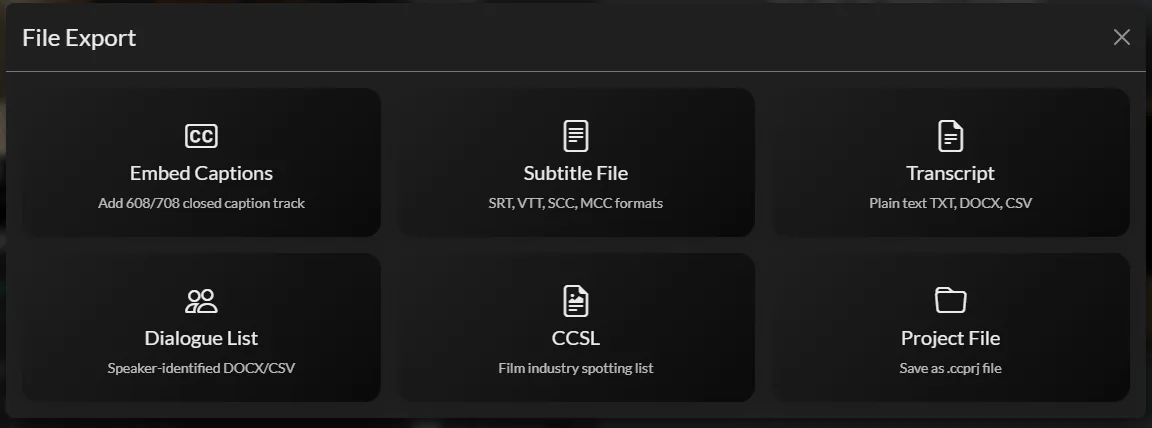
Delivery options in one screen — including SCC and MCC broadcast formats.
| Delivery format | Closed Caption Creator | HappyScribe |
|---|---|---|
| SubRip and WebVTT (.srt .vtt) | Import and export | SRT on all plans; VTT on Pro and above |
| EBU-STL (.stl) | Import and export | Export on Pro and above |
| TTML / DFXP (.ttml .dfxp) | Import and export | Not listed |
| Scenarist (.scc) | Import and export | Not offered |
| MacCaption 608/708 (.mcc) | Import and export | Not offered |
| Netflix and IMSC profiles | Import and export | Not offered |
| 608/708 embedded in MP4, MOV, GXF, MPEG, MXF | Included on Pro; $2.00/file + $0.40/GB | Not offered |
| Burnt-in subtitle video (MP4) | Included in video export | Watermark-free on paid plans |
| Transcripts (DOCX, PDF, TXT) | Export, including dialogue lists and CCSL | Export; DOCX and PDF on Basic and above |
Closed Caption Creator supports more than 30 caption and subtitle formats in total, including legacy broadcast interchange formats such as Cheetah .cap, ScreenSystems .pac and Cavena .890. See the full format list.
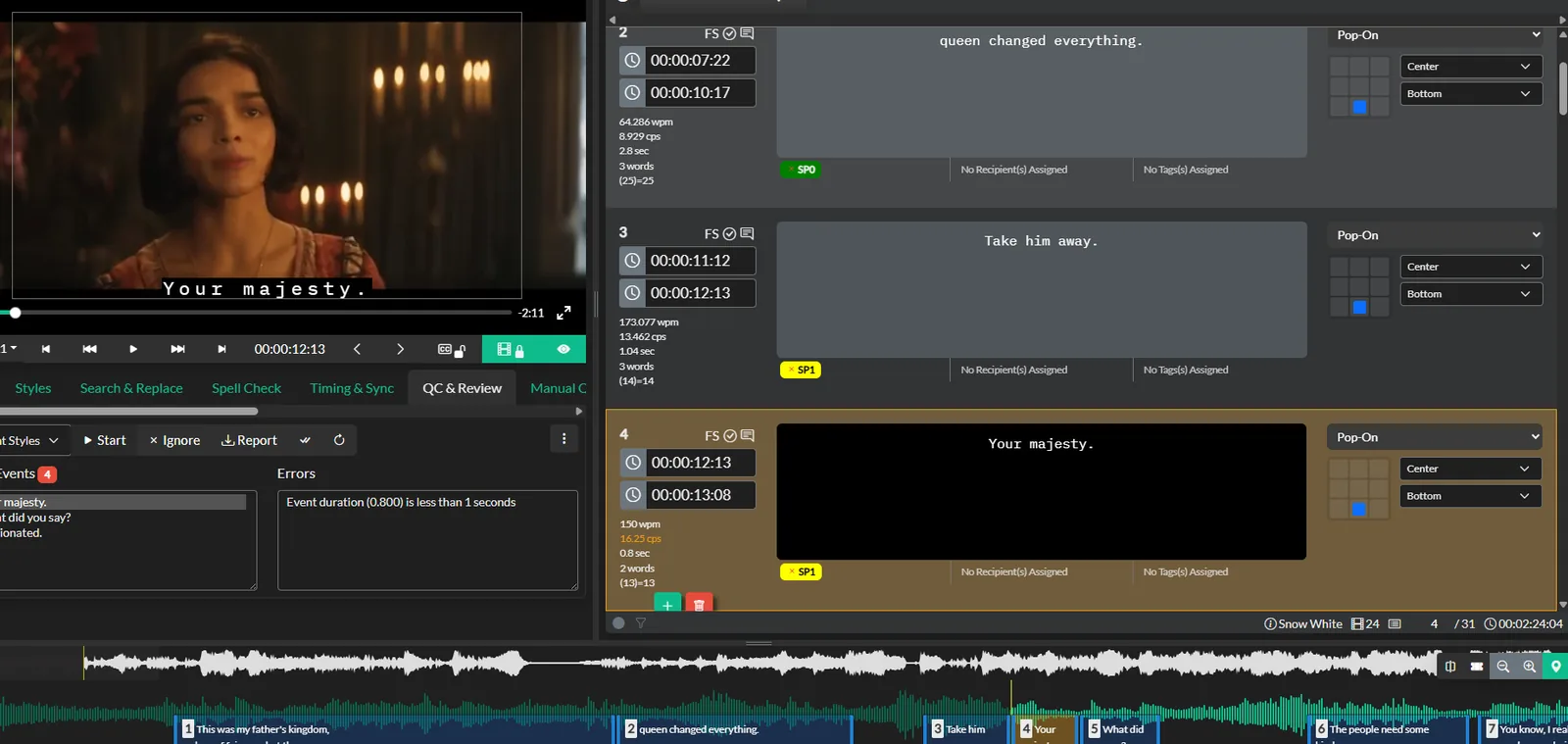
Automated QC and reviewer approval inside the same project.
QC is part of the editor, not an add-on
Closed Caption Creator flags reading rate, line length, timing overlaps and positioning against your style guide automatically, and team projects carry tagging, notes and reviewer approval.
HappyScribe's editor is built for correcting transcripts before export. Its style guides and glossaries govern terminology for the notetaker, not caption rules such as characters per line or minimum display duration.
One honest limitation
HappyScribe does things Closed Caption Creator simply does not: an AI notetaker that joins Zoom, Teams and Google Meet calls, human proofreading and professional translation services, transcription in 150+ languages, iOS and Android apps, and API and MCP access on paid plans. If meeting intelligence or managed human services are the core need, HappyScribe is the better fit.
Closed Caption Creator vs. HappyScribe at a glance
HappyScribe rates are taken from their published pricing page in August 2026; annual billing rates are shown. Both products include AI transcription — the differences are in what you can do with the text afterwards.
| Closed Caption Creator | HappyScribe | |
|---|---|---|
| Product type | Desktop and browser caption editor | Browser-based AI transcription and notetaker |
| Operating systems | Windows, macOS, Linux, browser | Browser; desktop apps listed as coming soon |
| Offline working | Yes, desktop application | No, cloud service |
| Pricing model | Flat subscription | Subscription plus per-minute top-ups and human services |
| Entry price | Free plan; paid from $35/month or $350/year; lifetime from $2,000 | Free tier; Basic at $8.50/month billed annually |
| Plan with 600 monthly AI minutes | Pro, $75/month or $750/year | Pro, $19/month billed annually |
| Additional minutes | $0.10 per minute | $0.20 per minute top-up |
| AI transcription languages | Via Deepgram, Speechmatics and AssemblyAI | 150+ languages |
| Machine translation | 500,000 characters/month on Pro | 80+ languages, drawn from the same minute balance |
| Human transcription and proofreading | Not offered | From $2.00/minute, 65+ languages |
| AI notetaker for Zoom, Teams, Meet | Not offered | Included on all plans |
| Export formats | 30+ including SCC, MCC, EBU-STL, TTML, IMSC | 15+ on Pro: SRT, VTT, STL, XML, FCPXML, EDL |
| SCC and MCC broadcast formats | Included on Pro | Not offered |
| 608/708 broadcast embedding | Included on Pro; $2.00/file + $0.40/GB | Not offered |
| Caption QC and reviewer approval | Automated checks and approval on Pro | Not offered |
| Audio description | Optional add-on, includes text-to-speech | Not offered |
| Team seats | 1–25 users included on Pro | 3 seats on Pro, 5 on Business; extra seats billed monthly |
| Mobile app | No | iOS and Android |
| Free trial | 7 days | Free tier with 10-minute AI trial |
Sourced from the HappyScribe pricing page, verified August 2026; annual billing rates shown and monthly billing is higher. The AI notetaker, human-made services, mobile apps and 150+ language coverage are things Closed Caption Creator does not offer — for meeting notes or managed human services, HappyScribe is the better fit.
Pre-release media can stay local
Closed Caption Creator's desktop builds work against local media, and an offline version runs with no internet connection at all — which matters for pre-release content under embargo.
HappyScribe is a cloud service, so files are uploaded for processing. It holds SOC 2 Type II certification and EU data residency, which suits most corporate policies — but some client contracts still require media that never leaves the facility.
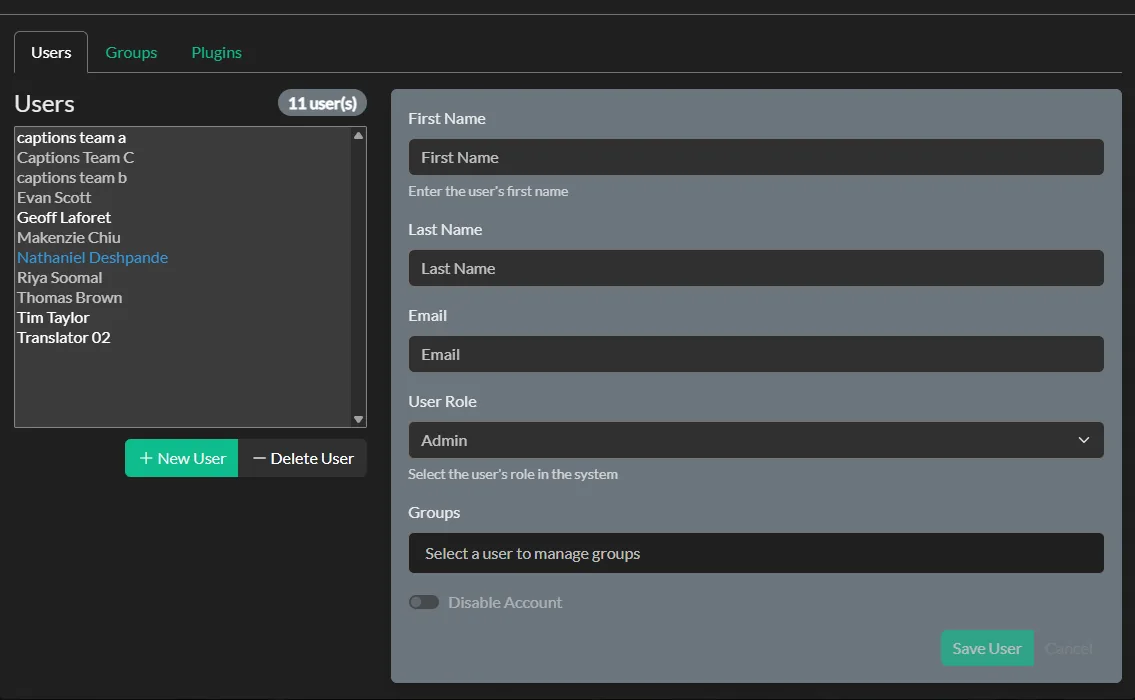
Shared team projects with 3 users included, included on the Pro plan.
Why HappyScribe users choose Closed Caption Creator for delivery
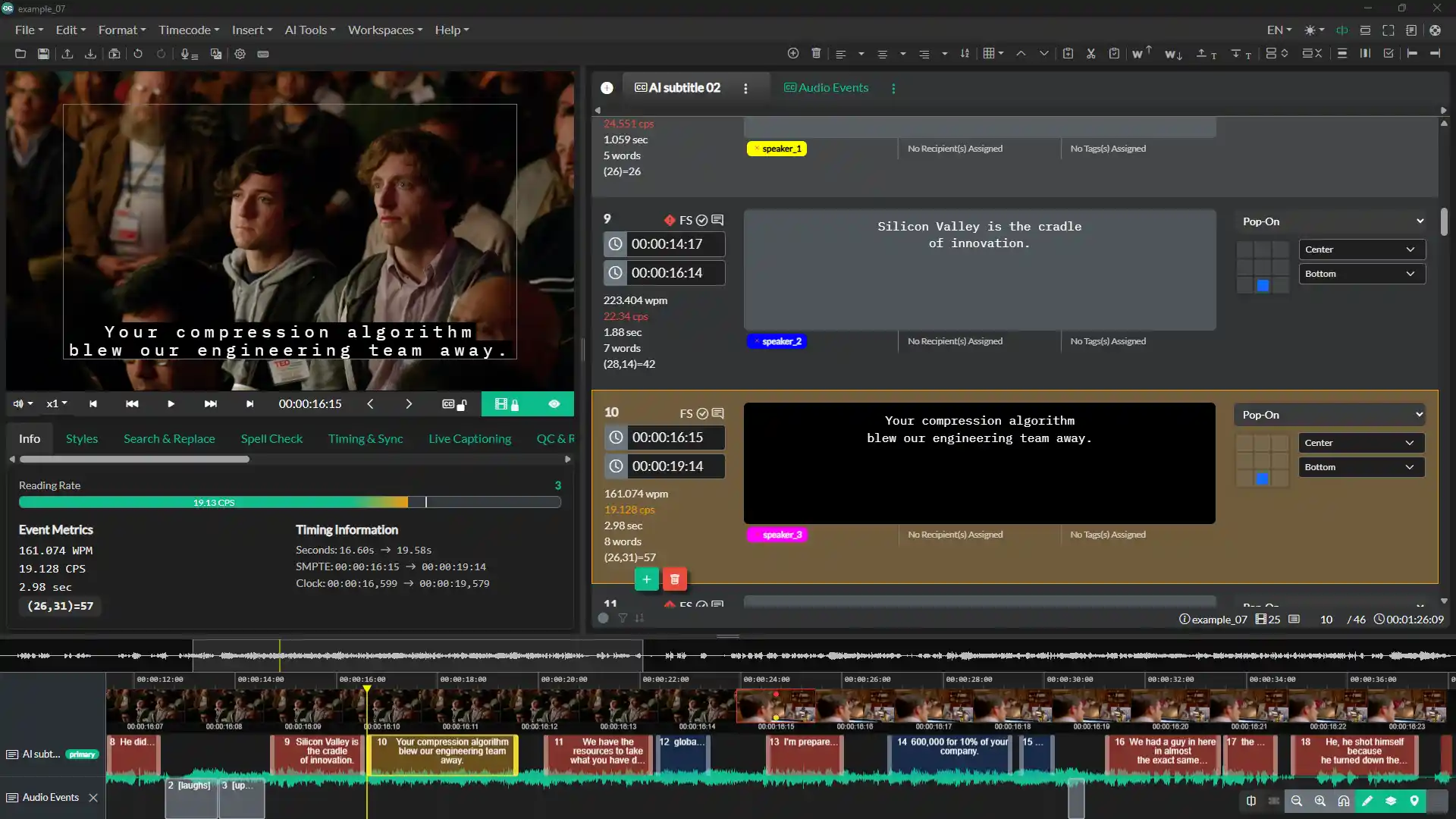
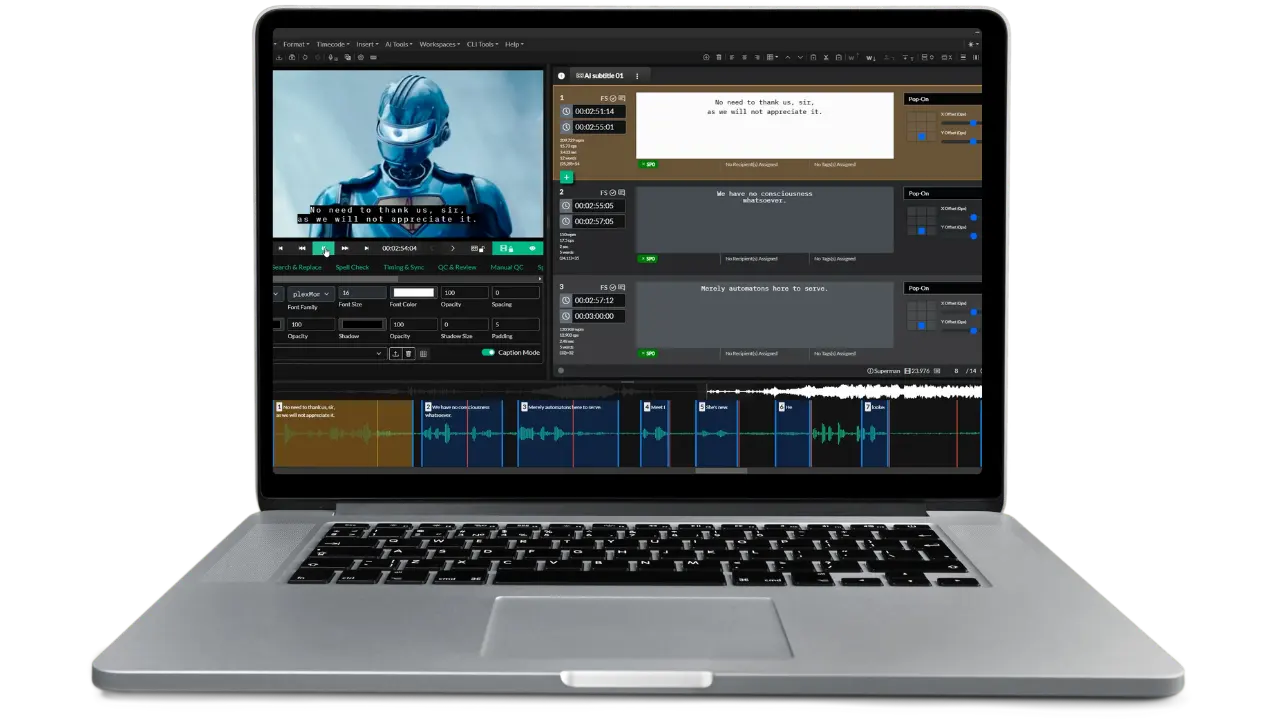
The editing workspace: video preview, event list with reading-rate metrics, positioning grid, and waveform timeline.
Broadcast formats built in
SCC, MCC and EBU-STL export, plus 608/708 embedding into MP4, MOV, GXF, MPEG and MXF — all on the Pro plan, not a separate service.
A real desktop editor
Native macOS, Windows and Linux builds with waveform timing, a positioning grid and an offline mode, so media never has to leave your machine.
QC before delivery
Automated reading-rate, line-length and style-guide checks with reviewer approval, included on Pro rather than billed per minute.
HappyScribe comparison questions
Common questions from teams weighing HappyScribe against Closed Caption Creator.
HappyScribe has a free tier with a 10-minute AI trial. Basic is $17 per month, or $8.50 per month billed annually, with 120 AI minutes per month. Pro is $29 per month, or $19 per month billed annually, with 600 AI minutes per month and 3 seats. Business is $89 per month, or $59 per month billed annually, with 6,000 AI minutes per month and 5 seats. Top-up credits are $0.20 per minute, and human-made services start at $2.00 per minute.
No. Plan credits reset at the end of each billing cycle, so unused monthly minutes are lost. Only separately purchased top-up credits remain in your balance beyond the billing period.
For raw AI transcription minutes, yes. HappyScribe Pro includes 600 minutes per month at $19 per month billed annually; Closed Caption Creator Pro includes the same 600 minutes at $62.50 per month billed annually. The difference pays for the authoring and delivery layer: SCC, MCC and EBU-STL export, 608/708 embedding, automated QC, desktop apps and offline working. Additional minutes are also cheaper on Closed Caption Creator at $0.10 versus $0.20.
No. HappyScribe's export list covers web and NLE formats such as SRT, VTT, STL, XML, FCPXML and EDL, on Pro and above. Scenarist SCC and MacCaption MCC are not offered. Closed Caption Creator imports and exports SCC, MCC, EBU-STL and more than 30 other caption and subtitle formats.
No. HappyScribe can burn open subtitles into an MP4, watermark-free on paid plans, but embedding EIA-608/708 closed captions into a broadcast video file is not offered. Closed Caption Creator embeds 608/708 into MP4, MOV, GXF, MPEG and MXF on the Pro plan, billed at $2.00 per file plus $0.40 per GB uploaded.
Not yet. HappyScribe's pricing page lists Mac and Windows desktop apps as coming soon; today it runs in the browser, with iOS and Android mobile apps. Closed Caption Creator ships native desktop builds for macOS, Windows and Linux, including an offline version that runs with no internet connection.
No. Meeting capture is a core HappyScribe strength: its notetaker joins Zoom, Microsoft Teams and Google Meet calls from your calendar and produces transcripts, summaries and action items. Closed Caption Creator is a caption and subtitle editor and does not record meetings.
HappyScribe does, through human proofreading and professional subtitling and translation services in 65+ languages, starting at $2.00 per minute. Closed Caption Creator does not offer human services; it provides automatic transcription through Deepgram, Speechmatics and AssemblyAI, which you then edit yourself.
Both support teams. HappyScribe Pro includes 3 seats and Business 5, with additional seats billed per month. Closed Caption Creator Pro includes 3 users (more at $10 per user per month) with shared team projects, QC panels, tagging, notes and reviewer approval.
Yes, and it is a reasonable split. Use HappyScribe for meeting notes, interviews and first-draft transcripts, then export SRT or VTT and import it into Closed Caption Creator to conform timing, run QC, and deliver broadcast formats or embedded 608/708 captions to spec.
How Closed Caption Creator compares to other captioning tools
Bring a HappyScribe export and finish it to spec
Export an SRT or VTT from HappyScribe, import it into Closed Caption Creator, and run it through QC and delivery. The trial includes the video courses and the full user guide.