Closed Caption Creator vs. Subtitle Edit
The Subtitle Edit alternative for broadcast delivery and team captioning
Subtitle Edit is free, open source, and converts more than 300 formats — but speech-to-text is a Whisper install you run yourself, Linux support goes through Mono, and there is no 608/708 embedding or shared team review. Closed Caption Creator ships native builds for macOS, Windows, and Linux with captioning minutes and support included.
Free 7-day trial · Cancel Anytime
What is the best alternative to Subtitle Edit?
Closed Caption Creator is the closest alternative to Subtitle Edit for teams who need commercial support, native macOS and Linux builds, and broadcast delivery. Subtitle Edit is free and open source with more than 300 formats and local Whisper transcription, but it is Windows-first and has no 608/708 embedding or managed team review. Closed Caption Creator has a Free plan, and paid plans start at $35 per month with automatic captioning included.
What do you get free — and what do you run yourself?
Subtitle Edit is one of the most capable free subtitle editors ever shipped. The trade-off is not money; it is ownership. Anything beyond manual editing — speech recognition, Linux, collaboration — is a component you install, wire up, and maintain.
Source: Subtitle Edit overview and help pages (verified August 2026)
-
Free and open source
GPL/LGPL licensed with the full C# source published, supported by donations. No paid tier, no seat licence, no trial clock. It requires Microsoft .NET Framework 4.8 on Windows.
-
300+ formats
The widest format library in the category: SRT, WebVTT, TTML, EBU-STL, PAC, Cheetah CAP, Cavena 890, Blu-ray SUP, D-Cinema, and hundreds more, plus command-line and UI batch conversion.
-
Whisper, self-installed
Speech-to-text runs through Whisper engines you pick, download, and configure yourself — some requiring Python, specific CPU instruction sets, or up to 16 GB of RAM. Powerful, and entirely offline.
-
Windows first, Linux via Mono
Subtitle Edit is a Windows program; its help pages describe Linux as running “mostly well” through Mono with manual library and symlink setup for video playback. There is no macOS build.
-
Community-supported
Documentation, videos, and a blog with active comment threads. There is no SLA, support desk, or live chat — when something breaks before a deadline, the answer is a search box.
Where does Subtitle Edit fit, and where does it not?
Subtitle Edit is a remarkable free tool with genuine depth in areas Closed Caption Creator does not cover. It is also built around assumptions — Windows, self-managed components, one editor working alone — that suit some workflows and rule out others.
Free, deep, and offline
Zero cost forever, more than 300 formats, waveform and spectrogram timing, Blu-ray and DVD OCR, a configurable Fix Common Errors wizard, karaoke effects, and Whisper transcription that never sends audio to the cloud.
If cost must be $0, this is the better tool.
Closed Caption Creator is commercial software. Nothing in this comparison changes that Subtitle Edit is free and excellent at what it does.
You become the integrator
Whisper engines, models, and Python runtimes are yours to install and debug. Linux means Mono workarounds. Team review is an experimental networking mode, and support is community documentation rather than a help desk.
The catch: free software, your time.
For a hobby or a single Windows workstation that trade is easy. Across a team with deadlines and delivery specs, setup and maintenance become a real cost.
Closed Caption Creator
Native builds for macOS, Windows, and Linux, plus a browser version, on one subscription. Automatic captioning is included and managed for you, with SCC, MCC, and STL export and 608/708 embedding on Pro.
Published pricing: Free, $35–$75 per month, or a lifetime licence from $2,000.
Shared team projects with QC review, an audio description plugin, and 24/7 email and live chat support included at every tier.
Can it deliver closed captions, not just convert subtitles?
This is the dividing line. Subtitle Edit is a subtitle editor — a superb one — but its published format list stops short of North American broadcast closed captions. Closed Caption Creator exports SCC, MCC, and STL on the Pro plan and embeds EIA-608/708 directly into video files.
QC is different too. Subtitle Edit's Fix Common Errors is configurable and can be tuned to Netflix-style rules, validating one file at a time. Closed Caption Creator's Style Guide Manager holds named rule sets — characters per line, reading rate, duration, overlap, illegal characters for 608 and Netflix — enforced across a whole team project, with profiles for Netflix, Disney, Broadcast US, and YouTube.
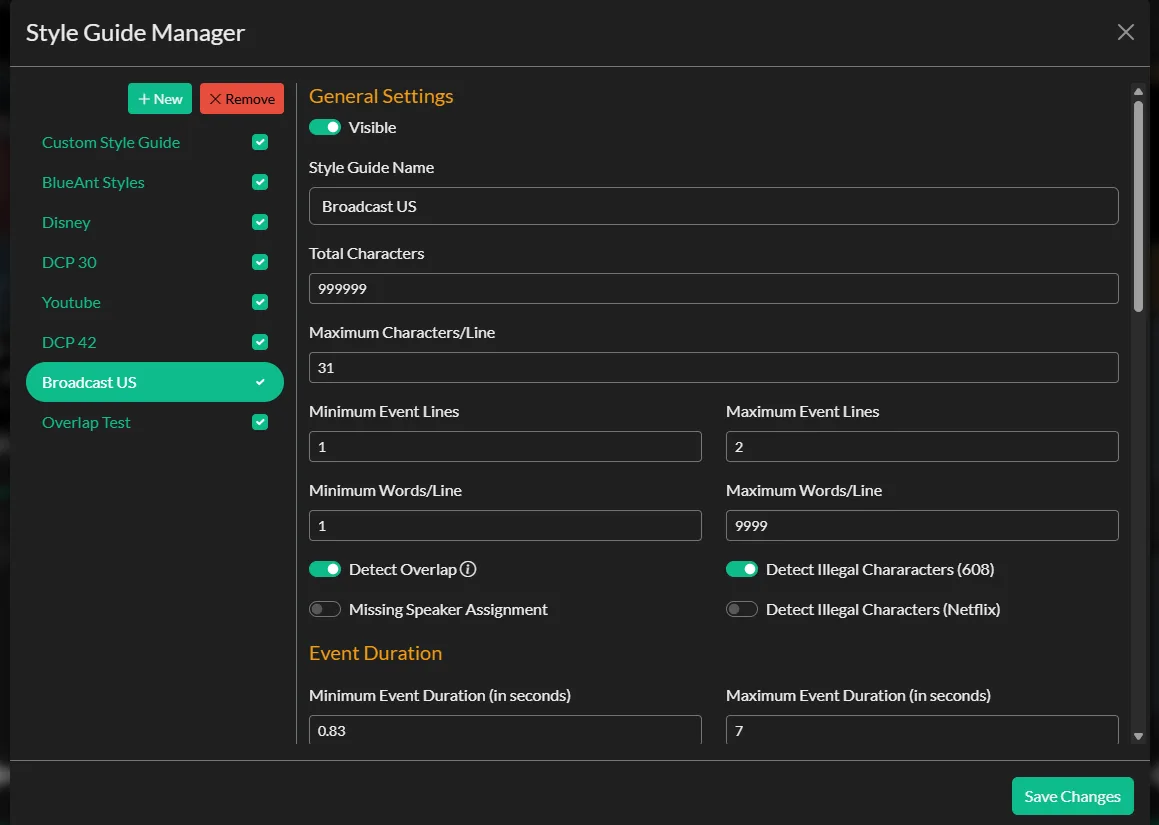
Named style guides with per-profile QC rules, validated across the whole project.
| Capability | In Closed Caption Creator | In Subtitle Edit |
|---|---|---|
| Open subtitles (SRT, WebVTT) | All plans | Yes |
| Timed text (TTML, DFXP, IMSC) | All plans | Yes |
| EBU-STL | Starter and Pro plans | Yes |
| Closed captions (SCC, MCC) | Starter and Pro plans | Not listed |
| 608/708 embedding into video | Pro plan | Not listed — soft-embeds subtitles via FFmpeg |
| Automatic captioning | 300–600 minutes/month included | Whisper, self-installed and offline |
| Audio description and text-to-speech | Optional add-on | TTS playback, not AD authoring |
| Team projects and shared review | Pro plan, 1–25 users | Experimental networking mode |
The pattern is different rather than simply better. Subtitle Edit converts more formats than almost anything else and costs nothing; Closed Caption Creator covers fewer formats but goes further into broadcast delivery, managed speech-to-text, team review, and audio description. See the full format list.
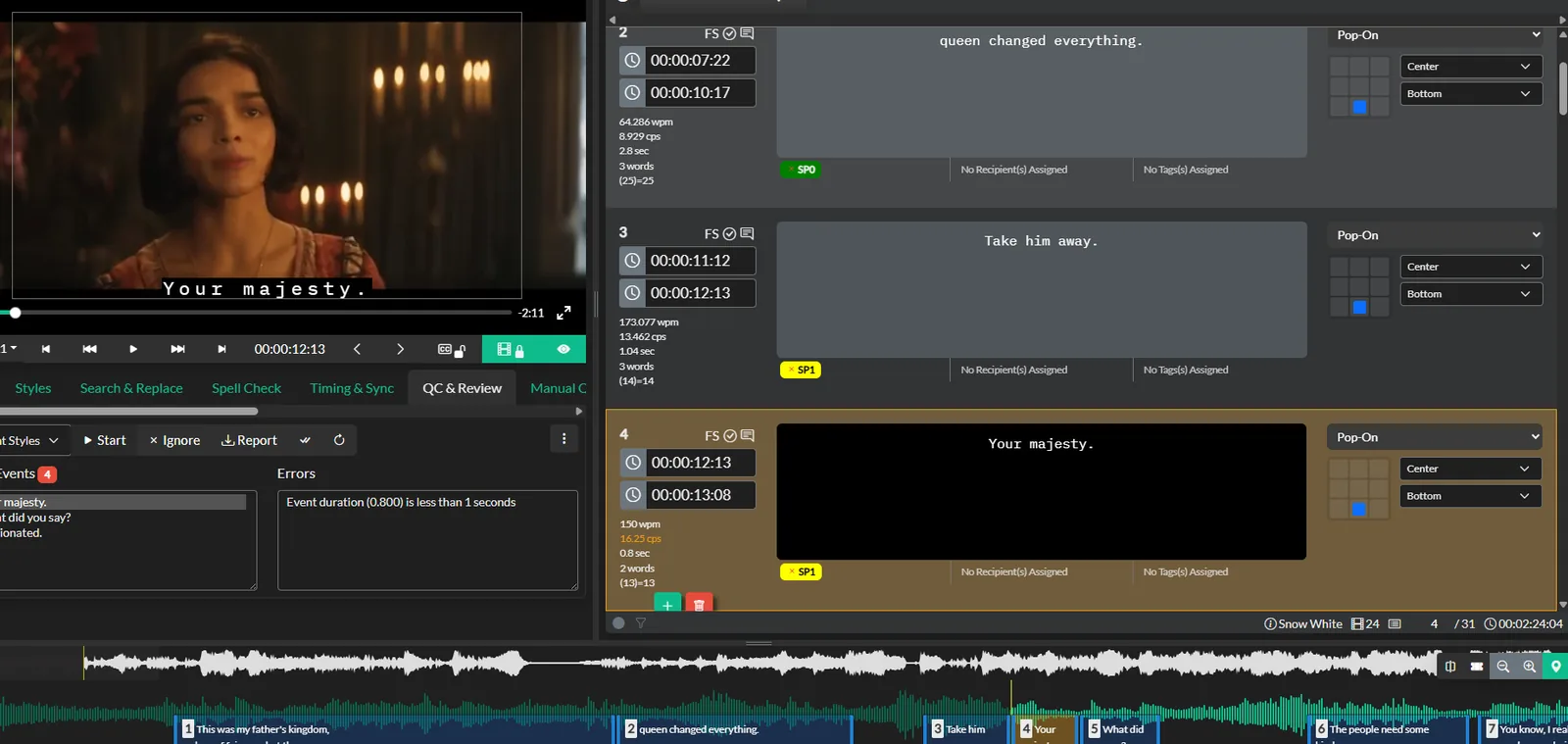
Automated QC and reviewer approval inside the same project.
Review and approval, not just editing
Closed Caption Creator includes QC panels, style guide validation, tagging, notes, and reviewer approval for team projects on the Pro plan.
Subtitle Edit's networking mode lets two editors sync changes over a connection, but there is no review queue, approval state, or managed hand-off between captioner and QC.
One honest limitation
Subtitle Edit is free and converts more than 300 formats — ten times the library Closed Caption Creator markets — and its Whisper transcription runs entirely offline, which some security policies require. If zero cost, maximum format breadth, or local-only speech-to-text are non-negotiable, Subtitle Edit is the better fit and this page will not change that.
Closed Caption Creator vs. Subtitle Edit at a glance
Subtitle Edit capabilities are taken from the nikse.dk overview and help pages in August 2026. Closed Caption Creator prices are in US dollars.
| Closed Caption Creator | Subtitle Edit | |
|---|---|---|
| Price | Free, $35–$75/month, or lifetime from $2,000 | Free, open source (GPL/LGPL) |
| Operating systems | Windows, macOS, Linux | Windows; Linux via Mono |
| Browser version | Yes, via Google Chrome | Subtitle Edit Online is a separate, lighter tool |
| Format library | 30+ broadcast and streaming formats | 300+ formats |
| Automatic captioning | 300–600 minutes/month included | Whisper, self-installed and offline |
| Machine translation | 500,000 characters/month on Pro | Google, DeepL, or local LLMs with your own setup |
| Closed captions (SCC, MCC) | Starter and Pro plans | Not listed |
| 608/708 broadcast embedding | Included on Pro; $2.00/file + $0.40/GB | Not listed — soft-embeds subtitles via FFmpeg |
| Team projects and shared review | Pro plan, 1–25 users | Experimental networking mode |
| Audio description | Optional add-on, includes text-to-speech | Not an AD authoring tool |
| Support | 24/7 email and live chat, every tier | Community documentation and blog |
| Free trial | 7 days | Not needed — free forever |
Sourced from the Subtitle Edit overview and help pages, verified August 2026. Format breadth, offline Whisper, OCR, and zero cost are areas where Subtitle Edit genuinely leads — if those are core to your work, it is the better fit.
Automatic captioning without the setup
Subtitle Edit's Whisper integration is excellent once running, but the help pages document engine choices, model downloads, Python installs, and CPU and RAM requirements for a reason — getting there is a project.
Closed Caption Creator includes 300 to 600 managed captioning minutes per month through Deepgram, Speechmatics, and AssemblyAI. There is nothing to install and nothing to tune; additional minutes are $0.10.
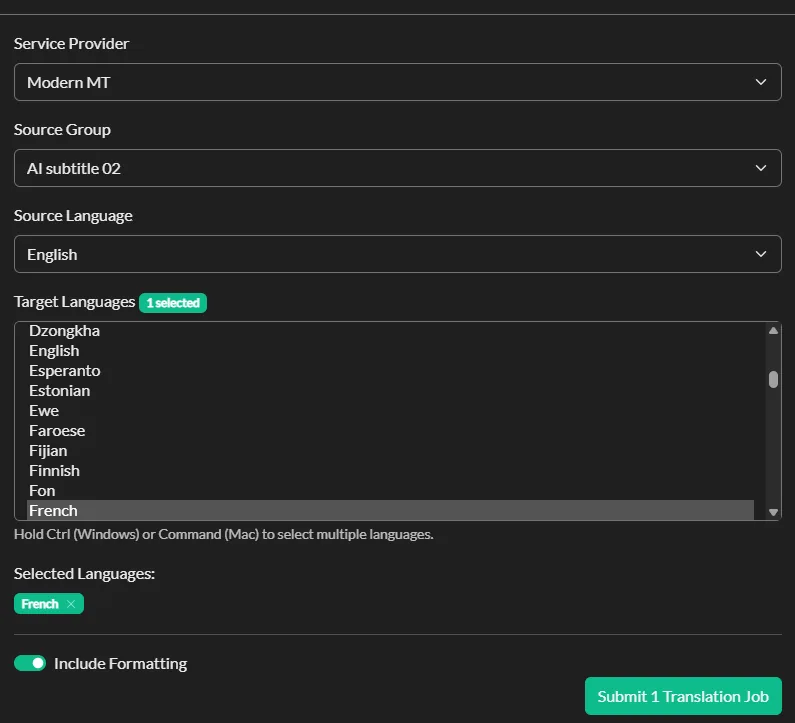
Machine translation into 70+ languages, included on the Pro plan.
Why Subtitle Edit users choose Closed Caption Creator
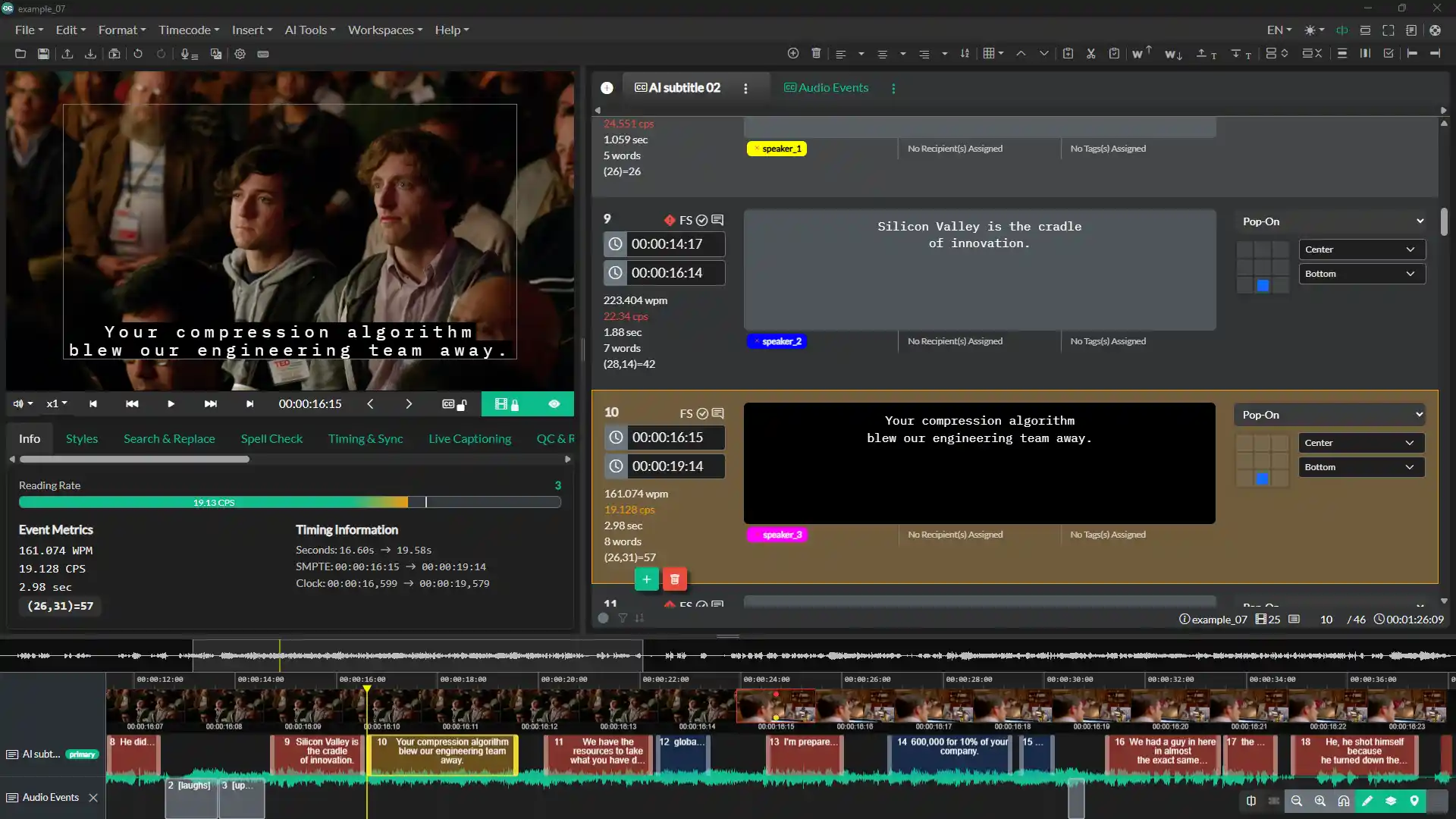
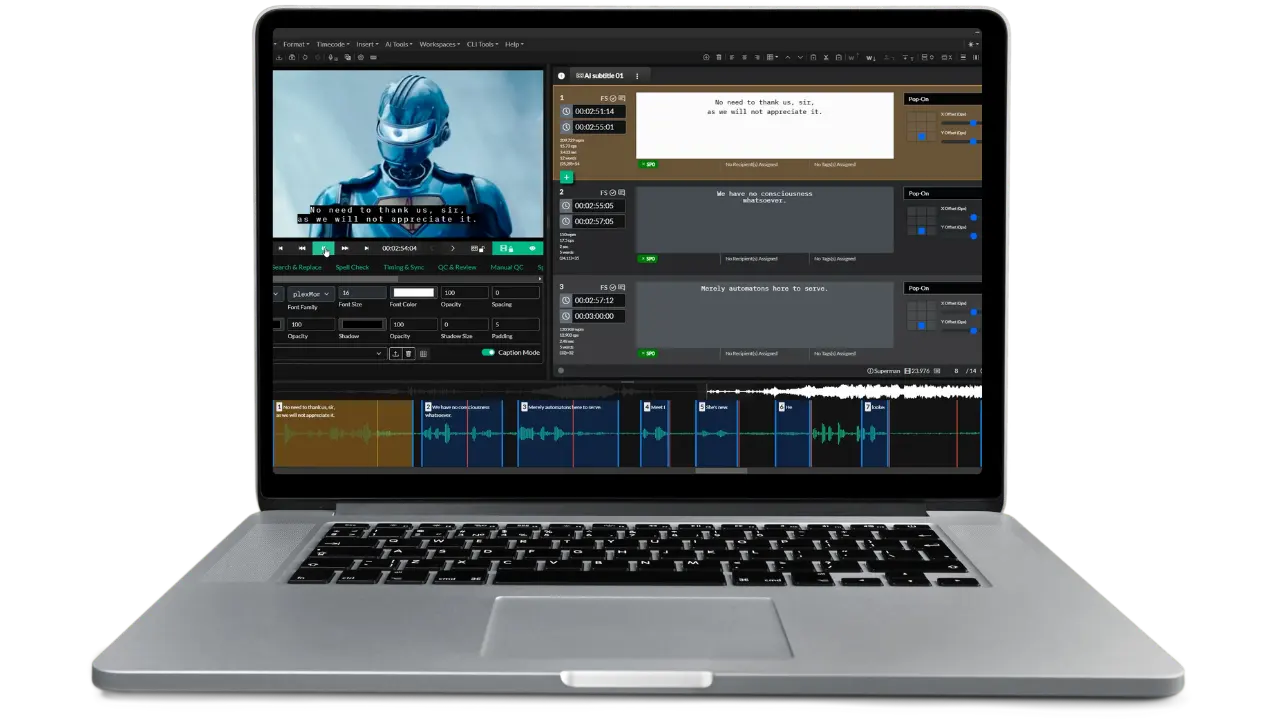
The editing workspace: video preview, event list with reading-rate metrics, positioning grid, and waveform timeline.
Your OS, your choice
Native desktop builds for macOS, Windows, and Linux from one subscription, plus a browser version. No Mono, no VM, and no second machine for the Mac users on the team.
Managed, not self-run
Captioning minutes, translation, and updates are included and maintained for you, with 24/7 email and live chat support instead of a search box when something breaks.
Built for teams and broadcast
Shared team projects with 3 users included on Pro with QC review and approval, plus SCC, MCC, and STL export and 608/708 embedding for North American broadcast delivery.
Subtitle Edit comparison questions
Common questions from teams weighing Subtitle Edit against Closed Caption Creator.
Yes. Subtitle Edit is free, open-source software released under the GPL and LGPL, with the full C# source available. There is no paid tier, no seat licence, and no feature locked behind payment. Development is supported by donations. Closed Caption Creator is commercial software with a Free plan and paid plans at $35 to $75 per month, plus lifetime licences from $2,000.
Subtitle Edit is a Windows application built on .NET Framework 4.8. Its own documentation describes it as a Windows program that runs “mostly well” on Linux via Mono, with manual library and symlink setup for video playback. There is no macOS build. Closed Caption Creator ships native builds for macOS, Windows, and Linux, plus a browser version.
Yes. Subtitle Edit exports standard interchange formats, and Closed Caption Creator imports SRT, WebVTT, TTML, EBU-STL, PAC, Cheetah CAP, Cavena 890, SCC, and MCC among more than 30 formats. Export from Subtitle Edit to any of those and timing and text carry across.
Not as published features. Subtitle Edit's format list covers more than 300 subtitle formats including EBU-STL and TTML, but Scenarist SCC and MacCaption MCC are not among them, and it does not embed EIA-608/708 into broadcast files. It can soft-embed subtitles into mkv or mp4 via FFmpeg. Closed Caption Creator exports SCC, MCC, and STL on the Pro plan and embeds 608/708 captions into video.
Subtitle Edit transcribes with Whisper, which you install and manage yourself — choosing an engine, downloading models, and meeting CPU and RAM requirements, with some setups requiring Python. It runs fully offline, which some facilities need. Closed Caption Creator includes 300 to 600 automatic captioning minutes per month through Deepgram, Speechmatics, and AssemblyAI with nothing to install, and additional minutes at $0.10.
On Closed Caption Creator's Pro plan, yes — shared team projects (3 users included, more at $10 per user per month) with QC, review, tagging, and approval tools. Subtitle Edit has an experimental networking mode for online collaboration, but there is no managed review workflow, role assignment, or approval state.
When cost must be zero, when you need its 300-plus format library, Blu-ray and DVD OCR, or karaoke and typewriter effects, and when speech-to-text must run entirely offline on your own hardware. It is an excellent power-user tool. Closed Caption Creator is the better fit when you need native Mac or Linux support, managed ASR, broadcast closed-caption delivery, team review, or commercial support.
Closed Caption Creator includes a Style Guide Manager on every plan, with named rule sets covering characters per line, reading rate, event duration, overlap, and illegal character sets for 608 and Netflix, plus profiles for Netflix, Disney, Broadcast US, and YouTube. Subtitle Edit has a configurable Fix Common Errors tool and Netflix-style rule options, which is genuinely strong for a free tool, but it validates one file at a time rather than enforcing named guides across a team project.
Closed Caption Creator does, through an optional Audio Description plugin that includes text-to-speech and Extended Audio Description export. Subtitle Edit can generate speech from subtitle text via ElevenLabs, Azure, Google, or local TTS engines, but it is not an audio description authoring tool.
Most Subtitle Edit users are productive within a day. The editing model is familiar — timeline, waveform, event list, and shortcut-driven timing. Free video courses and a full user guide are included, and 24/7 email and live chat support comes with every plan.
How Closed Caption Creator compares to other captioning tools
Try it on the files you actually deliver
Import an SRT, WebVTT, TTML, or EBU-STL export from Subtitle Edit and check the timing, QC results, and broadcast delivery options against your own specs. The trial includes the video courses and full documentation.