Machine Translation Engines for Subtitling: What Breaks, Engine by Engine
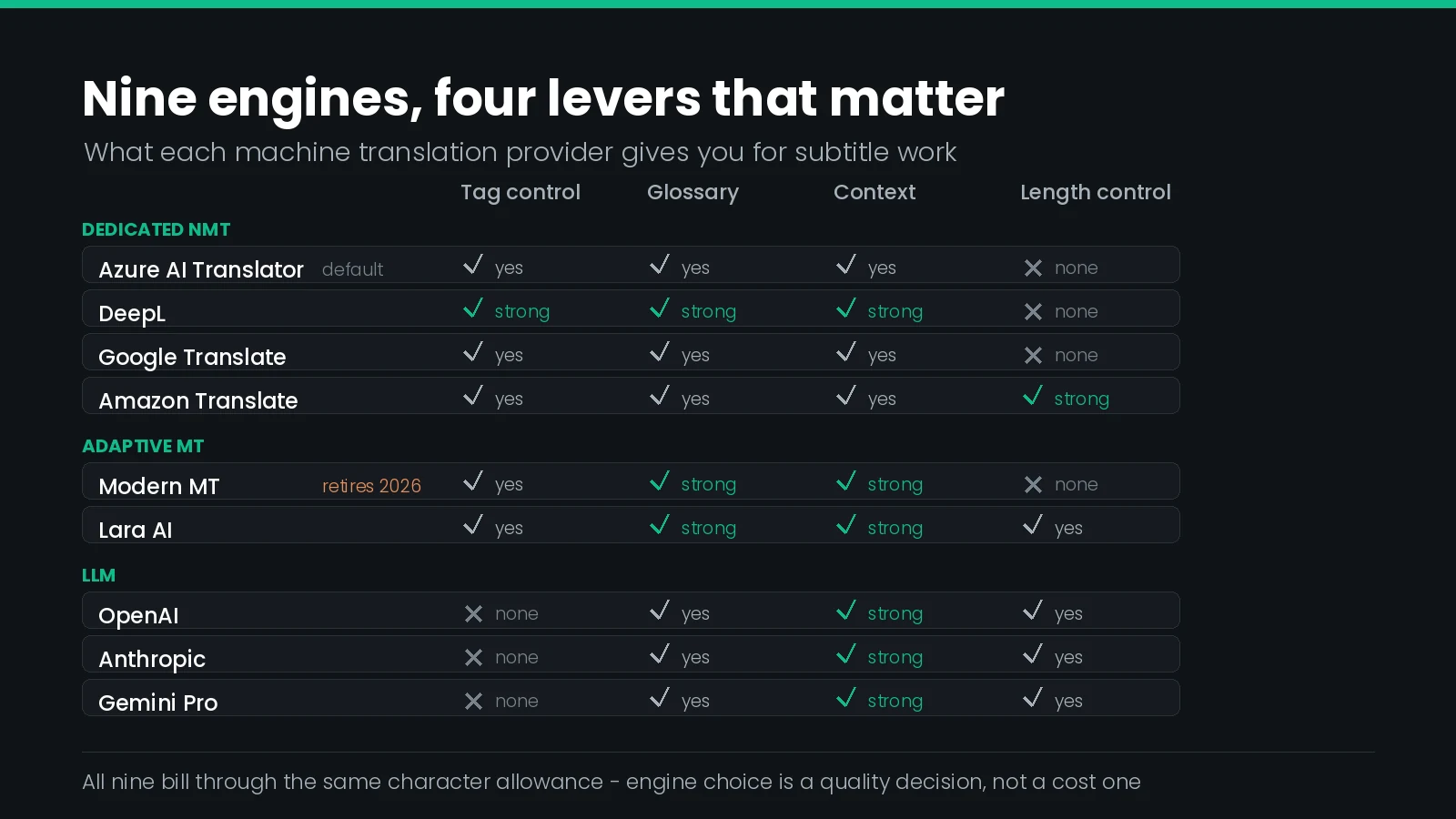
Which machine translation engine should you use for subtitles?
Pick the engine by what the deliverable needs, not by benchmark scores. Closed Caption Creator exposes nine providers and bills them all at the same rate, so the decision is about glossary support, tag fidelity and context handling. Azure AI Translator is the default; DeepL and Lara AI reward a glossary.
Every machine translation comparison you can find online ranks engines on prose. BLEU scores on news corpora, COMET scores on parliamentary proceedings, side-by-side paragraphs of marketing copy. None of that tells you what happens to a subtitle file.
A subtitle is not a paragraph. It is a short, hard-bounded string with a timecode, often a fragment of a sentence that finishes two cues later, frequently carrying an italic tag or a speaker label, and always subject to a character limit it must not exceed. The qualities that make an engine good at news articles are almost unrelated to the qualities that stop it wrecking a 900-event subtitle file.
This guide compares the nine engines Closed Caption Creator can call, on the dimensions that actually decide the outcome: what each one does with your formatting tags, how it treats your line breaks, whether it can see the cues either side of the one it is translating, whether you can hold terminology, and whether it can be told to keep the output short. It assumes you already know the constraints a translated subtitle has to satisfy — text expansion, reading speed by language, pivot languages, review. This is the layer below that: which engine to point at the problem.
The Nine Engines, Side by Side
Closed Caption Creator’s Automatic Translation workflow supports nine translation service providers. Selecting one refreshes the source and target language lists to that provider’s coverage, so the choice is made before the languages are.
| Provider | Type | Added in | Why you would pick it for subtitles |
|---|---|---|---|
| Azure AI Translator | Dedicated NMT | 1.8.26 | The default. Broad coverage, HTML tag handling, custom models by category, and profanity controls |
| DeepL | Dedicated NMT | 1.8.5 | The most granular tag and sentence-splitting controls of any engine here, plus glossaries and formality |
| Google Translate | Dedicated NMT | Baseline | Widest language coverage, free glossaries, and a predictable per-character bill |
| Amazon Translate | Dedicated NMT | 1.8.26 | The only engine with a setting built specifically to shorten output, plus formality and parallel data |
| Modern MT | Adaptive MT | 1.8.6 | Translation memories, context vectors and a quality score per segment — but retiring after December 2026 |
| Lara AI | Adaptive, two models | 1.8.49 | ModernMT’s successor. Translation memories, glossaries, free-text instructions and a style control |
| OpenAI | LLM | 1.8.19 | Takes a brief. Good where register, idiom or humour needs judgement rather than lookup |
| Anthropic | LLM | 1.8.26 | As above, with notably wide language handling — Inuktitut was added as a target in 1.8.31 |
| Gemini Pro | LLM | Recent | As above. Worth testing where a pair is poorly served by the dedicated engines |
Three families, and the family matters more than the brand. Dedicated NMT engines are predictable and fast and do exactly what their parameters say. Adaptive engines learn from your own prior work. LLM engines will follow an instruction but will also, occasionally, decide to be helpful in ways you did not ask for.
ModernMT Is Being Retired
This is the one item on this page with a deadline attached, so it goes first.
The ModernMT API documentation now states plainly that ModernMT “is evolving into Lara and will sunset by the end of 2026.” Closed Caption Creator follows the same timetable: Modern MT will be removed after December 2026, and selecting it in the Automatic Translation dialog already raises a warning recommending Lara AI or another remaining provider. Existing Modern MT jobs keep working until that date.
If any of your delivery specs or internal SOPs name ModernMT, they have a little over a year to live. The replacement is Lara AI, which is already available. Migrate while you still have both engines running side by side and can compare output on the same source file.
Two practical notes on the switch. First, Lara AI uses locale-specific language codes — en-US and fr-FR rather than en and fr. Any script, preset or work-order template that stores a two-letter code and hands it to the translation step will need updating, and the failure will look like an unsupported-language error rather than a code-format error.
Second, Lara splits into two models. Lara Base is a machine translation model; Lara Think is described as an advanced AI model that reads glossaries, style guides and contextual metadata before translating. If you are moving a series off ModernMT and you were relying on adaptation from translation memories, Lara is the closer equivalent of the two.
What Actually Breaks in a Subtitle File
Before comparing features, it is worth being specific about the failure modes. Machine translating a subtitle file goes wrong in six recognisable ways, and only one of them is “the translation was wrong.”
| Failure | What it looks like | The lever that fixes it |
|---|---|---|
| Tag loss or tag drift | Italics vanish, or wrap the wrong words in the target language | Content type and tag handling |
| Line reflow | Two tidy lines come back as one long one, or split in the wrong place | Sentence-splitting controls, then reformat on import |
| Context loss | A pronoun, a gender or a tense is wrong because the cue was translated alone | Context parameters, memories, or an LLM brief |
| Terminology drift | A character or product name is translated three different ways in one episode | Glossaries, do-not-translate markup, auto-replacement on review |
| Expansion | Every cue is now 30 per cent over the character limit | Brevity settings, or re-timing and condensing after import |
| Register mismatch | A drama reads like a user manual, or a formal interview reads casually | Formality controls, style settings, instructions |
Note how few of these are quality problems in the usual sense. Five of the six are integrity problems — the words may be right while the file is wrong. That is why a prose benchmark is close to useless here, and why the rest of this guide is organised by lever rather than by engine.
Formatting Tags and How Each Engine Protects Them
Subtitles carry markup. Italics for a song title or an off-screen voice, bold for emphasis, underline where a house style still uses it. If that markup is sent as naked text, the engine will translate it, move it or drop it.
Closed Caption Creator handles the first half of this with the Include Formatting toggle in the Automatic Translation dialog. With it on, bold, italic and underline codes are carried through to the translated Event Group; speaker tags, display positioning and timing are preserved regardless. The setting is remembered between sessions, so it is worth deciding once and deliberately. Turn it off only when you intend to restyle the target language from scratch, or when a provider is visibly mishandling formatted input.
The second half is engine-side, and every engine does it differently.
| Engine | How markup is declared | Do-not-translate mechanism |
|---|---|---|
| DeepL | tag_handling set to xml or html, with a selectable tag_handling_version — v2 shipped in October 2025 | ignore_tags, naming the tags whose contents are left alone |
| Azure AI Translator | textType set to html; markup must be well-formed, complete elements | class="notranslate" on the wrapping element |
| Amazon Translate | HTML content only — the feature is not available for plain text | translate="no" on any HTML element |
| Modern MT | format set to text/xml, text/html or application/xliff+xml; tags are stripped, then reinserted at aligned positions | translate="no" or class="notranslate", in beta, and not for plain text |
| Lara AI | content_type set to text/html or application/xliff+xml | translate="no", the notranslate class, or a <notranslate> element |
| Google Translate | Markup is passed through as content — and billed as content | Glossary entries, applied at no extra charge |
| LLM engines | Declared in the prompt, not in a parameter | Stated in the brief, and not guaranteed |
Tag preservation is the single most reliable way to tell a well-integrated engine from a badly-integrated one. Two engines with identical translation quality will give you completely different amounts of cleanup work depending on whether the markup made the round trip. Test this first, on a file that actually contains italics.
Two details deserve flagging. ModernMT strips tags before translating and reinserts them by alignment afterwards, which means a tag’s new position is a guess based on word alignment — usually right, occasionally wrapping the wrong word in a language that reorders heavily. And Azure requires well-formed complete elements, so a subtitle whose italic tag opens in one cue and closes in the next cannot be sent as HTML without being repaired first. That pattern is common in files converted from EBU-STL and other formats with per-row styling.
Line Breaks and Sentence Splitting
This is the failure that surprises people most, because it has nothing to do with translation quality and everything to do with a default.
A two-line subtitle contains a newline. Most engines treat a newline as a sentence boundary. The DeepL API’s split_sentences parameter defaults to splitting on punctuation and newlines, which means a cue reading “I told him the money / was never going to arrive” is translated as two independent fragments. In a language that puts the verb somewhere else, the result is not a translation of the sentence; it is two translations of two half-sentences.
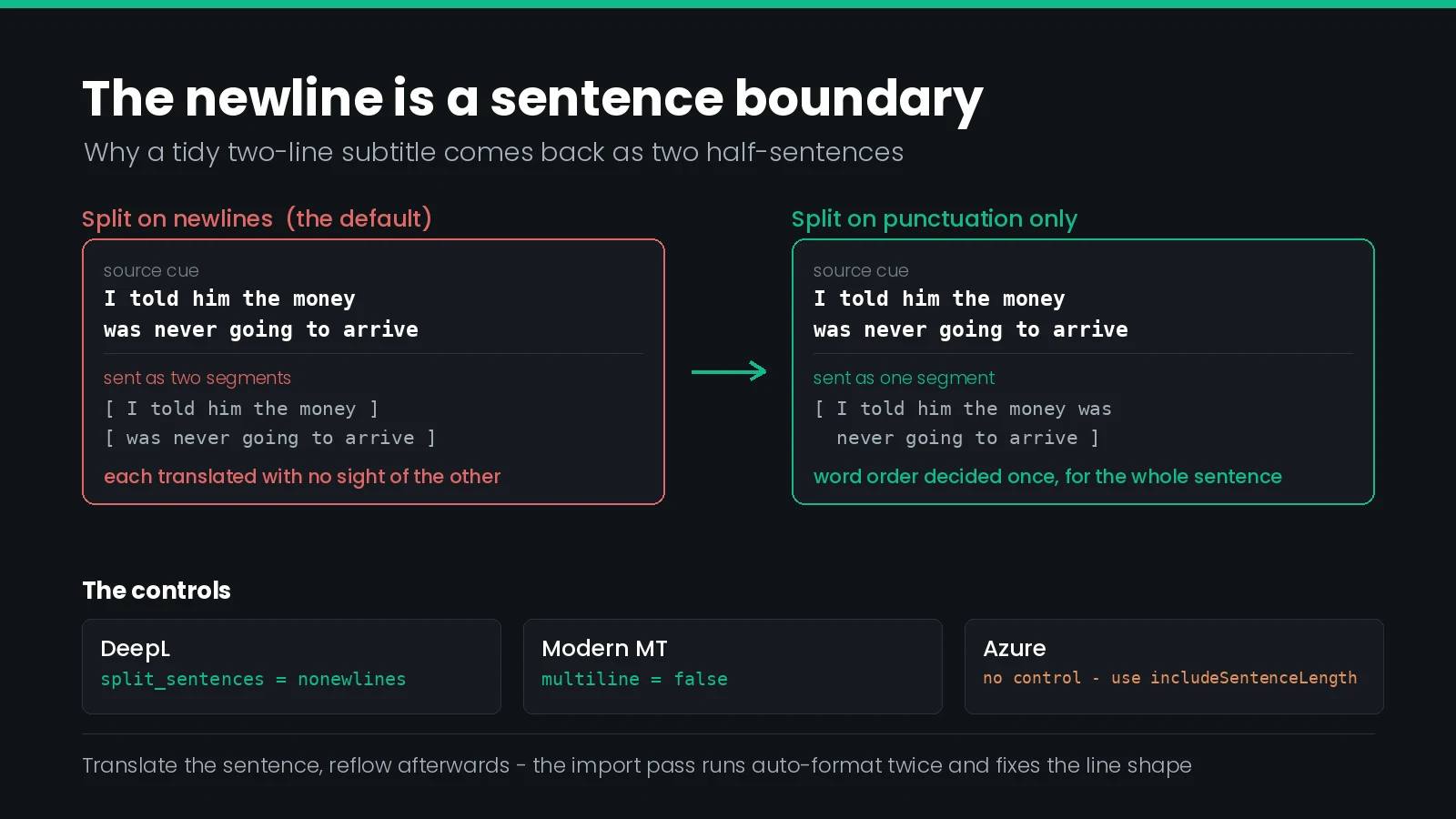
The controls that exist:
- DeepL —
split_sentencesaccepts0for no splitting at all,1for punctuation and newlines, andnonewlinesfor punctuation only. The default flips tononewlineswhentag_handlingishtml, which is one more reason to send markup properly. - Modern MT — the engine decides for itself whether to split long text, and the
multilineboolean forces the behaviour either way. - Azure AI Translator — no splitting control, but
includeSentenceLengthreturns the source and target sentence lengths, which is genuinely useful for driving a re-segmentation pass. - LLM engines — will respect a line-break instruction some of the time, which is not the same as a parameter.
The working rule is simple: translate the sentence, reflow afterwards. Do not try to preserve the source line breaks through the translation and hope they still make sense. Closed Caption Creator does this for you on import — the auto-format function runs twice over the imported Event Group to optimise line breaks, reading speed and character distribution, and overlap detection runs after it. Trust that pass rather than the engine’s line handling.
Context Across Cues
A subtitle file is a conversation chopped into two-second pieces. Translate each piece alone and you lose the information that decides gender agreement, formality, pronoun choice and tense — which is why the same engine can score well on documents and badly on subtitles.
The engines differ sharply in what they will accept as context.
| Engine | Mechanism | Subtitling use |
|---|---|---|
| DeepL | A context field that influences output but is neither translated nor billed | Pass the surrounding cues, or a one-line scene summary, for free |
| Lara AI | instructions, adapt_to for translation memory IDs, and style set to faithful, fluid or creative | Carry a style guide and prior episodes into the engine |
| Modern MT | context_vector with weighted memory IDs, hints, and a session identifier that adapts as it goes | Adaptation across a series, if your memories are organised by domain |
| Azure AI Translator | category, pointing at a trained Custom Translator model | Domain adaptation, but it needs training data and training time |
| Amazon Translate | Parallel data, branded Active Custom Translation | Matching the style, tone and word choice of example pairs |
| Google Translate | Adaptive translation, billed as a separate model tier upstream | Adaptation from example pairs, at a premium over the standard model |
| LLM engines | The prompt itself | Anything you can describe in a sentence, with no schema to learn |
DeepL’s context field is the quiet standout for subtitling, because it is explicitly not billed. The cost objection to sending neighbouring cues as context — that you pay for every character twice — does not apply.
Worth being clear about what Closed Caption Creator sends. The application prepares the source Event Group, removes events that contain no text, uploads the group once, and registers one job per target language against that single upload. So the engine receives a whole subtitle file rather than a stream of isolated strings. What the provider does with that structure — whether it reads across cues or treats each one as an island — is the provider’s business, and it is the main reason two engines can produce such different results from the same submission.
Glossaries, Terminology and Do-Not-Translate
Character names, product names, place names and invented terminology are where machine translation embarrasses you in front of a client. A name translated inconsistently across one episode is more noticeable to a viewer than a slightly stiff sentence.
What each engine offers:
| Engine | Terminology support | Notes that matter |
|---|---|---|
| DeepL | glossary_id, or glossary_ids for up to five at once | Requires an explicit source_lang, and the glossary pair must match the request |
| Modern MT | Glossaries stored as memories, unidirectional or equivalent | Capped at 10 MiB, case-sensitive unless ignore_glossary_case is set; verbs and inflected forms are discouraged |
| Lara AI | glossaries by ID, plus adapt_to for memories | Defaults to adapting to every memory on the account, which is not always what you want |
| Amazon Translate | Custom terminology, plus parallel data for style | Separate features with separate upload formats |
| Azure AI Translator | Custom Translator by category, plus an inline dynamic dictionary | Microsoft advises using the dictionary sparingly and only for proper nouns; allowFallback=false fails the request rather than silently using the general model |
| Google Translate | Glossaries, free to create and use | No charge for glossary creation or management requests |
| LLM engines | A term list in the prompt | Works surprisingly well, with no enforcement guarantee |
Now the honest part, because it affects how you should plan the work. The documented options in the Automatic Translation dialog are the provider, the source Event Group, the source and target languages, and Include Formatting. There is no glossary picker. Engine-side glossaries live in your own account with that provider and are not wired into this workflow.
Closed Caption Creator does have a terminology system — the KNP Terminology Manager, whose guides hold a Term column, a Type column drawn from five categories, and one column per target language attached to the guide. But the documented machine integration for KNP is with transcription: attaching a guide to an Automatic Transcription job passes the terminology to the speech provider as custom vocabulary. For translation, a KNP guide is a reference for the people reviewing, and the documentation describes it in exactly those terms — useful context for translators. KNP guides also require a team account.
Plan terminology enforcement as a review step, not a submission setting. Lock the names in a KNP guide, machine translate, then sweep the imported Event Group with auto-replacement and a terminology read-through. Expecting the engine to have got the names right is the most common reason a first multilingual delivery slips.
Output Length, and the One Setting Built for Subtitles
Text expansion is the constraint that makes subtitle translation hard. English into German or Spanish routinely gains 20 to 30 per cent in characters, and a cue that was comfortably inside its reading speed limit is not any more.
Exactly one engine in this list has a control designed for that problem. Amazon Translate’s Brevity setting shortens the output, and the AWS documentation names captions and subtitles as the case it exists for, alongside headlines and form fields.
It comes with real limits. Brevity works only for real-time text translation — not document translation, not asynchronous batch jobs. And it covers a narrow set of pairs: any source language into French, German, Italian, Brazilian Portuguese or Spanish, and those five languages into English. Ask for it outside that set and the translation runs with brevity silently off. The documentation does not quantify how much shorter the output gets, saying only that it is shorter for most translations.
For everything else, length has to be managed around the engine rather than inside it:
- Lara AI —
instructionsis free text, so “keep each line under 42 characters” is at least expressible, andstyleset tofaithfulresists the embellishment thatcreativeinvites. - LLM engines — will accept a character budget in the brief and will sometimes hold it.
- Everything else — condense on review. The auto-format pass on import redistributes characters across lines, which helps presentation but cannot remove words.
The practical consequence: apply a language-specific QC profile to each translated Event Group rather than reusing the source profile. Reading speed and characters-per-second have to be re-measured per language, because the limits themselves differ per language.
Formality, Register and Profanity
Register is a delivery requirement more often than people expect. A broadcaster’s children’s strand, a corporate training series and a reality format want three different second-person pronouns in German, and the engine will pick one for you if you do not.
DeepL exposes a formality parameter with four values: more and less, which fail outright on a target language that does not support formality, and prefer_more and prefer_less, which fall back to the default. For batch work the prefer_ variants are the safer choice, because a mixed-language job will not die on the one target that cannot honour the request.
Amazon Translate offers Formal and Informal, for any source into Dutch, French, Canadian French, German, Hindi, Italian, Japanese, Korean, European Portuguese, Spanish or Mexican Spanish. Unsupported targets ignore the setting, and the response reports AppliedSettings as null so you can detect it.
Lara AI handles register through instructions and style rather than an enumerated parameter. Azure AI Translator has no formality control; register there is a job for a trained custom model.
Profanity handling is the mirror image — sometimes you need it masked for a broadcast version, sometimes you must not touch it:
- Azure AI Translator —
profanityActionacceptsNoAction,MarkedorDeleted, andprofanityMarkerchooses between asterisks and a<profanity>wrapper. The tag form is the useful one for subtitling, because it tells you exactly which cues to look at rather than hiding the edit. - Amazon Translate — a profanity setting that masks profane words and phrases.
- Modern MT —
mask_profanities.
One warning: masking profanity in the translation while the source captions carry it unmasked produces a described-as-censored target and an uncensored source in the same delivery. Decide this at the spec level and apply it to every language version including the original.
LLM Engines Against Dedicated MT
Three of the nine providers are general-purpose language models. The trade is consistent enough to state as a rule.
| Dedicated NMT and adaptive MT | LLM providers | |
|---|---|---|
| Output predictability | High. The same input gives the same output | Lower. Re-running can produce a different phrasing |
| Tag fidelity | Governed by a documented parameter | Governed by an instruction, and not guaranteed |
| Following a brief | Only within enumerated parameters | Its main advantage — idiom, register, audience, tone |
| Terminology | Enforced glossaries | A term list it usually respects |
| Long-tail languages | Varies, generally well-defined coverage | Sometimes better, sometimes confidently wrong |
| Best use in subtitling | Volume work, series consistency, regulated deliverables | Difficult dialogue, humour, song lyrics, cultural adaptation |
The pattern that works in practice is a split assignment rather than a single choice: a dedicated engine for the bulk of a series, an LLM for the handful of scenes that need interpretation, both imported as separate Event Groups so a reviewer can compare them side by side. Closed Caption Creator keeps every translated Event Group in the same project file, which is exactly the organisation this approach needs.
Quality Estimation as a Triage Tool
One feature on this list changes how a reviewer spends their day, and it is easy to overlook because it is not a translation feature at all.
ModernMT exposes a quality-estimation endpoint that returns a score between 0 and 1 for each sentence-and-translation pair. Given a 900-event file, that is a sortable column. Instead of reading every cue with equal attention, a reviewer reads the lowest-scoring 10 per cent closely and spot-checks the rest.
Quality estimation is the difference between reviewing a file and triaging one. On high-volume multilingual work it is worth more than a few points of raw translation quality, because it tells you where the few points are missing. Factor it into any ModernMT-to-Lara migration decision.
Separately, Azure’s includeSentenceLength gives you source and target sentence lengths in the response. That is a crude expansion metric you can act on before import: flag the cues whose target sentence grew most and send those for condensing first.
Language Coverage and Language Codes
Coverage is the dimension everyone checks first and it is usually the least decisive, because the common pairs are well served everywhere. It becomes decisive at the edges.
Closed Caption Creator sidesteps the comparison for you: selecting a provider refreshes the source and target language lists to that provider’s actual coverage, so you only ever see combinations the engine can do. Right-to-left languages are detected automatically — Arabic, Hebrew, Urdu and Persian are flagged in the list, and the correct text direction is applied in the editor and during playback when the translation is imported. The machine translation feature page lists more than 70 target languages across the platform.
Two specifics worth knowing. DeepL’s supported-languages table runs to 126 target codes, twelve of which are regional variants available as targets only — EN-GB, PT-BR, ES-419 and the like — so a round trip through a variant is not symmetrical. And Anthropic gained Inuktitut as a translation target in release 1.8.31, which is the kind of coverage the dedicated engines generally do not have.
And the gotcha, repeated because it will bite someone: Lara AI expects locale codes such as en-US and fr-FR. Everything else in your pipeline probably stores two-letter codes.
What Engine Choice Costs
Here is the finding that simplifies the whole decision for Closed Caption Creator users.
Upstream, the engines price very differently. Google’s neural model lists at $20 per million characters with the first 500,000 free as a credit, its Translation LLM at $10 per million characters of input and $10 per million of output, and its adaptive translation at $25 per million each way. The others all have their own structures. If you were integrating these APIs directly, that spread would matter.
Inside Closed Caption Creator it does not. Machine translation is metered in characters against your plan allowance at one rate regardless of provider. The Pro plan includes 500,000 characters a month, Enterprise 6,000,000 a year, and additional usage is charged at $0.00005 per character — $50 per million — whichever engine produced it. Characters do not carry over between periods.
Engine choice is a quality decision, not a budget decision. Because every provider bills through the same allowance at the same rate, there is no cost penalty for picking the engine that handles your content best, and no saving to be had by picking a cheaper one. Choose on output, test freely.
Two things do affect the bill. Every character you send counts, and Google states explicitly that this includes whitespace and markup — the twelve-character example in its pricing documentation is a five-character word inside a paragraph tag pair. Closed Caption Creator trims part of this by removing textless events before upload, but if Include Formatting is on, your italic tags are characters too. And each additional target language is a separate job over the same source, so a six-language delivery is six times the character count, not one.
The job dashboard reports character count per job and can export the whole history as CSV, which is the right artefact for billing verification and for quoting the next series.
How the Job Actually Runs
Knowing the shape of the workflow explains several of the choices above, and it is short.
- Prerequisites. The project must be in online mode with a live connection to Closed Caption Creator cloud services, and the plan must include automatic translation. Machine translation is a Pro and Enterprise feature; Starter does not include it.
- Open the dialog. AI Tools, then Automatic Translation.
- Pick the provider. Nine options, Azure AI Translator pre-selected. The language lists update to match.
- Pick the source Event Group. The system copies it and strips every event with no text. The source group itself is never modified.
- Set the languages. One source, and as many targets as you want in a single submission — ctrl-click or cmd-click to multi-select, with a badge showing the count.
- Decide Include Formatting. On to carry bold, italic and underline; off to restyle later.
- Submit. The prepared group is uploaded once, then one job is registered per target language against that upload, so all languages process in parallel.
- Monitor. AI Tools, then Translation Import. The dashboard auto-refreshes every ten seconds and shows progress, status, provider, language pair, character count and timestamps, with date-range and status filters.
- Import. At 100 per cent and Passed, import brings the translated Event Group into the project. Auto-format runs twice, then overlap detection and correction. Timing, formatting, speaker tags and metadata come from the source; only the text is new.
Two consequences fall out of step 4 and step 9. Because the source group is copied and never altered, corrections made to the source after submission do not propagate — finalise and QC the source before you translate, not after. And because import reformats, the shape of the lines you get is the application’s decision rather than the engine’s, which is the right way round.
If a job fails or stalls, the status message on the row is the first place to look; the documented causes are connectivity to the provider and problems with the source content format. A provider that fails consistently is a reason to try another, since all nine are equivalent in price.
Choosing an Engine per Deliverable
Reduced to a decision table.
| If the job is | Start with | Because |
|---|---|---|
| A first pass on a common European pair | Azure AI Translator or DeepL | Azure is the default and well covered; DeepL gives the finest control if you need it |
| Heavily formatted subtitles with italics throughout | DeepL | The only engine with explicit ignore, splitting and non-splitting tag lists |
| A series where names must stay consistent | Lara AI | Glossaries plus memory adaptation, and it is the engine with a future |
| Content that is already at its character limit | Amazon Translate | Brevity, within its five supported target languages |
| A formal or informal register requirement | DeepL or Amazon Translate | Both expose an explicit formality setting |
| Drama, comedy, idiom or song lyrics | An LLM provider | It will act on a brief about tone and audience |
| A rare language pair | Google Translate, then an LLM | Widest documented coverage, then the engines that sometimes exceed it |
| High-volume work needing review triage | Modern MT today, Lara AI onward | Per-segment quality scores you can sort by |
| A broadcast version needing profanity masked | Azure AI Translator | Marked mode with a profanity tag shows the reviewer every edit |
| Anything named ModernMT in a current spec | Lara AI | Modern MT is removed after December 2026 |
Then stop choosing and start measuring. Run one representative reel — ideally the hardest three minutes of the content, with italics, overlapping speech and at least one proper noun — through two or three engines into the same project, and compare the imported Event Groups side by side. Twenty minutes of that is worth more than any comparison table, including this one.
What Goes Wrong
| Symptom | Likely cause | Fix |
|---|---|---|
| Italics missing from the translated group | Include Formatting was off | Re-submit with it on; the setting persists between sessions, so check it |
| Italics present but wrapping the wrong words | Tags reinserted by word alignment after a heavy reorder | Expected behaviour on some engines. Fix on review, or try a different provider for that language |
| Sentences translated as disconnected halves | The newline in a two-line cue was treated as a sentence boundary | An engine-side splitting default. Judge the translation on meaning, not line shape, and let the import reformat |
| Unsupported-language error after switching to Lara AI | A two-letter code where a locale code is required | Use en-US rather than en |
| Every cue over the reading speed limit | Normal text expansion for the target language | Apply a per-language QC profile and condense. Consider Brevity if the pair supports it |
| A character name translated three ways | No glossary is attached from this workflow | Auto-replacement pass against a KNP guide after import |
| Translation quality poor across the board | Source language misidentified at submission | The documented first thing to check. Set the source language explicitly |
| Imported group does not line up with the source | The wrong source Event Group was selected at submission | Check the job configuration in the Translation Import table and re-submit |
| Character count higher than expected | Markup and whitespace are billable, and each target language is a separate job | Export the job history as CSV and reconcile per language |
| Corrections to the source are missing from the translation | The source was edited after the job was submitted | Re-translate. Changes never propagate into an existing translated group |
Engine Selection Checklist
- Source Event Group reviewed, corrected and finalised before any job is submitted
- Source language set explicitly rather than left to detection
- Provider chosen for the content type, not by habit or by default
- Include Formatting set deliberately, and confirmed on the dialog rather than assumed
- A test reel containing italics, a proper noun and overlapping speech run through at least two engines
- Imported groups compared side by side in the same project before a provider is adopted for the series
- Terminology locked in a KNP guide, with an auto-replacement pass planned after import
- Per-language QC profiles applied, with reading speed re-measured for each target
- Right-to-left targets checked for direction in the editor and on playback
- Register and profanity policy decided at spec level and applied to every language including the source
- Any spec, preset or SOP naming ModernMT updated to Lara AI, with language codes changed to locale form
- Character budget estimated as source characters times the number of target languages
- Job history exported as CSV for billing verification before invoicing the series
- Native-speaker or linguist review scheduled for anything with specialist terminology or critical messaging
Frequently Asked Questions
Which machine translation engine is best for subtitles?
There is no single best engine. Closed Caption Creator exposes nine, and the right one depends on the language pair, whether you need a glossary, and whether formatting must survive. Azure AI Translator is the default. Test two or three on a representative reel before committing a series to one.
Can you choose the translation engine in Closed Caption Creator?
Yes. The Automatic Translation dialog has a provider dropdown listing Amazon Translate, Anthropic, Azure AI Translator, DeepL, Gemini Pro, Google Translate, Lara AI, Modern MT and OpenAI. Azure AI Translator is selected by default, and changing the provider refreshes the source and target language lists to match.
Is ModernMT being discontinued?
Yes. The ModernMT API documentation states that ModernMT is evolving into Lara and will sunset by the end of 2026. Closed Caption Creator will remove Modern MT after December 2026, and the Automatic Translation dialog already shows a warning recommending Lara AI or another remaining provider.
Do machine translation engines preserve italics in subtitles?
Only if you tell them to. Closed Caption Creator has an Include Formatting toggle that carries bold, italic and underline through the translation. On the engine side, tag protection needs the right content type: DeepL uses tag handling, Azure uses textType html, ModernMT and Lara use a format parameter.
Why does machine translation merge or split subtitle lines?
Because most engines treat a newline as a sentence boundary. The DeepL API splits on punctuation and newlines by default, and ModernMT decides on its own whether to split long text unless the multiline parameter forces the behaviour. Reflow the translated text after import, not before.
Can you apply a glossary to automatic subtitle translation?
Not from inside the Automatic Translation dialog, whose documented options are provider, source group, languages and Include Formatting. KNP guides hold per-language term columns, but the documented machine use of a KNP guide is as custom vocabulary on transcription jobs. For translation, enforce terminology on review.
Does the translation engine you pick change what you pay?
Not inside Closed Caption Creator. Machine translation is metered as characters against your plan allowance, and additional usage is billed at $0.00005 per character regardless of which provider produced it. That makes engine choice a quality and feature decision rather than a cost one.
What does the Amazon Translate brevity setting do?
It shortens the translated output, and the Amazon documentation names captions and subtitles as the case it exists for. It is limited to real-time translation and to a small set of pairs: any source into French, German, Italian, Brazilian Portuguese or Spanish, and those five into English.
Should you use an LLM or a dedicated engine to translate subtitles?
Use a dedicated engine when you need predictable output and tag fidelity, and an LLM when the content needs judgement: idiom, register, humour or a brief the engine must follow. Closed Caption Creator offers both, so the practical answer is to run a sample reel through one of each.
Do translation engines bill you for formatting tags?
Some do. Google states that every character sent is counted, including whitespace and markup, so a paragraph tag pair adds seven billable characters. Closed Caption Creator reduces the exposure by stripping textless events before upload, but italic and bold markup still travels with the text.
Engine choice is free inside Closed Caption Creator, so the only real cost of getting it wrong is the review time. Want to see nine engines compared on your own content? Talk to our team or start a free trial.