Forced Narrative Subtitles: What the Flag Means, and Which Formats Can Carry It
What are forced narrative subtitles?
Forced narrative subtitles are subtitle events that display even when the viewer has subtitles switched off. They cover dialogue in a language other than the main audio, story-critical on-screen text such as signs and location cards, and speech the audio does not make intelligible. They are usually delivered as a second, forced-only file alongside the full track.
Forced narrative is the only subtitle property that is simultaneously a creative decision, a per-event flag, and a packaging requirement — and the formats most people deliver in cannot store it.
That is the whole problem in one sentence. A captioner marks ten events as forced. The project exports to SRT. The SRT arrives at the platform with no forced information in it whatsoever, because SRT has no field for it. The flag did not get lost in conversion; it was never representable in the first place.
This guide covers what qualifies as forced, the delivery rule that catches almost everyone, and exactly where the forced flag lives in each format that can hold one — in the subtitle document, in the container, in the manifest, or nowhere.
What Counts as Forced Narrative
Forced narrative subtitles, often shortened to FNS or FN, are events that must reach every viewer regardless of their caption settings. The usual trigger is that the audio alone does not carry the meaning.
Netflix, whose specification most of the industry has converged on, defines an FN subtitle as a text overlay that “clarifies communications or alternate languages” meant to be understood by the viewer. Its guidance sets out four recurring cases.
| Case | What it covers | Example |
|---|---|---|
| Secondary language dialogue | A short passage spoken in a language other than the programme's main language | Two characters switch to Spanish for one scene of an English-language drama |
| On-screen text | Location cards, person IDs, dates, labels and signs, translated for audiences who do not read the original | A card reading “Berlin, 1989” in a dub for a non-German market |
| Communication not commonly understood | Signed language, invented languages, and non-speech communication the story depends on | Klingon dialogue, or a signed exchange with no interpreter in shot |
| Same-language clarity | Transcription of audio that is inaudible or distorted, frequently in documentary | A field recording where the interviewee is barely audible |
Two things on that list are worth separating, because they get conflated constantly. Secondary-language dialogue is forced because the viewer who hears it cannot understand it. Translated on-screen text is forced because the picture carries information the localized audio does not. They are different failures of the audio track, and in a dubbed delivery the second kind dominates.
Forced is not the same as open. Open captions are burned into the picture: unswitchable, unlocalizable, and baked into every version of the file. Forced subtitles are a selectable text track that the player chooses to display. Netflix requires the opposite of burn-in — the primary video must be delivered “as a non-subtitled file, or textless,” and neither full nor forced subtitles may be burned in over picture. See closed captions against subtitles for the wider taxonomy.
The Rule Everyone Gets Backwards
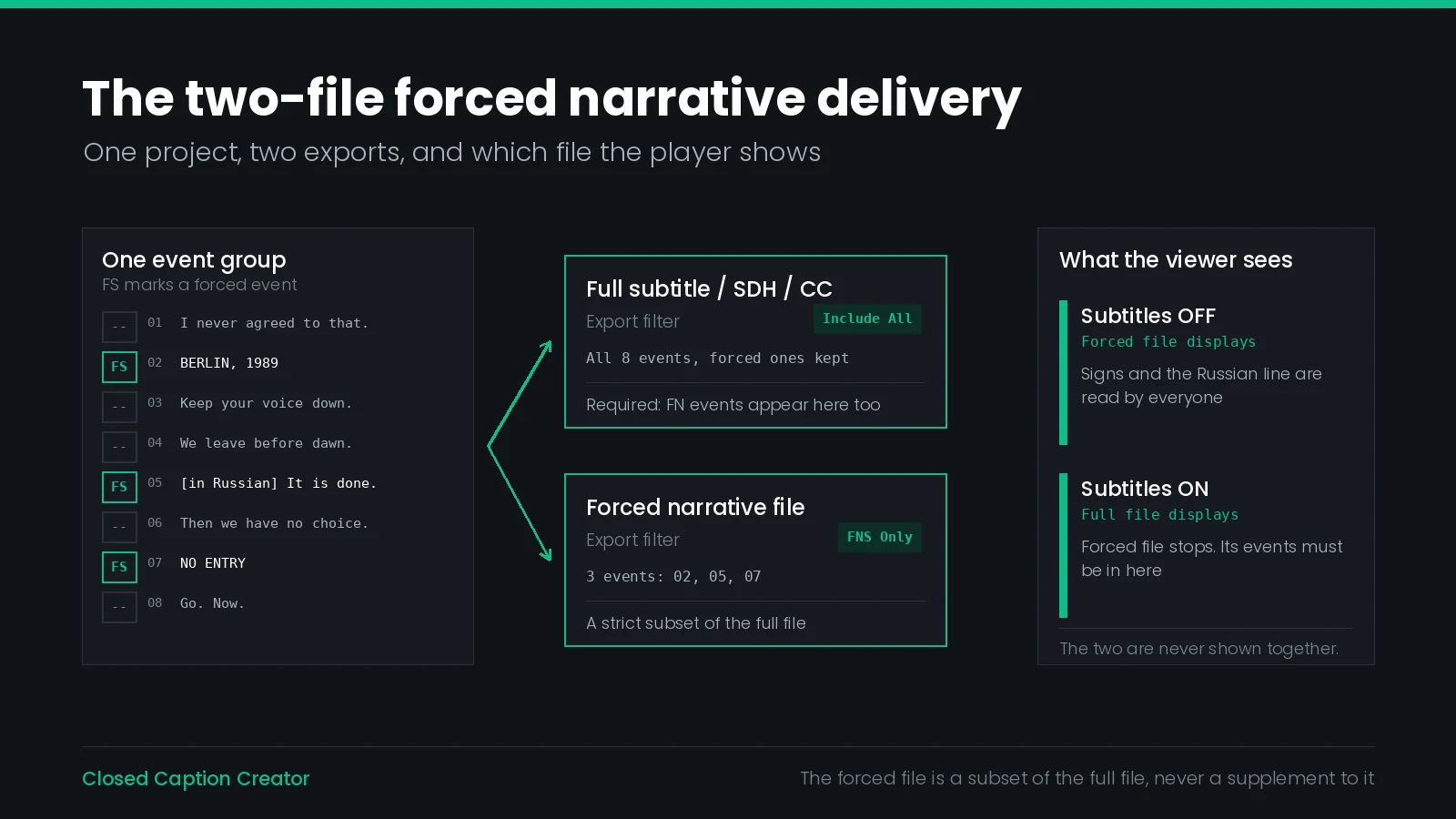
Here is the requirement that fails more forced narrative deliveries than any other: the forced events must also appear in the full subtitle file.
That sounds like duplication, and it is. The reason is player behaviour. Netflix states it plainly: “On our service, Forced Narrative subtitles are only displayed if full Subtitles and CC are set to ‘off’ in the user's playback settings. When the user activates a full Subtitle or CC file, the FN subtitle does not display and for this reason, we require that all Forced Narrative Events are also included in each full Subtitle and SDH/CC file.”
Read the mechanism rather than the sentence. The forced track and the full track are mutually exclusive renditions — the player shows one or the other, never both layered. So if the forced events live only in the forced file, every viewer who switches subtitles on loses the sign translations and the Klingon.
This is not a Netflix idiosyncrasy. Apple's HLS Authoring Specification for Apple Devices arrives at the identical rule from the player side, as requirement 5.8: “If the content has forced subtitles and regular subtitles in a given language, the regular subtitles track in that language MUST contain both the forced subtitles and the regular subtitles for that language.”
Two independent specifications, one rule. If you remember nothing else from this article: the forced file is a subset of the full file, never a supplement to it.
Where the Forced Flag Lives
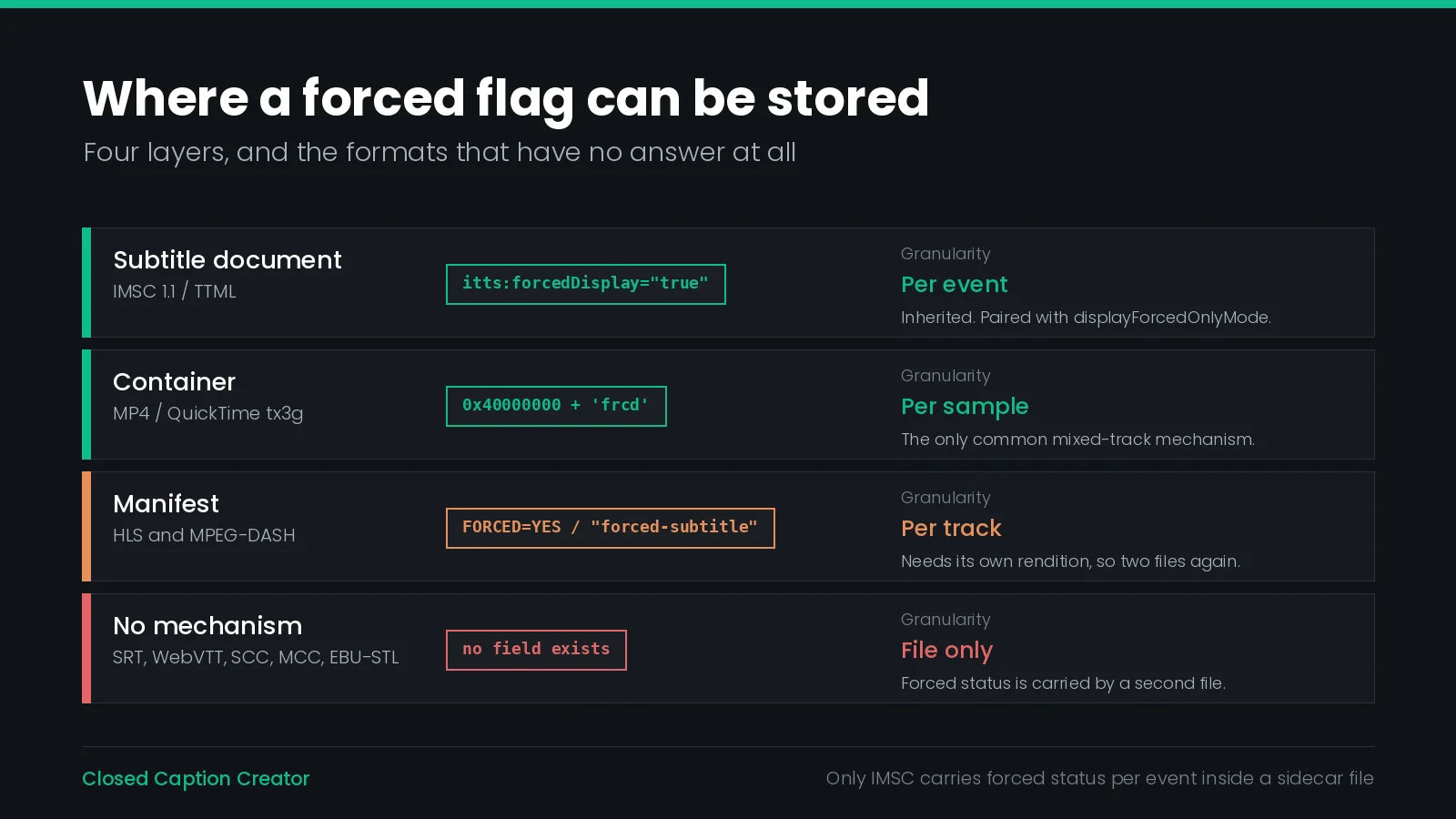
Forced narrative is a property of an individual event. Almost nothing in the delivery chain is built to carry a per-event boolean, so the industry has ended up with four different places to put it — and one widely used fallback for when none of them is available.
| Format or layer | Mechanism | Granularity |
|---|---|---|
| IMSC 1.1 / TTML | itts:forcedDisplay on body, div, p, region or span | Per event, inherited |
MP4 / QuickTime tx3g | Display flags 0x40000000 and 0x80000000, plus a 'frcd' atom per sample | Per sample and per track |
| HLS manifest | FORCED=YES on EXT-X-MEDIA | Per rendition |
| DASH manifest | Role@value="forced-subtitle" | Per adaptation set |
| SRT, WebVTT, SCC, MCC, EBU-STL | None — no forced field exists | Separate file only |
Notice the pattern. The only layer that holds forced status per event in a sidecar file is IMSC. Everything else either moves the decision up to the whole track, or has no answer at all. That single fact explains why the two-file delivery is the industry norm rather than an edge case.
IMSC and TTML: itts:forcedDisplay
IMSC 1.1 is the one widely deployed sidecar format that can mark a single event as forced inside the document. The attribute is itts:forcedDisplay, in the IMSC styling namespace, and its definition is short.
| Property | Value |
|---|---|
| Values | false | true |
| Initial | false |
| Applies to | body, div, p, region, span |
| Inherited | Yes |
| Animatable | Discrete |
The attribute does nothing on its own. It pairs with a player-side parameter called displayForcedOnlyMode, and the rule is conditional in one direction only: “If and only if the value of displayForcedOnlyMode is ‘true’, a content element with a itts:forcedDisplay computed value of ‘false’ SHALL NOT produce any visible rendering, regardless of the computed value of tts:visibility.”
In other words, forcedDisplay is a hiding mechanism, not a showing mechanism. In normal playback every event renders. When the player switches into forced-only mode, everything not marked forced goes dark. A presentation processor must accept the parameter, and if nothing sets it, the value is assumed to be false.
This gives IMSC something no other sidecar format has: one file that serves both deliveries. The spec's own Annex C example shows exactly that — a French document where the translated “High School” sign carries itts:forcedDisplay="true" and the voiceover subtitles carry false. A French-speaking viewer who has not turned subtitles on sees the sign; a hard-of-hearing viewer who has turned them on sees both.
The region trap. itts:forcedDisplay is inherited and applies to region, which makes region-level marking tempting. But the spec warns that a region's background can stay visible even when every piece of active content inside it is hidden. Mark a region true and you can end up with an empty caption box on screen in forced-only mode. Mark the p elements instead.
Two further details matter in practice. The attribute has no effect on layout or composition — it only governs visibility — so a forced-only presentation inherits the same region geometry as the full one. And IMSC prohibits TTML's condition attribute, which is why the usesForced metadata item from TTML2 “does not apply” in IMSC; itts:forcedDisplay is the only forced mechanism in the profile.
The practical catch is support. Writing a correct itts:forcedDisplay document is easy. Finding a platform that will accept a single dual-purpose IMSC file instead of two files is not, which is why most delivery specifications still ask for the pair.
HLS: FORCED=YES on the Rendition
In HTTP Live Streaming the forced designation is not in the subtitle file at all. It is an attribute on the EXT-X-MEDIA tag in the master playlist, defined in RFC 8216.
#EXT-X-MEDIA:TYPE=SUBTITLES,GROUP-ID="subs",LANGUAGE="en",NAME="English (Forced)",AUTOSELECT=YES,FORCED=YES,URI="subs/en_forced/index.m3u8"
#EXT-X-MEDIA:TYPE=SUBTITLES,GROUP-ID="subs",LANGUAGE="en",NAME="English",AUTOSELECT=NO,FORCED=NO,URI="subs/en/index.m3u8"
The attribute is optional, its valid strings are YES and NO, and “its absence indicates an implicit value of NO.” It is also scoped: “The FORCED attribute MUST NOT be present unless the TYPE is SUBTITLES.” A value of YES “indicates that the Rendition contains content that is considered essential to play,” and when choosing between forced renditions a client “SHOULD choose the one that best matches the current playback environment (e.g., language).”
Because the flag is per rendition, the forced events need their own playlist and their own segment files. That is the two-file delivery again, expressed in manifest terms.
Apple's authoring specification adds three operational rules on top of the RFC:
- 5.8 — the regular subtitles track in a language must contain both the forced and the regular subtitles for that language.
- 5.9 — if the video has text burned in and a clean version exists, you should use forced subtitles instead, because it “allows you to easily translate into multiple languages.”
- 5.11 — “Forced subtitles SHOULD always have
AUTOSELECT=YES.”
Rule 5.11 is the one that bites. A forced rendition left at AUTOSELECT=NO is syntactically valid and will simply never be selected automatically, which looks exactly like a missing forced track to everyone downstream. Also note that Apple's specification makes LANGUAGE mandatory on every subtitle EXT-X-MEDIA tag, so a forced rendition with no language declared is non-conformant against it.
DASH: forced-subtitle, and a Spelling Problem
MPEG-DASH signals forced subtitles with a Role descriptor on the adaptation set, using the scheme urn:mpeg:dash:role:2011. The correct value is forced-subtitle, defined in ISO/IEC 23009-1 Table 31 as textual information meant for display when no other text representation is selected.
<AdaptationSet mimeType="application/mp4" lang="en" codecs="stpp">
  <Role schemeIdUri="urn:mpeg:dash:role:2011" value="forced-subtitle"/>
</AdaptationSet>
The definition maps cleanly onto the HLS one — display this when the viewer has selected nothing. The problem is not the specification; it is that player implementations have historically matched the wrong string. Some have tested for forced_subtitle with an underscore, and a 2018 DASH Industry Forum discussion referred to forced_subtitled. Mainstream players have since moved toward accepting more than one spelling for backward compatibility.
Test the player, not the manifest. A DASH manifest can be perfectly conformant and still have its forced track ignored, because the forced role is the one subtitle signal where real-world player behaviour diverged from the spelling in the standard. If a platform does not publish which value it expects, ask — and confirm the forced track actually auto-displays in the target player before signing off the delivery.
MP4 and QuickTime: Two Flags and an Atom
Where subtitles are muxed into an MP4 or QuickTime file as a 'sbtl' track with the 'tx3g' sample format, forced status is carried in the subtitle sample description's 32-bit display flags field. Apple's QuickTime File Format documentation defines two relevant flags.
| Flag | Value | Meaning |
|---|---|---|
| Some samples are forced | 0x40000000 | At least one sample in the track contains a forced ('frcd') atom |
| All samples are forced | 0x80000000 | Every sample is treated as forced, with or without a 'frcd' atom |
This is the only common container that genuinely supports a mixed track: set 0x40000000, then mark the individual forced samples with a 'frcd' atom, and one track carries both kinds of event with the forced ones identifiable. A fully forced track sets both flags, which the documentation notes combines to 0xC0000000 — “If this flag is set, the Some Samples Are Forced flag must also be set.”
In practice this is also where forced subtitles most often quietly fail. The pattern is familiar from support threads: an MP4 muxed from an SRT sidecar plays the subtitle track fine but never auto-displays it, because the muxer wrote no display flags and no 'frcd' atoms. The events were marked forced in the authoring tool; the information had nowhere to go in SRT, and the mux had nothing to read.
The Formats With No Flag at All
Most captioning work is delivered in formats that cannot express forced status in any way.
| Format | Forced support | Why |
|---|---|---|
| SRT | None | An event is an index, a timecode pair and text. There is no attribute layer at all. |
| WebVTT | None in the file | Cue settings cover position and alignment, not purpose. Forced status is declared in the HLS manifest instead. |
| SCC / MCC | None | EIA-608 byte pairs encode characters and control codes. There is no spare semantic field. |
| EBU-STL | None | The TTI block carries timing, vertical position, justification and comment status, but no forced designation. |
For these, the two-file delivery is not a convention — it is the only available mechanism. The forced information is carried by the existence of a second file, and by whatever the filename and the delivery manifest say about it.
Which leads to the single most important consequence for anyone building a workflow: because the signal lives outside the file, it cannot survive format conversion on its own. Convert an IMSC file with itts:forcedDisplay markings to SRT and the markings are gone, silently, with no warning and no error. The same is true in the other direction: nothing in an SRT tells a converter which events were forced. This is the same degradation pattern that affects placement, but worse, because placement at least degrades to something approximate. Forced status degrades to nothing.
The Netflix Two-File Delivery
Netflix requires two separate subtitle files for any title that contains forced narrative content, and the composition of each is specific.
| File | Contains | Shown when |
|---|---|---|
| Full subtitle / SDH / CC | All dialogue plus every forced narrative event | The viewer has subtitles or CC switched on |
| Forced narrative | Only the forced narrative events | The viewer has subtitles and CC switched off |
Three constraints sit around that pair. The forced events are localized per language, so a title delivered in twelve languages needs twelve forced files, not one. The primary video must be delivered textless. And nothing is burned in.
There is also a limit worth setting expectations against: Netflix states that “there is no way to guarantee the appearance of FN subtitles,” because the rendering depends on the device and the fonts available to it. Forced narrative placement follows the same rules as full subtitles — bottom-centre by default, moved to the top to avoid covering picture or locator IDs — and both move up when the play bar is on screen.
That last detail has a consequence most teams discover during QC. A forced event can collide with burned-in on-screen text in a way that is invisible in the forced-only file, because when you preview the forced file alone there is nothing else on the timeline to collide with. Check placement against the picture, not against the file. Our Netflix conform guide covers the surrounding timing and framing requirements.
Marking Events in Closed Caption Creator
Forced narrative is a per-event property in Closed Caption Creator, and there are three ways to set it.
One event at a time. Each event row carries an FS toggle at the bottom. Clicking it sets the forced property; the label turns teal and bold when the event is marked, and clicking again removes the marking.
A selection at once. Select the events, right-click, and choose Forced Subtitle from the context menu. This sets forced = true on every selected event simultaneously.
A column at a time. Table View includes a Forced column showing the flag as Yes or No, with a dropdown selector on every row. Scanning down that column is the fastest way to audit and set forced status across a whole event group.
Clearing a Forced Flag in Bulk
This deserves its own section because of an asymmetry that catches people out.
The context menu is one-directional. The right-click Forced Subtitle option only marks events as forced. It will not remove the marking. Select forty events by accident, apply it, and you cannot undo it the same way you applied it.
There are two routes out, and neither is in the obvious place.
The first is Table View. The Forced column's Yes/No dropdown works in both directions, and the column is designed for exactly this kind of bulk pass — set approvals, forced flags or caption styles by scanning down a column. For a mistaken bulk marking this is normally the fastest fix.
The second is Metadata Merge, under the event group options menu, in the Combine & Compare tab. Its property list includes Forced Narrative, described as the forced flag including false — which means a merge can propagate a cleared flag, not only a set one. Build the result from a primary group's events and timing, take the forced flags from a group where they are correct, and the merge writes them across. Match by index, time or text depending on whether the two groups share event boundaries.
Falling back to the individual FS toggle on each row works too, but on a long programme it is the slowest of the three.
Exporting Both Files From One Project
Once the flags are right, the two deliverables come from the same event group. Open File → Export…, choose Subtitle File, and find the Forced Subtitles control in the More Options panel. It has three modes.
| Mode | Output | Use for |
|---|---|---|
| Include All | Every event, forced or not | The full subtitle, SDH or CC delivery |
| FNS Only | Only events marked forced | The standalone forced narrative file |
| Exclude FNS | Only events not marked forced | A dialogue-only version with the forced content stripped |
The Netflix pair is therefore two export passes over one group: Include All for the full track, then FNS Only for the forced file. Note that Include All, not Exclude FNS, is the correct setting for the full delivery — which is the same rule from earlier in this article, restated as a dropdown. Choosing Exclude FNS for the full file produces a technically valid file that fails the specification.
Save both configurations as named export presets. The preset stores the extension, profile, timing options and all the advanced settings, including the forced filter, so a series delivered episode after episode uses the same pair every time rather than relying on someone remembering to change a dropdown. Presets are also available in the batch export workflow.
Tracks as an Alternative to the Flag
There is a second way to separate forced content that does not use the forced property at all. Event groups support tracks — No Track plus A through D — and the Subtitle Export window can filter the output by track.
Keeping forced narrative on its own track, then exporting track by track, produces the same two files by a different route. It is the better approach when the forced content needs to be reviewed, approved or translated as a distinct body of work, because a track is visible as a structural division in the editor rather than a per-row boolean.
The flag is better when the forced events are interleaved with dialogue and belong editorially to the same pass. Most workflows end up using the flag; teams doing high-volume dubbed delivery, where the forced layer is almost entirely translated on-screen text, more often use a track.
What you should not do is use both inconsistently — forced events marked on some episodes and tracked on others — because the export settings differ and a preset built for one will silently produce the wrong file for the other.
Nothing Validates Forced Status
Closed Caption Creator runs three layers of automated QC, and none of them looks at the forced flag.
| Layer | What it tests | Checks forced status |
|---|---|---|
| Realtime Error Detection | Reading speed, characters per line, line count, duration range, event gap — as you type | No |
| Style Guide Manager | Lines and characters, overlap, character validation, duration, reading speed, event gap — on a review pass | No |
| Pre-export checks | Missing or inverted timecodes, zero-duration events, overlap, missing text — automatically on every export | No |
This is not an oversight so much as a consequence of what forced narrative is. Every rule in those three layers compares a measurable property against a threshold. Whether a sign needs translating for a given market is an editorial judgement about the picture and the audio, and there is no threshold for it.
The practical effect is that forced status is verified by a person or not at all, and the two failure modes are asymmetric. A missing forced marking means a viewer with subtitles off misses story information — the failure the whole mechanism exists to prevent. An extra forced marking means a subtitle appears for viewers who did not ask for one, which reads as a bug but loses no information.
Two habits cover most of it. Scan the Forced column in Table View as a dedicated pass, the way you would scan a reading-speed column. And diff the two exported files: the forced file should be a strict subset of the full file, identical in text and timecode for every event they share. If an event differs between the two, one of them was edited after the other was exported.
What Goes Wrong
| Symptom | Cause | Fix |
|---|---|---|
| Sign translations vanish when the viewer turns subtitles on | Forced events were put only in the forced file | Re-export the full track with Include All, not Exclude FNS |
| Forced markings disappeared after conversion | The target format has no forced field | Keep the flags in the project; carry forced status by delivering two files |
| Forced track never auto-displays in HLS | AUTOSELECT=NO, or no LANGUAGE on the EXT-X-MEDIA tag | Set AUTOSELECT=YES and declare LANGUAGE on every subtitle rendition |
| Forced role ignored by a DASH player | The player matches a different spelling than forced-subtitle | Confirm the expected value with the platform and test in the target player |
| Muxed MP4 plays the track but never forces it | No display flags and no 'frcd' atoms were written at mux time | Mux from a source that carries forced status, and verify the flags in the output |
| An empty caption box appears in forced-only mode | itts:forcedDisplay="true" set on a region whose content is all hidden | Move the attribute onto the p elements |
| A bulk forced marking cannot be undone | The context-menu option only sets the flag | Clear it in the Table View Forced column, or with Metadata Merge |
| A forced subtitle covers burned-in on-screen text | The collision is invisible when previewing the forced file alone | Review forced placement against the picture, with the full timeline loaded |
Delivery Checklist
- Confirm the title actually has forced content, and which of the four cases each event falls under.
- Mark the events, then audit the Forced column in Table View as a separate pass.
- Check the delivery specification for how many files it wants and in what format.
- Export the full track with Include All. Confirm the forced events are present in it.
- Export the forced track with FNS Only.
- Diff the two files — the forced one must be a strict subset, matching text and timecode.
- Save both configurations as export presets, named so the pair is obvious.
- If the delivery is manifest-based, verify
FORCED=YESwithAUTOSELECT=YESand a declaredLANGUAGE, or theforced-subtitlerole. - Localize the forced file per language. One forced file does not cover twelve markets.
- Review forced placement against the picture, not against the forced file in isolation.
Frequently Asked Questions
What are forced narrative subtitles?
Forced narrative subtitles are subtitle events that display even when the viewer has subtitles switched off. They cover dialogue in a language other than the main audio, story-critical on-screen text such as signs and location cards, and speech the audio does not make intelligible. Netflix describes them as a text overlay that clarifies communications or alternate languages.
Do forced narrative events also go in the full subtitle file?
Yes. Netflix requires that all forced narrative events are also included in each full subtitle and SDH or CC file, because the forced track stops displaying as soon as the viewer turns a full track on. Apple's HLS Authoring Specification states the same rule: the regular subtitles track in a language must contain both the forced and the regular subtitles for that language.
Does SRT support forced subtitles?
No. SRT has no field for a forced flag, and neither do WebVTT, SCC, MCC or EBU-STL. In those formats the only way to signal forced content is to deliver the forced events as a separate file, or to declare the whole track as forced in the manifest or container that carries it.
What is itts:forcedDisplay in IMSC?
It is the IMSC attribute that marks content as forced inside the subtitle document itself. Values are false or true, the initial value is false, it applies to body, div, p, region and span, and it is inherited. When a player sets displayForcedOnlyMode to true, any element computing to false must not render.
How do you mark an event as forced narrative in Closed Caption Creator?
Click the FS button at the bottom of the event row, which turns teal and bold when the event is marked. To mark a selection, right-click and choose Forced Subtitle. To set or clear the flag in bulk, use the Forced column in Table View, which offers a Yes or No dropdown on every row.
How do you produce the Netflix two-file forced narrative delivery?
Run Subtitle Export twice from the same event group. Export once with the Forced Subtitles filter set to Include All for the full track, then again with FNS Only for the standalone forced file. Save both configurations as export presets so the pair stays consistent across episodes.
What is FORCED=YES in an HLS playlist?
FORCED is an optional attribute on the EXT-X-MEDIA tag defined in RFC 8216. A value of YES indicates that the rendition contains content that is considered essential to play. It must not be present unless TYPE is SUBTITLES, and its absence implies NO. Apple adds that forced subtitles should always have AUTOSELECT=YES.
Is a forced subtitle the same as an open caption?
No. Open captions are burned into the picture and cannot be switched off or localized. Forced subtitles are a selectable text track the player chooses to display. Netflix requires the opposite of burn-in: the primary video must be delivered textless, and neither full nor forced subtitles may be burned in.
What Role value signals a forced subtitle in MPEG-DASH?
The value forced-subtitle in the scheme urn:mpeg:dash:role:2011, defined in ISO/IEC 23009-1 Table 31 as textual information meant for display when no other text representation is selected. Player support is inconsistent, because some implementations historically matched forced_subtitle or forced_subtitled instead.
Does any QC check validate forced narrative flags?
No. Realtime Error Detection, the Style Guide Manager and the automatic pre-export checks in Closed Caption Creator test timing, reading speed, line length, overlap, characters and structure. None of them inspects the forced flag, so a missed or extra forced marking is found by review rather than by a rule.
Forced narrative is a small flag with a large failure mode, and the tooling around it decides whether it survives to the viewer. Want to see how marking, filtering and dual-file export work on your own titles? Talk to our team or start a free trial.