Burned-In Subtitles: When to Burn Captions Into the Picture, and What It Costs
When should you burn subtitles into a video?
Burn subtitles in when the player cannot carry a sidecar track — social feeds, screeners, kiosks, embedded web video with no caption interface. The text is then permanent: it cannot be turned off, restyled, repositioned, translated or read by software. Every later change becomes a full re-render of the video.
The objection to burning subtitles into the picture is usually stated as a compliance objection. It is said that open captions do not count, that a regulator will not accept them, that burning in is the amateur option.
That framing is wrong, and it is worth clearing out of the way first, because it sends people to the wrong decision for the wrong reason. The FCC rules permit open captioning explicitly. WCAG lists it as a sufficient technique. Burning in is a legitimate, standards-conformant way to caption a programme.
The real case against it is an engineering one, and it is much more specific than “it is worse.” Burning in converts text into picture, and everything you could previously do with the text — change it, restyle it, move it, translate it, switch it off, feed it to software — becomes a job that re-renders the video. This guide sets out what the rules actually say, what the render actually costs, and how to get the deliverable without giving up the master.
What Burning In Does to the File
A caption that travels as a sidecar file, or as data embedded alongside the video, is text with timings attached. A player reads it, draws it at playback time, and the drawing is the player's decision: its font, its size, the viewer's preference settings, the viewer's choice to turn it off.
Burning in moves that decision upstream and makes it permanent. The text is rasterised and composited into every frame it appears on, and from that point the words are pixels like any other pixels. Nothing downstream can tell them apart from the picture.
| After delivery, can you still… | Sidecar or embedded | Burned in |
|---|---|---|
| Correct a spelling | Edit a text file | Re-render the video |
| Change the font or size | Player setting or a re-export | Re-render the video |
| Move a caption off a lower third | Edit a position value | Re-render the video |
| Add a language | Add a file | Render another full video |
| Let the viewer turn it off | Yes | No |
| Let the viewer enlarge it | Player preference | No |
| Read the words as text | Yes | No |
| Reuse them as a transcript | Yes | No |
Read the right-hand column as a list of future jobs rather than a list of limitations. None of them is impossible. Each of them costs a render of the whole programme, and that is the entire economic argument in one table.
The vocabulary is worth settling too, since three words get used for overlapping things. Open captions describes what the viewer experiences: captions that cannot be switched off. Burned-in, or hardsubbed, describes what was done to the file. Open is the outcome; burning in is the usual method. For the difference between captions, subtitles and SDH as content types, see our guide to closed captions, subtitles and SDH.
The Rule That Permits It
Start with the claim that burning in fails the regulations, because it is the one most often repeated and it is the one most easily checked.
The FCC's captioning rules define closed captioning at 47 CFR § 79.1(a)(2) as the visual display of the audio portion of video programming, produced to the technical specifications in that part. The pass-through obligation at § 79.1(c)(1) talks about keeping the original captioning data intact in a form decoders can recover, which is clearly about captions carried as data.
Further down, in paragraph (e) on responsibility for and determination of compliance, the rules address the question directly.
47 CFR § 79.1(e)(2). The paragraph states that open captioning, or subtitles in the language of the target audience, may be used in lieu of closed captioning. It is a permitted method of compliance, not an exemption — it sits in the compliance paragraph, not in the exempt-programming list at § 79.1(d). The programming still has to be captioned, and the quality standards at § 79.1(j)(2) still apply to it.
That is a narrower finding than it first looks, and the limits matter.
It says nothing about whether a particular distributor will accept an open-captioned file. A broadcaster's delivery specification is a contract, and contracts routinely require caption data the rule would not require — because the distributor needs to re-version, re-brand, re-time or localise the programme later, and burned-in text makes all of that harder. A file can be fully compliant with § 79.1 and still be rejected by the spec it was delivered against.
It also does not travel. Other jurisdictions have their own wording, and an accessibility obligation under a procurement rule or a service contract may be stricter than the broadcast rule. Check the specification you are delivering to rather than the general rule, every time.
Where WCAG Lands
The web accessibility guidelines are the other place people expect burning in to fail, and the answer there is the same: it conforms, and the reasons are specific enough to quote.
The requirement is that captions exist. Success Criterion 1.2.2, at level A, requires captions for all prerecorded audio content in synchronised media, with an exception for media that is itself an alternative for text. The criterion asks for captions. It does not ask for a particular carriage mechanism.
Open captions are a listed sufficient technique. The W3C's own Understanding document for 1.2.2 lists providing open captions among the sufficient techniques for satisfying it, alongside the technique for providing closed captions. The accompanying definition notes draw the distinction plainly: closed captions are the ones a player can turn on and off, and open captions are any captions that cannot be turned off.
The resize requirement explicitly excepts captions. Success Criterion 1.4.4 requires text to be resizable to 200% without assistive technology — except, in its own words, for captions and images of text. Burned-in text cannot be resized by the viewer, and the criterion that would otherwise object has already excluded it.
| Criterion | Level | Effect on burned-in captions |
|---|---|---|
| 1.2.2 Captions (Prerecorded) | A | Satisfied. Open captions are a listed sufficient technique |
| 1.4.4 Resize Text | AA | Does not apply. Captions are excepted by name |
| 1.4.5 Images of Text | AA | Turns on whether the rendered captions count as an image of text at all |
| 1.4.3 Contrast (Minimum) | AA | Text inside a picture with significant other visual content has no contrast requirement — which is a reason to set contrast yourself, not a reason to ignore it |
The 1.4.5 row is the only genuinely arguable one, and it is worth being honest about rather than resolving by assertion. The criterion says to use text rather than images of text where the technology can achieve the presentation, with an exception where the image of text can be visually customised to the user's requirements. Burned-in captions cannot be customised, so if they are an image of text under the definition, the exception does not rescue them.
But the definition of an image of text carries a note excluding text that is part of a picture containing significant other visual content — its example is a name on a nametag in a photograph. A caption composited over moving footage is arguably exactly that, which would place it outside the criterion's scope rather than inside its exception. The guidelines do not settle the point for captions specifically, and we have not found a W3C statement that does.
The honest conclusion. Burning in is not a compliance failure. It is also not accessibility-neutral: a viewer with low vision who needs the captions larger, or a viewer who needs them moved off a face, has no way to get either, and the reason WCAG does not catch that is an explicit exception rather than an oversight. “It conforms” and “it serves the viewer” are different tests, and burning in passes the first more comfortably than the second.
When It Is the Right Call
With the compliance question out of the way, the decision becomes a practical one: does the destination carry a caption track, and can you rely on it being switched on?
| Situation | Why burning in wins |
|---|---|
| Social feeds that autoplay muted | The text has to be on screen by default; a track the viewer must enable will not be enabled |
| Client and festival screeners | One file, no player dependency, no risk the reviewer never finds the caption menu |
| Kiosks, signage and exhibition playback | Often no caption interface at all, and frequently no remote control in the viewer's hand |
| Embedded web video with no caption UI | A bare player element may ignore a track entirely |
| Foreign-language dialogue in a mostly native-language programme | The viewer needs these lines whether or not they asked for subtitles — though a forced narrative track does this without burning in, where the destination supports one |
| Downloads that will be re-shared | A sidecar file does not survive being forwarded, re-uploaded or dropped into a messaging app |
The common thread is that the viewer's player is unknown or unco-operative. Where you control the player, or the platform guarantees a caption interface, the case for burning in gets thin fast.
When It Is the Wrong Call
The cases against are less obvious because the cost arrives later, usually on somebody else's schedule.
- Anything that will be localised. Every language is a separate full render, and the count only goes up.
- Anything that will be re-versioned. A cut-down, a different runtime, a regional variant — each one re-opens the composite.
- Archive and library masters. The master should outlive the deliverable. Burned-in text locks a styling decision, a language choice and a caption revision into the preservation copy.
- Anything delivered against a broadcast specification. Even where § 79.1(e)(2) permits open captions, the spec usually asks for 608 or 708 data or a sidecar, because the distributor needs the text.
- Anything where the caption copy is not final. Burning in before legal, compliance or the client has signed off converts a text edit into a render queue.
- Anything whose words have a second life. Transcripts, search, chapters, clip discovery and quotation all need the text, and burning in deletes it.
None of these rules out a burned-in deliverable. They rule out burning in as the only form the captions exist in, which is a different and much easier constraint to satisfy.
The Deliverable Count
Here is the cost in a form you can put in a schedule. The sidecar shape and the burned-in shape scale differently, and the difference is not a percentage — it is a multiplier equal to the number of language versions.
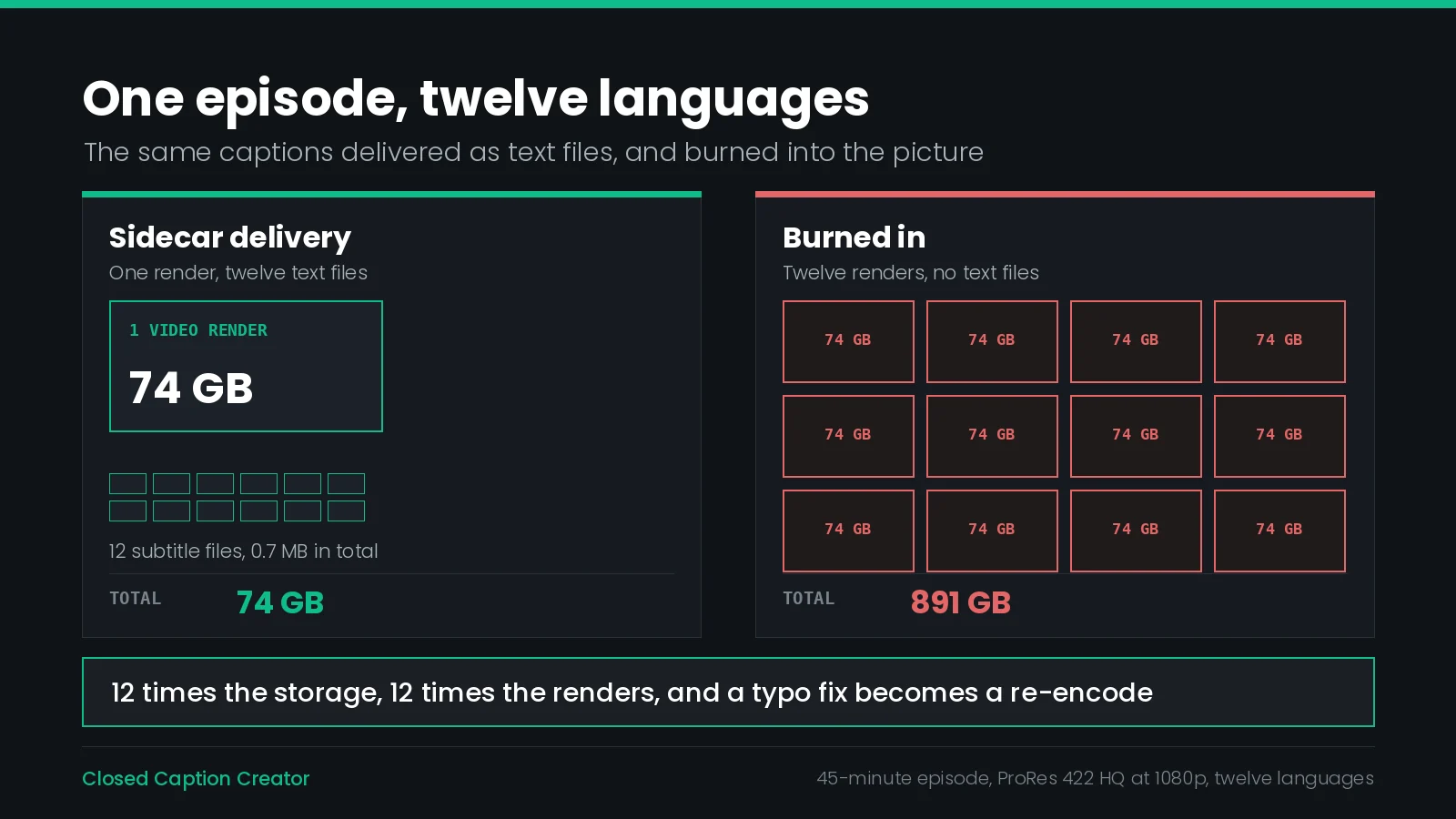
Take a 45-minute episode mastered as ProRes 422 HQ at 1920×1080, delivered in twelve languages. At the published data rate of roughly 220 Mb/s, the master is about 74 GB.
| Quantity | Sidecar delivery | Burned-in delivery |
|---|---|---|
| Video renders | 1 | 12 |
| Video storage | 74 GB | 891 GB |
| Caption files | 12 × about 60 KB | 0 |
| Caption storage | about 0.7 MB | — |
| Total | 74 GB | 891 GB |
| Cost of one typo fix | Edit one text file | Re-render one 74 GB file |
| Cost of a thirteenth language | Add a 60 KB file | Render another 74 GB file |
The multiplier is the language count. 74 GB × 12 = 891 GB, against 74 GB plus 0.7 MB. The caption text in the sidecar workflow is about one millionth of the video it describes, and the burned-in workflow pays full video price for every copy of it. Render time scales the same way: whatever one pass costs, you are buying twelve of them, and buying them again after every copy change.
Two qualifications keep this honest. Deliverables are usually compressed rather than mastered, so the absolute numbers fall; the ratio does not, because both columns shrink together. And a workflow that burns in deliberately will usually render from a compressed intermediate rather than from the ProRes master, which trades the storage back for a generation of quality — which is the next section.
The Re-Encode Nobody Budgets For
Compositing text into a picture is not an overlay operation on a finished file. It is a decode of every frame, a composite, and an encode of every frame — including the thousands of frames with no caption on them at all.
That matters in three ways that show up on the deliverable rather than in the schedule.
Generation loss covers the whole picture, not the caption area. A long-GOP source such as H.264 or HEVC is decoded to pixels and re-encoded from them, so every frame takes a second generation of lossy compression. Rendering from a mezzanine or intermediate codec avoids nearly all of it. Rendering a burned-in deliverable from an already-delivered H.264 file is the worst available option and also the commonest, because that file is the one to hand.
Caption text is expensive to encode. Hard-edged white glyphs against moving footage are high-frequency detail that changes every few seconds in a fixed region. A rate-controlled encoder spends bits there, and at a constrained bitrate it takes them from the rest of the frame. The visible result is mosquito noise around the lettering and a softer picture behind it, both worse on the small screens where burned-in captions are usually watched.
The platform will encode it again. Everything uploaded to a social or video platform is transcoded on arrival, usually to a lower bitrate than you delivered. Thin strokes and tight outlines that survived your encode may not survive theirs. This is the single most common reason burned-in captions look crisp in the edit and ragged in the feed.
| Render from | Generations of loss | Verdict |
|---|---|---|
| Uncompressed or ProRes master | One — the output encode | Correct |
| Mezzanine or intermediate | One, from a lightly compressed source | Acceptable |
| Delivered H.264 or HEVC file | Two, plus the platform's third | Avoid |
| A file already downloaded from a platform | Three or more | Never |
The practical rule is to keep the burn-in render as close to the master as the pipeline allows, and to treat the burned-in file as a leaf of the tree rather than a node anything else is made from.
The Display Style Does Not Survive
This is the detail that catches broadcast teams, because it is invisible until somebody compares the burned-in file against the caption file it came from.
Caption display styles describe how text arrives on screen. Pop-on places a complete caption at its in-timecode and clears it at its out-timecode. Roll-up scrolls lines upward within a window of two, three or four lines, which is how live and news captioning is usually authored. Paint-on reveals a caption character by character.
Rendering to picture flattens all of that.
Video Export renders pop-on only. In Closed Caption Creator, Video Export always uses the pop-on model: the text appears at the event in-timecode and disappears at the out-timecode. Events authored as Roll-Up 2, Roll-Up 3, Roll-Up 4 or Paint-On are not animated during export — the full event text is displayed as a static block for the whole event duration. If the deliverable requires true roll-up or paint-on behaviour, it needs embedded captions or an SCC or MCC sidecar instead.
The consequence is not cosmetic. A roll-up file authored for a news programme has events whose durations overlap the way scrolling lines do. Flattened to static blocks, those durations can produce text that sits on screen longer than intended, or two blocks that read as a jump rather than a scroll. If a programme was captioned roll-up and the burned-in version is approved without a side-by-side check, the first person to notice is usually the client.
The fix is to decide the display style before the caption pass, not after it. If the file is going to be burned in, author it pop-on and time it to a reading speed that works as a static block.
Sizing Text for the Smallest Screen
A sidecar caption is drawn by the player at a size the player chooses, which is why a viewer on a phone and a viewer on a television both get something readable. Burned-in text is fixed at the proportion of frame height you render it at, and that proportion is the only thing that survives.
So the sizing question is not “what looks right on this timeline” but “what is the smallest screen this file will play on.” Text set to look restrained on a 1080p review monitor can be genuinely unreadable in a phone feed, and there is no recovery from it after the render.
Closed Caption Creator's Video Export exposes the controls that matter, inside Show Subtitle Styling:
| Control | Range or options | What it decides |
|---|---|---|
| Font family | Any font in the Font Manager, or a system font | Legibility at size; avoid light weights and tight counters |
| Font size | 8 to 72 points | The one value that cannot be changed later |
| Font colour and opacity | Colour plus opacity | Contrast against the busiest shot, not the average one |
| Outline colour, opacity and size | Colour plus size in pixels | Separation from the picture; the first thing a platform encode degrades |
| Shadow colour, opacity and size | Colour plus size | Secondary separation on light backgrounds |
| Border style | Outline and shadow, or a solid background box | A box guarantees contrast everywhere and costs picture |
| Horizontal and vertical padding | Percentage of frame | How close the text sits to the frame edges |
Two of those deserve a stronger recommendation than the rest.
Prefer the solid background box when the footage is unpredictable. An outline is a bet that no shot behind the captions is both bright and busy. A box is not a bet. It costs a strip of picture and it is the only treatment that holds up over white backgrounds, snow, documents on screen and stock footage you have not graded.
Set the outline wider than looks necessary. The platform's transcode is the last encoder to touch the file, and thin outlines are exactly what it discards first. Judge the outline on a downscaled preview, not at 100%.
Styling that works can be saved with Save Preset in the styling panel, and the output settings — folder and encoder preset — separately with the export preset in the footer. For a series, settling both once and reusing them is the difference between twelve consistent episodes and twelve slightly different ones.
Padding, Safe Areas and Platform Furniture
A caption that is legible and correctly placed in your export can still be unreadable in the destination, because the destination draws its own interface on top of your picture. Usernames, captions, progress bars, like counts and share buttons all occupy the lower third of a social player, which is exactly where captions go.
Horizontal and vertical padding in Video Export are expressed as a percentage of the frame, which is the right unit: it keeps the margin proportional when the same style is reused across resolutions.
- Raise the baseline for social. A caption at the conventional broadcast height will sit underneath the platform's own overlay in a vertical feed. Lift it until it clears the furniture, then check it on the platform rather than in the player you exported from.
- Keep a margin even where nothing will crop. Text touching the frame edge reads as an error regardless of whether anything clips it.
- Treat reframing as a separate decision. A 16×9 master cropped to 9×16 moves everything, including the captions. Export presets for cropped vertical formats exist precisely so the crop and the caption placement are decided together rather than in sequence.
- Check the busiest shot, not the first one. Preview the events over the shots most likely to fight the text: titles, lower thirds, graphics, end cards.
For the layout rules behind vertical delivery specifically, our guide to captioning for 9×16 video covers the platform-by-platform detail. For the general principle of where captions belong in the frame, see caption placement and positioning.
The Preview panel in Video Export renders a thumbnail of any selected event over the actual frame, and the magnify control opens it full screen. Using it on half a dozen awkward events before committing to a render is the cheapest quality step available in the whole process, and the preview still can be downloaded and sent to a client for approval before anything is rendered at all.
Keeping the Master Textless
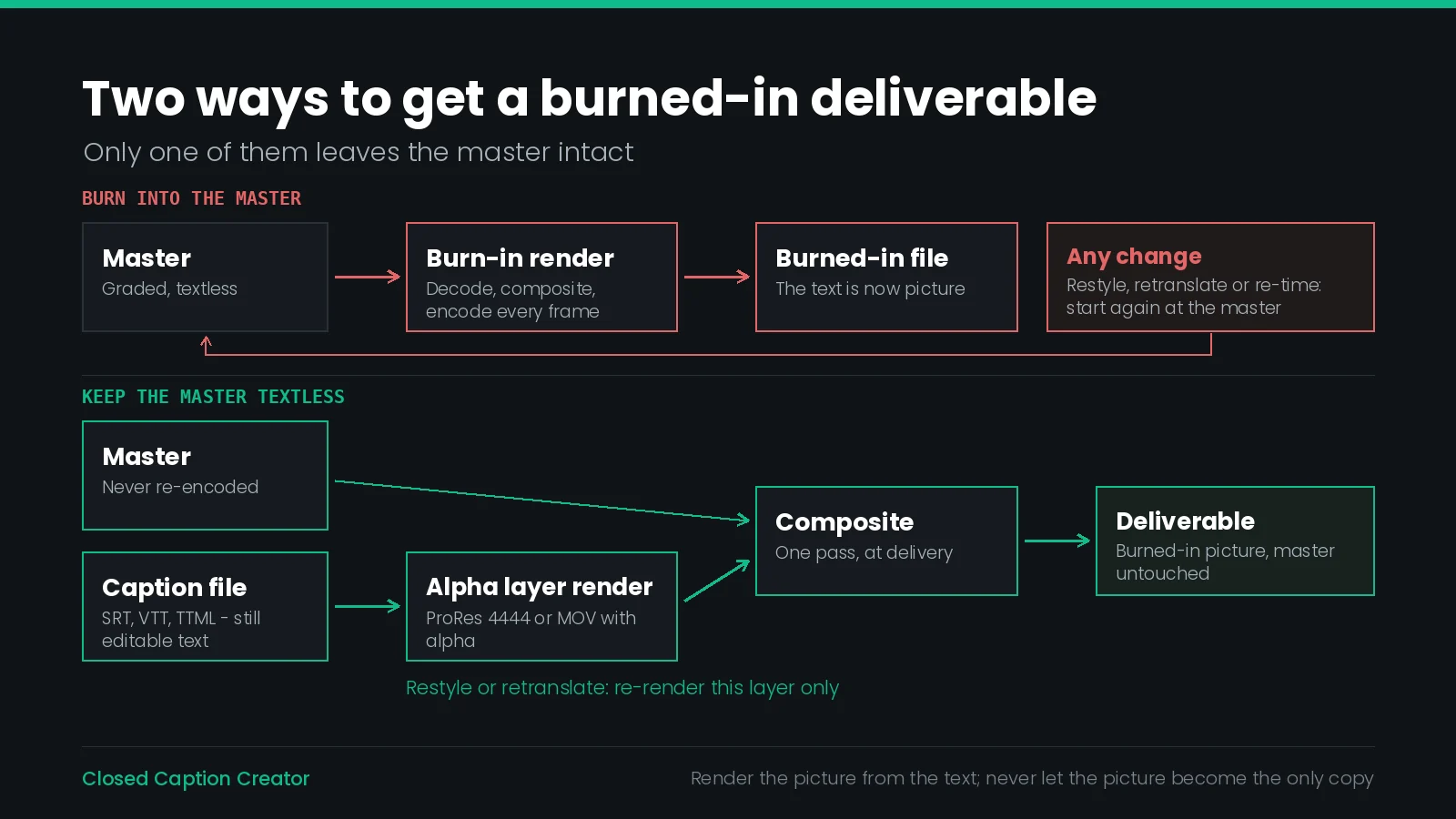
Most of this article's costs come from one decision: compositing the text into the master. Almost all of them disappear if the caption layer is rendered separately and composited at the end.
This is the standard practice in finishing, and it has a name — the textless master — but it is often skipped on short-form work because burning in looks like one step and this looks like two. It is two steps that you only pay for once.
| Route | What it produces | Best for |
|---|---|---|
| Alpha channel movie | A full-length transparent clip — Apple MOV Animation or ProRes 4444 | One clip on the timeline above the picture; the simplest composite |
| Image-based stills with FCP XML | One image per event, plus an xmeml sequence Premiere can import | Editorial control over individual events; conform and re-time in the NLE |
| BDN package | PNG stills and Blu-ray Disc Next XML | Disc authoring and image-subtitle delivery specifications |
| Scenarist Script | Four-colour TIFF stills and a Daikin Scenarist SST file, NTSC or PAL SD only | DVD authoring |
The alpha route is the one to reach for first. Closed Caption Creator's Video Export includes presets for Apple MOV with alpha and for ProRes 4444; the output is a full-length clip with transparency, which drops onto a timeline above the programme and composites in one operation. The master is never touched, a styling change is a re-render of the caption layer rather than of the video, and the same layer can be composited over a graded version, a cut-down or a reframe.
The image-based route trades convenience for granularity. File > Export > Image Subtitles writes one still per event plus an FCP XML sequence — produced for every profile — so an editor can import the sequence into Premiere and treat each caption as a clip: nudge one, re-time one, delete one, without regenerating the set. For a programme where caption timings will be adjusted in the edit rather than in the caption tool, this is the better shape.
Either way, the thing worth protecting is the same: the words should still exist as text somewhere, in a sidecar file, after the burned-in deliverable has been made. Render the picture from the text; never let the picture become the only copy.
What the Destination Can Already Do
Before burning in, check whether the destination carries caption tracks at all, because the answer has changed on most platforms over the last few years and the habit of burning in often outlives the reason for it.
The question to ask of any destination is a short one, and it has three parts: does it accept a caption file, does it display captions by default, and does the text become available as data afterwards?
| Question | If yes | If no |
|---|---|---|
| Does it accept a caption file? | Upload one, whatever else you do | Burning in is the only option |
| Are captions on by default? | A sidecar alone may be enough | Burn in as well as uploading the file |
| Does the text become searchable data? | A strong reason to supply the file | Judge on display alone |
The second row is the one most often answered wrongly. A platform accepting a caption file is not the same as a platform showing it: a muted autoplay feed is a context where the text must be visible with no viewer action at all. Those cases are the legitimate home of the belt-and-braces approach — burn the text in and upload the caption file, so the viewer sees it and the platform can still read it.
Because platform behaviour changes without notice, verify the current behaviour on the account you are actually publishing from rather than trusting a table in an article, including this one. Our guide to delivering subtitles to streaming platforms covers the file requirements for the major destinations.
Burned-In Text Is Not a Forced Track
Forced narrative subtitles are the subset of subtitles a viewer needs regardless of their language setting: a sign, a foreign-language line in an otherwise native-language programme, an on-screen location card. They are a natural candidate for burning in, and conflating the two causes real delivery rejections.
A forced narrative track is a flagged timed-text asset. The flag is what tells the player to show those events to everyone. Burning the same lines into the picture produces the same viewer experience and none of the metadata — the player does not know anything has happened, and neither does the distributor's validation.
There is a useful signal in how a major platform's subtitle templating guidance treats this. Netflix's subtitle template instructions tell a template creator that where an episode title appears on screen — whether from principal photography or burned into the video — an episode-title forced narrative event should be added. The burned-in text is treated as part of the picture, and a timed-text event is created anyway so the information exists as data. That is the whole principle in one instruction.
Our guide to forced narrative subtitles covers which formats carry the flag and how to set it. The rule of thumb here: if the spec asks for forced narrative, it is asking for a track, and burning the lines in does not satisfy it.
What You Give Up in Search
This is the cost least likely to appear in a delivery conversation and most likely to matter six months later.
Caption text that exists as text is readable by software. It populates an interactive transcript, feeds a platform's own indexing, lets a viewer search inside a video, supports chapters and clip discovery, and can be lifted into a transcript or an article on the page. Caption text burned into the picture is image data. None of that is available, and no amount of re-processing recovers it short of running the picture back through recognition.
| Downstream use | Caption file | Burned in |
|---|---|---|
| Interactive transcript on the player | Yes | No |
| Search within the video | Yes | No |
| Text on the page for indexing | Yes | No |
| Quotation and citation by an assistant | Yes | No |
| Screen reader access to the words | Yes | No |
| Translation without re-rendering | Yes | No |
| Reuse as chapters or clip metadata | Yes | No |
Every row there is an argument for supplying the caption file even when you have burned the text in. The two are not alternatives. Burning in solves a display problem; the file solves a data problem; a video that has both has solved both. The cost of keeping the file is a few tens of kilobytes.
If the video lives on a page you control, publishing the transcript alongside it is the same decision taken one step further, and it is the step that makes the content quotable at all. The words in the picture are not the content as far as anything automated is concerned.
QC on a File You Cannot Read
Every automated caption check depends on reading the caption text. Reading speed, line length, overlapping events, illegal characters, timing gaps, spell-check — all of them parse a file. A burned-in deliverable has no file to parse, so the whole automated layer of caption QC stops working.
The answer is to run the checks before the render, not after it, and to keep the post-render pass visual and short.
| Check | When | How |
|---|---|---|
| Spelling, grammar, speaker IDs | Before | On the caption file, automated |
| Reading speed and line length | Before | On the caption file, automated |
| Timing, gaps and overlaps | Before | On the caption file, automated |
| Display style is pop-on | Before | Confirm in the event group; roll-up will flatten |
| Legibility over the busiest shots | Before | Preview panel, on chosen events |
| Text clears the platform interface | After | On the platform, on a phone |
| Outline survived the transcode | After | On the platform, at the delivered quality |
| No caption clipped at frame edges | After | Spot-check first, last and longest events |
| Render completed without dropped events | After | Compare event count against the file |
Keep the caption file with the burned-in deliverable in whatever archive you use. It is the only record of what the picture says, and the only thing a future correction can start from.
What Goes Wrong
| Symptom | Cause | Fix |
|---|---|---|
| Captions unreadable on a phone | Size judged on a full-size monitor | Set the size on a downscaled preview; re-render |
| Text sits behind the platform's overlay | Broadcast-height placement in a social feed | Increase vertical padding; check on the platform |
| Ragged, fringed lettering in the feed | Thin outline lost to the platform transcode | Wider outline, or a solid background box |
| Captions vanish over bright shots | Outline-only treatment on unpredictable footage | Switch the border style to a solid box |
| Roll-up captions appear as static blocks | Video Export renders pop-on only | Author pop-on, or deliver embedded or SCC instead |
| Whole picture looks soft | Rendered from a delivered H.264 file | Re-render from the master or a mezzanine |
| A typo reaches air in twelve languages | Burned in before copy sign-off | Lock copy first; keep the alpha layer so fixes are cheap |
| Distributor rejects for missing forced narrative | Forced lines burned in instead of flagged | Deliver a flagged forced narrative track as well |
| No transcript available months later | Caption file never archived | Keep the sidecar with the deliverable, always |
Burn-In Checklist
- Confirm the destination genuinely cannot carry a caption track, or cannot be relied on to show one.
- Check the delivery specification separately from the regulation — § 79.1(e)(2) permitting open captions does not mean your distributor does.
- Lock the caption copy and get sign-off before any render.
- Run the full automated QC pass on the caption file while it is still a file.
- Confirm the event group is authored pop-on; roll-up and paint-on will flatten.
- Decide the smallest screen the file will play on, and set type size against that.
- Choose the border style for the worst shot in the programme, not the average one.
- Set outline width wider than looks necessary, to survive the platform transcode.
- Set horizontal and vertical padding so the text clears platform interface overlays.
- Preview the hardest events — graphics, titles, bright shots — before rendering.
- Save the style preset and the export preset so the next episode matches this one.
- Render from the master or a mezzanine, never from a delivered compressed file.
- Prefer the alpha-channel or image-based route so the master stays textless.
- Upload the caption file as well, wherever the destination accepts one.
- Archive the caption file alongside the deliverable; it is the only readable copy of the words.
Frequently Asked Questions
When should you burn subtitles into a video?
Burn subtitles in when the destination cannot carry a separate caption track, or when you cannot rely on the viewer to switch one on. Social feeds that autoplay muted, client screeners, kiosk and signage playback, and embedded web players with no caption interface are the usual cases. Everywhere else a sidecar file is cheaper and more useful.
Do burned-in captions satisfy accessibility requirements?
For WCAG purposes, yes. Success Criterion 1.2.2 requires that captions be provided, and providing open captions is listed as a sufficient technique for meeting it. Success Criterion 1.4.4 on resizing text explicitly excepts captions. The accessibility cost of burning in is that a viewer who needs larger or repositioned text cannot get it — a real cost, even though it is not a conformance failure at level AA.
Does the FCC accept open captions instead of closed captions?
The rules say so directly. 47 CFR § 79.1(e)(2) states that open captioning, or subtitles in the language of the target audience, may be used in lieu of closed captioning. It sits in the paragraph on responsibility for and determination of compliance, so it is a permitted method of compliance rather than an exemption, and the programming still has to meet the applicable quality standards.
Can you remove burned-in subtitles from a video?
Not cleanly. Once the text is composited into the picture it is part of the image data, and the pixels it replaced are gone. Inpainting and blur can hide it at the cost of visibly degrading that region of frame. The practical answer is to keep a textless master and treat every burned-in file as a disposable deliverable rendered from it.
Does burning in subtitles reduce video quality?
It forces a decode, composite and re-encode of every frame, so a long-GOP source picks up a generation of loss across the whole picture, not only where the text is. Rendering from a mezzanine or intermediate codec rather than from a delivered H.264 file avoids most of it. Sharp white text on a moving background is also expensive to encode and can starve the rest of the frame of bitrate.
Do roll-up captions survive a burn-in render?
No. Video Export renders every event using the pop-on model — text appears at the in-timecode and disappears at the out-timecode. Events authored as Roll-Up 2, 3 or 4 or as Paint-On are not animated, and the full event text is shown as a static block for the event duration. A deliverable that must roll up needs embedded captions or an SCC or MCC sidecar.
Are open captions and burned-in subtitles the same thing?
Open captions are captions the viewer cannot turn off. Burning in, also called hardsubbing, is the usual way to produce them, by compositing the text into the picture. The terms are used interchangeably in practice, with one distinction worth keeping: open describes the viewer's experience, burned-in describes what happened to the file.
How do you add burned-in subtitles without re-rendering the master?
Render the caption layer on its own with a transparent background and composite it downstream. Closed Caption Creator can export a full-length alpha channel movie as Apple MOV Animation or ProRes 4444, or export each event as a still with a Premiere FCP XML sequence. Either way the master stays textless and the composite happens once, at the point of delivery.
Do burned-in captions help SEO?
No. Burned-in text is image data, so it is not available to a platform's search index, to an interactive transcript panel, to a viewer searching inside the video, or to an assistant summarising or citing the content. A sidecar caption file is the same words in a form software can read, which is why a page with a transcript outperforms one with the words only in the picture.
What font size should burned-in subtitles be?
Size the text against the smallest screen the file will play on rather than the master's resolution. Burned-in text is fixed at the proportion you render it, so a size that reads on a 1080p review monitor can be unreadable on a phone. Set size, outline and padding on a downscaled preview frame and check it there before rendering the full file.
Burning in should be a deliverable, not a destination. Want the burned-in file and the caption data from the same pass? Talk to our team or start a free trial.