Speaker Identification in Captions and SDH: The Conventions, Side by Side
How should captions identify who is speaking?
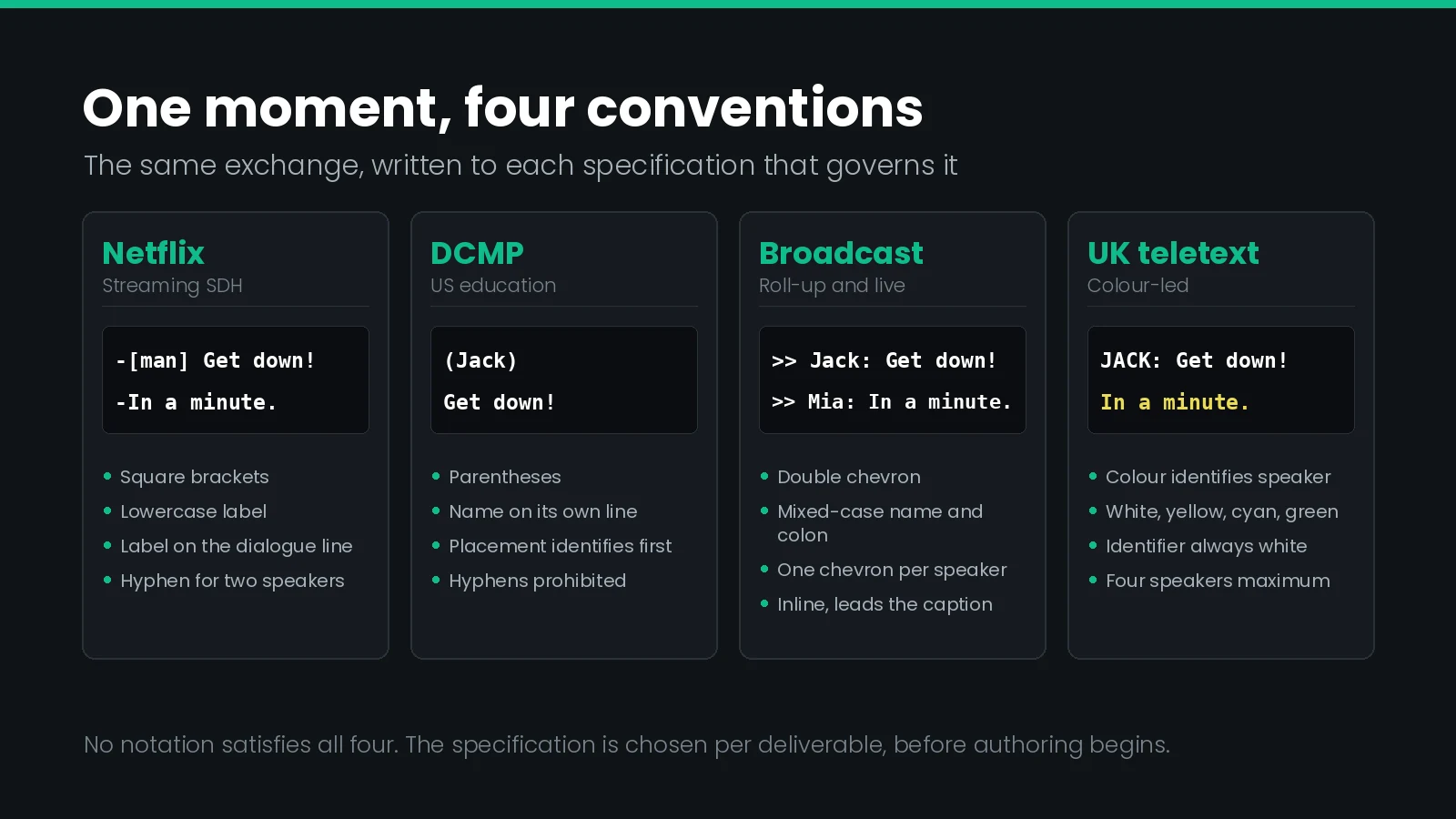
Identify the speaker by position first, label second. Where the caption can sit under the speaker, placement does the work. Where it cannot, add a short label — brackets and lowercase for streaming SDH, parentheses on their own line for DCMP, a mixed-case name and colon for broadcast.
Almost every captioning guideline in the industry tells you to identify the speaker. Each one tells you to do it differently, and no two of them agree on the punctuation.
That is not a trivial inconsistency. A label written the Netflix way will fail a DCMP review, and a label written the DCMP way will fail a Netflix QC pass. The underlying editorial judgement — does the viewer know who is talking? — is identical in both. Only the notation differs, and the notation is what gets the file rejected.
This guide puts the four conventions that actually govern professional work side by side, names the places where they contradict each other outright, and sets out what each file format can carry. It assumes you already know the difference between captions, subtitles and SDH as categories; this is about the notation inside them.
Why This Is a Compliance Requirement, Not a Style Choice
Speaker identification is often filed under house style. In the United States it is regulated.
The FCC's caption quality rules at 47 CFR 79.1 set four standards: accuracy, synchronicity, completeness and placement. The accuracy standard does not stop at the words. It requires captioning to convey “nonverbal information that is not observable,” and the first example the rule gives is the identity of speakers, followed by the existence of music, sound effects and audience reaction, all “to the greatest extent possible.”
Omitting a speaker label can be a compliance defect, not just an editorial one. Where the viewer cannot otherwise tell who is talking, the missing identity is nonverbal information the accuracy standard asks for. That is a different conversation with a client than “we prefer fewer labels.”
Two things follow. First, a caption file that transcribes every word perfectly and never says who said them is not automatically compliant. Second — and this is the part that surprises people — the rule specifies that you must identify speakers and is entirely silent on how. It names no bracket, no colon, no capitalisation. The regulator requires the information; the style guides fight over the notation.
Our guide to the FCC caption quality standards covers the other three in detail.
The Four Conventions, Side by Side
Four specifications govern most paid captioning work in English. Here is what each one asks for.
| Netflix (streaming SDH) | DCMP Captioning Key (US education) | Broadcast roll-up and live | UK subtitling (teletext lineage) | |
|---|---|---|---|---|
| Label punctuation | Square brackets [ ] | Parentheses ( ) | Name plus colon, after a chevron | Name plus colon, no enclosure |
| Capitalisation | All lowercase except proper nouns | Name capitalised normally; sound effects lowercase | Mixed case for the name | Identifier fully capitalised |
| Line placement | Ideally on the same line as the dialogue | Must be on a line of its own | Inline, leading the caption | Leading the caption |
| Speaker change marker | Hyphen, no space, one speaker per line | Placement or separate timecodes — hyphens prohibited | Double chevron >> | Colour change |
| Primary identification method | The written label | Caption placement under the speaker | The chevron, then the name | Colour, then a label if needed |
| Italics on the label | Never, even over italic dialogue | Yes, when the dialogue is italic | Italics for disembodied voices | Identifier always white, never coloured |
| Worked example | [man] Get down! | (Jack)I don’t see how blasting | >> Dr. Phil: All right. | JACK: Get down! in white |
Read down any row and the disagreement is total. There is no neutral way to write a speaker label that satisfies all four.
Where the Guidelines Directly Contradict Each Other
Three of these conflicts are not differences of emphasis. They are rules that cannot both be obeyed in the same file.
| Question | Netflix says | DCMP says | Consequence |
|---|---|---|---|
| Does the label share a line with the dialogue? | Yes, ideally the same line | No, it must have its own line | Changes the line count, so it changes reading speed and may force a re-segment |
| Can a hyphen mark two speakers in one caption? | Yes, one speaker per line | No — use placement or separate timecodes | A conforming Netflix caption is a DCMP defect, and fixing it adds events |
| Is the label italicised with italic dialogue? | Never italicise a speaker ID | Italicise it when the dialogue is italic | Opposite instructions for the same frame of the same programme |
No single file satisfies both Netflix and DCMP. They give opposite instructions on line placement, on hyphens for dual speakers, and on italicising the label. Pick the specification per deliverable, and treat a conversion between them as an editorial pass rather than a reformat.
The practical consequence is that speaker identification does not survive a format conversion unattended. Converting an SDH file to an education deliverable is not a syntax change; it is a re-edit with a different line count. Build that time into the quote.
When Placement Does the Work
The oldest convention is also the one most often forgotten: if the caption sits under the person talking, no label is needed at all.
The DCMP Captioning Key makes this the primary method rather than a fallback. Captioned dialogue “must be placed under the speaker as long as it does not interfere with graphics or other preexisting features,” and a name is introduced only when placement cannot do the job. It goes further on simultaneous speech: when two people on screen talk at once, place each caption under its speaker, and if that is impossible, caption them at different timecodes. Explicitly, do not reach for hyphens.
Two refinements are worth knowing because they come up constantly in documentary and interview work:
- Off-screen but locatable. If a speaker is off screen and their position is known, place the caption to the far left or right — as near as the frame allows to where the voice is coming from.
- A speaker who moves. If someone walks across frame, do not let the captions chase them. Use one placement for that speaker throughout and add an identifier if clarity demands it.
Placement is also where speaker identification collides with the FCC placement standard, which requires captions not to obscure faces, mouths or essential on-screen text. Moving a caption under a speaker can push it over a lower-third graphic. When those two pull against each other, the graphic wins and you fall back to a label.
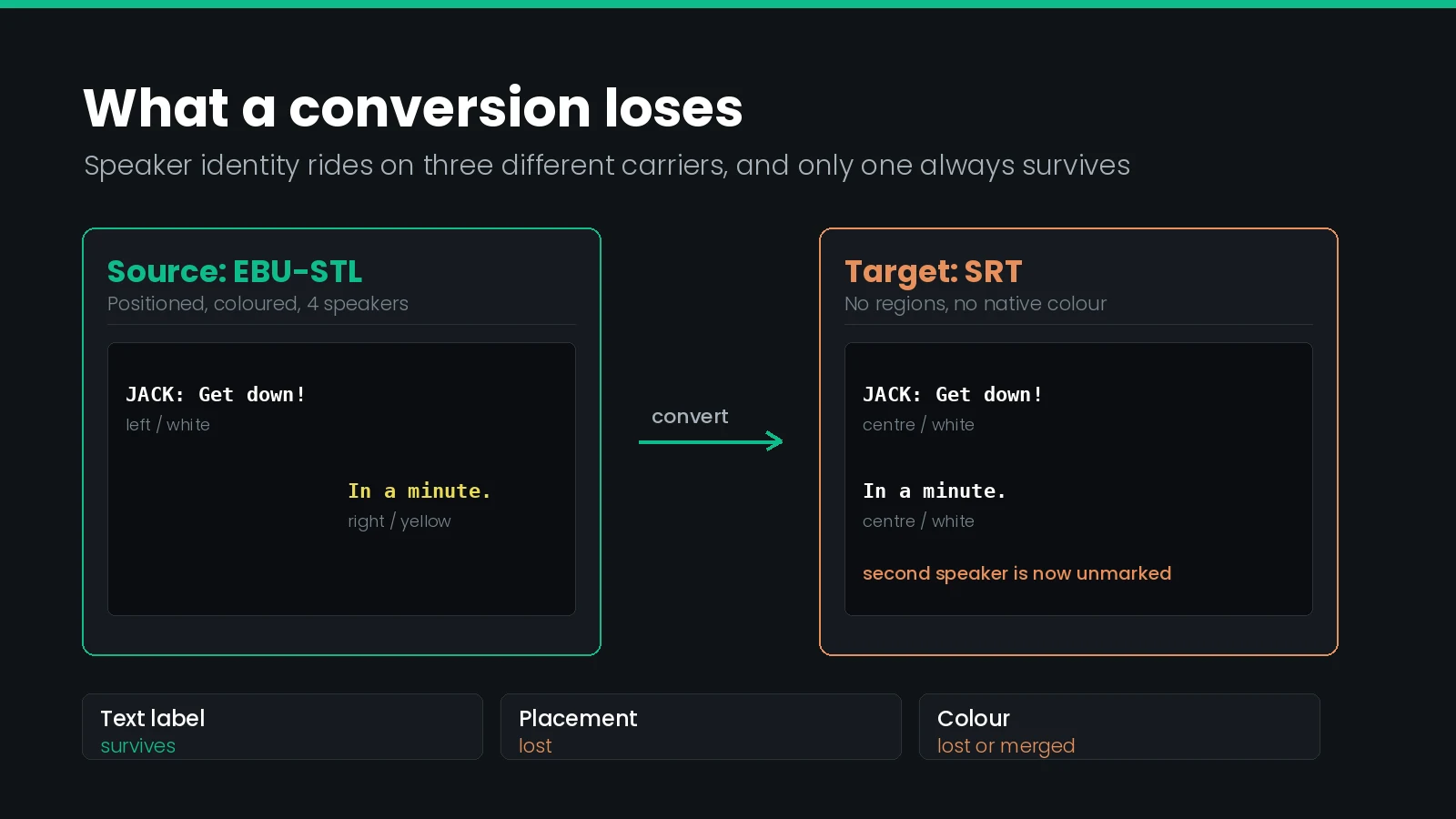
Placement-based identification is the first thing lost in conversion. It lives in the file’s positioning data, and the formats differ wildly in whether they carry it. A positionally identified caption set flattened into a format with no regions arrives with its speaker information silently gone — the words are all still there, so nothing looks broken.
How to Write the Label Itself
Once you have decided a label is needed, four decisions follow, and each specification answers them differently.
Enclosure
Netflix uses square brackets for both speaker IDs and sound effects, which keeps one visual grammar for “this is not dialogue.” DCMP splits them: parentheses for speakers, brackets for sounds. That split is useful in practice, because a viewer learns quickly that round means someone and square means something.
Case
Netflix requires all lowercase except proper nouns, so an unnamed character is [man] and a named one is [Jack]. UK advertising practice goes the other way and capitalises identifiers in full. Realtime broadcast captioning has historically run entire captions in capitals, a constraint inherited from early decoders rather than a readability finding — mixed case is easier to read and is now preferred wherever the chain supports it.
Line position
This is the conflict with real cost. Netflix wants the label and its dialogue on the same line. DCMP requires the name on a line of its own:
(Jack)
I don’t see how blasting
would work on this building.
That is three lines where Netflix would have two. On a 42-character line at 20 characters per second, the label line consumes display time without adding words, which tightens reading speed exactly where you cannot afford it.
Repetition
Label the speaker when the speaker changes and the change is not otherwise obvious — not on every caption. A label repeated on each event of a two-minute monologue adds nothing and costs characters. The exception is roll-up and live captioning, where captions scroll and a viewer tuning in mid-scroll has no earlier context to rely on.
Colour as a Speaker Cue
UK and European practice solves speaker identification with colour rather than text, and it is the most elegant solution of the four — when the delivery chain can carry it.
The convention, inherited from the teletext palette, is tightly specified: use colour to distinguish speakers, keep each speaker’s colour consistent for the whole programme, and limit yourself to white, yellow, cyan and green, in that order. The first speaker is white, the second yellow, and so on. Written identifiers are capitalised and always white, whatever colour the speaker uses, so the label never reads as a fifth voice.
| Order | Colour | Typical use |
|---|---|---|
| 1 | White | Main speaker, narration, and every written identifier or sound label |
| 2 | Yellow | Second speaker |
| 3 | Cyan | Third speaker |
| 4 | Green | Fourth speaker |
Four colours is also a hard ceiling on the technique. A scene with six speakers needs labels regardless, which is why colour and labels coexist in UK practice rather than one replacing the other.
The risk in colour-based identification is conversion. EIA-608 supports italics, underline and seven colours besides white, and the teletext palette used by EBU-STL overlaps closely with it but is not identical. Two distinct speaker colours in a source file can land on the same colour in the target, which does not throw an error — it silently merges two characters into one. We cover this specific trap in the PAC to SCC conversion guide, and the same caution applies to SCC to STL.
Two Speakers in One Caption
When two people exchange short lines, putting both in one caption keeps the rhythm of the dialogue. Netflix allows it with a hyphen and no space, one speaker per line, maximum two lines:
-Are you coming?
-In a minute.
DCMP prohibits exactly this. Where speakers overlap, place the captions beneath them or split them across timecodes — and it names hyphens as the technique not to use.
If the two lines come from different sources rather than two people — a line of dialogue and a sound effect together — Netflix uses the same hyphen structure to separate them. Keep one item per line and the structure stays readable:
-[glass shattering]
-Everybody out!
Off-Screen Voices, Narrators and Voice-Over
A voice with no visible source is the case where every guideline agrees something extra is needed and none agrees on what.
| Specification | Treatment of an off-screen or disembodied voice |
|---|---|
| Netflix | Italicise the dialogue; never italicise the speaker ID itself, even inside a voice-over |
| DCMP Captioning Key | Italicise off-screen dialogue, narration, sound effects and music — and italicise the speaker ID too when the dialogue is italic |
| Canadian broadcast (pop-on) | Italics for disembodied voices carrying a speaker ID; indicate gender in the ID where possible |
| UK advertising practice | Single quotes opening each voice-over caption and closing when it ends; an optional capitalised white name and colon |
The Netflix and DCMP rules here are straightforwardly opposite instructions about the same characters on screen. There is no clever formatting that satisfies both, which is why the convention has to be fixed before authoring rather than negotiated during QC. More on how italics survive specific platforms in our guide to caption formatting on YouTube.
Naming Someone the Audio Has Not Named
A captioner usually knows the whole script. The viewer does not, and a label can hand them a name three scenes early.
Both main guidelines close this off. DCMP: do not identify the speaker by name until the speaker is introduced in the audio or by on-screen text, and where the name is unknown, identify the speaker “using the same information a hearing viewer has.” Netflix reaches the same place from the other direction, recommending generic IDs such as [man] or [woman] specifically to avoid spoilers, and once a character is named, favouring the name the content itself uses.
Two secondary rules sit underneath this:
- Actors playing real people are identified as the person portrayed, not the performer —
(as George Washington). - Documentary and formal content often takes last names, matching how the programme's own lower-thirds refer to contributors.
Automatic transcription will happily guess names from context. If you are starting from machine-generated captions, speaker labels are one of the first things to verify by hand.
Sound Effects and Audience Reaction
Speaker identity is one of four kinds of nonverbal information the FCC accuracy standard names. The others are the existence of music, sound effects, and audience reaction, and they share the speaker label's notation.
DCMP is the most prescriptive source here, and its rules are mechanical enough to QC against:
- Include the source of the sound in brackets, unless the source is plainly visible on screen.
- Present tense, always. Captions are synchronised with the sound, so
[door slamming], never[door slammed]. - Sustained versus abrupt. A sustained sound takes the present participle; an abrupt one takes the third-person verb —
[dog barking]against[dog barks]. - Specific over vague.
[dried leaves crunching]rather than[noise]. - Repeated word, no hyphen; two different words, hyphen. So
ding, dingbutding-dong. - Description and onomatopoeia can combine, description first and on its own line, both lowercase.
Netflix overlaps but emphasises judgement over completeness: include plot-pertinent sound effects unless the visuals already carry them, be descriptive with adverbs where they help, and include paralinguistic sounds such as “hmm” or “whoa” when they matter to plot, mood or characterisation. It also warns against [stutters] unless the character genuinely stutters — represent hesitation in the transcription instead.
Canadian broadcast practice adds the most useful idea for anyone working to a time budget: a hierarchy of relevancy. Primary information is crucial to understanding the audio or the story. Secondary is important but not essential, such as tone. Tertiary is incidental and included only if time and space permit. When reading speed forces a cut, cut from the bottom.
Music Notes and Lyrics
Music notation is the one area where the guidelines nearly converge, and the differences are small enough to list exactly.
| Detail | Netflix | DCMP Captioning Key | Canadian broadcast |
|---|---|---|---|
| Note placement | One note at the start and end of each subtitle | One at the start and end of each caption, two at the end of the final line of a song | Notes at the start and end of each lyrical phrase, not each line |
| Spacing | Space between note and text | Space after the opening note and before the closing note | Not specified |
| Italics | Italicise lyrics | Italicise music, including background music | Not specified |
| Capitalisation | Capital at the start of every line, including the second line of a two-line subtitle | Verbatim | Not specified |
| End punctuation | Only question marks and exclamation marks — no commas or periods | Not specified | Not specified |
| Duets | A note at the start and end of each sung line | Not specified | Not specified |
| Instrumental music | Generic bracketed ID, for example rock music playing over stereo | Bracketed description with performer and title where possible; nothing under five seconds | Parenthetical description, preferring a specific one over a generic one |
| Indiscernible lyrics | Describe rather than guess | Describe the music instead | Parenthetical description |
The DCMP double note at the end of a song is the detail most often missed, because it only appears once per song and automated checks rarely look for it. A correct DCMP song closes ♪ I’m pickin’ up good vibrations ♪♪.
What Each Format Can Actually Carry
A convention you cannot encode is a convention you do not have. Before committing to placement-based or colour-based identification, check that the delivery format carries it.
| Format | Positioning | Colour | Italics | Named speaker field |
|---|---|---|---|---|
| SCC (EIA-608) | Yes — row and column grid | Seven colours besides white | Yes | No |
| CTA-708 | Yes, with windows | Wider palette | Yes | No |
| EBU-STL | Yes — teletext rows | Teletext palette | Yes | No |
| WebVTT | Yes — line and position settings | Via CSS | Yes | Yes — voice span |
| TTML / IMSC | Yes — regions | Full styling | Yes | Via metadata, not a dedicated field |
| SRT | No | Player-dependent only | Player-dependent only | No |
Two rows deserve expanding.
WebVTT is the only format with a real speaker field
WebVTT has a dedicated voice span. The start tag is v and it requires an annotation, which is the name of the voice:
00:00:04.000 --> 00:00:06.500
<v Jack>I don’t see how blasting would work.

00:00:06.700 --> 00:00:08.200
<v.loud Esme>It’s a blue apple tree!
This matters more than it first appears. The speaker name is structured data rather than typed-in text, so a stylesheet can colour each voice, a player can expose the name in its own styling, and a downstream process can extract the cast list without parsing brackets. Class names after the tag name — .loud above — attach styling hooks per cue. The closing tag may be omitted when the voice span covers the whole cue.
The caveat is support: not every player renders the annotation visibly, so a WebVTT file that relies solely on voice spans may show no speaker at all on some devices. Where the label must be seen, write it into the cue text as well. Our guide to segmented WebVTT in HLS covers how these files behave in streaming delivery.
SRT carries nothing, which is why conventions matter most there
SRT has no positioning, no native colour and no speaker field. Every identification decision has to live in the text itself. That makes the choice of convention more consequential, not less — the text is the whole specification, and nothing recovers a speaker label that was never written down. Our TTML and IMSC guide covers the richer end of the spectrum.
Choosing a Convention and Holding It
The decision is driven entirely by the deliverable, and it has to be made before the first event is typed.
| Deliverable | Convention to use |
|---|---|
| Streaming SDH to a major platform | Brackets, lowercase, label on the dialogue line; follow the platform’s own guide where it differs |
| US educational or government content | DCMP Captioning Key — placement first, parentheses on their own line |
| North American broadcast, pre-recorded | Pop-on with placement; mixed-case name and colon on a separate line when needed |
| Broadcast roll-up or live | Double chevron for each new speaker, mixed-case name and colon when known |
| UK or European broadcast | Colour in white, yellow, cyan, green order; white capitalised identifiers |
| No specification supplied | Ask. Failing that, use brackets and lowercase — it is the most widely recognised and the least likely to fail an automated check |
Whichever you pick, three habits make the difference between a convention and a mess:
- Write it down before you start. One line at the top of the project brief: enclosure, case, line position, and the cast list with any agreed colours. A convention held only in a captioner’s head does not survive a handover.
- Fix the cast list once. Decide whether a character is
[Jack],[Jackson]or[man]and keep it for the whole programme and the whole series. Inconsistent naming within one file is the single most common speaker-related QC finding. - Check labels as a set, not in sequence. Extract every distinct label in the file and read the list. Variants, typos and spoilers are obvious in a sorted list of twelve names and nearly invisible when scrolling a timeline. QC and review tooling can collect these for you.
For multi-language work, remember the convention travels but the names may not: proper names are generally not translated unless the client supplies approved translations. See our guide to translating subtitles for broadcast.
What Goes Wrong
| Symptom | Cause | Fix |
|---|---|---|
| Speaker information vanished after conversion | Identification was positional and the target format has no regions | Re-identify with text labels before converting, not after |
| Two characters appear to be the same person | Distinct source colours collapsed onto one target colour | Map the palette deliberately; add labels where colours merge |
| Reading speed fails only on labelled events | A separate label line consumed display time | Move the label inline if the spec allows, or re-segment |
| QC rejects hyphenated dual-speaker captions | Netflix-style file reviewed against DCMP rules | Split to separate timecodes or place under each speaker |
| A character is named before the audio names them | Captioner worked from the script | Replace with a generic descriptor until the introduction |
| Same character labelled three different ways | No fixed cast list across a long file or a series | Extract all labels, agree one form, find and replace |
| Labels on every caption of a monologue | Label applied per event rather than per speaker change | Keep the first, drop the rest |
| Speaker label italicised inconsistently | Two guidelines mixed within one file | Pick one rule and apply it to every label |
| Caption moved under a speaker now covers a graphic | Placement rule applied without checking the lower third | Keep the caption clear of the graphic and use a label instead |
| No speaker shown on some players despite a voice span | Player does not render the WebVTT annotation | Duplicate the name into the cue text where it must be visible |
Speaker Identification Checklist
- Governing specification identified and written into the project brief
- Enclosure, case and line position fixed before authoring begins
- Cast list agreed, including generic descriptors for unnamed characters
- No character named earlier than the audio or on-screen text names them
- Placement used wherever it identifies the speaker without covering graphics or faces
- Labels present wherever placement, picture and voice leave the speaker ambiguous
- Labels applied on speaker change, not on every event
- Dual-speaker handling matches the specification — hyphens only where permitted
- Italics rule for labels applied consistently across the whole file
- Colour assignments consistent for the whole programme, and within the target palette
- Off-screen voices, narration and voice-over handled by one consistent rule
- Non-speech information in present tense, specific, and sourced where not visible
- Music notes correct, including the closing double note if DCMP applies
- Distinct label list extracted and read as a set for variants and typos
- Reading speed re-checked after labels were added
- Target format confirmed to carry the identification method chosen
Frequently Asked Questions
What is a speaker ID in captioning?
A speaker ID is a short label added to a caption to say who is talking. It is used when position, voice or picture does not already make that clear. Guidelines differ on its punctuation, its capitalisation and whether it shares a line with the dialogue.
Do you use brackets or parentheses for a speaker label?
It depends on the specification. Netflix encloses speaker IDs in square brackets and keeps them lowercase. The DCMP Captioning Key uses parentheses and puts the name on its own line. Canadian broadcast practice uses neither, preferring a mixed-case name followed by a colon.
Should speaker labels be uppercase or lowercase?
Netflix requires all lowercase except for proper nouns. The DCMP Captioning Key lowercases sound effects but capitalises names normally. UK advertising practice capitalises the identifier in full and always renders it white. Broadcast realtime captioning often runs the whole caption in capitals.
Does the FCC require speaker identification in captions?
Yes, as part of its accuracy standard. Rule 47 CFR 79.1 requires captions to convey nonverbal information that is not observable, naming the identity of speakers alongside music, sound effects and audience reaction, to the greatest extent possible. It prescribes no punctuation.
How do you show two speakers in one caption?
Netflix allows a hyphen with no space at the start of each line, one speaker per line. The DCMP Captioning Key forbids this, requiring simultaneous speakers to be placed under each person or captioned at separate timecodes instead. The two rules cannot both be satisfied.
Which colours identify speakers in UK subtitles?
White, yellow, cyan and green, assigned in that order and held consistent for the whole programme. The convention comes from the teletext palette. Any written identifier stays white regardless of the speaker colour, so the label never competes with the colour cue.
How do you label a speaker whose name is not yet known?
Use the same information a hearing viewer has. A generic descriptor such as man, woman or narrator avoids revealing a name the audio has not given. Both Netflix and the DCMP Captioning Key treat naming a character before the content does as a spoiler.
Should a speaker label be italicised for a voice-over?
The two main guidelines disagree. Netflix never italicises a speaker ID or sound effect, even when the dialogue it introduces is italic. The DCMP Captioning Key does the opposite, italicising the label whenever the captioned dialogue is italic. Pick one and apply it everywhere.
How do you identify a speaker in a WebVTT file?
Use a voice span. The tag is written as a v start tag carrying the speaker name as its annotation, so the name is structured data rather than typed-in text. Players and stylesheets can then target that speaker, and the closing tag may be omitted.
Do you need a speaker label when the speaker is on screen?
Usually not. Every major guideline treats a visible speaker as self-identifying and prefers caption placement under that person over a written label. A label is added only when placement is impossible, the speaker is off screen, or several people talk at once.
Speaker conventions are set by the deliverable, not by habit, so confirm the governing specification before the first event is typed. Want label consistency, placement and reading speed checked in one pass? Talk to our team or start a free trial.