Foot Pedal Setup
Foot pedal support helps reduce keyboard/mouse load for high-volume transcription and spotting workflows. Pedals use hold-to-play by default: press to start an action, release to stop or pause.
Supported pedal integrations
Closed Caption Creator supports three pedal input sources. Pick the one that matches your hardware and OS.
| Source | Best for | Requirements |
|---|---|---|
| WebHID Device | Generic USB foot pedals that expose HID reports | Chromium browser with WebHID; permission grant |
| vPedal (Browser API) | vPedal owners who already use the tray app | Windows; vPedal 2015API.exe running; window focused |
| Gamepad / Joystick | Philips Footcontrol USB, vPedal native mode, other game-controller pedals | Pedal visible to the OS as a game controller |
Prerequisites
- A compatible foot pedal is connected.
- For WebHID: a Chromium-based browser (or host shell) that supports the WebHID API.
- For vPedal Browser API: Windows, plus the vPedal 2015 API tray application running.
- For Gamepad / Joystick: a pedal that appears as a game controller (including Philips Footcontrol and vPedal native joystick mode).
- You have a target control scheme (play/pause, rewind, fast-forward).
Navigation paths
- Pedal configuration:
Edit > Options > Foot Pedal Setup - Keyboard fallback configuration:
Edit > Shortcut Keys
Workflow 1: Choose an input source
- Open
Edit > Options > Foot Pedal Setup. - Enable foot pedal control.
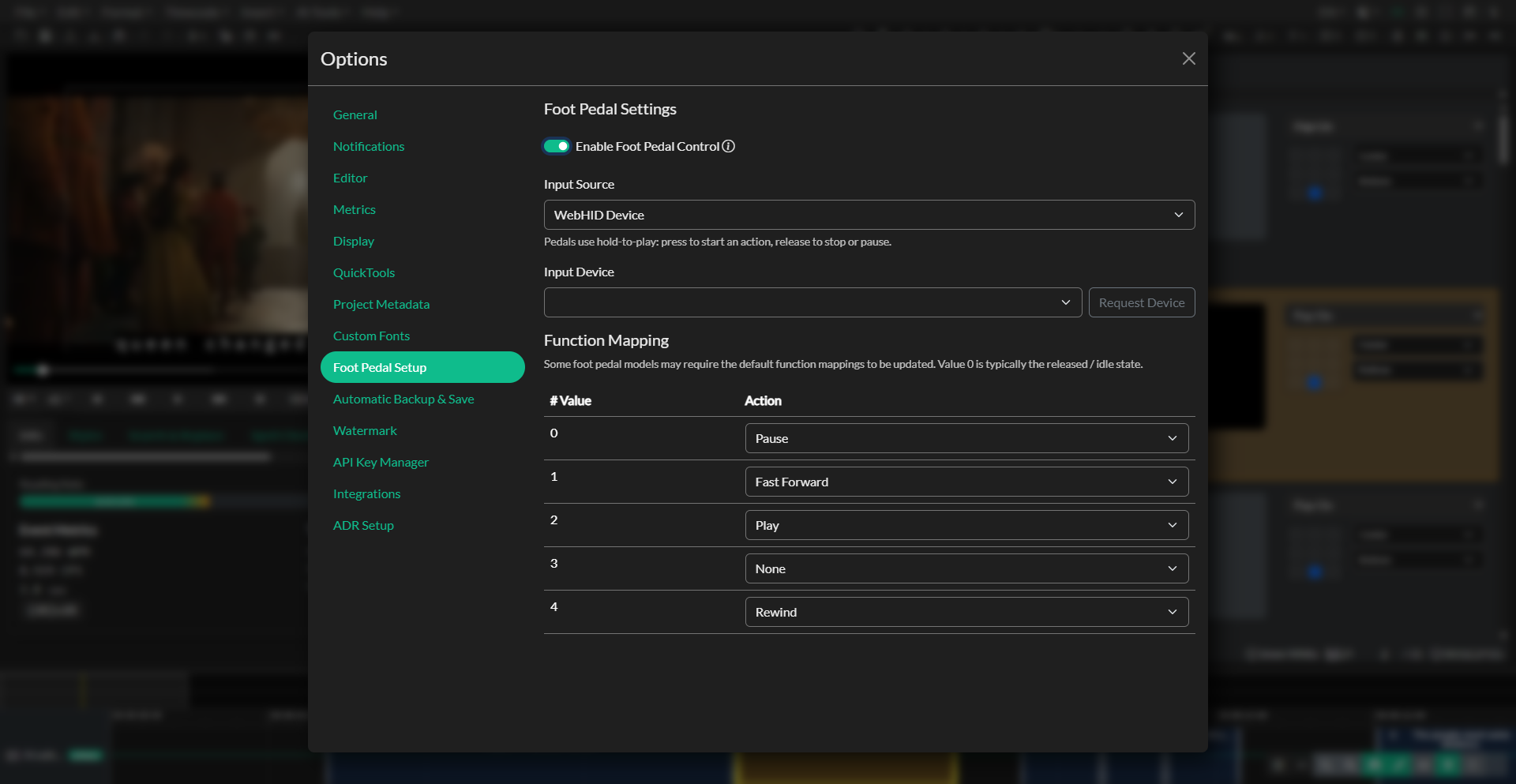
- Select an Input Source:
- WebHID Device — generic HID pedals (browser permission required).
- vPedal (Browser API) — uses Ctrl+Alt+Shift+1–6 from the vPedal tray app.
- Gamepad / Joystick — polls the Gamepad API (Philips independent pedals, or vPedal combined mode).
- Complete the source-specific setup below.
Validation checks
- Enable state and selected source persist after save/reopen.
- Status errors (if any) are shown in the Options panel.
Workflow 2: WebHID device and mapping
- Click Request Device and choose your pedal in the browser picker.
- Select the device from the list if more than one is available.
- Map report values to actions (value
0is typically released / idle). - Test each pedal: hold play, hold rewind, hold fast-forward, then release.
Validation checks
- Each pedal action triggers the expected playback behavior while held.
- Releasing the pedal pauses or stops scrub modes.
- No duplicate triggers after re-enabling control.
Workflow 3: vPedal Browser API
- Install and run vPedal 2015API.exe (desktop shortcut) before opening Creator.
- In Foot Pedal Setup, choose vPedal (Browser API) and enable control.
- Keep the Creator window focused while using the pedal.
- Confirm play / rewind / fast-forward hold behavior.
Official chord map (from vPedal programmer notes):
| Chord | Action |
|---|---|
| Ctrl+Alt+Shift+1 | Play (down) |
| Ctrl+Alt+Shift+2 | Play (up / stop) |
| Ctrl+Alt+Shift+3 | Rewind (down) |
| Ctrl+Alt+Shift+4 | Rewind (up) |
| Ctrl+Alt+Shift+5 | Fast forward (down) |
| Ctrl+Alt+Shift+6 | Fast forward (up) |
Workflow 4: Gamepad / joystick
- Press a pedal once so the OS registers the controller.
- Choose Gamepad / Joystick, click Refresh, and select the device.
- Choose a Gamepad Mode:
- Independent buttons (Philips Footcontrol) — each pedal is its own button; remap per button below.
- Combined buttons (vPedal) — vPedal joystick layout: left = rewind, right = fast forward, center (both) = play.
- For Philips Footcontrol USB (
0911:1844), defaults are:
| Button | Action |
|---|---|
| #0 | Fast Forward |
| #1 | Play |
| #2 | Rewind |
- Test each pedal: hold to engage, release to stop.
Gamepad notes
- Philips Footcontrol USB (
Vendor 0911, products such as1844/ ACC2300 / ACC2330) is detected as an independent-button device and defaults to the mapping above. - If your pedal reports buttons in a different order, change the mapping in the Gamepad panel — no reload required.
- Gamepad mode requires the browser window to stay focused / visible.
Workflow 5: Pair with keyboard shortcuts
- Configure core keyboard shortcuts in
Edit > Shortcut Keys. - Reserve the pedal for transport controls; keep text-edit controls on the keyboard.
- Hotkey pedals (for example Philips ACC2310 / ACC2320) continue to work via Shortcut Keys — bind Toggle Playback / Fast Forward / Rewind as needed.
Validation checks
- Operators can sustain playback/edit workflow without frequent remapping.
- Playback remains controllable while editing event text (vPedal Browser API chords are handled globally).
Troubleshooting
Pedal device not listed (WebHID)
- Reconnect the device and click Request Device again.
- Confirm the browser supports WebHID and that permission was granted.
vPedal chords do nothing
- Confirm
vPedal 2015API.exeis running. - Confirm Creator is the focused window.
- Confirm Input Source is set to vPedal (Browser API) and control is enabled.
Gamepad not detected
- Press a pedal button, then click Refresh.
- Confirm the device appears in an online gamepad tester.
- On Philips Footcontrol, verify it shows as Footcontrol USB under Windows Game Controller settings.
Wrong actions in Gamepad mode
- Switch Gamepad Mode between Independent buttons and Combined buttons.
- If actions are still wrong, remap button indices in the mapping table.
Pedal works initially but not after restart
- Re-verify enabled state and source in Options.
- For WebHID, accept the startup permission prompt when asked.