QC & Review
Delivering high-quality closed captioning and subtitles requires more than accurate transcription. Before a file leaves your project, it must pass both content checks — timing, reading rate, formatting, dialogue accuracy — and technical checks that confirm the file is structurally valid for the target delivery format. Closed Caption Creator provides a suite of integrated tools that address every stage of this process, from authoring-time warnings through to a final automated validation that runs the moment you click Export.
Two Kinds of Quality Checking
Quality control in closed captioning generally falls into two categories. Content QC is the responsibility of the captioner or editor who authors the work. It involves verifying that caption events accurately reflect the audio, meet reading-speed requirements, respect line length and character limits, and adhere to any style guide adopted for the project. Technical QC confirms that the file itself is well-formed: timecodes are present and ordered correctly, events do not overlap where the target format forbids it, and no mandatory metadata is missing.
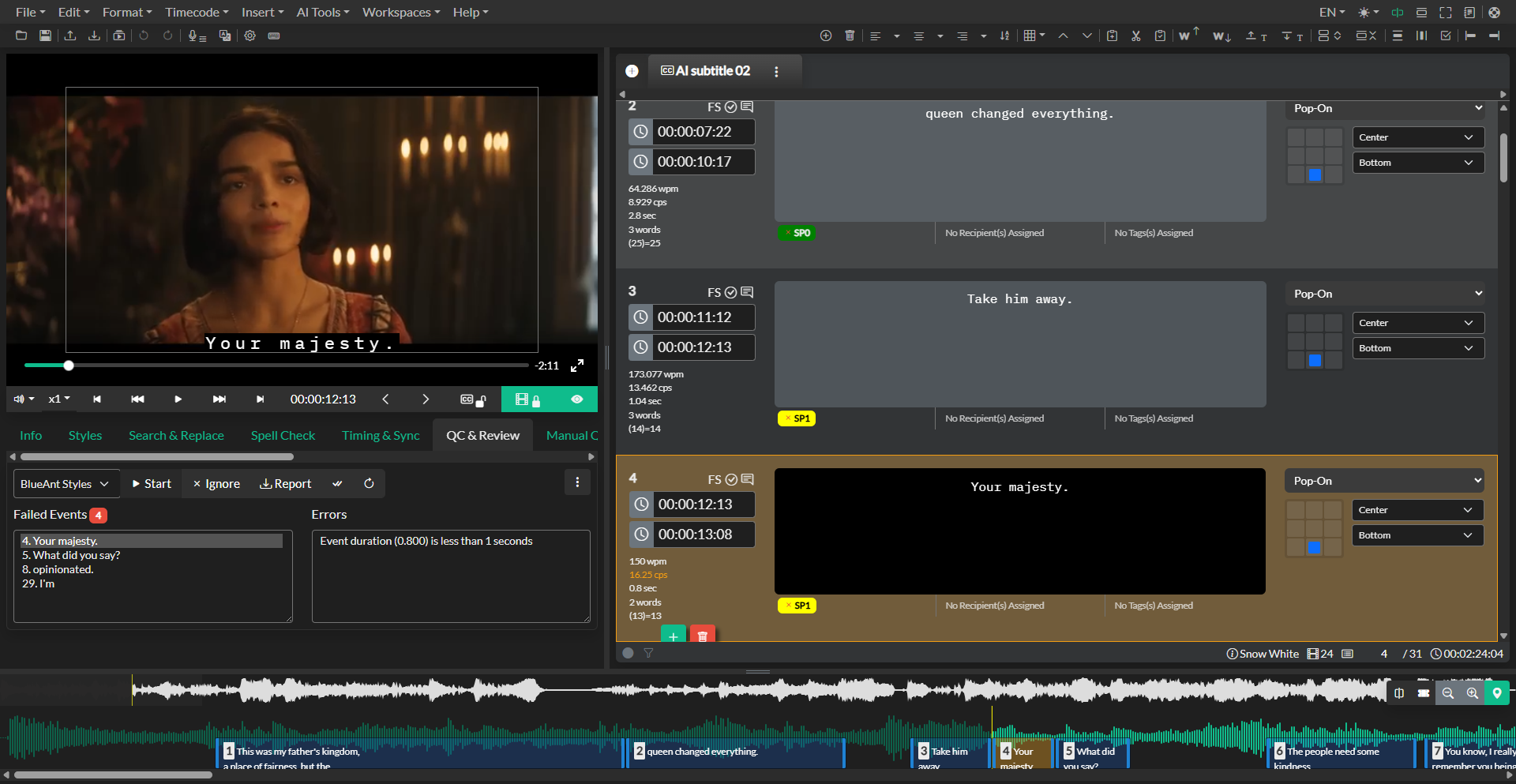
Closed Caption Creator handles both types. Realtime error indicators surface content problems as you work, so issues are caught and corrected before they accumulate. Style Guide review scans a completed event group against a configurable ruleset in a single pass. The export pipeline runs a final structural validation that cannot be skipped — ensuring that files with critical defects never leave the application unnoticed.
An Iterative Process
QC is not a single step at the end of a project. Professional practice treats it as an iterative loop: author, review, correct, and review again. A recommended production pass sequence is to begin with a Realtime Error Detection configuration that provides warnings during authoring, run a Style Guide review once a first draft is complete, use the Error Nav panel to work through each remaining failure, address any team feedback through the Event Notes and Approval system or the Manual QC issue tracker, and finally run a full Style Guide pass before exporting.
The tools described in this section are designed to support that loop at every stage.
What's in This Section
Realtime Error Detection explains how to configure per-event-group thresholds so that visual warnings appear inline as you caption.
Style Guide Manager covers building and managing reusable Style Guide configurations that define the rules for automated review.
Running a Review documents how to run a Style Guide review pass, navigate errors, use the Error Nav panel, and export a QC report.
Event Approval and Notes describes the per-event team collaboration tools: the approval checkbox and the threaded notes and reply system.
Manual QC covers the Manual QC issue tracker for editorial and non-automated findings.
Automatic Correction Tools explains the Automatic Format and Auto Correct Timing tools that can fix batches of errors in a single operation.
Compare Event Groups documents how to diff two event groups and selectively merge changes between them.
Pre-Export Checks describes the automatic structural validation that runs every time a file is exported.