Removing SDH Elements
SDH (Subtitles for the Deaf and Hard of Hearing) captions include descriptive sound cues, speaker identifications, and other hearing-assistance elements that are typically enclosed in brackets or written in a distinctive style. When a clean subtitle deliverable is required — for example, for a foreign-language subtitle track or a theatrical subtitle release — these elements must be removed and the remaining events consolidated. The Remove SDH tool automates this process across an entire Event Group or a selected subset of events.
Prerequisites
- A project is open with an Event Group that contains SDH-formatted caption events.
- If you intend to apply the removal to selected events only, make that selection before opening the dialog.
Navigation paths
Editmenu → Remove SDH — opens the Remove SDH dialog.
Configuring the removal
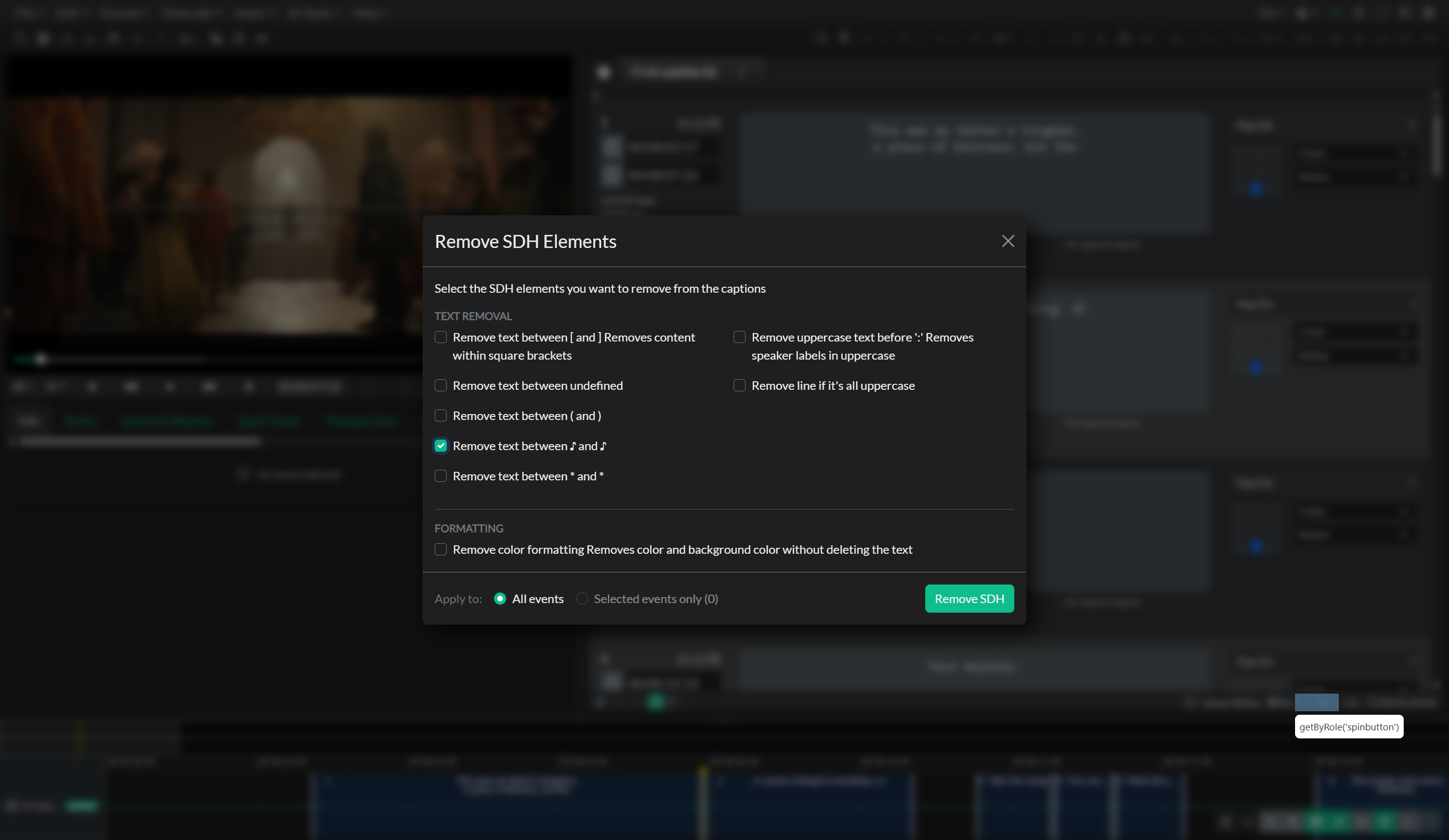
The dialog is split into two parts. The body lists what to remove, grouped into Text removal and Formatting. The footer chooses where to apply it (All events or Selected events only) and runs the operation. The Remove SDH button is disabled until at least one option is checked.
Text removal
These categories delete matching paragraphs. Enable each independently.
Square Brackets removes any paragraph within an event whose text is enclosed in square brackets, such as [Dog Barking] or [Dramatic Music]. This is the most common SDH format and is typically the first category to enable.
Curly Braces removes paragraphs enclosed in curly braces, such as {Sound Effect}. This format is less common but is used in some production workflows.
Round Brackets removes paragraphs enclosed in parentheses, such as (Narrator). Be cautious when enabling this category, as round brackets are also used in some subtitle styles for translated or implied dialogue that should be retained.
Music Notes removes paragraphs that contain music note symbols (♪) surrounding the text. This is used when the music passage descriptions are not appropriate for the clean subtitle deliverable.
Stars removes paragraphs enclosed in asterisks, such as *applause*. This convention appears in some production and transcription formats.
Upper Case Speaker Label removes paragraphs that consist entirely of an upper-case label followed by a colon and space, such as JOHN: or NARRATOR: . These speaker identification lines are an SDH convention that is typically not included in subtitle deliverables.
Upper Case Line removes paragraphs consisting entirely of upper-case words, which is sometimes used for action lines or sound effects in certain SDH formats. Use this category cautiously, as it will also remove any event text that happens to be written entirely in capitals for stylistic reasons.
Formatting
Remove color formatting strips inline text color and background color from the event text without deleting the words. Bold, italic, underline, and paragraph alignment are left intact. This is intended for European and other subtitle files that use color to identify speakers rather than speaker labels. Unlike the text-removal categories, this option does not empty events, so colored dialogue stays in the sequence after the color is removed.
For comparison, Clear Formatting on the Format menu removes bold, italic, underline, and color. Use Remove SDH when you only need to drop speaker colors. See Formatting & Position.
Apply to
The footer Apply to radios set the scope of the run:
- All events processes every event in the current Event Group. This is the default each time you open the dialog.
- Selected events only processes the current selection. The label shows how many events are selected. The option is unavailable when nothing is selected; in that case the tool falls back to all events.
Category checkboxes are remembered between sessions. The Apply to choice is not — it returns to All events the next time you open the dialog.
What happens after removal
After the pattern matching runs, any events whose text content is entirely empty as a result of the removal are automatically deleted from the Event Group. This means that an event that consisted only of a bracketed sound cue — and had no other text — will be removed from the sequence entirely, not left as an empty event. Events that only had color formatting removed still contain text, so they remain in the sequence.
The selected events are cleared after the operation completes, and the action is recorded in the undo history so it can be reversed in full if needed. The dialog also saves your last-used category selection, so the same configuration will be pre-populated the next time you open it.
Practical guidance
The most reliable workflow when producing a clean subtitle version from an SDH master is to work on a duplicate Event Group rather than the original. This preserves the SDH version intact for future use while allowing you to apply the SDH removal to the copy. Once the removal is complete, review the remaining events for timing gaps left by the deleted sound-cue events, and apply a QC pass to confirm reading rates and line counts still meet your delivery specification.
If the SDH master uses a mixture of formats — for example, some brackets, some upper-case labels, and speaker colors — enabling all relevant categories in a single pass is more efficient than running the removal multiple times.
Troubleshooting
Some SDH elements were not removed
The Remove SDH tool matches specific patterns. If the content uses a convention that does not match any of the available categories — for example, a sound cue that is written without any enclosing brackets — it will not be detected automatically. Those events will need to be identified and edited manually.
Too many events were removed
If a category was too broad — for example, Upper Case Line removing events that should have been retained — use undo to restore the full Event Group and re-run with the problematic category disabled. Then address the remaining SDH elements manually.
Colored events are still in the timeline after Remove color formatting
That is expected. Remove color formatting only strips color and background color; it does not delete the dialogue. The events remain, uncolored. If you also enabled a text-removal category, empty events from that category are still deleted as usual.
The removed events left gaps in the timing sequence
This is expected behavior. After removing sound-cue events, review the sequence in the timeline and decide whether the gaps need to be filled with new events, closed by extending adjacent event durations, or left as natural pauses in the subtitle flow.
Related docs
Source notes
- Component:
src/components/modals/RemoveSdh.svelte